




Love what you are seeing?
We have created several courses where we dive more into the technical aspects. So, if you like what you read here, you'll love our courses!!





By:
Greg Jenkins
|
February 9, 2026
|
Technology
Update: If you have questions about using Dynamic Content then check out this Facebook group that started specifically as a place to share ideas and use cases for this feature.
Say what? Conditional content for Infusionsoft?
Yup. Big news sport fans. BIG news.
For a long time, dynamic email content has been one of the most requested features - and it's finally happening.
If you've ever wanted the ability to send an email to a group of people, and have different sections display based on what tags someone had, or what value was in a custom field - well, it's coming.
Conditional content, aka dynamic content, aka liquid content is on the horizon (like, coming this year).
They're still ironing out the details for how it'll be accessed in the app, but I've been playing with a version of it and it's slick. The potential behind this fuctionality is massive.
It's basically shortcodes for emails.
So if you've ever used shortcodes, like maybe inside a membership area - then this might feel familiar.
They've created a short code buider that allows you to set up the syntax you want - then you can copy and paste it into whatever email you want.
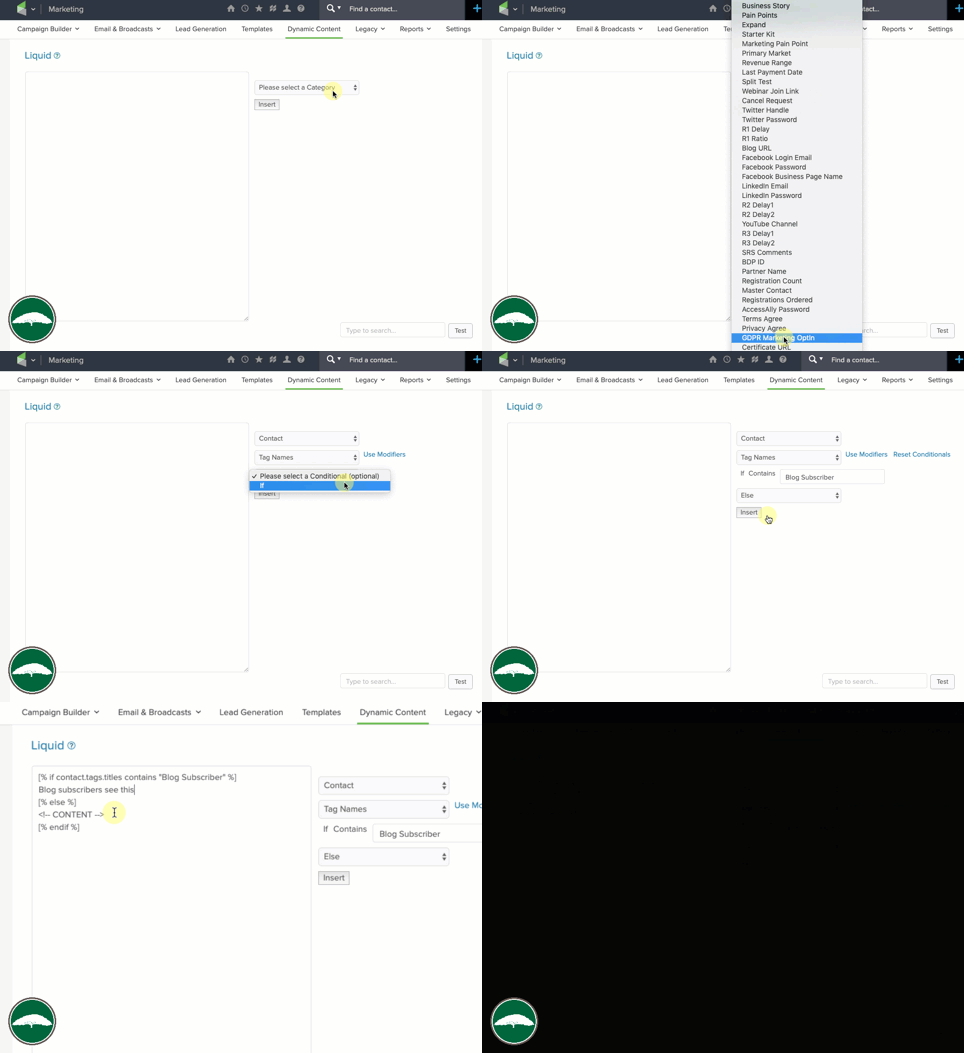
And that's just the conditional display portion, there's more...
Modifiers allow you to tweak or adjust the copy - so, if you wanna merge in someone's name but you want to switch it to all upper case, YOU CAN.
(...or lower case, Or Proper Case)
If you want to merge in a multiple of someone's reported revenue - yup, ya can.
You wanna merge in a date, but automatically dial it forward a week, month, or a year - yup, yup, yup.
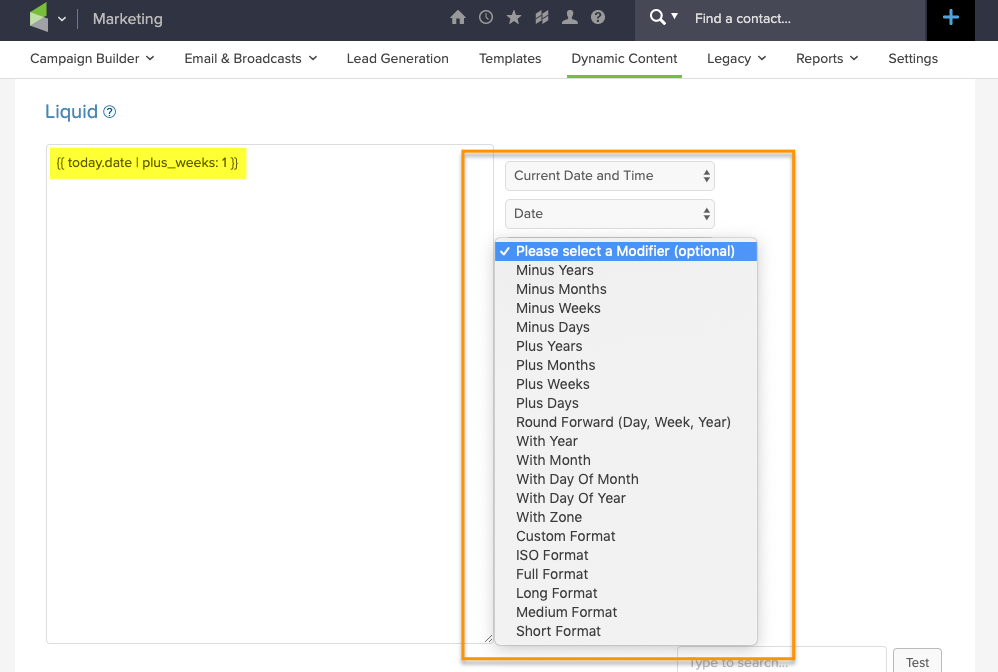
this old blog post wishlist I wrote.
Obviously I'm not an official spokesperson for the company, but everything I'm hearing indicates conditional content for Infusionsoft emails should be available in the next month or two. Update: Release of this feature was pushed back until Q1 of 2020.
Honestly, I'm stoked for this - so I don't wanna take anything away from that.
That said, it will definitely need to be easier to use - I imagine I'll get used to building the shortcodes, but the copy/paste over into an actual email process feels...clunky.
And the other primary drawback I noticed was that it only seems to work with text - which is a great start, but longer term it'd be great if we could use this same concept to hide/display the other email elements (like buttons, images, etc). Though, worth noting that this syntax DOES appear to work with the HTML section, so that opens up some flexibility for images.
It CAN be used to hide/reveal images, buttons, or other email assets, check it out:
He's a real world use case from my buddy Jordan Hatch - in this scenario he's using Liquid to reformat a date he wants to insert into an email so that it's easier to read - using this method instead of the previous one allows him to achieve the same result more quickly, and without requiring a second custom field.
Here are the links he mentioned in the video:
Now, I won't pretend that I've got this whole thing figured out, my brain is still running through scenarios for how and where conditional content for Infusionsoft can be used, but the exciting part for me is two-fold; first - I'm stoked about this specific feature, it's going to make a lot of things possible that previously weren't.
Second, and perhaps even more importantly, I'm excited about what this represents - it's a significant release that represents commitment to the long term development of Infusionsoft, and I know that should go without saying - but my relationship with Infusionsoft has been a little strained lately and features like this are exciting to see.
Anyway, would love to hear your thoughts and ideas in the comments below!
We have created several courses where we dive more into the technical aspects. So, if you like what you read here, you'll love our courses!!