




Love what you are seeing?
We have created several courses where we dive more into the technical aspects. So, if you like what you read here, you'll love our courses!!





By:
Greg Jenkins
|
February 9, 2026
|
Technology
Update: Keap released a new sequence step item that has opened up some additional flexibility for looping structures. Check it out here.
Looping campaigns in Keap (formerly Infusionsoft) is a request that I see pop up at least once a month - it's one of those things that isn't exactly straightforward, but may be less complicated than you think.
Before we dig into this I should say that if you are just looking for the basics of how to build a simple campaign, then you probably want to check out my Campaign Builder 101 blog post.
From time-to-time you may recognize that you need a campaign process to repeat itself, and in those situations it makes a lot of sense for that campaign to loop (looping just means that when the contact reaches the "end" they are automatically restarted).
Some of the most common use cases for this are scenarios where you have reminders for repeating calls or events that happen at the same interval each week, each month, or each year.
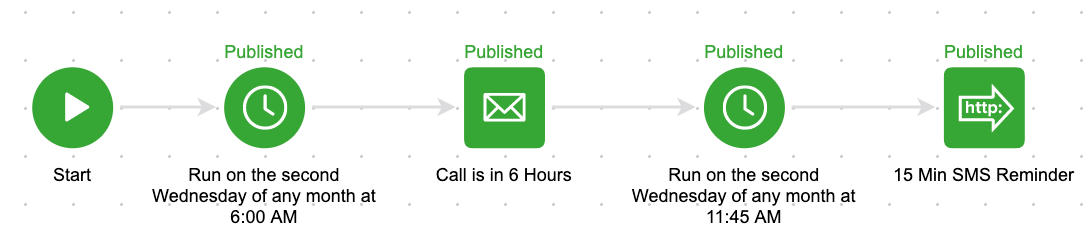
For example, let's say you have a repeating call that always happens on the second Wednesday of the month. And the morning of that call you have an email go out 6 hours in advance, and then a 15-minute sms reminder. It'd look something like this:
Goals as the "triggers" of campaigns; and largely they serve to start and stop automation.
So to loop a campaign we need to use the exact same goal at the end, and also at the beginning. That way, when the goal is completed it stops the campaign and also restarts the campaign.
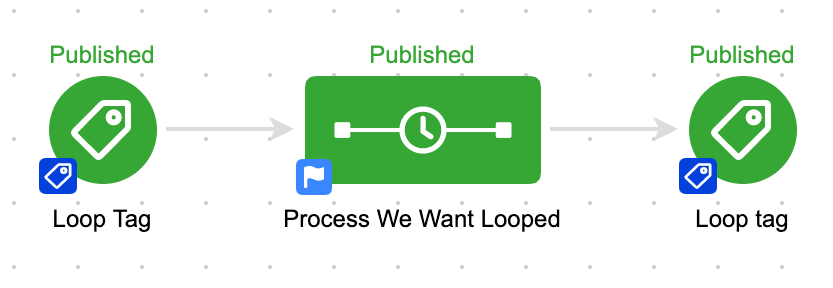
Now, the lag is imperceptable to humans, so it appears they're happening simultaneously but it's important to know that the contact is drawn out of the campaign before they're readded; if it happened in the opposite order then the loop would immediately stop and we wouldn't be able to depend on this methodology.
Sure, check out the example at 4:09 in the video above - it's a perpetual resource loop to stay in touch with my referral partners and make sure they have easy access to their links and the resources I've created for them.
Tag goals are by far the most common goal method used to build loops, but technically you could use any goal method that can be configured to be simultaneously achieved.
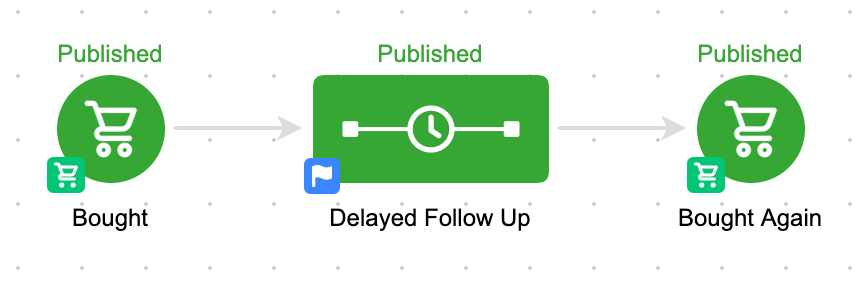
Another example might be using purchase goals - and if X amount of time elapses between purchases you could create a task to call that contact, or trigger automated outreach from their point of contact.
Here's an example of what that campaign might look like:
new sequence widget that permits users to add and remove contacts from campaign sequences without requiring that they achieve a goal - and Kevin Mogavero recorded this short tutorial on how you can use it to create a looping campaign structure without the use of tags (or purchase goals, etc).
Campaign Builder Finishing School.
It's a quick video series covering a selection of tactics you can use to level up your existing Keap campaigns.
We have created several courses where we dive more into the technical aspects. So, if you like what you read here, you'll love our courses!!