




Love what you are seeing?
We have created several courses where we dive more into the technical aspects. So, if you like what you read here, you'll love our courses!!





By:
Paul Sokol
|
February 9, 2026
|
Strategy
I’m pretty excited about today’s post because it covers the heavy-duty topic of digital tracking, which is akin to black magick if you don’t know how it works.As a warning, there's a lot in this post, and it builds as we go on - so depending on your experience some of it may feel like review. And to help bring this to life, we'll also include a variety of examples. Here are some quick links if you want to jump around:1. What is Digital Tracking?2. How does Digital Tracking work?3. How do I implement Digital Tracking?4. How do I visualize it?5. Example 1: CRM Emails6. Example 2: Downloadable PDF7. Example 3: Ad Traffic8. Example 4: Paul's Mom9. How do I make these links?10. How do I analyze it?
Let's start fairly simple.
A business’ website exists to serve the business. A website is a powerful Marketing tool. It can be a powerful Sales tool. And, depending on the kind of Offer(s) you provide, your website can also drive your Fulfillment process.
If your business has a website you would be absolutely foolish to NOT have insight into what people are doing when they visit.
What pages they go to, from where, for how long, and what kinds of behaviors they take (opt-in, purchases, etc.) is objective data. That data is critical to helping you understand if your various efforts are working.
Digital tracking is how you collect this kind of website visitor data.
The de facto standard for digital tracking is Google Analytics. I use it, all my clients use it, Monkeypod uses it, and I would recommend you do too. The tool is free, built to handle more traffic than you will (likely) ever be able to amass, and lightweight so that your page load speeds are not slowed down by the data collection.
All you have to do is install a small tracking script into your website’s code.
he easiest way to think about it is to go back to kindergarten.Remember when the teacher would pin a note to your shirt for your parents when you got home, because you were too little of a tyke to reliably share stuff? Digital tracking is like pinning a note to a link anytime you point it back to your website. You can pin up to five notes actually (see the next section).Whether your link is in an email, from social media, in a direct mail piece, behind a QR code, behind a shortened link on a billboard…you can ALWAYS track from where your website visitors came. And IMHO you always should.The magic is in the URLs themselves.If you’ve ever paid attention to a link and noticed stuff like “utm_source=BP-05-2025” that’s like a little note being pinned to a link so the website operator can understand where that traffic came from.Later, the website operator can go into Google Analytics and look for traffic that came from any sources with “BP-05-2025” and see what those specific visitors did.
Google Analytics allows you to “pin” up to five different utm parameters to any link so you can analyze the link’s performance:
As you can imagine, in order to get meaningful and usable data, you want to be consistent with the parameters you use between marketing efforts because you can technically use anything you want. If you have a team, you must create some kind of document or spreadsheet that tells people what utms the business is using.Over time with consistent utm schemas, your Google Analytics will form a rich tapestry of website visitor data that you can dive into for insights.
This is very heady, especially if you aren’t used to crunching data and numbers.Think of UTM parameters as an upside-down pyramid with five levels, each narrowing down to the specific link click.
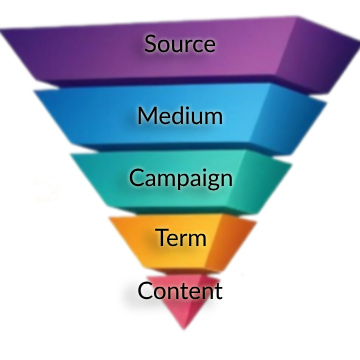
These are the five notes pinned to the shirt of every link you put out in the world.
Anytime a blog post is published, I email our list about it. Usually more than once. To track the effectiveness of those email announcements, I have used this particular utm schema for years.
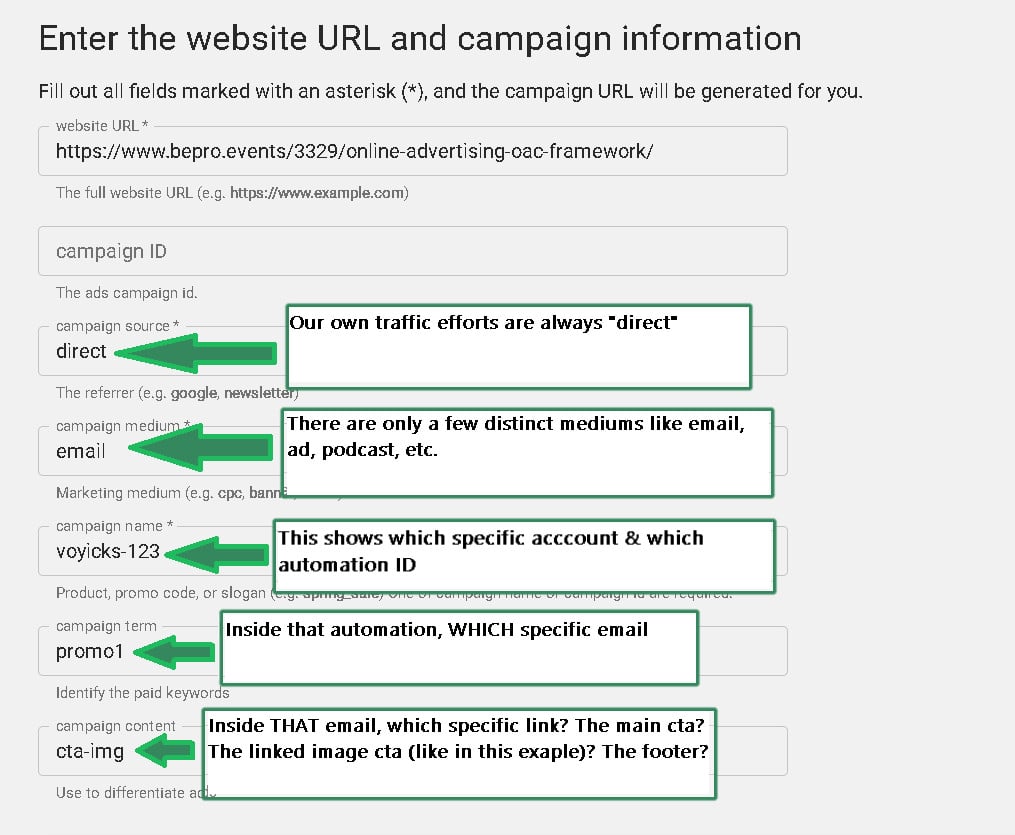
This schema will allow me to not only track which specific email drove the click, but which specific link in that email did the job.[Back to Top]If it helps to visualize with the pyramid, one blog post announcement email that links to the article via the featured image AND a text-based CTA can be thought of like this:
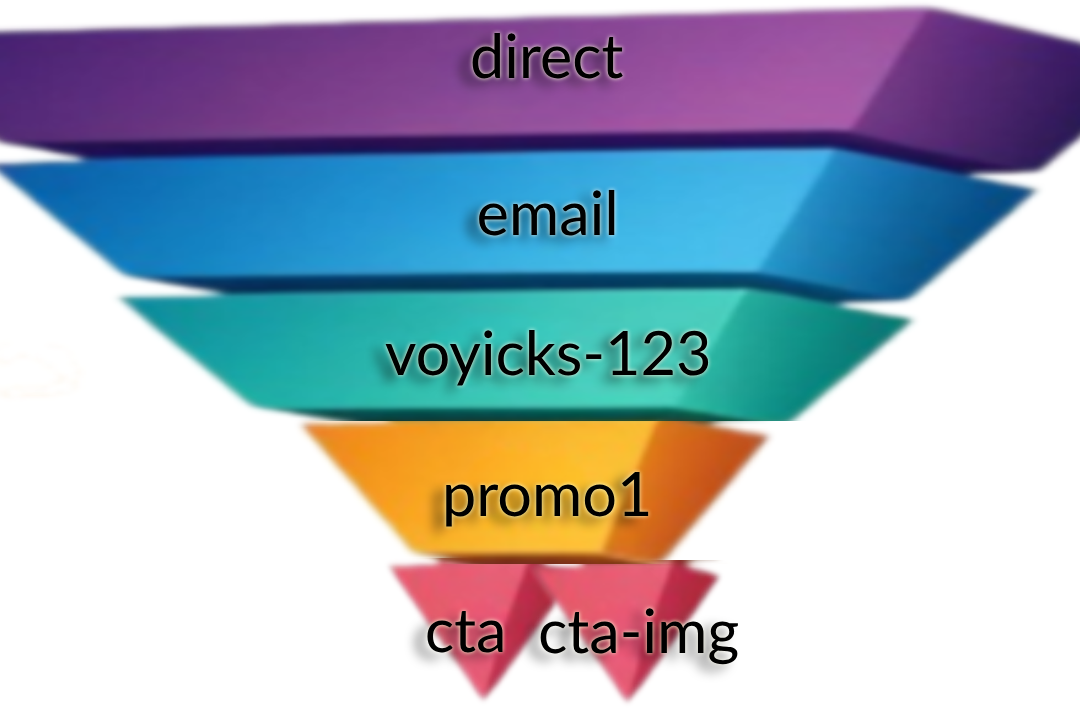
All UTMs are the same in the email except the text-based CTA has a Content of ‘cta’ and the linked image to the same article has the Content ‘cta-img’. This will answer the question of “Do people get to the blog post by clicking on the featured image in the email or the linked text?”
Imagine you have a 20 page PDF. Now, imagine the header and footer of every page has a call-to-action for people to visit a sales page on your website.20 pages times two links per page is 40 links throughout the whole document.If you want to Be Pro about things, you would ensure that every one of those calls-to-action is uniquely trackable via utms even though they all direct to the same destination.The pyramid visual for the first two pages would look something like:
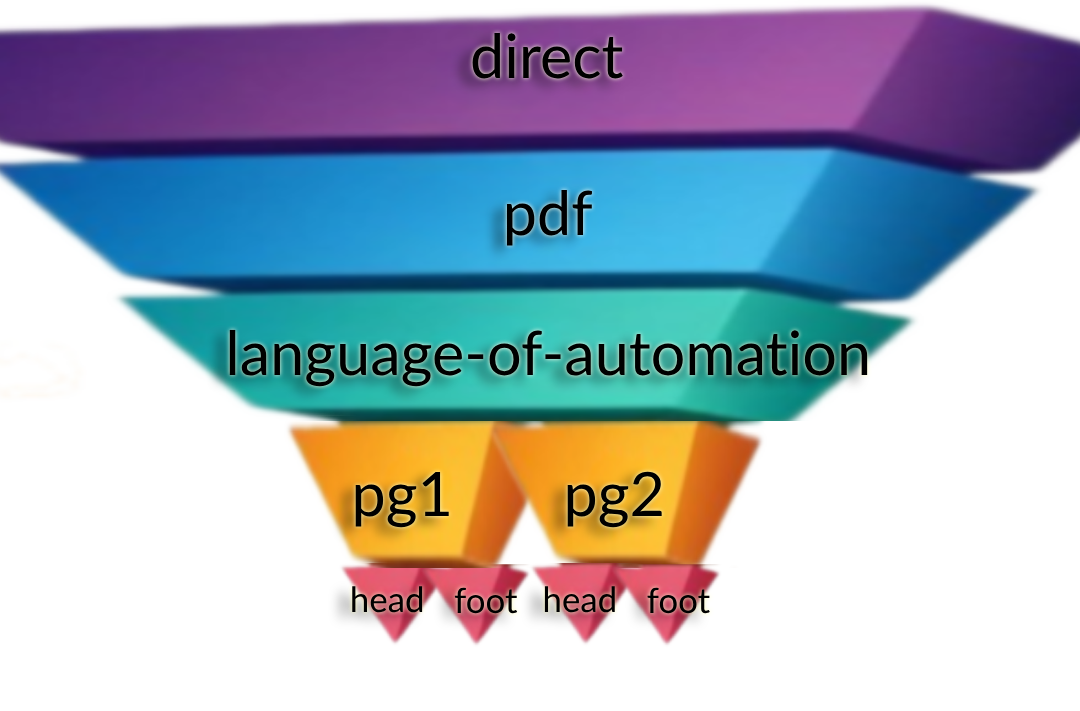
In this case, the Source, Medium and Campaign utms are all the same. Then, each page is its own Term using the same “head” or “foot” Content parameters. Now, not only can we see if more people are clicking the header or footer, but WHICH PAGE is actually getting people to the website.
Let me be as clear as I can: If you are doing any kind of Meta or Google advertising (or anywhere else for that matter), you absolutely 100% need to be using utms in an intentional way.
Anytime we run ads for ourselves or clients, we use the OAC Framework; Objective, Audience, and Creative.
In that case, the Source is always the ad platform and the Medium is always “ad”.
Then, the rest of the utms directly correlate to the OAC distinction:
Using utms in this way allows you to directly analyze your paid efforts and do win-loss analysis much easier.
Here are the tracking parameters we use for various common platforms. You can literally copy/paste these into the appropriate places in the ad platform. If you need help with these please reply and let me know!
Google Ads:
{lpurl}?campaignid={campaignid}&adgroupid={adgroupid}&keyword={keyword}&device={device}&utm_source=google&utm_medium=ad&utm_campaign=campaignId-{campaignid}&utm_term=adGroupId-{adgroupid}&utm_content={keyword}
*If you are advertising on YouTube, update the utm_source to be youtube
Bing Ads
{lpurl}?utm_source=bing&utm_medium=ad&utm_campaign={CampaignId}-{Campaign}&utm_term={AdGroupId}-{AdGroup}&utm_content={TargetId}-{AdId}
Meta Ads
?utm_source=meta&utm_medium=ad&utm_campaign={{campaign.name}}&utm_term={{adset.name}}&utm_content={{ad.name}}+-+{{ad.id}}
LinkedIn Ads
?utm_source=LinkedIn&utm_medium=ad&utm_campaign={{CAMPAIGN_GROUP_NAME}}&utm_term={{CAMPAIGN_NAME}}&utm_content={{CREATIVE_ID}}
My mom is a leading educator around medical simulation for nursing students. She has been teaching this stuff for well over a decade and has written a lot of articles on the topic. Every time she writes an article, she promotes it on LinkedIn because that is where she hangs out professionally online and networks with other professionals.
A few years ago, I encouraged her to start building her own list so that she would not be reliant on LinkedIn for getting the word out about new articles. The idea is simple: anytime she has a new article she publishes it and then emails her list about it to drive readership & conversation.
I helped her build a simple landing page for people to join her list, and then helped her build out a weekly chain of articles she had already published. Then after new subscribers make it through, they are all caught up and will be notified of new articles as they come out.

By now, she has nearly a full year’s worth of weekly articles. I’m super proud of her and a little jealous I haven’t done this for my own business. Classic cobbler’s kid problem #AmIRight?
Also, to Be Pro about it, I added proper Google Analytics tracking to the article links in each email.
For example: https://www.healthysimulation.com/52522/concept-mapping-healthcare-simulation/?utm_source=keap&utm_medium=email&utm_campaign=kathy-sokol&utm_term=concept-mapping&utm_content=thumbnail
The extra utm_stuff after the "?" in the url are the tracking parameters for Google Analytics :)
You noticed that, huh? Well, there is a reason for that.
If you look at the link above, it is pointing to HealthySimulation.com. My mom does not own this website, she is simply a guest contributor. She will NEVER get access to that company’s Google Analytics.
That doesn’t mean she still can’t prove her own promotional efforts with this publisher. By seeding her own utm parameters, rather than leave it up to fate, whoever does their web traffic analysis will be able to see exactly how many clicks her emails specifically drove to that article.
Put another way, this means she can prove to this publisher (and others in the future) that her articles are genuinely driving web traffic with her own promotional efforts.
Since we are here, and because we love my mom, go ahead and give that article link above a little click-a-rooney-doo to give that guest post a spike in traffic which will make her look cool.
A moment ago we linked you to Paul's resource defining the OAC acrynoym, and how that framework helps you define the Objective, Audience, and Content. Did you click that link? If you haven't, go ahead and click it now - if you look carefully you'll see that I updated the URL parameters so that when Paul checks his traffic, he'll be able to differentiate traffic sent this this page from Monkeypod from traffic generated by his other channels.
Nah. Google has its own UTM Builder tool that I've had bookmarked for probably a decade by now. I’d recommend you bookmark this now too.Simply paste in the link you want to track, input the source/medium/etc. and then you can copy the link beneath and use it wherever you want.In fact, the screenshot from example #1 above is the UTM builder tool.
In case you were wondering why they are called “utm” parameters, there is a fun & short history lesson here.The Google Analytics technology was not developed by Google. A company called Urchin was the original developer of a tool for this kind of website tracking. You installed their tracking script on your website and then appended the various parameters to the links you wanted to track. Those parameters were called Urchin Tracking Modules. UTM.Google acquired the company in 2005 and turned it into Google Analytics. They chose to keep the same utm_source/medium/etc. parameters. The rest is history.[Back to Top]
Another smart question.Attaching those utms to links is great because that starts pushing the data YOU want to see inside Google Analytics. Looking at the data is a whole different kettle of fish. Mostly because there are SOOOO many ways to slice and dice the data that whole books have been written on the topic.There is way more to cover about website traffic analysis than I would ever want to write about in a single post.Fortunately, a few months ago on our bi-monthly Knights of Automation Mastermind, my friend Heather Wells and I spoke about this exact topic. The first part of the mastermind covers how utms work, which you’ve already learned about in this email. Starting about 15 mins into it I explain HOW to dig into the utm data.
I know there was a lot here - so feel free to take your time and re-visit any sections that felt intimidating. I'm passionate about this topic because I know the difference it can make for business owners who want to take this seriously, and benefit from the insights it makes available.Are you starting to now see how powerful digital tracking can be when done right? What questions do you have for me? Is there anything you’d like me to clarify?No matter how big Be Pro grows, I plan to personally read and reply to all questions that come in for as long as I can. You can comment on this post, or reach out here if you have additional questions I can help with.[Back to Top]
If you want to learn how to lay the groundwork and install digital tracking, I did a presentation for a WordPress conference showing how to install Google Analytics and some other tracking pixels (Facebook, Google Ads) using Google’s Tag Manager. Watch it here:
If you would benefit from a place to ask automation questions when you get stuck, and get ideas and inspiration from other businesses, you can join us in the Monkeypod Membership.

We have created several courses where we dive more into the technical aspects. So, if you like what you read here, you'll love our courses!!