




Love what you are seeing?
We have created several courses where we dive more into the technical aspects. So, if you like what you read here, you'll love our courses!!





By:
Greg Jenkins
|
February 9, 2026
|
Technology
We’re going to talk about Keap sequence settings, but first – let me be clear:
Keap’s campaign builder is, in my opinion, the most powerful marketing tool on the planet. Period.
At its most basic, it’s a tool for building automation into your processes.
But the more time you spend with the campaign builder, the more you’ll find that there are exceptions to many of the “rules” you thought you knew.
Those exceptions have led to frustrated users (and empty wine bottles) on more than a handful of occasions.
If you’ve ever wished the campaign builder would stop surprising you, then let me invite you to check out the Advanced Automations Complete Collection – a robust free course on Keap Academy.
Okay, the purpose of this post is to talk about a hidden little Keap sequence setting that many users don’t even know exists:
Normally, your sequence has a little blue flag in the lower-left corner, right? That indicates the default behavior: the sequence will stop when a goal to the right is achieved.
If you click on that blue flag, you’ll see the sequence settings – and one of them is “Runs until completed”. When you switch that on, the flag turns green.
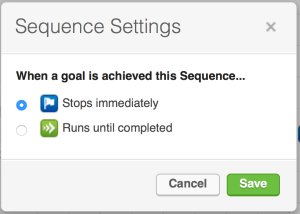
In plain English, this setting means:
For a long time, the only example I could give for why this feature existed was “10 tips” sequences or other promised content series – where you’ve told someone you’ll send them something over time, and you want to fulfill that promise even if they take another action.
Imagine a “10 Tips” campaign where someone opts in to get ten tips via email, and inside that sequence you also offer them an upsell. If they buy that upsell, you still want to deliver all ten tips you promised.
“Runs Until Completed” is one way to do that:
Could you restructure the campaign to achieve the same result? Absolutely. But this sequence setting is a handy shortcut once you understand what it does.
Here’s a video where I walk through an example of this in more detail:
Watch: Keap “Runs Until Completed” sequence setting
While this feature is powerful, it can also be confusing if you forget you’ve turned it on.
If you have questions about this sequence setting, or have found your own use cases for it, share them in the comments – chances are you’ll help another Keap user avoid a head-scratch moment.
We have created several courses where we dive more into the technical aspects. So, if you like what you read here, you'll love our courses!!