




Love what you are seeing?
We have created several courses where we dive more into the technical aspects. So, if you like what you read here, you'll love our courses!!





By:
Greg Jenkins
|
February 9, 2026
|
Technology
When it comes to Infusionsoft campaigns your contacts can have one of three statuses, they are either Active, Queued, or Done.
Active and Done are fairly straightforward, but understanding queued contacts isn't quite as straightforward.
(More on those status types here)
When you're looking at the reporting tab of the campaign, queued contacts are represented by the orange number you see in each sequence - in the image below there are 1.3.k queued contacts (and 360 active ones).
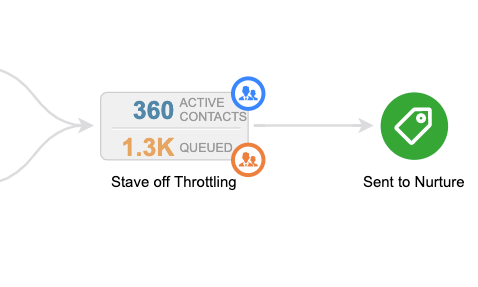
the journey you've built for them, then you can think of queued contacts as the people who for one reason or another stalled out before they hit the next milestone.
There are plenty of reasons why this might happen, but when I see queued contacts in my campaigns I think of it as a place where contacts are getting stuck and treat it as an opportunity to add another touch point.
Pro Tip: Unless they move on or you remove them, contacts can stay queued indefinitely - so, if you're adding new steps to a sequence which contains queued contacts make sure you're clear on which contacts could be affected, and whether or not that's what you would like to have happen.
Here's an article from the Infusionsoft help center that digs into making changes to sequences with queued contacts.
Hope you found this post valuable - please leave any comments or questions you have below.
If you want a deeper dive on this - or anything to do with the campaign builder, check out the CB Trilogy Course, or grab the free trial below.
We have created several courses where we dive more into the technical aspects. So, if you like what you read here, you'll love our courses!!