Finding someone’s FIRST Purchase Date (inside Keap)

Finding someone’s FIRST Purchase Date (inside Keap)

Alright, so here’s the thing: Keap gives us a ton of data about our contacts—like, a ton. You can see what people bought, how much they spent, how they paid, etc.

But one thing that’s surprisingly tricky to pin down is when someone officially became a customer. Like, their very first purchase.

This question came up recently in our private community (shout out to Susan 👋), and we realized that while the info exists in Keap, isolating it isn’t always straightforward. Sure, you could export purchase data and do the digging in a spreadsheet—but that’s manual, time-consuming, and doesn’t help you the next time you want the same info.

So we put some brainpower on it and came up with a better way—an automated option using PlusThis to calculate and store the “first purchase date” in a custom field that you can reference in searches, reports, or automations. Let’s walk through how it works:

Pretty smooth, right? Once you’ve got this set up, your system just quietly tracks that first purchase milestone in the background—no exports, no spreadsheets, no elbow grease required.

This kind of thing might feel small, but having a reliable “customer since” date opens the door to smarter segmentation, personalized follow-ups, and deeper reporting. PlusThis made it easy to pull off, and now Susan (and anyone else who needs it) can start putting that data to work.

If you give this a shot—or if you have another sneaky Keap problem you’ve been trying to solve—drop a comment or reach out. We love a good puzzle.

Have your own questions?

If you would benefit from a place to ask automation questions when you get stuck, and get ideas and inspiration from other businesses, you can join us in the Monkeypod Membership.

Fundamentals of Nurture Automation

Fundamentals of Nurture Automation

Let’s talk about Nurture.

It’s not flashy. It’s not new. But it’s one of the most important parts of your sales and marketing ecosystem — and too many businesses skip it entirely.

Where does Nurture fit?

The short answer is: in the gaps.

You know those little moments between major milestones in your customer journey? The space after someone opts in but before they buy? Or between a discovery call and a proposal? That’s where Nurture lives. It’s the connective tissue that keeps people engaged, supported, and moving forward — instead of slipping through the cracks and disappearing altogether.

The role of a Nurture process is to systematically follow up, answer questions, remove friction, and make it easier for a lead to say yes when the time is right. It’s about progress. It’s about support. It’s about keeping the conversation going.

Why is Nurture valuable?

This part is huge. Because the leads you’re nurturing? You already have them.

You (or your marketing team) worked hard to generate traffic. You ran ads. You built landing pages. You created offers and lead magnets. And if you’re not actively nurturing those leads, then a chunk of them are just sitting there — slowly cooling off.

A well-built nurture process helps you improve the conversion rate of the leads you’re already getting. Which means better ROI on your ad spend. Better performance from your lead magnets. Better alignment between your marketing and sales efforts.

If you’re trying to grow without a nurture strategy, you’re just leaving money on the table.

How do I actually do it?

Good news: This part is straightforward — especially if you’re using an automation platform like Keap, ActiveCampaign, HighLevel, etc.

The basic idea is that you create an automated series of helpful, supportive touch-points (emails, texts, videos, etc.), and then you set it up to trigger when a contact might otherwise be at risk of going cold.

The nurture process keeps them warm. It provides resources. It addresses FAQs. It builds rapport and trust — so that when they’re ready to buy, they think of you.

Hopefully you’re reading along and nodding your head, and if you’re thinking “…but, what should I say?” — we’ve got you covered.

This short video will walk you through some of the actual content ideas that can make up a strong nurture campaign. Real examples. Clear guidance. Stuff you can implement today.

So we’ve given you ten nurture topics – that could be the material you need for a ten day nurture sequence – if you’re sending daily, but it also could be content that is spread across ten weeks, or ten months, depending on the cadence you decide.

Let’s review, those ten topics are:

  1. Welcome, Introduction Message
  2. Business Origin Story
  3. The Core Problem you Solve
  4. Case Study (or Testimonial)
  5. Common FAQs
  1. Behind the Scenes Look
  2. Quick Demonstration of Value
  3. Signature Service/Offering
  4. Best Practice/Industry Trend
  5. Invitation to Connect

And, you may have noticed that some of these topics could easily be used to generate a handful of nurture touch-points. Like, say you had more than one case study to share, or more than one FAQ to address, etc.

So don’t be afraid to take these topics and expand on them as you develop your nurture strategy – a rule of thumb is that it’s always better to have too much nurture than not enough.

Nurture: Next Steps

If you’ve made it this far, then let me encourage you to take action.

Either build a brand new nurture process from scratch — or revisit one you’ve already got and see how it could be stronger. Because even small improvements to your follow-up strategy can lead to big wins over time.

Nurture is one of the most efficient ways to grow — and once it’s set up, it works around the clock to help your leads take the next step.

Let’s stop letting good leads go cold. Start nurturing.

Automation Expanded

Nurture is one very clear and specific automation use case – but automation is infinitely versatile, if you know where to look If you aren’t sure where automation would fit – we’ve built a course specifically designed to help you identify those opportunities.

Automated Content Sharing Recipe

Automated Content Sharing Recipe

Ever feel like you’re creating strong content, but it’s not getting the attention it deserves? Yeah—same.

I think this dynamic affects most everyone who produces content – we know what we’re putting out is valuable, but for any number of reasons it might not be reaching the people it can really serve.

One of the ways we try to squeeze a little extra mileage out of the stuff we publish is by making sure it actually gets posted to all of our social channels. In this video, I’ll break down the exact automation recipe we use to share new Monkeypod content—mostly YouTube videos and blog posts (like this one)—out to our different social channels.

It’s a simple formula that runs through Zapier, but it helps us stay visible, consistent, and efficient.

This simple setup helps us get more eyes on the content we’re already creating—without adding a bunch of extra work to the pile.

While I demonstrated it using Zapier (because that’s what we use), you could totally build a similar system with other automation platforms like Pabbly, Make, n8n, or whatever tool fits your stack.

The real takeaway here is that a little bit of automation can go a long way in making sure your content actually gets the attention it deserves.

And as an added benefit, it helps keep your social channels from going stale if you aren’t regularly publishing new material. Happy sharing.


Looking for Ideas?

This was a fairly unique automation use case – but these types of scenarios are all over the place. If you aren’t sure where automation would fit – we’ve built a course specifically designed to help you identify those opportunities.

Productivity Hacks (for my ADHD brain)

Productivity Hacks (for my ADHD brain)

Staying organized is tough enough for most of us, and when your brain doesn’t play by the rules that adds a whole new layer.

Our beloved Monkeypod Community Manager, Jade, has ADHD – and over the years she’s built a system of tools, habits, and little brain hacks to help her stay on top of things. And in this video, she’s pulling back the curtain to share what works for her.

If you feel like you’re constantly juggling a hundred things (and maybe dropping a few along the way), this one’s for you. Check out Jade’s setup and see if any of her tools strategies can help you hack your brain too.

The thing about productivity is that there’s no one-size-fits-all approach—what works for one person might not work for another.

But the key is finding tools and systems that complement your brain, not fight against it. Hopefully, some of Jade’s tricks gave you a few ideas to test out in your own world.

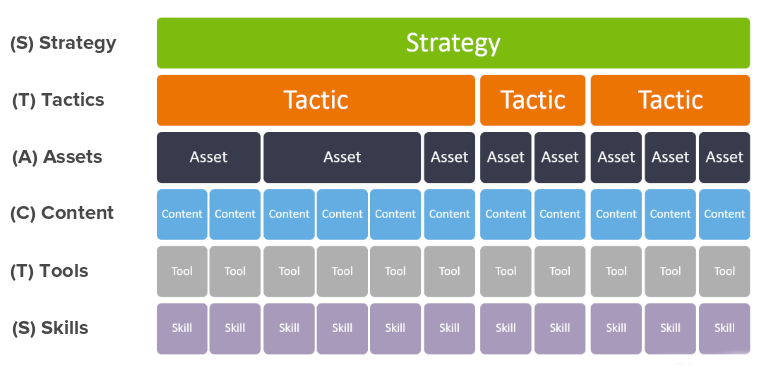
And, if you’re planning a project from scratch – here’s a framework tool that can help you avoid friction as you bring a project to life.

Want a demo of this framework in action? Check it out here.

If you’ve got your own favorite hacks (or tools you like) for staying organized, drop ‘em in the comments—we’re always down to learn something new.

Is my CRM data safe?

Is my CRM data safe?

Your CRM is built to keep your data safe—Keap even has its own backup systems, so it’s unlikely your contacts are just going to vanish overnight. But that doesn’t mean your data is bulletproof.

The real risks comes from human error (we’ve all been there) and misconfigured integrations.

Human Error

As much as we love automation, the reality is that if humans are involved in the business – then there will always be a risk of human error. This can be as simple as inadvertently deleting contacts, typos as we’re inputting data, or something more malicious – like a spiteful ex-employee or contractor deliberately erasing information.

Integration Issues

Integrations are a core part of most businesses. Tools like Zapier and Make are household terms, and often times provide the connections that allow different software systems to speak, and pass information back and forth.

But, along with this efficiency also comes risk – if the integration is configured improperly, or a connection breaks – the data that was being maintained can instead be corrupted. And if they’re doing a lot of volume, then it could mean a lot of mistakes.

Cameron recently sat down with Jeff Arnold to talk about how things can go wrong and, as importantly, what you can do to protect your CRM data.

If something goes sideways with your Keap data, Keap’s team can often help recover it—but it’s not always quick, and often a paid service.

That’s why Jeff created his solution, it gives business owners more control and flexibility by maintaining our own automated backups. Instead of crossing your fingers and hoping to avoid a major issue, you get daily (or more frequent) backups that let you restore lost data with the click of a button.

Jeff’s solution is CRM-backup.com, it gives a business owner more transparency and control by maintaining an independent back-up that is refreshed regularly (generally daily, sometimes more often).

These are the core benefits from their website:

Automatic Daily Backups:
At the core of this service is a reliable and automated Keap CRM backup solution designed for peace of mind.

Restore Deleted Contacts in Seconds:
If you accidentally delete a contact – you can restore, “undelete”, or recover it in just a few clicks.

Rollback Line-Item Changes Anytime:
Made a mistake? You can quickly revert to any previous version with the version history or rollback feature for easy recovery.

I like the way Jeff describes his tool when he says “You buy car insurance, life insurance, or home insurance….this is basically data insurance.”

You can learn more about how it works here:

3-part Payment Puzzle (inside Keap)

3-part Payment Puzzle (inside Keap)

If you sell your products (or services) in the simplest fashion – then it’s likely one transaction. Someone swipes their card, and boom – it’s done.

But, depending on the nature of your business it may not be quite so simple – and fortunately, Keap has a lot of flexibility in the ways it can support more complicated purchases.

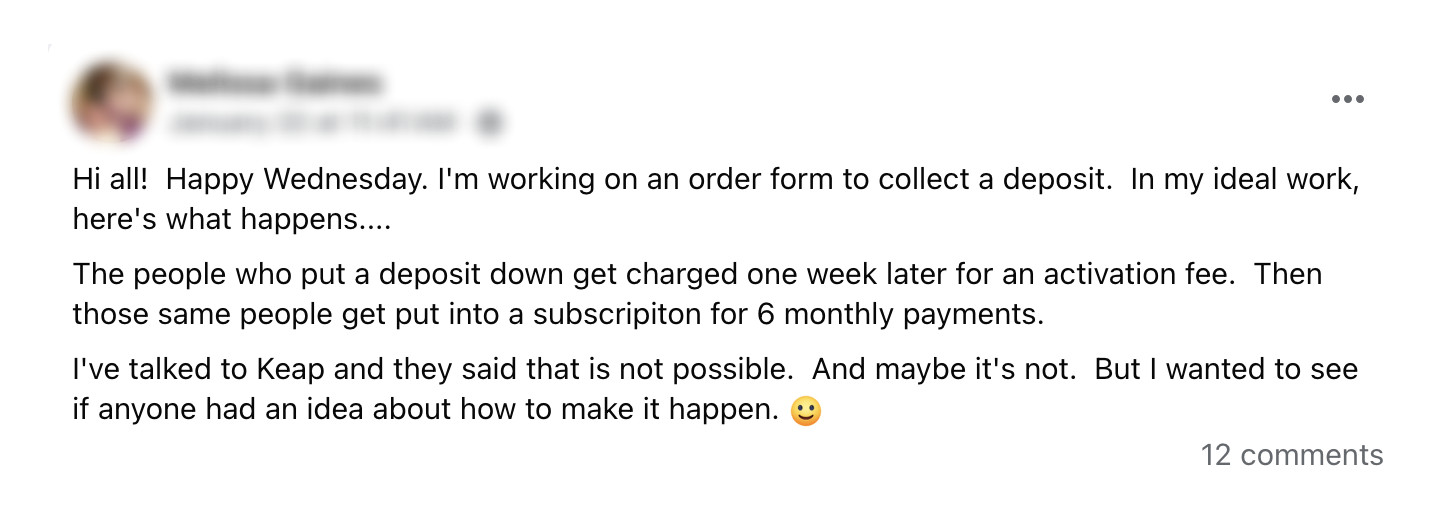
We had a question pop up recently in our private community where Melissa was looking to break a purchase up into three components – a deposit, an activation fee, and then a recurring subscription.

group question

This may feel like a puzzle (and it is), but thankfully it’s one that can be solved – and solved without needing third-party tools or integrations.

Here’s a walk-through of how to use automation to support a three-part payment process like this inside Keap:

Here are the key things to remember:

1. The initial purchase is what starts this whole process – and it’s important because this is how the credit card is added to the contact record.

2. Then, using automation we wait the specified delay before charging the card for the second amount – the activation fee.

3. Finally, after another delay, the subscription is initiated automatically – this can run in perpetuity, or for a set number of cycles.

This may feel complex at first, but if we break the purchase down into it’s individual components, it turns into a logical three step progression. The amounts and the delays can change, but this process could be used to support a wide range of use cases where we need a multi-part payment in order to complete a transaction.

Hope you find it useful – please feel free to drop questions or comments below.

Have your own questions?

If you would benefit from a place to ask automation questions when you get stuck, and get ideas and inspiration from other businesses, you can join us in the Monkeypod Membership.