Dear Men’s Wearhouse…

Dear Men’s Wearhouse…

At thirty years old, I’ve been well aware of George Zimmer and his Men’s Wearhouse brand probably since renting my first tux for high school prom. Since that awkward and memorable evening, I’d say I’ve rented or purchased items from Men’s Wearhouse between 5-10 times.

Well, recently I got fitted for another tuxedo at Men’s Wearhouse for a wedding, and it was memorable and awkward in a much less endearing way. I stopped in to get fitted, and 65 minutes later I left frustrated and annoyed. It wasn’t until I parked at home that I recognized the silver lining of the situation. I had had a negative customer experience, but the reasons it was negative could easily be translated into valuable lessons – which, subsequently, I thought would make a very nice blog post. (Sidenote: Sometimes I rewrite sentences to avoid saying “had had” or “that that”, but I’m working to embrace it and put more trust in the reader)

So here we are.

I arrived at Men’s Wearhouse and wandered over to what I deemed must be the rental section. I had never been to this particular store, and while there wasn’t anyone there to greet me, the stores are all roughly the same so I was able to quickly find the rental counter and make my way over there.

After a few minutes of standing around looking lost and puzzled among a handful of other equally confused guys, one of the busy clerks told me that I should add my name to the sign-in list.

Sign-in list? Okay, I’ve never been to a Men’s Wearhouse with a sign-in list, but sure. Why not?  So I signed in, and after another few minutes, one of the guys waiting near me said “You’re gonna wanna fill out one of those forms” as he pointed at a note-pad with some sort of rental agreement form on it. Something about the tone he delivered this directive with gave me the impression that I was in for a treat.

My experience continued as such– vague and delayed instructions offered to me lazily by other gentlemen who also had better places to be.

After 15-20 minutes of standing around, I gathered that most of the other gentlemen hadn’t yet been helped either. And because I knew who had been waiting longer than I had, I surmised that I could safely run next door to Target to grab a few things and be back before they called my name.

I notified one of the (well-dressed) attendants that I’d be back shortly, and asked if my assumption about my position in “line” was correct. Her exasperated response was that they were working as quickly as they could, they wouldn’t come get me at Target, and if I wasn’t here they’d have to move on.

Noted.

After returning from Target, I resumed standing about with the other gents watching slowly as one after another was called for various measurements and fittings, and eventually my name was called. I stood awkwardly in between floor displays as they proceeded to take one measurement every few minutes in between rushed trips to the back to grab a different size shoe or shirt for other renters.

measuringtape2During my analysis while waiting I thought I had figured out that one employee was handling measurements, another was responsible for assisting the guys picking up tuxedos, and the last was collecting deposits; but when it was my turn to be measured my careful observations quickly fell apart. There was no longer a discernible rhyme or reason to their “system”.

They all were sort of doing each role. And the unfortunate result was none of the roles were being done effectively.

In fact, at one point they had taken measurements, written some numbers down and walked away to leave me standing long enough that I had to seek someone out just to ask “Am I all set here? Or, is there something else you need?”

There was more they needed. I resumed my ranks among the other impatient, dejected patrons.

Eventually, someone came back, summoned me again, and after trying on some shoes I gave them my credit card and they eagerly accepted my deposit.  I got my receipt and as I (equally eagerly) turned to leave, I realized we hadn’t discussed where or when my Tuxedo would be ready. The wedding would be in Michigan, and I live in San Diego. The logistics of picking up my Tuxedo in a state other than the one in which I had been fitted seemed to be an insurmountable obstacle for the attendee at the rental desk.

So, I quickly googled the stores in the greater Lansing area and decided which one would be best for me, located the store number, and spoon-fed her the details to finalize and update my reservation. Then I quickly left, without an ounce of confidence that my tuxedo would arrive where I needed it, or in proportions that matched my own.

Listen, I’m not an unreasonable guy. And in the grand scheme of things I realize that 65 minutes isn’t that long. But that’s also kind of the point. This minor interaction is a fundamental part of their business. Men’s Wearhouse sells suits and men’s clothing, but they also do a fair amount of business renting tuxedos. So for a business who does this regularly, I’d expect them to have worked out an iron-clad system to get me in, fitted, and out.

At it’s very core, I’m paying $200 to rent clothing that other people have worn for a single evening. If I’m willing to accept that, it seems like making my experience as fluid as possible is the least they can do, right?

Yes, I gathered that they were busy. And I pieced together what I perceived to be the process. But as a customer, I want to be told exactly what is happening, and I want to be kept up to speed if that changes.

We could probably dive in to their whole rental process and identify a number of areas where it could be improved, but before we even go there I want to call out a much lower hanging piece of fruit for them. Communication.

(Nevermind the fact that I rented a Tuxedo 3 months prior and they insisted that I still needed to come in to be measured again…)

If Men’s Wearhouse had simply said “Hey, welcome, we’re really busy right now. But if you sign up here, and start filling out this paperwork, we’ll call you when we’re ready to get your measurements. We’ve got 4 people ahead of you, I’d guess it’ll be 30 minutes before we get started with you.” I think I’d have been just fine with it.

I don’t expect perfect service. It doesn’t have to be immediate. I totally understand what it’s like to be stressed, busy, or overwhelmed. But I’ll be much quicker to forgive mediocre or even poor service if you set the right expectation with me, acknowledge ownership and communicate clearly with me as things change.tuxedo

I don’t want to bash Men’s Wearhouse too thoroughly, because they’re probably doing some things really well. I recognize that this was a single isolated experience. And because they’re a massive organization, there are things like this that can probably be overlooked without severe long term damage.

But that’s rarely the case for small businesses. It’d almost certainly have a much longer-lasting impact for my business. What about yours?

Things won’t always be perfect. And inevitably some of your customers will end up frustrated. But if you’re transparent with them you’ll find that they’re much more likely to accept your imperfections in stride. Or even go so far as to defend you to others (should you need it).

Sidenote: The Tuxedo arrived at the store it was intended to. And it didn’t fit originally, but the in-house tailor was able to make a few modifications and we ended up pretty sharp-looking bunch.


Improve your Homepage with 3 Tips

Improve your Homepage with 3 Tips

ClayHarper

Clay Harper, Small Business Performance Expert, Infusionsoft

Clay Harper is an Infusionsoft employee of 3+ years, with experience in a variety of roles all having one common theme- helping entrepreneurs. He’s made it a point to stick around in customer facing roles because solving problems is one of his passions. And I’ll be the first to add that he’s darn good at it too. He’s got a level-headed, no-nonsense approach that really resonates with lots of folks.  In addition to his passion for helping small businesses, Clay is an accomplished traveler, business owner, and professional beekeeper (For real).  Anyway, I asked him to write, and here’s the awesome outcome.

3 Tips to Improve Your Website’s Homepage

“What do you think of my website?” is a question I am frequently asked by my consulting clients. Whether these entrepreneurs are do-it-yourselfers who made their own wordpress site or they paid thousands to a web designer to get it done, they all want to know if their website’s homepage is making a good impression.

Tell me truly… If you had a consistently underperforming employee, wouldn’t you fire them? Surely, you’d let them go? With great gusto you would!

Your website’s homepage is no different and it has three jobs that it must accomplish! Your homepage must:

1. Welcome and inform visitors about your business
2. Persuade to engage with your website
3. Obtain an email address/phone number

Homepages that accomplish this start on the right footing with customers, get visitors to interact more with their site and convert more visitors into email addresses, phone numbers and ultimately sales.

Welcome and Inform:

I believe it was Tolstoy who penned that “All happy websites are alike, but that each unhappy website is unhappy in its own way.” If you look at enough websites you notice that the good ones tend to have white backgrounds, use non-primary colors, and are tightly organized. They show rather than tell and they are judicious in their use of stock photography.

welcome_matYour website is the face of your business so it needs to be unique to you, but realize people have already figured out how to make a good website. You aren’t going to suddenly invent a new way to do it. Look at competitors and emulate those doing it well.

The colors, style and layout you choose greatly influence how people think about you. This is doubly true for new visitors to your website that find you organically or from your advertising efforts.

Keep your writing punchy and to the point and be sure to include more than one “call to action”. Remember that people tend to skip paragraphs longer than 4 sentences long. It is generally more effective to show than to tell, so use graphics (and video) when possible.

Take advantage of the natural way people tend to scan or read through web pages. In English, people read left to right top to bottom but they always look at things exactly that way. For more on this check out this resource.  Most modern themes for websites apply these patterns into their design so you should too.

It can be difficult to evaluate your own website. Have a trusted, web savvy person take a look and ponder on their advice. Lastly I don’t always use boring stock photography… but when I do I prefer ones that have Vince Vaughn in it.

Persuade them to click deeper into your website

shovelYour homepage’s second job is to get people to dive deeper into your website. Your homepage is the most trafficked page because it’s the first or second page that people visit. A good homepage has links and buttons that are persuasive to different segments in your target market.

Not everyone who hits your website is the same. Each person has different priorities and interests (like a snowflake). You want your homepage to educate and offer a virtual potpourri of interests so that the visitor can choose the one that most interests them. Self-segmentation!

Most homepages should be a filtering page where visitors can see a variety of options and click the one they like best. This means visitors to your secondary pages are prepared and ready to consume targeted content and click on calls to action.

Convert Visitors into Email Addresses and/or Phone Numbers

Finally your homepage must convert your visitors into email addresses. Conversion is the most important job for your website and your copy should be geared toward that end. Most websites convert visitors into email addresses using a web form to give away free valuable content in exchange for that email address.

traffic-conversionOnce the visitor (now a shiny new lead!) submits that email address you will need to deliver what you promised and follow up with an amazing nurture sequence of emails to persuade them to purchase. This is where email automation takes over and Infusionsoft (or whichever tool you use) springs into action.

I’ve been focusing on email addresses but the same is true for phone numbers. Just realize that people more closely guard their phone number as an email rarely interrupts dinner.

Often businesses will choose to have a more generic lead capture featured on their homepage, since most visitors hit that page, so an offer with broad appeal can be more effective. They save their more specific lead magnets for the individual pages of their website where they are most effective.

A homepage that welcomes, persuades visitors to dig deeper, and captures email addresses will bring you quality leads who are more likely to purchase. So take a look at your website. How does it stack up? Do you need to have a hard conversation with your website about it’s future with the company?

Creating a beautiful, high-converting website that you can be proud of is definitely some work, but having a website that educates, engages and is in-tune with your marketing is invaluable. Take action now!

Please post your questions and comments below, or you can tweet directly at Clay.

Notes are for Humans, Tags are for Computers

Notes are for Humans, Tags are for Computers

A few weeks ago I participated in the first Mastermind Panel, hosted by my friend Jordan Hatch. It was basically a strategy session where Jordan, Paul Sokol, Nathan Paris and I dissected some campaigns, made recommendations and explored different campaign building strategies. If you missed this one, you can check out the recording here.

(It was a bunch of fun, and we’ll certainly do it again. If you’re interested you should sign up here to be notified for the next one.)LeahRemini

Anyway, after the mastermind panel I received an email from a Michael Rogan (A friend and Infusionsoft employee) who said that while listening to us strategize he had a big “Ah-ha” moment.

You know, the type where you finally connect the dots and realize that Leah Remini on King of Queens was also Stacey Carosi from that one weird season of Saved By the Bell where they all worked at a beach resort.

Anyway, his ah-ha moment can be boiled down to this:

Notes are for humans, tags are for computers.

I think Nathan said it on the call, but it resonated with Michael, and then it stuck with me when I read his follow up email.

The reason this is so important is because there are a handful of issues in the Infusionsoft community that all tie back to tags.

You see, lots of the other CRM or email marketing platforms out there operate with what are called lists. Infusionsoft doesn’t use lists, it uses tags.

But those tags can also be used to trigger automation. They can also be used as criteria for your reports. Or for your searches. And can be applied and removed automatically when someone clicks a link (or doens’t click a link).

Swiss-Army-knifeThey’re all over the place. I like the quote “Tags are like a swiss army knife. They can do a lot of things, but you have to be careful with them.

But just because a swiss army knife can open a bottle of wine, doesn’t mean it’s the easiest way to open wine. And just because a swiss army knife has a blade doesn’t mean you should cut your steak with it when you have a steak knife.

Just because a tag can be used for something, doesn’t mean it should be.

I hear people say all the time that their tags are a mess. I hear people complaining that they have too many tags, or that their tags are repetitive, or confusing. So I want to set a few things straight:

There is no tag limit. So there isn’t an official “too many” number. I’ve seen people with a few hundred tags, and I’ve seen people with 10K+.

What matters is whether or not the tags are carrying meaningful information.

If they’re redundant, or if they don’t mean anything at all, then yeah, you might want to audit your tags and trim it down. So, there are plenty of philosophies on tags, and strategies for organizing them out there, and in fact that’ll probably be a whole course of it’s own some day (here’s a good post on tags for the meantime).

I think a big part of the confusion surrounding tags is that people don’t fully understand what their other options are, so they rely on tags when they could have easily used something else.

This brings me to notes. Notes, and note templates are a remarkably valuable way for recording something that happened offline. They’re perfect for denoting something that took place as part of a process online, or even recording a specific action that took place online. You can personalize the note and add context to it as you’re using it. You can automate the application of a note, to create a time and date stamped record that something happened.

If you need to manually start a campaign process, you could use a tag to achieve a goal. Or you could use a note. (Here’s an example of a campaign I think everyone should be using, and it starts with a note)

The beauty of using a note is it allows you to not only record what happened, but also add additional details about the interaction so you can reference them down the road.

Here are the key distinctions:

  • Notes can be applied more than once, and maintain a record of each time it was used.
  • Both can be used to achieve goals.
  • Both can be applied manually by a human, or as an automated step in a sequence.
  • Tags can be applied from the Snap app or the Infusionsoft Mobile app.
  • Notes can be customized to add details from your conversation, or context around why it was applied.
  • Tags achieve multiple goals in more than one campaign.

With Infusionsoft there tend to be multiple ways to do most things. But the more you understand, the easier it’ll be to choose the best tool for your particular needs. I’m not saying that you shouldn’t use tags, just that you should use them judiciously.


BONUS: Recently I had someone ask about the difference between legacy notes in the templates section, and the notes we create in the campaign builder. So I created this video to help clear up how both work.


7 Steps to Create a 6 Figure Coaching Business (Part 2)

7 Steps to Create a 6 Figure Coaching Business (Part 2)

CameronRobertsIn a previous post, we had Coach Cameron Roberts outline the first four of his tips toward building a 6 figure coaching, training or consulting business. These tips are valuable for small businesses of all kind, but as Cameron has outlined, he’s dialed in to a niche within a niche, and has proven the strategies for specific business models.

The 7 Steps for Creating a 6 Figure Coaching, Consulting or Training Business in 6 Months or Less (Part 2)

Step 5 – Solve Big Problems

As a coach, consultant or trainer you are paid in direct proportion to the value you deliver to the marketplace. This value is the problems you solve.

Solve bigger problems and you can charge more in coaching, consulting and training fees.

Ask yourself these questions about your ideal clients:

  • What are their fears?
  • What are their frustrations?
  • What are their deepest desires?
  • What are their wants?
  • What causes them stress?
  • What keeps them up at night?

Then once you answer these questions get busy in creating product offerings around them to present to all your future prospects.

Nothing will build your coaching, consulting or training business faster than your ability to solve your prospects’ and customers’ biggest problems!

Step 6 – Compete to Win

An old sports coach once told me “2nd place is the first loser” – and while that may seem a bit hardcore, or not politically correct in today’s “everyone is a winner” society – it’s not too far from the truth of real life.

Think about the Olympics.

There’s 8 athletes in a swimming race final.

The difference between 1st and 8th in some races are fractions of a second.

The first place winner gets a gold medal and returns home to TV interviews, new sponsorship deals, and lots of publicity.

olympic swimmer

But what about 8th place who finished 0.50 of a second behind 1st place?

I mean they are the 8th fastest person in the world… certainly that’s worth something right?

Realistically we all know they don’t get the same sponsorship deals and opportunities.

In your coaching, consulting and training business – you’ve got to compete to win.

Business these days is “hyper-compeitive”.

Your competition is no longer the other coach or consultant in your neighbourhood, town or city.

Your competition is all the other consultants worldwide getting the attention of your prospecting clients.

This is a game you must play to win.

Plan to dominate.

Play hard.

Get up early.

Stay up late.

Never give up.

Get up, Dress up and Show up and you’ll go up!

Compete to win.

Step 7 – Be Sales Focused

Invest 20% to 40% of your working week “on” your coaching, consulting and training business rather than “in” your business.

Consultants and coaches tend to be great technicians – this is what makes them great consultants. But it can also make them lousy business owners!

As a business owner you must Master Sales!

Create a “Sales Focused” coaching, consulting or training business.

Have a look at your current prices and put them up 10% to 20% straight away.

Stop charging “per hour” and start charging “per package” or “per month” for your services.

Make a list of the different revenue streams you could create more sales from within the next 6 months.

And stop dropping your pants when it comes to your fees when you sense an objection from a prospective client.

There’s nothing that will damage your credibility more than backing down on your fees to get a prospect over the line. When’s the last time you seen a heart surgeon negotiate their fees to their patient on the table about to get operated on?

It never happens right – and if you’re great at what you do, it shouldn’t happen in your business either.

So invest 20% to 40% of your weekly business timetable working “on” your business and always keep a sales focus!

Here’s to your success – good luck with building your 6 figure coaching, consulting and training business in the next 6 months or less!

Regards,

Coach Cameron Roberts


Contact:
Cameron Roberts
Australasia’s Leading Sales Coach and Digital Marketing Consultant
Web: https://coachcameronroberts.com/
Follow Cameron on Twitter: @CoachCameron

7 Steps to Create a 6 Figure Coaching Business (Part 1)

7 Steps to Create a 6 Figure Coaching Business (Part 1)

CameronRobertsOnce upon a time I was a nobody. And in the past few months I’ve skyrocketed to fame and I think I can trace it all back to the time I appeared on Coach Cameron Roberts podcast. Okay, so maybe skyrocketed isn’t quite true. And maybe fame isn’t the right word. But I was on a podcast with Coach Cameron and it was awesome. Here’s why: He’s super smart. Coach Cameron runs a consultancy in Australia, is an Ironman athelete, hosts a podcast, and has helped thousands of entrepreneurs. He’s a multitalented digital renaissance man and I was honored when he agreed to write a post for the Monkeypod Blog.

The 7 Steps for Creating a 6 Figure Coaching, Consulting or Training Business in 6 Months or Less

If you’re reading this, there’s a good chance you’re in the coaching, consulting or training industry.

But are you taking advantage of the opportunity to capitalize on what is a $200 Billion Global Industry?

The sad fact is many coaches and consultants never really make serious money.

Most are struggling to make $40k, $50k or $60k per year…

So how do you quickly flip your consulting or coaching business around so you go from making $50k per year to $50k per month?

That’s a great question. Glad you asked.

To help you out – I’m giving you my 7 Steps for creating a 6 Figure Coaching, Consulting or Training Business in 6 Months or Less.

And it all starts with the most important step of all…

Step 1 – Adjusting Your Attitude

Being a leading sales coach and marketing consultant – I love studying the human mind and the truth is that most coaches and consultants are not “sold” on their own services. They don’t back themselves. The vast majority act like a personal trainer for business owners when they should be acting like the heart surgeon.

It’s a mindset shift – you’ve got to adjust your attitude.

attitude

I recently discovered that we have 12,000 to 60,000 thoughts per day and 98% of these thoughts are the same thoughts we had yesterday!

What’s more alarming is that 80% of these thoughts are negative!

So the first and most important step is to adjust your attitude.

The reason is simple: All success starts in your mind.

You must be able to believe it before you achieve it. (I know, corny, right?)

If you can’t see yourself being a 6 figure coach, consultant or trainer – you’re limiting your own income potential.

Many years ago I adopted the habit of writing my financial and business goals down daily and it’s served me very well. I’ll also take 5 to 10 minutes out of my day, to visualise these goals “as if” they have already been achieved.

Then I’ll “act like” I’m already the person I want to become!

You should do the same thing.

Take out a piece of paper and write down all the goals you are COMMITTED to achieving in the next 3 months, the next 6 to 12 months and the next 12 months and beyond.

These form your short, medium and long term goals.

The main thing here is to only write down the goals you are 100% committed to achieving. This is not some “big dream for your life” or “vision board” – do that somewhere else.

This is an execution plan for driving your business to the next level regardless of what you go through, what the economy goes through or what your competition throws out you. It keeps you on track.

You’ll also want to listen to positive speakers, coaches and trainers who inspire you. With 80% of our daily thoughts being negative – you’ve got to be proactive about inserting some positive thoughts into your mind.

Then invest big in coaching yourself.

Here’s the odd thing about some coaches…

They dream of making lots of money but they won’t invest in other coaching programs and mentoring.

How do you expect to charge your clients $1000, $2000 or even $5000 per month if you flinch about paying a mentor the same (or more) per month?

I’ve had coaches and consultants contact me asking for help to grow their business but then tell me they don’t have the “budget” for that level of mentoring…

Talk about a money mindset block!

Let me make this crystal clear – your income as a coach or a consultant is capped to the level you’re prepared to invest into your own coach or mentor.

Want to charge $5000 per month to your clients?

Find a mentor you can pay $5000 per month to show you how it’s done!

Do yourself a favour – find a coach, consultant or trainer who is already getting the results you want and them pay them whatever they want to show you how to get the same results.

It’ll be the fastest way to grow your coaching, consulting and training business.

Step 2 – Define Your Niche then Drill Down Deeper!

To succeed as a coach, consultant or trainer you must specialize. No-one wants to pay big money for a generalist.

Consider the difference in fees between a general practitioner Doctor and a Heart Surgeon – even though they are both “Doctors”, which one earns the big money?

You need to stop being the “generalist” and start being the “specialist” – you need to become the heart surgeon of a niche market.

Then once you define your niche market – you need to drill down deeper.

You need a niche within a niche.

When I was a teenager I had a passion for competitive swimming… and this is where I first learnt about becoming a specialist and competing in a niche within a niche.

In swimming there’s over 5 freestyle events ranging from 50m to 1500m and there’s 3 form strokes (Fly, Back, Breast) that have 50m, 100m and 200m races and then you have the 200m and 400m Individual Medley. So in total there’s over 16 different races you can do and each require a very different type of preparation and training.

My old swimming coach use to say to me “Cameron – you can me a jack of all trades or a master of one, but you can’t be both.”

So I “mastered” the 200m breaststroke.

My sport was swimming. My niche was breaststroke. My niche within the niche was the 200m breaststoke.

I’ve down the same with every business model I’ve ever owned and operated over the last 15 years – and I help my clients do the same, because that’s where the money is.

breaststroke

It’s like drilling for oil – sometimes you’ve got to drill deeper to strike it rich!

Step 3 – Create an Avatar

Once you define your niche within a niche and you have a clear picture of your target market – you need to create an avatar of “who is your ideal client” within that niche market.

people

The truth is, you are not right for everybody in your market.

And not everybody is right for you!

So put pen to paper and describe your ideal client.

Who are they?

Where do they hang out? What do they enjoy doing? What are some of their character traits? What problems do you solve for them?

Get a clear picture of who your ideal client is – then create all your marketing messages, your sales dialogues and your business around them and for them.

It’ll stop you wasting valuable time taking on the wrong clients and you’ll be able to get better results for your ideal clients.

Step 4 – Build Your Brand

If you’ve completed the previous 3 steps then you’re ready to start building your brand.

Consider where you’re ideal clients hang out the most and be where they can see you.

Play hard on social media, Facebook, Google and Linkedin but don’t forget about some of the more traditional ways to network and build your brand.

Join traditional “offline” networking groups, attend business breakfast events, join community groups and even consider becoming part of a business group or chamber of commerce.

People want to do business with people they know, like and feel like they can trust.

The intention is not to sell your services to the people you form relationships within these groups – but to position yourself as the “go-to-guy” or “go-to-girl” for what it is you do so they can refer prospects to you.

We’ll be back in a few days with tips 5, 6 and 7. In the meantime, start mapping out how you can integrate this first four steps into your business growth plans. And as always feel free to ask any questions below!

If you’d like to contact Cameron Roberts, Australasia’s Leading Sales Coach and Digital Marketing Consultant, you can find him at:

Website: https://coachcameronroberts.com/

Follow Cameron on Twitter: @CoachCameron


Campaign Builder: Gotcha #3

Campaign Builder: Gotcha #3

As you probably have gathered if you read the first and second post in this series, the campaign builder is a powerful tool.

But there are also some key nuances to it, which if you aren’t expecting, can totally catch people off guard and cause their fair share of grief.

So, in this third Gotcha I want to address one of the single hardest things for people to really grasp as it pertains to the campaign builder.

In fact, on two separate occasions I’ve seen Keap Certified Partners selling education on this exact topic in which they still get their facts wrong – or, omit a critical piece.

I’m talking about what you can expect to happen when you republish a live Infusionsoft campaign that has people in it.

First of all, you should know that republishing is a whole subject on it’s own, and there are so many “what if” type scenarios that it’d be impossible to cover them all here.

So what I’m going to address is specifically what people commonly refer to as “The Rule of 7 Days”, or as I like to call it “The 7 Day Shadow”.

(Note: The Rule of 7 Days was eliminated in an Infusionsoft update in Dec 2017.)

It’s also worth calling out that the Advanced Automations course from Keap Academy dives into this, and all of the other campaign builder nuances – so if you’re looking to really wrap your head around the rest of this topic, I’d start there.

But for now, here’s the module of that course that talks about republishing:

CB: Gotcha #3

In a perfect world, we’d all build our campaigns out from start to finish, we’d launch them, and we’d get it right the first time and we’d never have to go back and make any changes.

I remember talking with an event attendee once and they got genuinely frustrated when I said “Just don’t make any changes to your campaigns and you won’t have to remember any of this stuff.”

And of course I meant it in jest, but the reality is that the 7 Day Shadow, and any of the other republishing nuances ONLY come into play when you are making changes to a live campaign that has people in it.

UPDATE: As of December 2017 the Rule of 7 Days, or 7 Day Shadow is being removed. I’m leaving this section of the article here for historical context, but it may no longer describe the behavior in your app.

So, without further ado, let’s talk about The 7 Day Shadow. And I’ll even explain why I like this name better than “The Rule of 7 Days”. Here’s the way that it works: When you republish a campaign, the system will recalculate the steps in each individual sequence for each contact.

Steps that have already been processed, will not be processed again.

This means that if I change the timers, and an email that you’ve already received is now scheduled to happen tomorrow, it will NOT send that email, because it recognizes that you’ve already received the email. It also means if you change the content of an email, or the subject line, it will not resend that step to people who have already received it.

NOTE: Delay timers are the only timers affected by this. Field timers and Date timers ONLY run on the exact date (or during the range) for which they are scheduled.

Changes you made to the sequence can only impact Active or Queued Contacts that are in that sequence.

This means that if you make changes to a sequence, it can impact the people who are still actively receiving that specific sequence. Or, if contacts are still in that sequence and are queued (because they haven’t moved on) it could impact them too. But any changes you’ve made will not affect contacts who are “Done” (meaning that they’ve progressed into the next sequence, or they’ve achieved a goal to exit the sequence).

Any steps you’ve added that are scheduled for the future, will be scheduled as if they were always there.

If I’m receiving your 3 tips sequence, and I’m on tip number two and am scheduled to receive number three tomorrow (shown in blue), and you decide to come in and add an fourth tip (shown in red). When you republish it will schedule the fourth tip for the future, and I’ll receive it a day after the 3rd as intended. It’ll be as if it was there the whole time. FourTips

New or updates steps scheduled to occur in the past 7 days will process immediately.

This is the hard part for people to wrap their heads around. Think of it this way – if you add a new step, or you change the timing of the existing steps – the system is going to recalculate the whole sequence (for the people that are active and queued).

And if the new step you added, or any of the existing steps for which the timing been modified, happen to fall within the last seven days, then the step will process immediately. (In most of the examples I use I’m referring to emails, but the campaign uses the same logic for all sequence steps) Let’s take a look at a few examples using two of my childhood crushes to really wrap our heads around this:

Example 1:

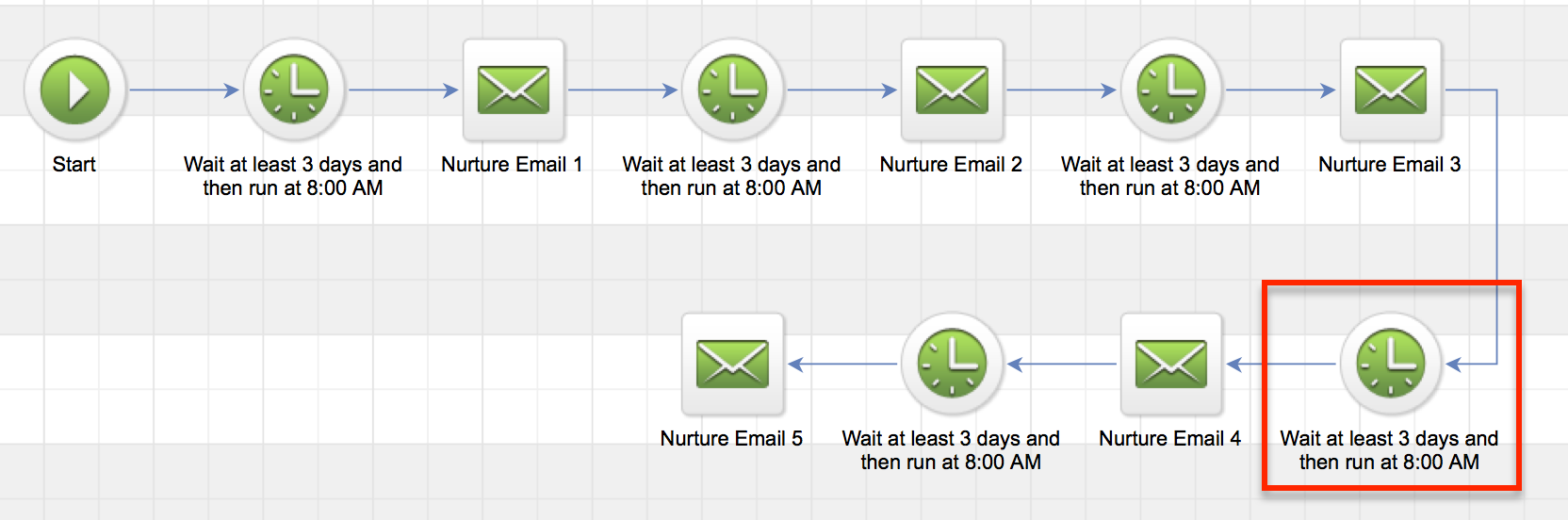
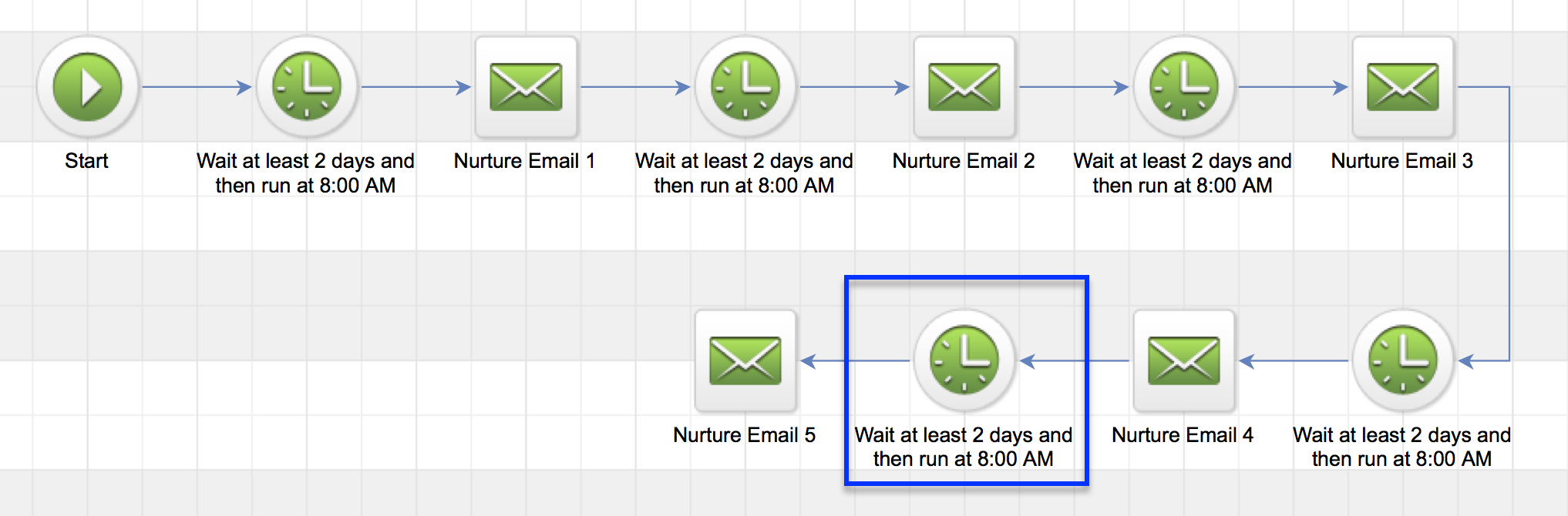
Topanga Lawrence has been in your nurture campaign for exactly 9 days. Your campaign is structured to send an email every three days. So, she’s just received her third email, and is scheduled to receive email number four in exactly three days. She’d be waiting on the timer indicated in red below. (I’ve built it using that “snake” layout just to keep it all on one screen) Nurture Campaign 1 Okay, so now let’s say you decide that you need to change the sequence timing. And instead of sending an email every three days, you decide that you want to send an email every two days. So you come into the sequence, and you change all of the timers, and then you republish.

Here’s what you can expect: Topanga has still been in the sequence exactly 9 days. But now, with the new timing, it means that email four should have been sent yesterday. It’s scheduled to be sent 8 days after someone enters the sequence. And since Topanga has been in there 9 days, email 4 would have been sent within her last 7 days. So, it’ll process immediately.

After it sends email four, then Topanga will queue up on the blue timer below waiting for Email 5. Which is scheduled for 10 days after the start of the sequence, and would be tomorrow for Topanga. Nurture Emails 2 Are you with me so far? Let’s look at another example.

Example 2:

Let’s say Kelly Kapowski is in the same sequence. But she’s been in there for 45 days. That means that she has completed all the steps you had scheduled, but she hasn’t moved on. So she’s considered “queued“.

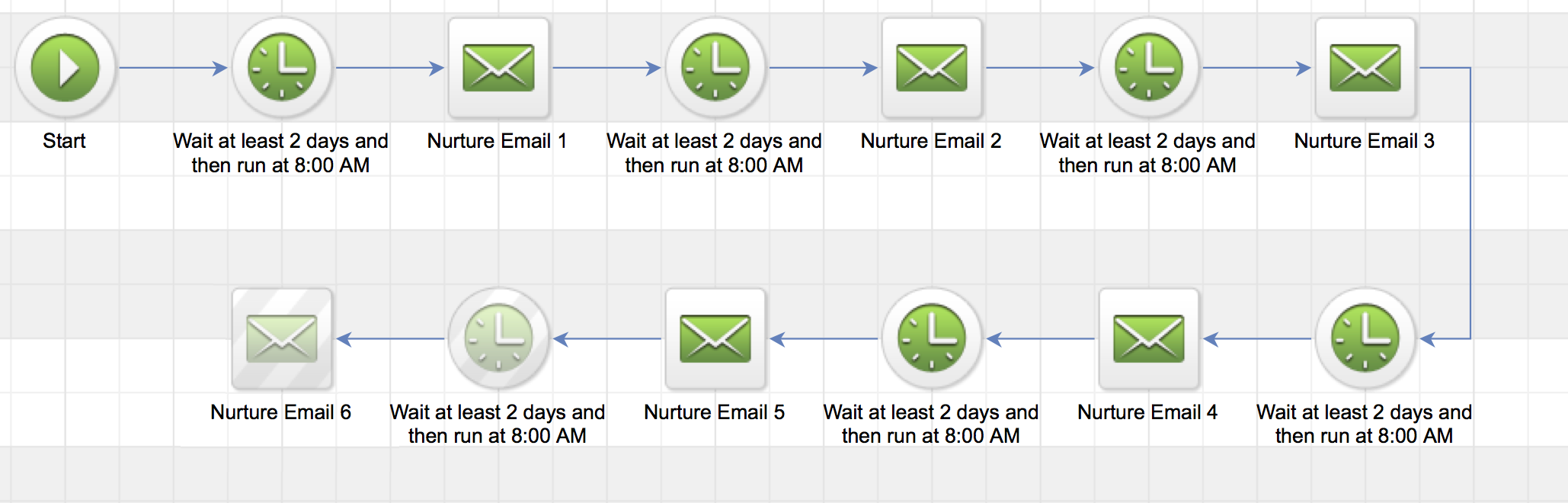
Now you decide to extend your nurture sequence, so you add another two day delay, and then a 6th email.

Well, when you publish this new step, the system is going to recalculate the steps in the sequence, and when it realizes there’s a new step, it’ll decide whether or not it should be sent to Kelly, based on where it falls with respect to how long she’s been in the campaign. Nurture Emails 3 Because the new step is scheduled to happen 12 days after someone enters the sequence, and Kelly has been in the sequence for 45 days, this step would not have been sent to her in the last seven days. And therefore, it won’t be sent to her at all.

Now, if you added a bunch of steps (every other day), giving you 22 total emails (over 44 days), so the last of which would fall 44 days after someone entered the sequence.

Now, when you publish Kelly WOULD receive email #22. Because it should have been sent in her last 7 days. It should have happened on day 44, and she’s been in there 45 days.

But here’s the catch, Kelly will also receive emails 21, 20, and 19. Because those emails would have been sent 38, 40 and 42 days after she entered the sequence.

So, because she’s been in there 45 days, all four of those emails are within her last 7 days. This is why I call it a 7 Day Shadow. As the contact spends time in the sequence, their shadow stays with them.

It doesn’t matter if they’ve been in the sequence a year, if you add a step that falls 360 days after the start of the sequence, that step will process immediately for that particular contact. I know, it get’s a little hairy. Here’s one way to remember it.

If A is equal to the total amount of time that a contact has been in the sequence.

And B is the amount of time from the start of the sequence to the scheduled step.

If A-B is less than 7, then the step will process right away.

There are a few things to look out for here. If there is a long gap, and you add multiple steps, it’s possible that some contacts might get the last email (email 44 in the example above) without getting the in between email. It’s also possible that multiple steps could fall within their last 7 days, and so they could receive more than one step at the same time (which could also be confusing).

So, what do we do about it, right? That’s kind of the natural question here. It’s a little tricky, and of course you want to create the best possible experience for your customers, right?

Well, there are a handful of ways to handle this, and I dive into a few options in the third chapter of the CB: Trilogy course, but for the purpose of this post I recommend a tactic I call “switching the tracks”.

It works like this.

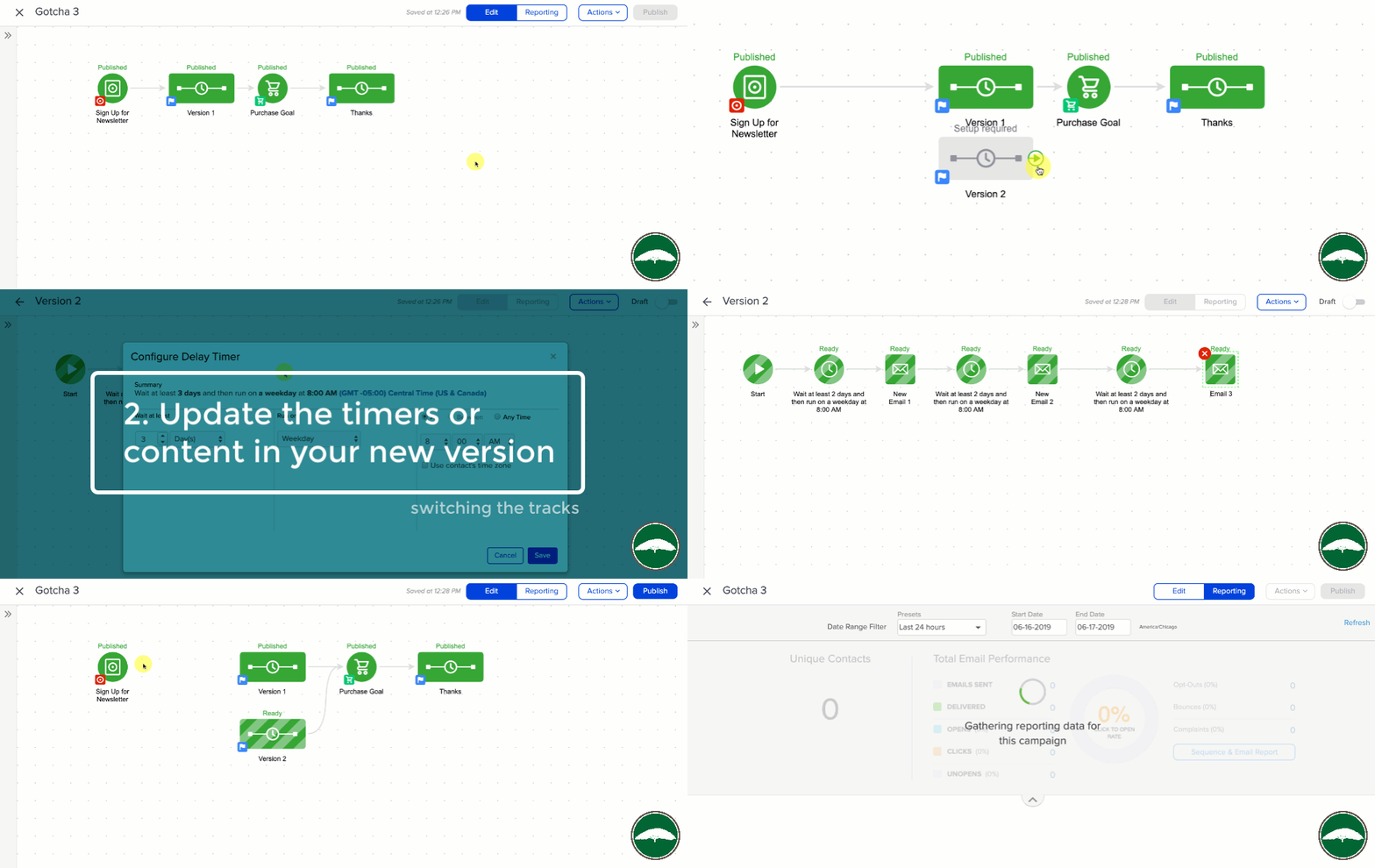
Switching The Tracks

When you want to make changes to a sequence that has contacts in it, and you aren’t sure what will happen. You make a copy of the sequence, and make all your updates to the new sequence.

Then, once it is ready to go, you just simple detach the original sequence, and switch the tracks to route new contacts into the new sequence you’ve now built. It’s not perfect, because you now have contacts in two sequences, and the folks in the original don’t get you fancy new updates, but this way guarantees that you know what your contacts will experience, and that no one gets emails out of order, or multiple emails at once.

So, that’s the 7 Day Shadow. I like this better than “Rule of 7 Days” because I think it’s clearer that the rule is on a per contact basis. I’ve heard people say that changes you make don’t matter after a contact has been in the sequence for more than 7 days. This is wrong.

I’ve heard people say that after a contact has been queued for 7 days, they drop out of the sequence. Also wrong.

What matters is how long the contact has been in the sequence. And how long after the start of the sequence the step is scheduled. That’s all. If you made it this far, thanks for reading. Lemme hear those questions!

Where do I learn more?

The Keap Academy platform features a robust course, The Advanced Automations Complete Collection, covering the fundamentals for building campaigns, from basic to advanced features and settings.