Turning Any Link Into An Unsubscribe Link

Turning Any Link Into An Unsubscribe Link

Hey there Monkey Podders!

It’s your (arguably biased) favorite guest author back with another blog post that has some ground level technical wizardry in it.

I’m going to show you something I’ve been personally using for years in my own newsletter that is really easy to do once you understand what is going on. First, before we get into that, I have to share with you what problem we are solving for in the first place…

Infusionsoft Unsubscribe Links

Email subscriptions have gone though several evolutions since I’ve been using Infusionsoft. The legacy unsubscribe links were very powerful, but not well documented and susceptible to abuse. What I mean by “abuse” is that people were using a hack on subscription (confirmation) links to redirect and omit the confirmation message. In essence, they were tricking people into confirming their email addresses. This is an Acceptable Use Policy no-no. Unfortunately, the same “engine” was used on both link types.

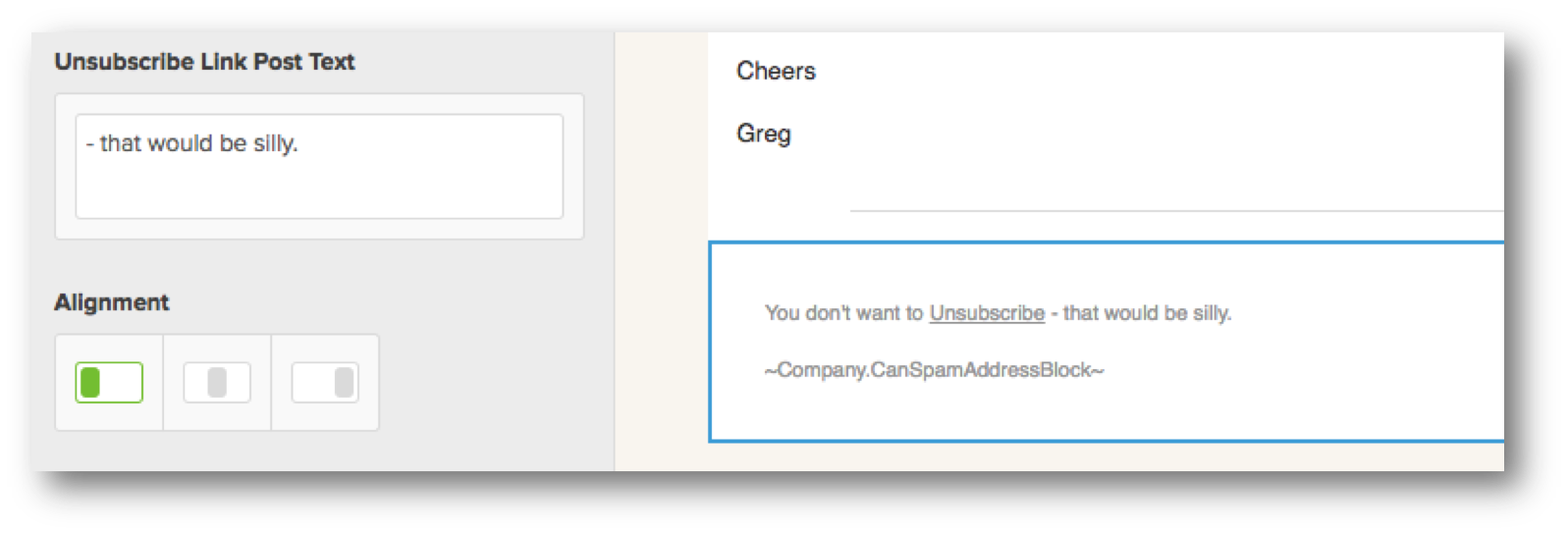
As a result, when unsubscribes were introduced into Campaign Builder, the functionality was severely limited because confirmations were severely limited. They have opened up the restrictions a bit lately. Specifically, you have more control over text before/after the unsubscribe link as well as the link text itself. You also have justification options (right, left, center).

Unsubscribe Footer

Definitely a massive improvement for the kinds of automated experiences you can create.

So what’s the problem?

Even if you use the ~OptOut_xx~ merge field hack, you are still limited to a text-based link only that stands by itself.

But what if you want to use an image to entice people to opt out? Or what if you want to embed an unsubscribe link within the middle of a sentence, like I do in my newsletters?

Until this moment in the blog post (technically further down), you would be out of luck.

Not today! I’m going to show you how to turn any link anywhere into an unsubscribe link 🙂

First, you have to make an unsubscribe link and send yourself an email containing it. You’ll see why later.

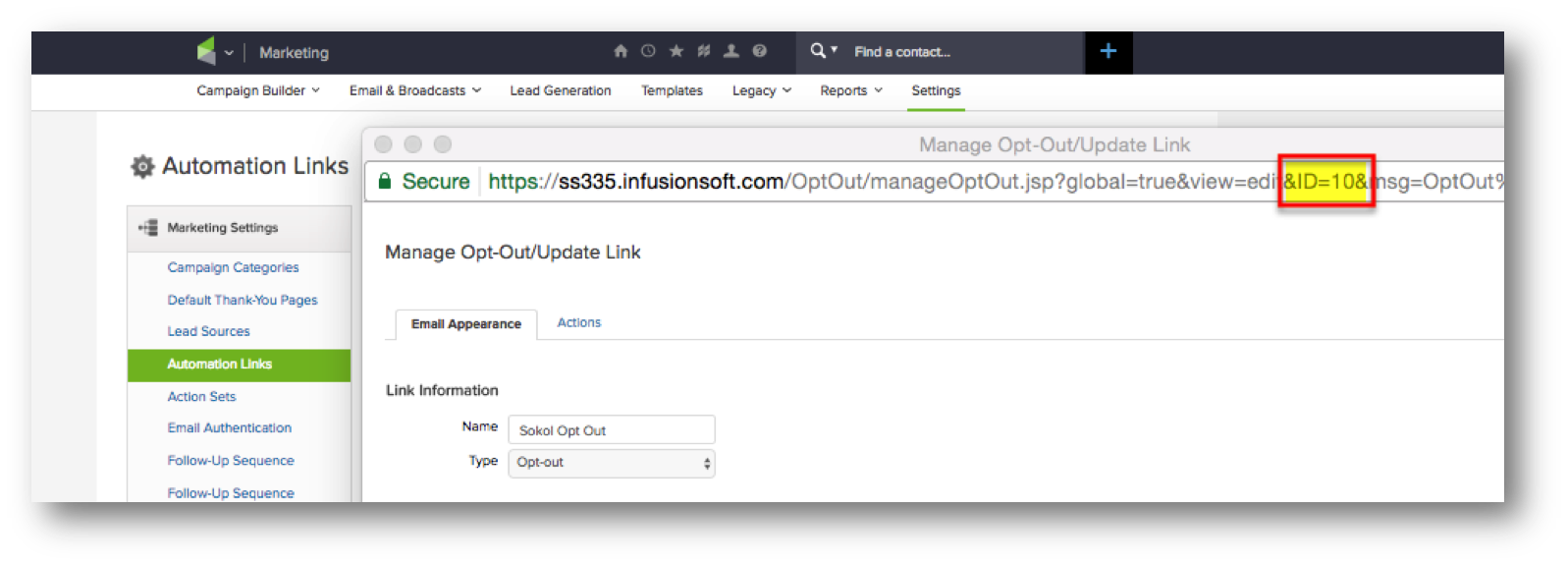
To do this, we start by going into our Marketing > Settings and go to Automation Links. From there we can add a new unsubscribe link. All you need to do is give it a name, some placeholder link text, and Save (not Save & Close).

When the page reloads, pay attention to the ID in the URL. We are going to need this.

Opt Out ID

Now, go into any email and put in the merge field ~OptOut_xx~ where “xx” is the ID we just obtained; you’ll know you did it right if you see the link text in your preview.

Now send that email to yourself. Here’s where we get really under the hood.

Hover over the link in your browser and right click on it. Copy the link location and bring it into a Notepad. Paste it into your notepad.

By now, you should have a link that looks like this:

https://voyicks.infusionsoft.com/app/optOut/25/70b25da2de31f7b1/40162/4a871468d7b3ed95

You may notice something, our link ID is in that URL right after the “/optOut”. I noticed that too. I also noticed that that random hash string of characters (in this example asfasdf), was the same for every opt out link in every email each time. That got me thinking, there has to be a way to manually construct a link with the same structure!

Knowing how the system works, I also observed that the number after the random hash string was an Infusionsoft batch/email ID. Then I remembered: we have a secret merge field for the batch ID (and the other one)!

I discovered these one afternoon many moons ago when I converted an email with the social sharing widgets (remember those?) into a code builder email for some reason. In that moment, I learned of two secret merge fields that I had never seen before:

~EmailSent.Id~

~EmailSent.PartialHash~

That’s how the system was building those social share links on the backend. Every email has its own send ID and a unique hash key unique to the specific send and it was “assembling” a link using the social share parts of the system.

If we replace those last two numbers with those secret merges, we now have a re-usable link URL for an unsubscribe, that can be used anywhere a link can be configured in an email.

https://voyicks.infusionsoft.com/app/optOut/xx/yyyyyyyyyyyyyyy/~EmailSent.Id~/~EmailSent.PartialHash~

Remember, for you, your app name will be different and you’ll have different unsubscribe link IDs (xx) and a unsubscribe link hash key (yyyyyyyyyyyy). But, in essence, you can now set any link to that destination and it will function as a unsubscribe link.

What do you think? Pretty cool, huh?

Now go out there and invite people to unsubscribe in clever, conversational ways or using graphics 🙂

Leave a comment below if you have any other secret merge fields that you’ve uncovered on your own!

Update: Want to do this same thing but with a custom opt-IN link? Check out this tutorial on creating your own Infusionsoft confirmation links from Infusionsoft Certified Partner Jessica Dohm.

ICON 2017: Recap and Update

ICON 2017: Recap and Update

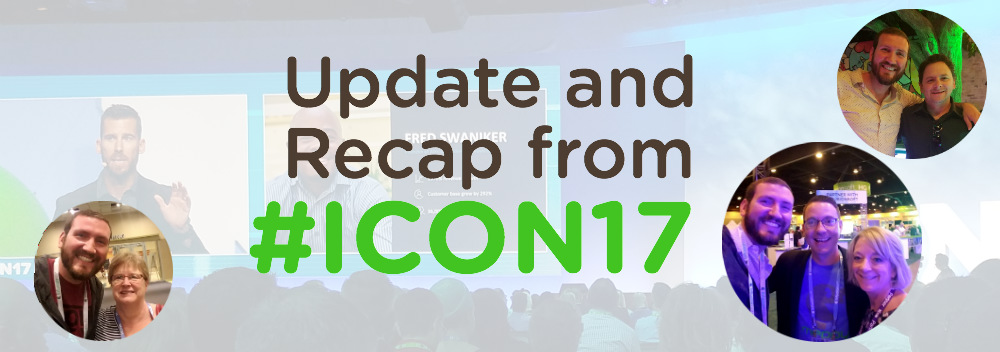
I wrote a post after ICON last year and it got long enough that I had to split it into a part one – where I talked about product updates, and part two, where I talked about the overall experience. I’m going to try and keep this post from getting too long by being as succinct as I can. As Bud Light says, Here Wego!

The Theme

The theme at InfusionCon 2017 this year, as emphasized by Clate, by keynote speakers, and by ICON finalists, was to get back to the basics. There was a noticeable focus on the fundamentals of business, Lifecycle Marketing, and relationship building. During the opening keynote session I almost felt like Clate was my opening act for my session later that day on Nurture, as he discussed the value of building rapport with your audience, and the results that simple follow-up can create. If you missed my session and want to grab the nurture slide deck you can do that here.

The Product

Infusionsoft is a software company after all, and there were a handful of product related updates that I want to make sure everyone is up speed on.

  • WordPress Plugin: This plugin was first announced at PartnerCon last fall, and was delayed a few times (due to some legal troubles, from what I hear), but was finally released last week. This is a lead capture plugin that allows you to create simple (and sexy) opt-ins for your WordPress site and ties back into Infusionsoft with a new WordPress goal in the campaign builder. Here’s a tutorial from my friend Daniel Bussius on how you can use this new plugin.
  • Infusionsoft Propel: Infusionsoft announced they’ll be adding a new product to their line-up: Infusionsoft Propel. Propel will be designed to serve the needs of ultra-small businesses, ones that may not be ready for the flagship Infusionsoft product yet. It sounds like Propel is designed to be a gateway product for Infusionsoft, and will be competing with tools like MailChimp and Constant Contact.
    My two cents: I may have been reading into things too much, but it sounds like Propel will be the first release of a larger vision Infusionsoft has for their product line.
  • BigCommerce Integration: Infusionsoft’s shopping cart is…basic. And if that has caused you grief in the past you now have a new option. Infusionsoft has partnered with Washmo Media to introduce an official BigCommerce integration. Special shout out to Monkeypod Member and my friend, Jason from Washmo Media, for his work on this integration.
  • Facebook Ads Service: Infusionsoft announced that they’ll be launching a new service to help small businesses launch Facebook ads. Basically you’ll meet with a Facebook Ads expert, discuss your goals, then they’ll create the copy and the ad, and you’ll launch. Everything I heard indicated that this service would be inexpensive (~$200) and that the turnaround time would be quick (~3 days).
    My two cents: I have no doubt that many Infusionsoft users need help with Facebook Ads, but I also know that the reviews of the similar Google Adwords service were not all that positive. I honestly hope this one is better received, but if it isn’t, then I hope Infusionsoft learns their lesson and sticks to creating world class software, and lets the partner community help with services like this in the future.
  • Vimeo Integration: Yup. Infusionsoft announced an integration that is good news if you’re using Vimeo for your video hosting. If you’ve seen the Wistia integration that has been around for years (yup, that’s a dig), it’ll be really similar to that. It will allow you to gate your content, and add turn-style lead capture forms to your videos. I can’t find any active documentation on this, but honestly I also didn’t try that hard.
  • Internationalization: Infusionsoft is a global company, and for a long time they’ve failed to fully recognize and embrace that. It seems that with the latest round of international enhancements that they’re finally giving the user base outside the US a little love. Among the most exciting enhancements, there are now translations available in French, German, Spanish, and Brazillian Portuguese for Quotes, Invoices, Shopping Cart pages, and Order forms.
  • New Landing Page Builder: Yesssss! Infusionsoft has formally announced that they will be integrating with a new landing page builder. I’ve played with the new landing page builder some, and it is definitely capable of producing landing pages that are far superior to what we have now. However, like most things Infusionsoft releases, it will likely need to be improved on over time. I’ll do a formal review of the new LP builder sometime, but for now, just recognize it for the progress it represents, and be patient if it doesn’t do everything you need from it right away. I have it on good authority that if you’ve worked with the landing page builder from Convrrt, then this will feel very familiar. I’ve also heard the release date isn’t far off.
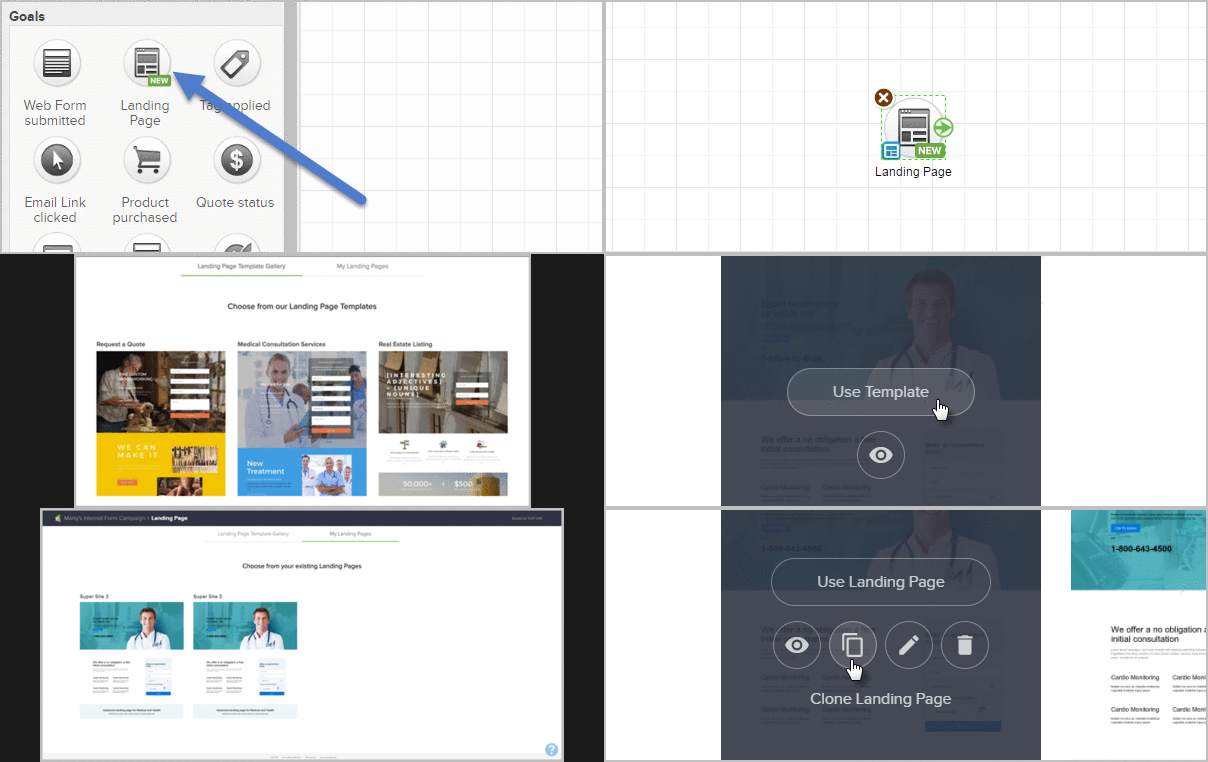
Moving GIF of Infusionsoft's Langing Page Builder

The Content

Well, if I’m being 100% honest, I didn’t go to very many sessions this year, and I’m not sure why. I usually try and attend a handful, and pick up what I can for my own business. But this year my focus was on relationship building, meeting new people, and absolutely murdering my own sessions (Check, check, and check, btw). Infusionsoft asked me to deliver two sessions this year, one on Nurture, and the other on launching a referral partner program that scales. I have a handful of things I think I could have done differently/better in my presentations, but all in all, I’m pleased. Both were better attended than I expected, and the feedback I received was very positive.

So, outside of my own sessions, I went to the opening session each day, and I went to the ICON finalist stuff to support my friend Justin, and ALU (an organization I’ve been working with for the last twelve months); and that’s about it.

The Small Business ICON finalists were, by the way, outstanding. I came into the week feeling full-on competitive, and hoping ALU would take home the trophy (or whatever), but after watching all three finalists present, I genuinely felt that I could support any of the three finalists. Justin did an impeccable job representing ALU, and it gave me goosebumps to watch him share the story I’ve watched unfold over the last year. Dierks Farms, the winner, had a great story and you could just feel how proud they were to be included. And then the guys from Kickstagram held their own too – with contradictory humble swagger that both said “we’re just trying to figure things out” and “we’re only getting started”.
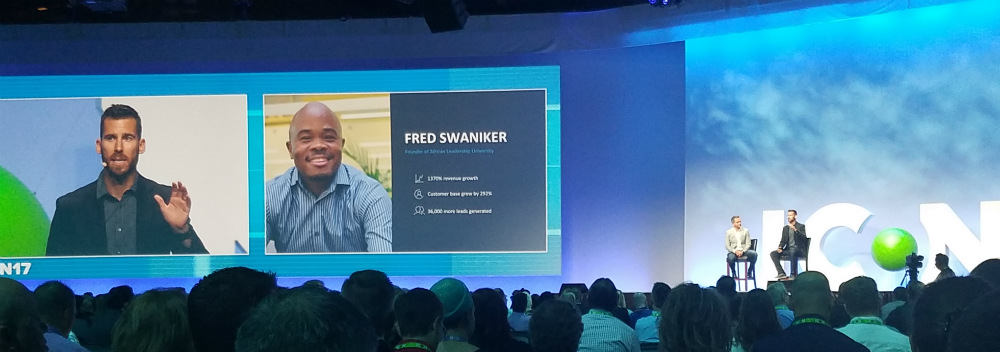
ICON Finalist

Update: The ALU project wound up being a pretty strong example of how marketing automation can be used in an end-to-end customer journey, so we produced an Infusionsoft case study showcasing exactly how we used automation on this project. Enjoy.

I can say this though: In the past I’ve felt that there were too many breakout sessions, and that there wasn’t much rhyme or reason to the way the breakouts were structured. I didn’t feel that way this year, and I didn’t get that sense from others. I felt like the content was well paced, and varied nicely. The feedback I heard from most people was that they were getting good value from the sessions they attended (with a few exceptions), and equal value from the conversations they had and the connections they made.

The People

The people are the best. The Infusionsoft ecosystem is unlike any community I’ve ever known, and Infusionsoft deserves all the credit in the world for cultivating such an impressive tribe. Everywhere you turn at ICON you see people enjoying themselves, connecting over the small business experience, or sharing their strengths to try and creatively solve problems for one another; it’s powerful, and inspiring.

When I attended ICON in 2016 I had been a partner for less than a year. This year, Monkeypod was much more of my identity and I was absolutely humbled by the number of people who approached me just to say hello, or to share how one of my blog posts answered a question they had, or how a course of mine helped with how they use or think about Infusionsoft. I really enjoyed getting to meet OG members, reconnect with former co-workers, and catch up with current colleagues.

The Event

The overall event feel was excellent. I want to give the Infusionsoft events team a big shout out on this one. The check-in process seemed to run seamlessly, the expo area was arranged so that it was easy to navigate, and once again – there were puppies you could play with/adopt. I liked that they made an effort to have beverage stations at certain times of day where you could grab a pick-me-up, or a whisky neat. I thought the ICON mobile app made it easy to pick the sessions you wanted to see, and get notifications about contests, book signings, etc. I ate lunch off site each day, but I didn’t hear any major griping about what was served on location – in the past I’ve sensed frustration with both the quality and availability of meals. Once again I learned that emcee, Scott Harris, isn’t for me – but I also learned that there are plenty of people who seem to dig his style and energy, so maybe that’s more of a personal thing.

I should also mention a few other blog posts that I’ve seen summarizing ICON17, or InfusionCon 2017, through perspectives other than my own. Check out Jorge Diaz’s take here, Mandy Brasser’s here, and Jim Hacking’s experience here.
#ICON17 Lessons and Review

#ICON17 Lessons and Review

ICON has come and gone again, and once again it didn’t disappoint. I’m crafting a post about my experience at #ICON17 a few weeks ago, but first I thought it’d be valuable to share a variety of perspectives from other ICON attendees. Thanks to all the folks who shared their sentiments below:

“This was my first ICON and I have signed up for next year already.  The thing that is sticking with me right now is to dream big.  To write down goals for the short term (still dreaming big) and then the long term (dreaming even bigger still).  I want to envision myself in that place 1 year or 5 years or even 10 years from now.  So leaving ICON I realized I need to build the foundation for my first dream big first goal of doubling my business income by the end of the year!  First step is to take a course on branding and really hone in on what I want to convey to my ideal client!  I think the dreaming big was an underlying theme of the conference itself but was really reinforced by Keynote speaker Lisa Nichols.”
– Chris Wojcik, Soar Above Solutions, 1st ICON

“Being a sponsor of ICON gives you an interesting perspective on the event. Part of you, wishes you could be in the panels and breakouts with all the other attendees learning along with them. But the other part knows it’s important to be available to attendees that have needs you can help them with. As a sponsor, you’re privileged to have a unique understanding of the Infusionsoft space; the experts, tools and services that are available to Infusionsoft customers.

So as I manned our kiosk throughout the event, I learned a lot about Infusionsoft users. And one of the biggest takeaways from the event I realized was how great it was for people to network…even if you’re not typically the networking type. Often, someone would come up to our kiosk looking for one thing, and by the time they left, they had a list of two or three other people they should connect with to help their business succeed. It’s by far the best opportunity an Infusionsoft user has to connect with the right people to grow their business.”
– Bryce Christiansen, PlusThis, 7th ICON
“It’s the third time that I’ve ventured over from Australia to attend ICON17 and it’s up there as one of my favorites! Love the opportunity to meet and connect with so many like-minded people and learn from some of the best. Loads of take aways, including the importance of doing the basics well and not over complicating things. This point was stressed by Clate Mask as well as many speakers and the ICON finalists. You can really succeed with plain and boring follow-up that works! (yes there is hope for all of us, there truly is!) Marcus Lemonis was definitely a highlight. Yes, I’m a huge fan and it probably didn’t matter what he said ???? , but I took away one of my biggest ah ha’s from any conference that I have in years as to what’s stopping me really pushing my business forward. Great to catch up with you Greg and others and looking forward to ICON18!”
– Mandy Brasser, Streamline for Success, 3rd ICON
“This year at ICON we saw a theme to focus on the BASICS. As entrepreneurs, we always look for the next shiny object forgetting about the simple follow-up methods you need to have in place for continuous growth in your business”
– Meny Hoffman, Ptex Group, 9th ICON
“I was I impressed, again, with the networking this year at ICON and how many business owners and entrepreneurs were really out to connect and support each other. There were great connections to be made, and the value I received just from that made the trip to ICON worth it.”
-Rafaella DeSantis, Rafaelladesantis.com, 4th ICON
“Although I’ve heard it many times before, it really hit me this time for some reason – It’s good to have a Good, Better, Best product offering, and to price them based on who you want to attract.  If the prices are too low, you’ll attract a different set of people than if your prices are higher.
The best part of ICON for me however, is the networking, finding stuff out like how Kelsey Bracher is a Zapier Wizard, how the team over at Capsule 5 is starting to get some serious growth, how there is a company out there that will do Facebook advertising on a commission basis, and how Justin MacDonald is helping world leaders and might need some help in areas that I might be able to contribute.  That’s the stuff I like most about ICON.”
– Kevin Mogavero, KRM Consulting, 6th ICON
“This was my first ICON as an entrepreneur and I was blown away by how great the sessions were and networking was. Although there were many tangible takeaways throughout the conference, inspiration was the greatest thing that I walked away with. The sessions were both engaging an inspiring, and a great reminder that by just being there, we were taking charge of our respective businesses. This was also evident in the connections I made. Definitely going back next year.”
-Ronnie Kassiff, ronniekassiff.com, 1st ICON
“At first, I wasn’t sure if I liked Marcus’s talk. It made me feel uneasy learning about others’ deep secrets, but as I reflected on ICON, it’s certainly the one that stood out the most because it was so unique for a business conference. What I got out of it was that it’s critical to be real with others that I work with. I’m naturally a more reserved and ‘closed’ person, but I realized I shouldn’t be afraid to be more open, even a little vulnerable, with partners, vendors, employees, etc.
In the end, it was really just a powerful reminder that business is about people above all else.
To drive home what Marcus said, I love how Verne Harnish finished off the conference by saying something like: It’s always a question of who, not what”
– Brett Farr, Blick Digital, 7th ICON
“The most beneficial take away I get from every ICON is new connections I’m able to make with like-minded people that are doing amazing things in their own realm, and reconnecting with old colleagues and customers.
The speaker that I got the most from this year was Lisa Nichols. Her “Yes, YES!” message really inspired me. Essentially she shared that when you commit to something you say yes, and then you say it a little stronger, but a little louder and with more conviction because it needs to cost you a little bit. The first yes is from yourself, and the second yes symbolically represents reaching beyond yourself and stretching yourself to grow and do something bigger. This was particularly relevant because this ICON I also presented from stage for the first time. It was exciting to be able to share some of the knowledge I’ve built up over the years with those who attended my session, and it definitely required me to stretch beyond my comfort zone and grow.”
– Justin Roberts, Bandera Marketing, 6th ICON

“I’ve noticed a trend among several marketing conferences this year. This trend is based on the idea of building Human to Human Relationships with subscribers instead of focusing on building a bigger subscriber list to move more units & close more sales. And I was delighted to see that ICON was no exception.

Marcus Lemonis gave an amazing keynote that reiterated this trend, and his quote: “Vulnerability doesn’t have to be a liability – it can be an asset.” really hit home for me. Instead of pushing for more sales & more business growth, small business owners who embrace this idea (and importance!) of building real relationships with subscribers will find that they’re not only cultivating a more memorable brand experience, but they’re also using the power of human connection to create better, more meaningful relationships with their subscribers via marketing automation.

At the end of the day, it’s not about making another sale – it’s about creating a customer, and I’m excited to see this concept become an integral part of email marketing through nurture funnels and post-purchase customer engagement campaigns”

– Jamie DuBose, Zenplicity, 3rd ICON
“This was my 3rd ICON and my nugget this year was simple. Relationships lead to opportunity. The most impactful part of the conference for me was engaging other business owners in the evening over drinks and food. I had some great conversations that opened the doors to partnerships and friendships that could be great for our company.
And then, obviously the sessions by that brilliant dude from Monkeypod Marketing.”
– Josh Hindman, Capsule Five, 3rd ICON
“An important lesson for me was having all your follow-up mechanisms/strategies fully developed and in place BEFORE day 1 of the conference. This ensures you can focus on being with others because you know there is a system to handle that new business card, or email written on a napkin or whatever.”
– Paul Sokol, PLS Consulting, 7th ICON

“Great to see ICON back on track after an off year. This was my 4th ICON and it seems like they are getting their act together. Breakouts were not jammed all together, the sessions themselves were informative and useful (hat-tip to our man Greg), there was enough time to meet new people and vendors, I didn’t feel like I was getting of the one main sponsor rammed down my throat like last year, and the keynote speakers were interesting and engaging. Before ICON we had already discussed that if ICON17 was anything like ICON16 it would probably be our last but we happily bought our tickets of ICON18 already.

One point for improvement would be to bring back recording all the sessions. It kind of sucks to come all that way (almost 9,000 miles and 24hrs of travel time) and have to make a difficult choice between one breakout and another. I sat in on a great session but about 10mins in I realized I was already doing all of it and we missing another session that maybe could have helped me more. It doesn’t have to be anything fancy, just digital camera in the front of the room and sync the mic. Don’t try to upsell us on the content, give it to us because we paid for it but were unable to use it. That’s going to help small business succeed even if it doesn’t move your bottom line.
It was also great to meet new people, old friends, and also put faces to other Monkeypod Members. Really enjoyed talking ‘metal’ with Shoan at his booth, mostly Mastodon and DiamondHead.”
– Liam Crow, FirstMed, 4th ICON
IS Wishlist

IS Wishlist

It’s no secret that I love Infusionsoft.

And while I do believe that Infusionsoft is the most powerful small business marketing automation tool on the planet, I also, like most of us, always have a list of things that I wish it would do differently, or better.

I love Infusionsoft, of course, but I wanted to share a list of my current frustrations for a few reasons.

  1. My hope is that it will help raise awareness of some issues, and help you avoid them before they become problems for you.
  2. If you’re frustrated with Infusionsoft, I want you to know that you’re not alone. Yes, I love Infusionsoft. But by my count, I’ve raised 70 support tickets with Infusionsoft since I left in May of 2015. It’s not perfect.
  3. My goal is to model a transparent and productive way to highlight concerns, issues, and feature requests with the hope that it may help Infusionsoft address them.
Caveat: I don’t work for Infusionsoft anymore, and they may not endorse this as productive, but it should be said that I have already, directly or indirectly, communicated every item on this list to employees at IS.

Dear Infusionsoft, thanks for all you do. But also, please…

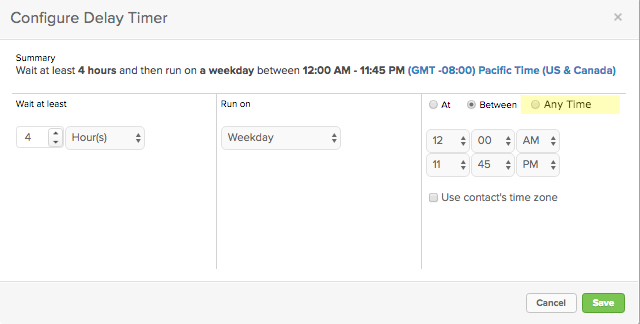
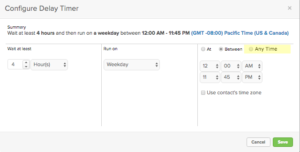
1. Give us an “Any Time” option for timers.

SOLVED: Infusionsoft addressed this in the August 2017 update. Thank you!

This, to me, feels like a really easy win for Infusionsoft. Right now if I want to set a delay of a few hours or minutes, I need to also choose a time or time range. If I don’t care what time it happens, and I just want to let it run after X hours, then I have to configure “Between 12:00 am and 11:45 pm”, which is just plain clumsy.
2. Give us conditional snippets in emails.

SOLVED: Released in Q1 2020. (read more)

This one is a little more of an ask, but I’d really love the ability to add a snippet to the email builder, and then choose conditions under which that content appears. This would give us as marketers the ability to send one message, but include different call-to-actions for different segments of our audience.

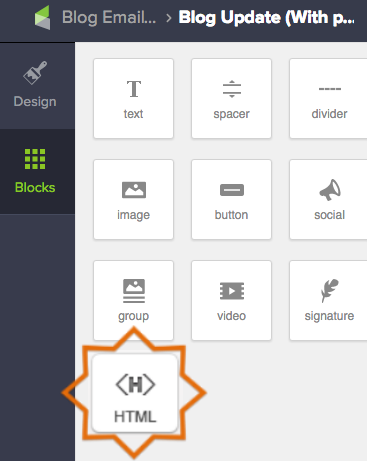
3. Add an HTML snippet to the new builder.

SOLVED: Infusionsoft addressed this in the November 2017 update. Thank you!

This one is straightforward. Please bring back the ability to add an HTML block to our emails. This was available with the legacy builder, and the functionality hasn’t yet been added to the new email builder. If it’s easier, I’d also accept more widgets that simulate the some of the common reasons for needing an HTML snippet (e.g. Adding a tracking pixel, embedding a table, coding untracked links, etc).
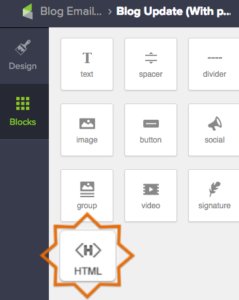
HTML Snippet, Please

4. Stop clearing out my search results when I leave that page. Preserve them (like it used to) for when I return.

SOLVED: Infusionsoft addressed this in an October 2018 update. Thank you!

Again, I’m not asking for anything new on this one, I just want the old functionality back. Up until a few months ago my search results would stick around until I clicked “Start Over”. Sometimes that’s not a big deal, but if you’re having to rerun the same search multiple times because the system keeps dumping your criteria, then it can cost you time, and increases the opportunity for human error.

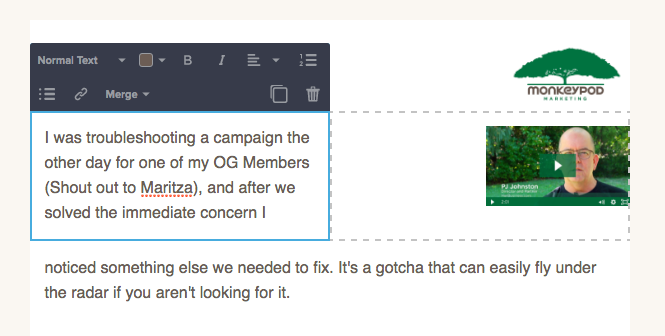
5. Let us adjust the width of our columns in emails.
The ability to easily have two and three columns is one of the best features about the new email builder. But the problem is that it always splits your columns into 1:1 or 1:1:1 ratios. It’s be nice to be able to manually adjust the width for each snippet to form our own custom layouts.
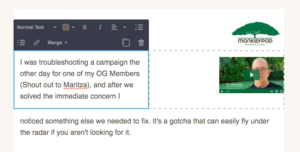
Column Adjustments

6. Let me use campaign merge fields on web forms and landing pages.

SOLVED: Infusionsoft addressed this in an update since this article was originally posted. Thank you!

I’ll be honest, I have no idea what it would take to make this real, but it feels like it should be possible. To be clear – I’m not asking to be able to use contact merge fields, but rather I want to be able to use campaign merge fields. Here’s why: Let’s say I’m hosting an event, and I have a series of emails promoting the event, and I’m driving my prospects to a landing page so they can RSVP. Well, I’m likely going to use Campaign Merge Fields to save myself time in building the campaign. That way if I need to update the date, I can just change it in one location and it updates the whole campaign. It’d be great if that updated my landing page in addition to the emails.

7. When I use a merge field in a subject line, don’t push it to the end of the subject line.
This is probably the most minor annoyance on this list, but for some reason any merge fields you are adding to your subject line get pushed to the end of the subject line, then you need to copy and paste them to where they go, or just learn to add them as you write.

8. Let me add tags to a category when I create them from within the email builder.

SOLVED: Infusionsoft addressed this in an update since this article was originally posted. Thank you!

When I create a tag in the campaign builder, on a goal or in a sequence, it prompts me to categorize that tag as I go. But, if I create a tag from within the email builder (on a link or a button), it does not prompt me to categorize that tag. Tag categories are important, and usually more important than new users realize, so emphasizing best practices as users are creating tags can save a lot of headache down the road.

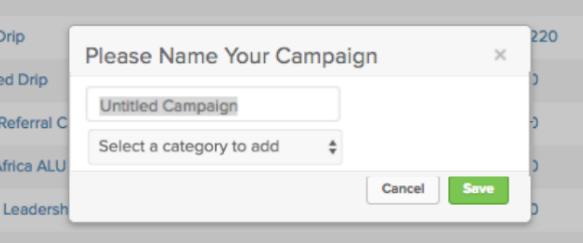
9. Allow, or prompt even, us to categorize our campaigns as we name them. (The way you can with tags.)

SOLVED: Infusionsoft addressed this in an update since this article was originally posted. Thank you!

The campaign builder was introduced roughly 5 years ago, and since then, I’ve been telling people “Don’t worry. They’ll build in folders, or categories, at some point. It’s logical. Just be patient.” And boom, I’m thrilled we’ve finally got them. But it shouldn’t be so laborious to categorize my campaigns. If this is going to be a best practice, it makes sense to me that we’d be prompted to categorize our campaigns as we create them. Something like this:
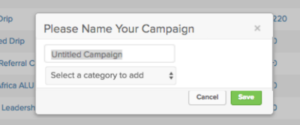
Add campaigns WITH categories

10. When I go from a list back to the campaign, don’t default to the edit tab, return me back to the reporting tab.

SOLVED: Infusionsoft addressed this in an update since this article was originally posted. Thank you!

This one drives me nuts. You’re working along, checking up on your campaigns and running reports, let’s say you’re several layers deep looking for the group of contacts who have received an email in the last 30 days, and then you click into the report, and when you click “back to campaign” you’re defaulted all back out to the edit tab of the campaign. Just take me back to the reporting tab, like it used to do, pleeeeeease.

11. Give me an option to dismiss this, and not be prompted again.

SOLVED: Infusionsoft addressed this in a November 2018 update. Thank you!

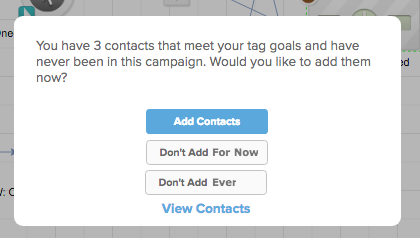
I love that tag goals can retroactively find contacts who would have been added to this campaign, and that you can choose whether or not you want to add them. So, well done, and thanks for that. But, it gets a little annoying for the campaign builder to ask me every single time I publish. Seems like maybe it’d work to give me a “dismiss” option so that it doesn’t ask again? Like so:
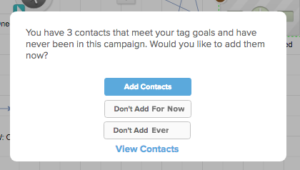
Add Contacts Prompt

———-

Okay, as I said previously, this isn’t a comprehensive list. It’s just a few things off the top of my head that feel like they’re worth addressing. I love Infusionsoft, and I have a number of friends who work directly on making product improvements; so I hope this blog post is received in the constructive manner in which it was intended. Don’t worry, once they’ve tackled this list I’ll be doing my best to prep another one!

For anyone wondering, I used Loom for the brief video recordings in this post. Loom is a Chrome plugin, it’s free, and it’s great. I recommend downloading some sort of free screen capture tool, it makes it easier to communicate with technical support if you’re able to document bugs or issues as you see them.

If any of these jump out at you as being important, I’d love to hear about it in the comments below! Or, if you want to share your own list, I’d love to hear that too! Thanks for reading.

Importing Contacts in Keap without Creating Duplicates

Importing Contacts in Keap without Creating Duplicates

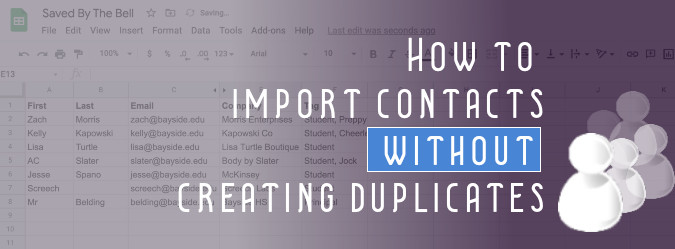
When you import contacts into Keap (formerly known as Infusionsoft), it automatically creates unique contact records for every person on the list you added. 9 times out of 10, this is exactly what you’d want, but occasionally, you need to import contacts who are already in Keap.

How do I perform an Keap import without creating duplicates?

One option is to just import them as normal, then run a duplicate check, then review the duplicates, and merge. You can review and merge contacts individually, or, Keap actually has two built in options for merging contacts en masse.

Here are the steps for identifying and merging duplicates.

This isn’t a whole lot of work, but it does require a few extra steps; oh, and it breaks down if you have some contacts that you don’t want to merge.

So, that’s the problem right? Well, the good news is that there is an easier way, and it just involves a little excel magic known as the VLOOKUP.

If you’re good with excel, then this may be really basic for you, but I’m lousy with excel, so this is basically witchcraft for me. Rather than explain all the steps, I thought I’d record a quick video to show you each and every step:

This solution has saved my bacon more than a few times, and my hope is that it makes your life easier.

Basically, if you ever need to import contacts that you believe are already in Keap, this this tactic will allow you to do that without creating duplicates, and instead, will add the new information directly to the existing contact records, thereby keeping everything neat and tidy.

And if you want a take-away resource, download the step-by-step instructions below:

[rad_rapidology_inline optin_id=”optin_12″]

If you are looking to level up your Keap usage – check out the training courses inside Keap Academy.

Or, for free tips and training – subscribe to the Monkeypod YouTube channel.

Secret Keap Merge Fields

Secret Keap Merge Fields

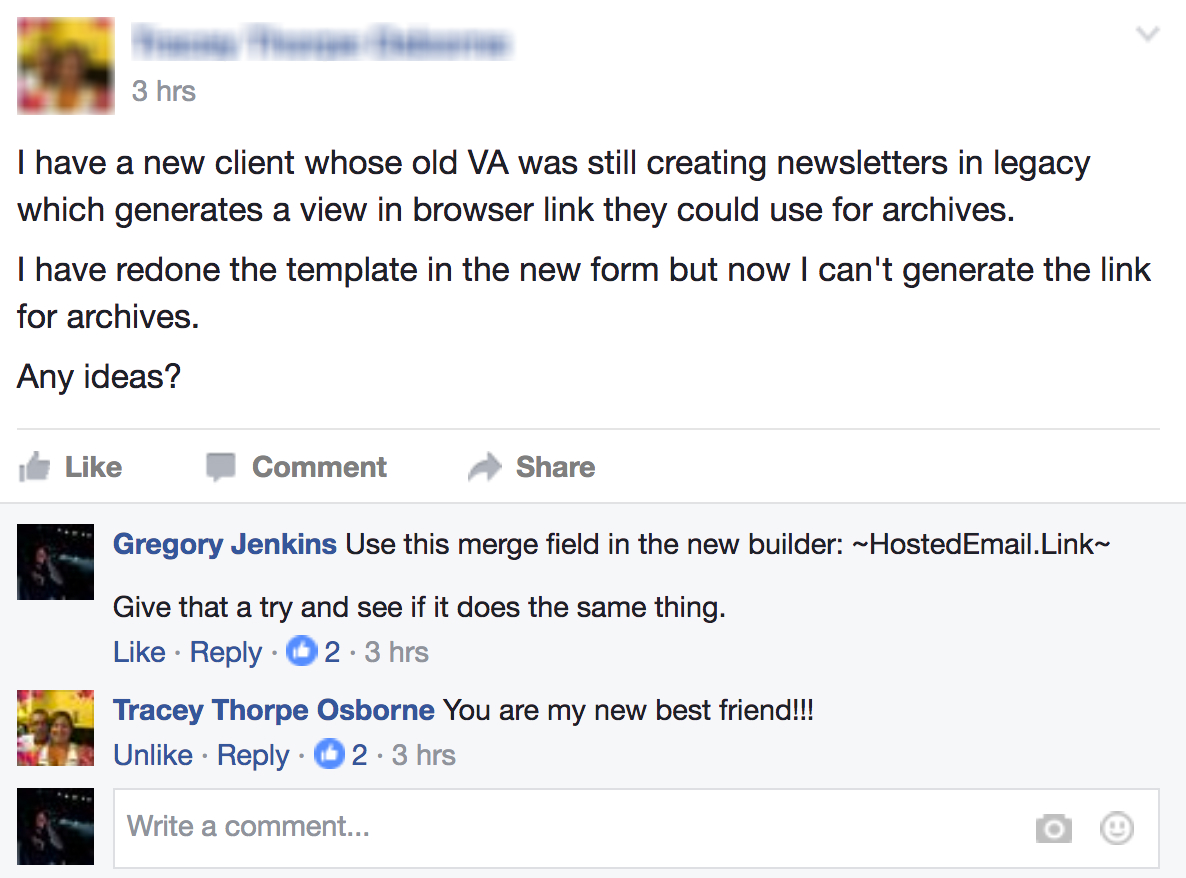
So, the other day I answered a question in one of the Keap Facebook Groups. I have a rule: If I answer a question three times, I try to create a resource for the fourth time. So, that’s where the idea for this blog post came from (Thanks for the question Tracey!).

Basically Merge Fields are the key to personalizing your marketing messaging. If you’ve used Keap for any amount of time you’ve probably learned that you can use ~Contact.FirstName~ when you want the system to add their first name to the message, right?

Well, there are a few other less known merge fields that I want to shine a light with the hopes that it will make your life easier.

Hosted Email Link

Anyway, the question from last week was essentially “How can I add a link to the hosted version of an email if I’m using the new mobile responsive email builder?”

Well, the answer is fairly simple: Any time you want to add a link to the hosted version of an email, you can do it by using the following merge field: ~HostedEmail.Link~

Now, I recognize that there are plenty of businesses who will never need that particular merge field because they don’t use the hosted version of their emails for anything, but maybe one of these next ones will save the day sometime.

Update: As of 10/11/24 Keap has officially “sunset” the Hosted Email merge field. Here’s an article with the details.

Date Merge Fields

Did you know that you can merge details about the current date into emails? Here are the fields:

~Date.Current~                  – Month DD, YYYY
~Date.DayOfWeek~           – What day of the week it is (i.e. Monday)
~Date.DayOfMonth~          – What day of the month it is (i.e. 20)
~Date.Month~                    – The name of the month we are in (i.e. February)
~Date.MonthOfYear~         – What number month we are in (i.e. 2)
~Date.Year~                       – The current year (i.e. 2017)
 
You guys, the more personal an email is, the more it will resonate with your audience. Using date merge fields means you can say things like “Hope June was a good month for your business!”, “Good luck closing out 2017!” and “Enjoy the rest of your Monday!”, and you can rest easy knowing that whenever that info goes out, it will be accurate.

Disclaimer: The date merge fields use Eastern US Time – and I haven’t found a way to change that. So, for folks on the other side of the international date line this means that sometimes the date merged in would be yesterday; which is…annoying. Just proceed with caution, test thoroughly, and check out these date modifiers which might save the day.

Contact Record Link

Picture this: You’ve built a fancy campaign and it’s movin’ and groovin’, saving you time and growing your biz. All good. Well, now let’s say that there’s a point in the campaign where you wanna get real fancy, and automatically send an email to yourself, or another staff member. This can be useful for prompting yourself to check on something, triggering reminders to other people, or any other number of circumstances. Well, to take those useful reminders to a whole new level, there’s a merge field that you can include to automatically open the contact record that needs attention. Here’s the merge field: ~Contact.EditPage~

Bonus Secret: HTML User Signatures

Some Keap users need more flexibility than the built in user signature offer, so they opt for the HTML route instead. The merge field for adding the HTML version of the owner’s signature is: ~Owner.HTMLSignature~

However, there are situations where you may want to be able to merge the signature of a user other than the contact’s owner. You can do that by using ~User_ID.HTMLSignature~ and replace the “ID” with the user ID number.

That’s it for today’s post, if you have a favorite “secret” feature of Infusionsoft, I’d love to hear about it!