Small Automations, Big Impact

Small Automations, Big Impact

I think when people hear the word automation, it can sound daunting – like we’re about to hand our entire business over to a bunch of robots.

But in reality, getting started with automation doesn’t mean reinventing your business; it often starts with a few small, intentional tweaks.

In the video below, we’ll talk about finding those “micro moments” – the tiny tasks, handoffs, or recurring steps that you repeat every week (or every day) without thinking about it. These are often the best areas to start with automation.

When you can standardize or streamline those pieces, you start freeing up your time for the parts of your business that actually need you. And just to be clear, automation isn’t about removing humans entirely – it’s about using humans more strategically. Think of it like assigning technology the repetitive stuff so your team (or just you) can focus on high-impact, high-value work.

If you’ve ever felt like there just aren’t enough hours in the day for your to-do list, or you’re painfully aware that the things your working on don’t feel like the best use of your time – this video is for you.

If the ideas in this video resonate and you want help finding specific areas where automation can simplify your operations (and your life), check out the Fundamentals of Business Automation course. It’s designed to help you spot opportunities, build smarter systems, and spend more time on the things that matter most.

Wise Words: Automation

We interviewed eight business owners who use automation in their own businesses, and with their clients. This course is a compilation of the lessons we wish we’d learned earlier.


A Full Paid Traffic Strategy Session with Paul Sokol

A Full Paid Traffic Strategy Session with Paul Sokol

When we produced The Lead Magnet docuseries, one of the most valuable parts of the process was a strategy call between Cameron and longtime friend (and paid traffic wizard) Paul Sokol.

In that conversation, Paul guided Cameron through the same framework he uses with his private clients to map out paid ads plan following the three-part OAC framework.

The conversation was basically too good – we couldn’t fit it all into the edited docuseries. What made it into episode 4 was just a fraction of the full discussion.

And it felt like a shame to leave the rest on the proverbial cutting room floor. So, we’re sharing it here. This kind of ads coaching would usually happen in a private one-on-one session, but in this extended cut you get to listen in.

At the heart of this conversation is the OAC framework:

Objective – What outcome are we trying to achieve?
Audience – Who is this for, and where can we find them?
Creative – What assets (images, videos, etc) and messaging will resonate most?

It’s a simple structure, but it creates clarity and alignment that helps across any paid traffic plan. We were running ads for a new lead magnet, but this approach could easily translate for promoting an event, a tripwire, or a flagship offer.

We value (and have benefited from) Paul’s expertise, and if you’re looking for guidance or support with paid strategy, he’s a resource we trust. In the meantime, we hope this video gives you new ideas and a clear sense of how to think about ads for your own business.

The Lead Magnet

The term “Lead Magnet” is deceptively simple – most people know the idea, but what does it actually take to design and launch a lead magnet actually brings in qualified prospects? This documentary follows the start-to-finish process.

Finding Automation Opportunities

Finding Automation Opportunities

Have you heard of geocaching? It’s a real-world treasure hunt. People hide small caches in parks, along hiking trails, in cities, basically everywhere.

I only recently learned about it. I downloaded the app and…boom, turns out there are caches all around me.

There’s literally one at the park next to my house, about 107 feet from where I’m sitting right now.

Here’s the kicker: those caches were there the whole time.

I just didn’t see them, and even if I’d stumbled on one, I probably wouldn’t have recognized it.

Automation is like that. Opportunities to streamline, standardize, and save time are scattered throughout your business – support inbox, onboarding, billing, follow-ups, internal handoffs.

But if you don’t know what you’re looking for, you can trip over an opportunity and never realize it.

In this short video, we dig into how to build your “automation lens” so those hidden wins start popping into view.

Here are some things you can do today to start developing that automation lens:

  • Track repetition: Any task you (or your team) do 3+ times the same way is a candidate.
  • Spot delays: Look for steps that sit waiting on someone, things like approvals, data entry, “just checking in” emails.
  • Template first: If you can templatize it, you can often automate it.
  • Log friction: Keep a running list of annoyances and bottlenecks; review it regularly with an automation mindset.
  • Ask for help: Inviting outside perspectives will help you spot things you aren’t seeing.

Automation opportunities are everywhere; once you know how to spot them. And that matters because automation isn’t just a tech flex; it’s leverage. It reduces tedious tasks, standardizes your customer experience, and frees up time for the work that’s the best use of your skills.

Start training your automation lens, and those small wins add up to a smoother business and more room to do your best work.

Want to build your automation lens?

We’ve built a course specifically designed to help you identify opportunities in the customer journey where we’ve seen automation solve problems and create momentum.

Lighthouse Metrics: Your Business Scorecard

Lighthouse Metrics: Your Business Scorecard

You know that feeling when someone asks how business is going—and your answer starts with “Uhh… I think pretty good?”

We’ve all been there. When your business is running across half a dozen different platforms, it’s easy to lose track of the actual numbers that tell the story.

Most of us want to be data-driven, but we end up being data-distracted; drowning in spreadsheets, copying stats from one dashboard to another, and still unsure what to focus on.

That’s where the idea of lighthouse metrics comes in.

What are Lighthouse Metrics?

Think of lighthouse metrics as the numbers that guide your business. They’re the high-level signals that tell you whether you’re heading in the right direction.

Unlike vanity metrics (likes, impressions, etc.), these are the ones tied to actual performance across your customer journey. And they’re different for every business.

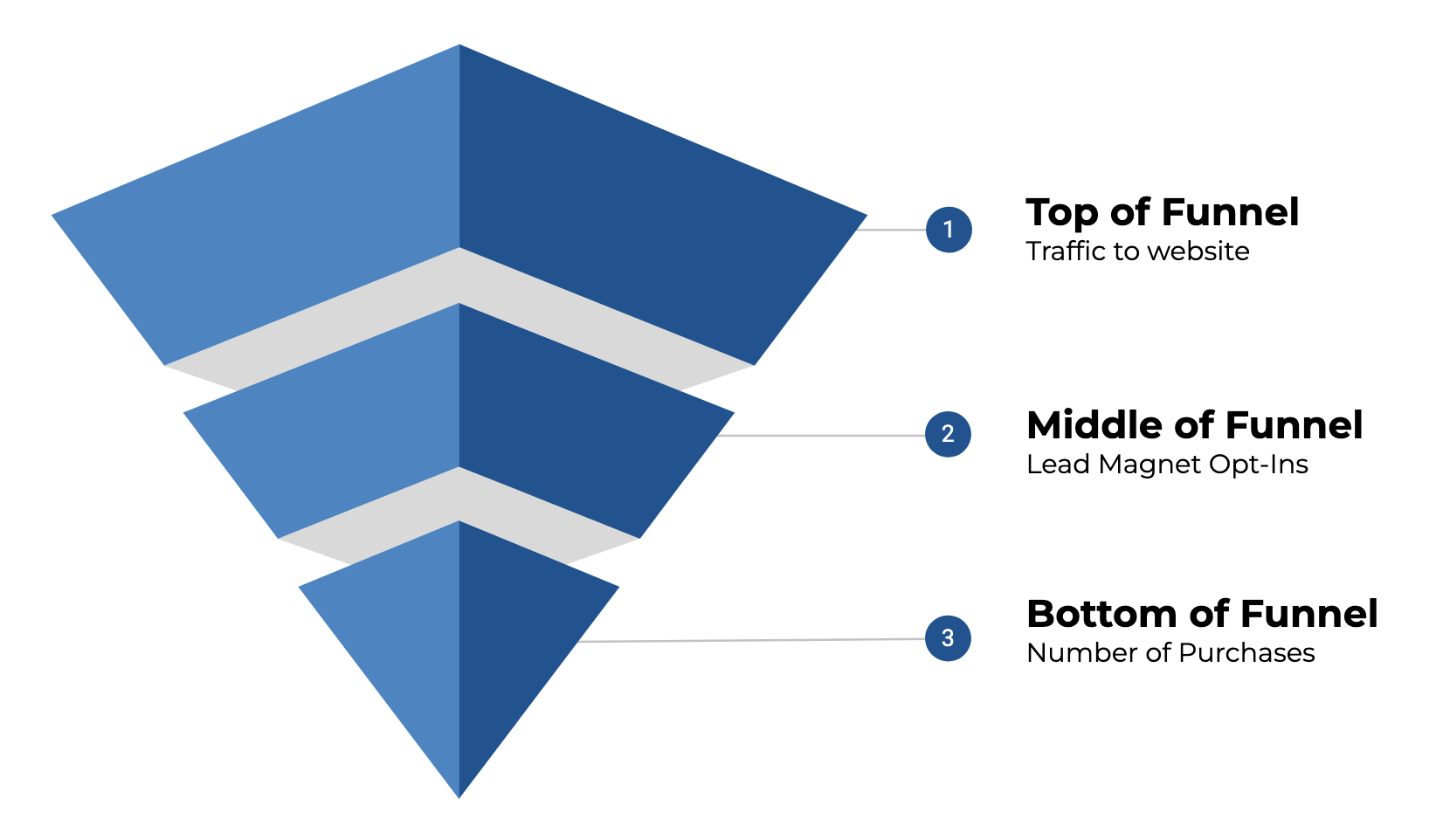
Funnel Diagram

If you run a service-based or knowledge-based business, your metrics might look like:

  • From Google Ads: Ad spend or conversions
  • From Google Analytics: Site traffic
  • From WordPress: Lead magnet form submissions
  • From Keap (or HighLevel, etc): Number of new contacts, engaged contacts (by tag)
  • From Calendly: Booked consultations
  • From WooCommerce: Purchases or revenue

You don’t need 100 metrics. But you do need the right ones.

The Problem: Scattered Data, Siloed Systems

Right now, a lot of us are stuck cobbling this info together manually. You log into Keap, then Calendly, then Google Analytics – grabbing numbers and dumping them into a spreadsheet that may or may not get updated reliably.

That approach works… until it doesn’t.

It’s error-prone. It’s time-consuming. And worst of all, it often leads to reactive decisions based on incomplete or out-of-date info.

Gentle Reminder: If this has been your method, we get it – no shame. It’s how most of us start. But it may be time to level up.

Building a Unified Business Scorecard

So, what do you do with all those siloed metrics?

It helps to think in terms of a scorecard; a single, centralized view of your key business metrics, collected across the platforms that matter to you.

This doesn’t need to be fancy. It doesn’t even need to be automated (at least not at first). What matters most is having a clear view of what’s working (and what’s not) across your customer journey.

The data points you track will be specific to your business, but in general they should represent the key milestones a contact experiences as they make progress toward becoming a customer. Something like this:

Metrics Timeline

Step 1: Identify Metrics That Reflect Progress

Pick a few lighthouse metrics across your funnel. Think:

  • Top-of-funnel: Website traffic, ad clicks, lead magnet downloads
  • Middle-of-funnel: New leads added to your CRM, booked consults
  • Bottom-of-funnel: Sales, subscriptions, or revenue

Keep it simple at first—three to five metrics is plenty.

💡 Tip: Choose numbers you can realistically check at least weekly.

Step 2: Map Where the Data Lives

List the platforms where each metric comes from. For example:

  • Website traffic → Google Analytics
  • Lead magnet submissions → WordPress (Gravity Forms)
  • Contact activity → Keap, GHL
  • Calls booked → Calendly
  • Sales → WooCommerce or Stripe

This is where you may start to notice how spread out your numbers really are.

Step 3: Create a Central Hub

You don’t necessarily need a data warehouse. A fairly simple Google Sheet could work just fine.

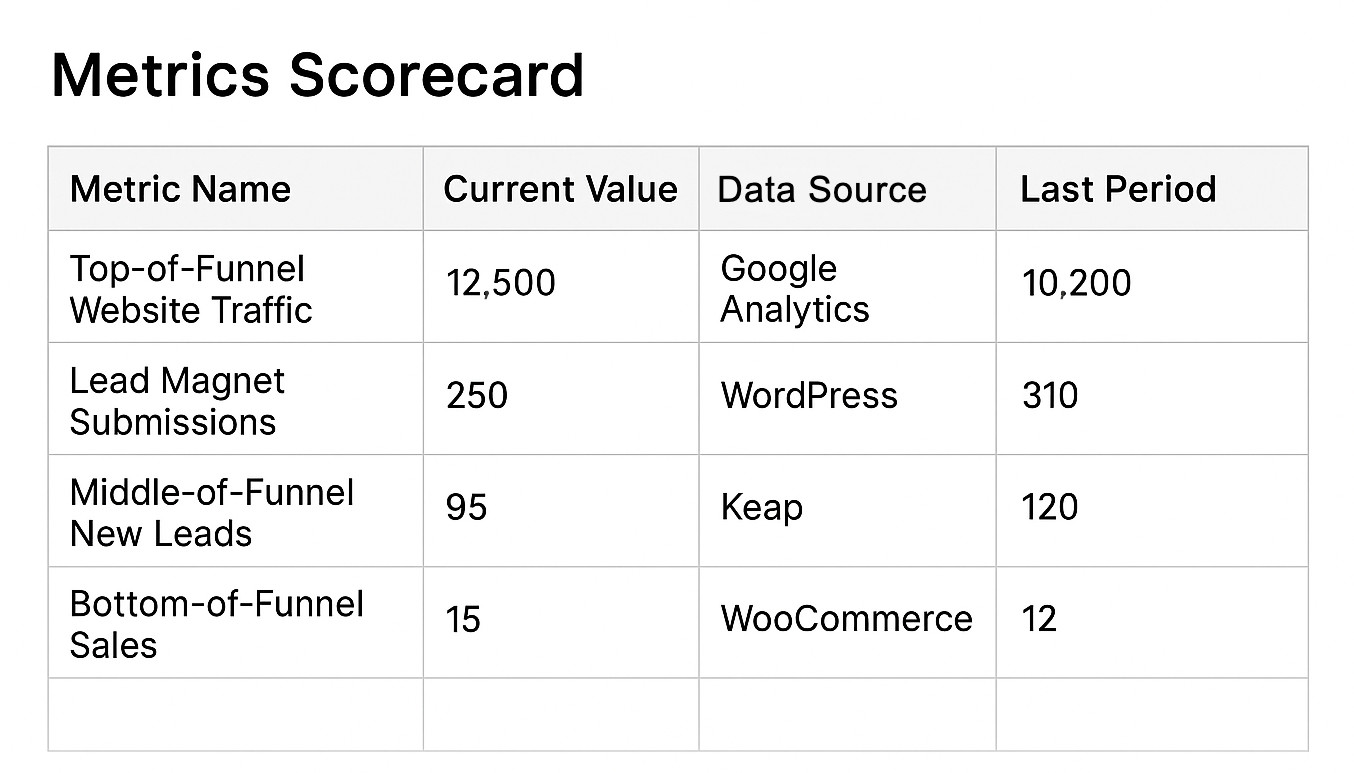
Set up a simple table with the metric name, the value for this week (or month), and a place to compare to past performance. Add notes if needed, like “running a promo this week” or “Facebook ads paused.”

Scorecard Example

Yes, it can be that simple – though, it may be worth adding a column that also shows you the delta (the change up or down from one period to the next).

Making It a Habit (not a headache)

Once your scorecard exists, the real value comes from using it (novel, right?). Paying attention to these will help you identify which numbers are improving, which are holding steady, and which may be getting worse, and in need of some focus.

But if reviewing your numbers feels tedious or unclear, you’re not going to stick with it.

Here’s how to keep it going:

  • Pick a cadence (Weekly is great; Monthly can work too)
  • Add a calendar reminder to review and reflect
  • Use color coding or arrows to highlight trends at a glance
  • Make it collaborative, share with a team member or accountability partner

The goal isn’t perfection. It’s awareness.

When should I Automate? (And Why It Matters)

If you’ve ever built a Google Sheet that relied on copy/pasting numbers from five tabs, you’ve already discovered the limits of doing this manually.

There are a handful, but namely we’re talking about introducing errors, wasting time, inconsistent updates, and adding friction to your process of extracting insights.

That’s where automation comes in, not just to save time, but also to unlock smarter decisions.

On the flip, if your scorecard updates automatically:

  • You can check your performance anytime, not just once a month
  • Year-over-year trends are easy to spot
  • Alerts can notify you when something spikes or drops
  • You’re free to track more (because there’s no added work)

For anyone ready to automate: There are tools out there that can connect Keap, Google Analytics, Calendly, and other apps to a central dashboard. One example we’ve been exploring is BlinkMetrics, which helps pull everything together for Keap users (and beyond). More on that in the upcoming webinar on August 20th.

At the end of the day, this is about trusting your numbers and trusting yourself to make decisions based on what’s actually happening.

Whether you track your metrics with a clipboard or an AI-powered dashboard, what matters most is that you’re keeping an eye on the parts of your business that matter.

If you’re not doing that yet, that’s okay. This post is your invitation to get started.

Looking for Next Steps?

If this post has you thinking about the way you track performance in your business, and you’re looking to create a reliable, less stressful way – we’ve got you, you can join us on August 20 for a live webinar where we’ll be diving deeper into:

  • How to identify lighthouse metrics
  • Real-world scorecard examples
  • Tools and systems for automating your reporting

And if you’re already curious about whether tools like BlinkMetrics might make sense for your setup, you can explore that over here.

Have your own questions?

If you would benefit from a place to ask automation questions when you get stuck, and get ideas and inspiration from other businesses, you can join us in the Monkeypod Membership.

Riverside: Recording, Editing, Livestreaming, etc

Riverside: Recording, Editing, Livestreaming, etc

If you know anything about Monkeypod then you probably know we do a fair amount of video content.

Yes, videos for our YouTube channel – but also for our free mini courses, paid courses, webinars, livestreams, and any other number of use cases.

And while I’m often the face on camera, it’s actually my business partner Cam who has taken the time to get our tech set-up dialed in.

So when the following question came up in our private community the other day, I tagged Cameron in to share what he’d learned from his research into video production.

Cameron the Director

Konstantin asked if we could recommend a software that offered the ability to a) record and edit video, b) livestream to various social platforms, and c) included a teleprompter type feature.

There may be a few options that handle all these requirements, but the one that we zeroed in on is called Riverside. Let’s take a look:

At the end of the day, we use Riverside because it works really well for what we need, high-quality video and audio, flexible recording options, and built-in tools that save us time. It’s not the only platform out there, but it’s the one that checks the most boxes for our workflow.

If you’re already using Riverside, we’d love to hear how it’s working for you – and if you want to check it out you can do that here

And if you’ve got another tool you swear by for webinars or content creation, let us know (in the comments below). We’re always curious to learn how other folks are solving the same challenges.

Have your own questions?

If you would benefit from a place to ask automation questions when you get stuck, and get ideas and inspiration from other businesses, you can join us in the Monkeypod Membership.

Professional Digital Tracking

Professional Digital Tracking

I’m pretty excited about today’s post because it covers the heavy-duty topic of digital tracking, which is akin to black magick if you don’t know how it works.

As a warning, there’s a lot in this post, and it builds as we go on – so depending on your experience some of it may feel like review. And to help bring this to life, we’ll also include a variety of examples. Here are some quick links if you want to jump around:

Let’s start fairly simple.

What Is Digital Tracking?

A business’ website exists to serve the business. A website is a powerful Marketing tool. It can be a powerful Sales tool. And, depending on the kind of Offer(s) you provide, your website can also drive your Fulfillment process.

If your business has a website you would be absolutely foolish to NOT have insight into what people are doing when they visit.

What pages they go to, from where, for how long, and what kinds of behaviors they take (opt-in, purchases, etc.) is objective data. That data is critical to helping you understand if your various efforts are working.

Digital tracking is how you collect this kind of website visitor data.

The de facto standard for digital tracking is Google Analytics. I use it, all my clients use it, Monkeypod uses it, and I would recommend you do too. The tool is free, built to handle more traffic than you will (likely) ever be able to amass, and lightweight so that your page load speeds are not slowed down by the data collection.

All you have to do is install a small tracking script into your website’s code.

How does Digital Tracking work?

he easiest way to think about it is to go back to kindergarten.

Remember when the teacher would pin a note to your shirt for your parents when you got home, because you were too little of a tyke to reliably share stuff? Digital tracking is like pinning a note to a link anytime you point it back to your website. You can pin up to five notes actually (see the next section).

Whether your link is in an email, from social media, in a direct mail piece, behind a QR code, behind a shortened link on a billboard…you can ALWAYS track from where your website visitors came. And IMHO you always should.

The magic is in the URLs themselves.

If you’ve ever paid attention to a link and noticed stuff like “utm_source=BP-05-2025” that’s like a little note being pinned to a link so the website operator can understand where that traffic came from.

Later, the website operator can go into Google Analytics and look for traffic that came from any sources with “BP-05-2025” and see what those specific visitors did.

How do I implement Digital Tracking?

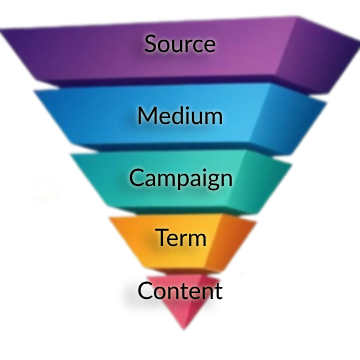
Google Analytics allows you to “pin” up to five different utm parameters to any link so you can analyze the link’s performance:

  1. Source – The highest level of tracking distinction. I recommend using the publishing source for this value (e.g. Facebook, Hulu, New York Times).
  2. Medium – This is the next highest level of distinction and should be platform agnostic. For example, every Source above could have “ad” as the medium. You will be wise to note that when digging into Google Analytics data, you can view things by the Source/Medium pair of utm parameters. No other parameters have this kind of paired view.
  3. Campaign – I recommend thinking about this as the main asset itself. For example, if I had a free report with various calls-to-action on different pages, I would set the Campaign as the name of the free report.
  4. Term – This should reference the specific piece of the main asset where the link is actually found. Keeping with the free report example, I would set the Term as “pageX” where X is the specific page the link is found.
  5. Content – This should be unique for every instance of the link. Even on a single page of a free report, there might be multiple instances of the same link. For example, the header and footer of each page might have the same call-to-action. In that case, the Content could be set to “header” and “footer”, respectively.

As you can imagine, in order to get meaningful and usable data, you want to be consistent with the parameters you use between marketing efforts because you can technically use anything you want. If you have a team, you must create some kind of document or spreadsheet that tells people what utms the business is using.

Over time with consistent utm schemas, your Google Analytics will form a rich tapestry of website visitor data that you can dive into for insights.

Can you help me visualize it…

This is very heady, especially if you aren’t used to crunching data and numbers.

Think of UTM parameters as an upside-down pyramid with five levels, each narrowing down to the specific link click.


Upside Down Pyramid with Tracking Schema
These are the five notes pinned to the shirt of every link you put out in the world.

Example 1: Tracking with CRM Emails

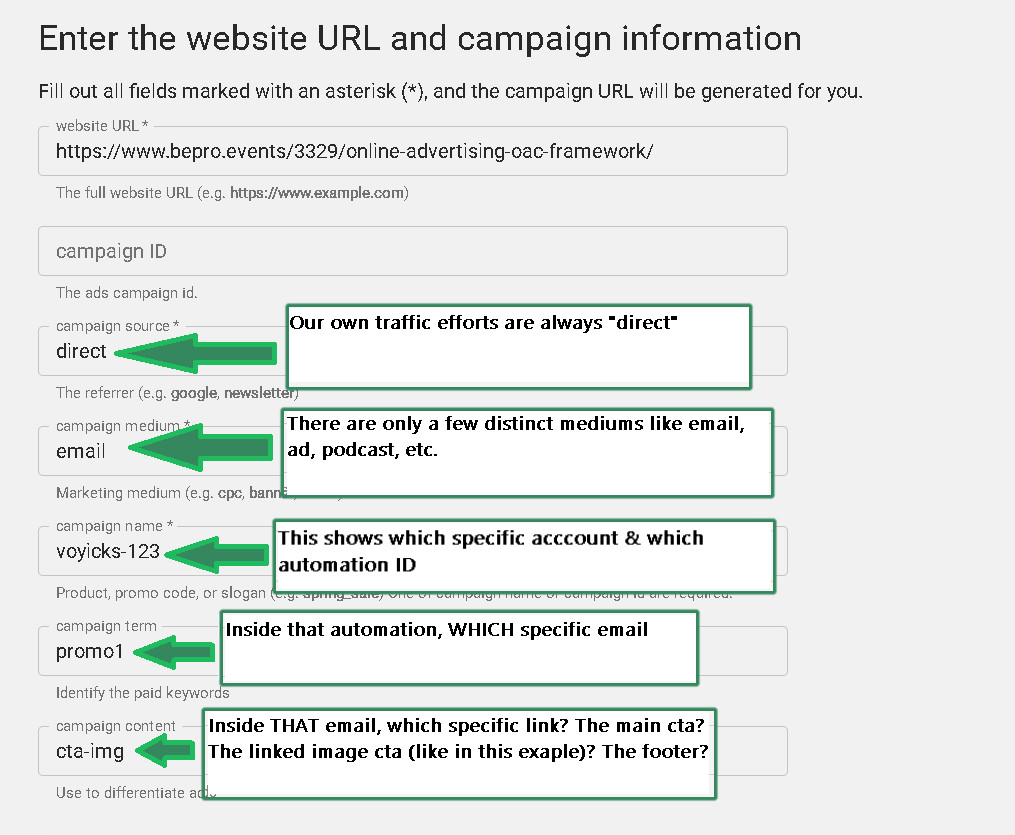
Anytime a blog post is published, I email our list about it. Usually more than once. To track the effectiveness of those email announcements, I have used this particular utm schema for years.

CRM link tracking schema
This schema will allow me to not only track which specific email drove the click, but which specific link in that email did the job.

[Back to Top]

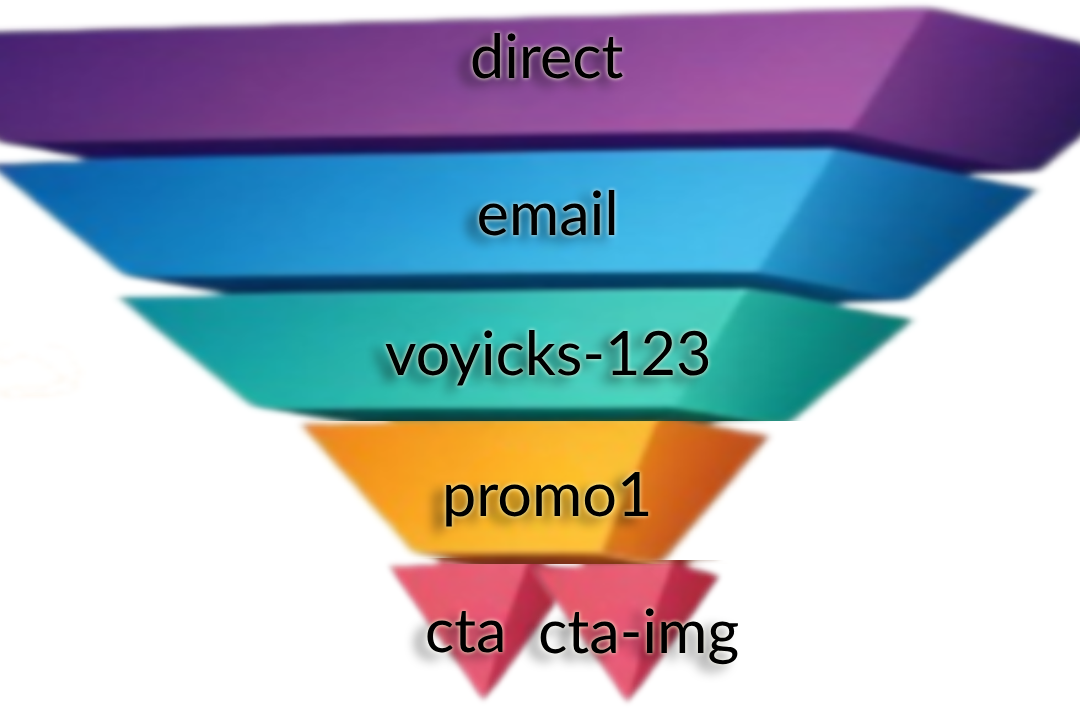
If it helps to visualize with the pyramid, one blog post announcement email that links to the article via the featured image AND a text-based CTA can be thought of like this:

two link pyramid tracking
All UTMs are the same in the email except the text-based CTA has a Content of ‘cta’ and the linked image to the same article has the Content ‘cta-img’. This will answer the question of “Do people get to the blog post by clicking on the featured image in the email or the linked text?”

Example 2: A PDF With A Call-to-Action On Every Page

Imagine you have a 20 page PDF. Now, imagine the header and footer of every page has a call-to-action for people to visit a sales page on your website.

20 pages times two links per page is 40 links throughout the whole document.

If you want to Be Pro about things, you would ensure that every one of those calls-to-action is uniquely trackable via utms even though they all direct to the same destination.

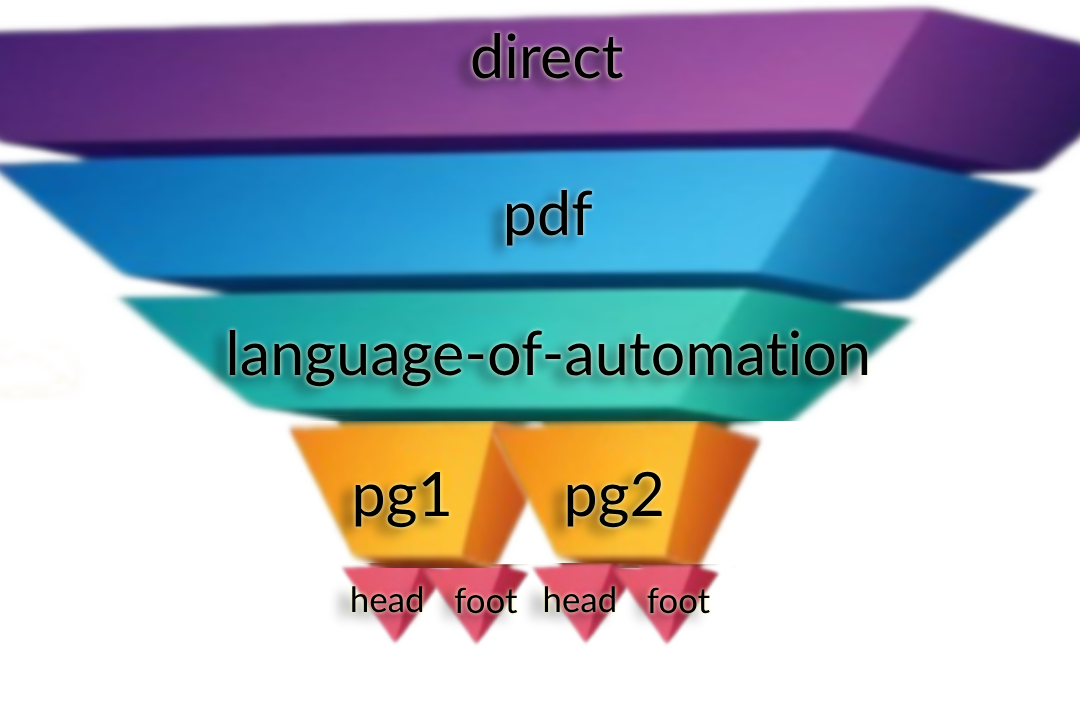
The pyramid visual for the first two pages would look something like:

PDF Link Structure Example
In this case, the Source, Medium and Campaign utms are all the same. Then, each page is its own Term using the same “head” or “foot” Content parameters. Now, not only can we see if more people are clicking the header or footer, but WHICH PAGE is actually getting people to the website.

Example 3: Ad Campaign Tracking Swipes

Let me be as clear as I can: If you are doing any kind of Meta or Google advertising (or anywhere else for that matter), you absolutely 100% need to be using utms in an intentional way.

Anytime we run ads for ourselves or clients, we use the OAC Framework; Objective, Audience, and Creative.

In that case, the Source is always the ad platform and the Medium is always “ad”.

Then, the rest of the utms directly correlate to the OAC distinction:

  • utm_campaign  is the name of the advertising campaign where the Objective is set.
  • utm_term  is the name (or ID) of the Audience settings.
  • utm_content  is the name of the specific Creative people see; the raw ad itself.

Using utms in this way allows you to directly analyze your paid efforts and do win-loss analysis much easier.

Here are the tracking parameters we use for various common platforms. You can literally copy/paste these into the appropriate places in the ad platform. If you need help with these please reply and let me know!

Google Ads:
{lpurl}?campaignid={campaignid}&adgroupid={adgroupid}&keyword={keyword}&device={device}&utm_source=google&utm_medium=ad&utm_campaign=campaignId-{campaignid}&utm_term=adGroupId-{adgroupid}&utm_content={keyword}

*If you are advertising on YouTube, update the utm_source to be youtube

Bing Ads
{lpurl}?utm_source=bing&utm_medium=ad&utm_campaign={CampaignId}-{Campaign}&utm_term={AdGroupId}-{AdGroup}&utm_content={TargetId}-{AdId}

Meta Ads
?utm_source=meta&utm_medium=ad&utm_campaign={{campaign.name}}&utm_term={{adset.name}}&utm_content={{ad.name}}+-+{{ad.id}}

LinkedIn Ads
?utm_source=LinkedIn&utm_medium=ad&utm_campaign={{CAMPAIGN_GROUP_NAME}}&utm_term={{CAMPAIGN_NAME}}&utm_content={{CREATIVE_ID}}

So simple my Mom uses it…

My mom is a leading educator around medical simulation for nursing students. She has been teaching this stuff for well over a decade and has written a lot of articles on the topic. Every time she writes an article, she promotes it on LinkedIn because that is where she hangs out professionally online and networks with other professionals.

A few years ago, I encouraged her to start building her own list so that she would not be reliant on LinkedIn for getting the word out about new articles. The idea is simple: anytime she has a new article she publishes it and then emails her list about it to drive readership & conversation.

I helped her build a simple landing page for people to join her list, and then helped her build out a weekly chain of articles she had already published. Then after new subscribers make it through, they are all caught up and will be notified of new articles as they come out.

Keap Campaign Kathy Sokol

By now, she has nearly a full year’s worth of weekly articles. I’m super proud of her and a little jealous I haven’t done this for my own business. Classic cobbler’s kid problem #AmIRight?

Also, to Be Pro about it, I added proper Google Analytics tracking to the article links in each email.

For example: https://www.healthysimulation.com/52522/concept-mapping-healthcare-simulation/?utm_source=keap&utm_medium=email&utm_campaign=kathy-sokol&utm_term=concept-mapping&utm_content=thumbnail

The extra utm_stuff after the “?” in the url are the tracking parameters for Google Analytics 🙂

[Back to Top]

Hold On A Sec…That Isn’t The Schema Your JUST Shared Paul…

You noticed that, huh? Well, there is a reason for that.

If you look at the link above, it is pointing to HealthySimulation.com. My mom does not own this website, she is simply a guest contributor. She will NEVER get access to that company’s Google Analytics.

That doesn’t mean she still can’t prove her own promotional efforts with this publisher. By seeding her own utm parameters, rather than leave it up to fate, whoever does their web traffic analysis will be able to see exactly how many clicks her emails specifically drove to that article.

Put another way, this means she can prove to this publisher (and others in the future) that her articles are genuinely driving web traffic with her own promotional efforts.

Since we are here, and because we love my mom, go ahead and give that article link above a little click-a-rooney-doo to give that guest post a spike in traffic which will make her look cool.

Editor’s Note:

A moment ago we linked you to Paul’s resource defining the OAC acrynoym, and how that framework helps you define the Objective, Audience, and Content. Did you click that link? If you haven’t, go ahead and click it now – if you look carefully you’ll see that I updated the URL parameters so that when Paul checks his traffic, he’ll be able to differentiate traffic sent this this page from Monkeypod from traffic generated by his other channels.

Those Links Look Crazy, Is That Hard To Make?

Nah. Google has its own UTM Builder tool that I’ve had bookmarked for probably a decade by now. I’d recommend you bookmark this now too.

Simply paste in the link you want to track, input the source/medium/etc. and then you can copy the link beneath and use it wherever you want.

In fact, the screenshot from example #1 above is the UTM builder tool.

Pinning Little Urchins To Any Link

In case you were wondering why they are called “utm” parameters, there is a fun & short history lesson here.

The Google Analytics technology was not developed by Google. A company called Urchin was the original developer of a tool for this kind of website tracking. You installed their tracking script on your website and then appended the various parameters to the links you wanted to track. Those parameters were called Urchin Tracking Modules. UTM.

Google acquired the company in 2005 and turned it into Google Analytics. They chose to keep the same utm_source/medium/etc. parameters. The rest is history.

[Back to Top]

Ok…I Can Seed The Tracking Data But How Do I Analyze It?

Another smart question.

Attaching those utms to links is great because that starts pushing the data YOU want to see inside Google Analytics. Looking at the data is a whole different kettle of fish. Mostly because there are SOOOO many ways to slice and dice the data that whole books have been written on the topic.

There is way more to cover about website traffic analysis than I would ever want to write about in a single post.

Fortunately, a few months ago on our bi-monthly Knights of Automation Mastermind, my friend Heather Wells and I spoke about this exact topic. The first part of the mastermind covers how utms work, which you’ve already learned about in this email. Starting about 15 mins into it I explain HOW to dig into the utm data.

What’d you think?

I know there was a lot here – so feel free to take your time and re-visit any sections that felt intimidating. I’m passionate about this topic because I know the difference it can make for business owners who want to take this seriously, and benefit from the insights it makes available.

Are you starting to now see how powerful digital tracking can be when done right? What questions do you have for me? Is there anything you’d like me to clarify?

No matter how big Be Pro grows, I plan to personally read and reply to all questions that come in for as long as I can. You can comment on this post, or reach out here if you have additional questions I can help with.

[Back to Top]

Want more?

If you want to learn how to lay the groundwork and install digital tracking, I did a presentation for a WordPress conference showing how to install Google Analytics and some other tracking pixels (Facebook, Google Ads) using Google’s Tag Manager. Watch it here:

Have your own questions?

If you would benefit from a place to ask automation questions when you get stuck, and get ideas and inspiration from other businesses, you can join us in the Monkeypod Membership.