Infusionsoft December 2016 Update

Infusionsoft December 2016 Update

Closing out the year strong with another solid Infusionsoft update. And as you may expect, there are a few features I wanted to highlight this month that will make our lives easier. Let’s get to it:

Feature #1: Campaign Categories (Easier)

What it does: You can now add and remove your campaigns to and from categories without having to do it one-by-one.
Why it matters: Campaign Categories are a recent update themselves, but in the first iteration you could only update one campaign at a time. So, if you had a list of dozens of campaigns, you’d have to go through them all, one-by-one and manually assign them to the appropriate categories. Well not anymore. As we hoped, Infusionsoft has now given us the ability to handle both adding and removing en masse.


When Campaign Categories first came out I recorded a video demonstrating what to expect and how it works, well, since this update changed a few things, I’ve gone ahead and updated my video to give you the most recent take on how this feature works and how you can use it:


Feature #2: Time Zone Timers

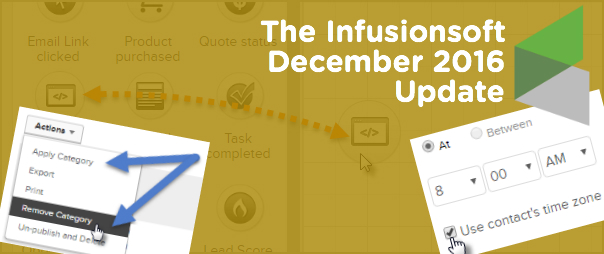
What it does: This update allows you to use the recipients time zone in order to schedule your campaign sequence steps.
Why it matters: This matters because if you have contacts across multiple time zones, or around the world, then this means that you can have your messages show up in their inbox at the times that you know they’ll be best received. If you know that your specific audience opens email at 5:15 am, then you can make sure this message is in their inbox bright and early, no matter where they are in the world.

Caveat: Because this feature determines their time zone based on a web form submission, landing page submission, or a purchase through the shopping cart, there is a reasonable chance that you may not have time zones on record for some/most of your contacts. IF you don’t have a time zone on record, then it’ll process this step using the time you selected and the local time zone for your app (basically as it would have without this setting anyway). Furthermore, their time zone is based off of where they are when they submit your form/landing page, so hopefully they’re in their local time zone, but if they take one of those actions while traveling, it’s possible that you could have the wrong time zone on record for them.

Second Caveat: There are some circumstances where you will NOT want to use this, here’s an example: If I schedule this blog post to go live at 8:00 am Pacific US Time, and then I schedule up an email for 8:15 am Pacific Time to let everyone know that my awesome blog post is ready, well, I wouldn’t want to use the Time Zone feature because 8:15 am in Sydney happens 17 hours before it happens in San Diego, and that would mean the email was going out 17 hours before my blog post was actually live. I could see some similar concerns if you’re doing a promotion that ends at Midnight local time, etc.


Feature #3: DKIM in Infusionsoft

What it does: This gives you the ability to digitally sign your own emails, basically telling your domain that Infusionsoft has permission to send emails on your behalf. (AKA It should improve deliverability.)
Why it matters: This is a fairly technical feature, but it’s one that many people have been requesting for a while. It’s mostly over my head, but recently I recorded a bonus module for my IS Starter Kit to cover setting this up, so if you’ve got the IS Starter Kit check out the bonus modules tab for a video over view, or, if you don’t have the Starter Kit course for some reason, you can learn more here.

Caveat: If email deliverability in general is over your head, and you’d like to brush up, or if you think you may have deliverability issues, there’s nothing I recommend more than The Ultimate Guide to Deliverbility from Adrian Savage at WeDeliver.Email.


Feature #4: Web Page View Goal Method

What it does: Now you can trigger or stop automation when someone visits a page on your web site.
Why it matters: This is HUGE. This means that you can start or stop automation based on a contact in your database visiting a page on your website. Think about that for a moment, this means that if someone visits a check-out page and doesn’t purchase, you can send a follow up email addressing the most common objections, or offering them a discount. It means that if someone visits your FAQ page you can trigger a task for a sales rep to contact them, and on, and on, and on. The applications for this are really versatile.

Check out the recent blog article from Brett at Blick Digital for a step-by-step walk through on how to use this new feature.

Caveat: This brand new feature has already had some bugs and is currently listed on the Known Issues page. I’ve seen it work successfully, but I’ve also heard reports of people have issues with it. So, if you’re a little iffy about new stuff like this, maybe give this feature a month or two while they work out the kinks.


You may have heard me say this, but it’s worth repeating: I believe it’s our job as the user community to help guide where the product goes – and the easiest way to do that is through constructive and thoughtful feedback. If you are loving what they’re doing, tell them. And if you are concerned about something you’re not seeing, tell them that too.

Thanks for reading. Probably worth mentioning that there were a few other features packed into this release that I didn’t call out above (like Opportunities coming to the IS mobile app…). I’d love to hear which features from this update you love (or don’t love) in the comments below!

5 Tips for Using Infusionsoft Support

5 Tips for Using Infusionsoft Support

Editor’s note: It’s my pleasure to welcome back a good friend of mine, and today’s guest author – Thomas Jones. Thomas was the head of my department at Infusionsoft for a while, and before that, he was the director of the Technical Support team at Infusionsoft.

We all know what it’s like; you’re cruising along, working on some pretty cool stuff.

A tag here-

A link-click goal there-

KAPOW – Decision diamond configured

Then it happens.  You get stuck, an error code pops up, or a something strange happens.  What do you do?

You call support.

(I’ll readily acknowledge my bias here.  I spent exactly 5 years with Infusionsoft and even spent some of that time running the support team.  Having given you that disclaimer, I think Infusionsoft has some of the best support in the world.)

Even with a great support team, you’ll always have a rough experience on occasion.  I wanted to give you five things you can do to give yourself the best shot at getting a great experience every time.

1. Be prepared to talk about the result you’re looking for.

Notice, I didn’t say, “Know what you’re trying to do.”  Even though they’re close, they aren’t the same.  I saw it all of the time; someone calls in and asks how to do something.  The support person tells them, but it doesn’t produce the result the customer was looking for.  The question was asked and answered, but the customer was still frustrated because they didn’t get what they needed. Do you see the difference? Sometimes the thing you’re asking to do won’t produce the outcome you’re trying to achieve.

2. Do your best to see if you can replicate the issue you’re having.

This isn’t always applicable, but when you have the ability, arm the support rep with as much ammunition to attack the problem as you can.  If you’re getting an error, see if you can replicate it and save a screenshot or screencast. (You can download tools like Loom for Chrome, or jing from techsmith to create free recordings of your desktop as you retrace your steps.) The support rep absolutely wants to help you with your problem.  Anything you can give them will help that happen more quickly.  A note of caution, if you think something bad may have happened; don’t do this step.  Just write down the things you did leading up to it.  You don’t want to compound any potential issues.

(Editor’s note: It can also be helpful to do some basic trouble shooting on your own: Can you repeat the issue? Does the issue happen in more than one browser? If it’s only in one browser, can you try clearing your cache and cookies to see if that fixes it? I know how basic these things seem, but if you test these before you get on the phone/chat with support you’ll have a little more background ready to go.)

Yelling Through The Phone3. Treat the rep with respect.

You’re a business calling into a place of business, keep that in mind.  One of my first experiences at Infusionsoft was listening to the Director of Support getting on a call and telling a customer that we’d cut him loose if he kept berating our support rep.  It left a really strong impression on me.  The support reps are doing their best and are going to make mistakes on occasion.  As frustrated as you might get on occasion, remember it’s rarely a matter of always and never.  Meaning, they don’t always suck or never know what they’re talking about.  You’d be surprised how far mutual respect will go.

4. Make powerful requests.

One of the biggest problems in life is unspoken requests and assumed commitments.  I could write an entire blog post on just this one, but I’ll give you an overview.  Think about the difference between two people closing a conversation with, “Will you let me know what you find out?” and “Will you let me know by end of business tomorrow what you find out?”  Too often we’re afraid of pushing, so we hope they know how important this is.  Phrase your request so the only possible responses are yes, no, an alternative (I can’t have it by then, but how about XXX), a commit to commit (I can’t don’t know when I can have that for you, but I’ll let you know by tomorrow by 10 when I can have that for you).

Don’t leave it open ended.

(Editor’s Note: After you open a support ticket there is usually an automated email that is sent setting expectations for when they’ll get back to you, this automated email doesn’t necessarily reflect the conversation you just had. So if the messaging there is different than what the rep just told you, don’t panic. Automation isn’t always perfect.)

5. Don’t assume the answer you got was correct.

Please don’t misunderstand me.  I’m not saying you should assume the answer you get is wrong.  I’m simply saying, if it feels like the answer isn’t right or it doesn’t make sense, then don’t be afraid to keep looking for answers.  Ask your peers, join a group, call back in, do something.  I almost didn’t put this one because it’s so easy to turn this into a negative.  It’s not.  We all know Infusionsoft is capable of so much.  There’s nobody who knows everything.  I can tell you that nobody is going to think anything about you asking for a second opinion.

There you go.  It always stinks when you have to call support.  Not because they stink or it happens all of the time, but because it means you have to stop what you’re doing and make a call or log into the chat line.  When you do have to do that, give yourself the best shot at having a great experience.

Oh, and if you invest in high quality education you may find that you wind up with fewer support inquiries altogether. Now if only we knew someone with some awesome Infusionsoft training courses…

Would love to hear any additional tips or tricks you’ve picked up along the way!

3 Times Zapier Saved the Day

3 Times Zapier Saved the Day

When I worked at Keap (formerly Infusionsoft) I was often asked to recommend third party tools that would solve the problems that Keap didn’t natively address, but if I’m being honest, I didn’t really use any of those tools first hand.

I avoided using them because I was representing the Keap brand, and I didn’t want to play favorites by recommending one tool over another.

So, since leaving Keap I’ve found myself gradually adopting these tools that I avoided for so long, and each time they make my life easier, I kick myself for waiting so long.

Anyway, it’s been about 18 months since I started Monkeypod and I’m proudly using PureChat, PlusThis, LeadPages, WebinarJam and a few others. (So proudly in fact, that those are all affiliate links right there. So, go nuts.)

But this blog post isn’t about those tools, it’s about Zapier.

You see, I had heard the name Zapier thrown around for so long, I was sort of embarrassed to say that I hadn’t really used it. Fundamentally I knew what it did, but I really didn’t quite “get” it. Until recently.

At it’s core Zapier is a connector. It allows two systems to pass information back and forth.

Without Zapier there are probably other ways to make these systems talk, but it’d be massively complex. Zapier makes it easy. They’ve created the connections necessary to allows hundreds of different tools to speak to one another, and Keap is one of those options.

At any rate, to help illustrate how useful Zapier has been, I want to share 3 examples from the last 6 months where I was in a sticky situation, and Zapier saved the day for me, and for ALU.

Example 1:

Scenario: Some of you know that I do some work as a consultant for a school in Africa, The African Leadership University (ALU). There’s a remote team of 7 regional reps who are all responsible for coordinating events in a particular part of the continent. These reps host events locally to talk with prospective applicants for the school, and attendees register on a sign-in sheet. After the event the reps are responsible for uploading this information to a shared google sheet so that their manager can easily see how many leads came from each event, and a handful of other details about that prospect. The problem is that these reps aren’t all users on the Keap account. So they can’t very well add them straight to Infusionsoft, I mean, they could fill out a form for each one, but then they can’t query the data or run reports on it.

Solution: Zapier allows you to sync Google Sheets and Keap. So, when a new entry is added to our master google sheet, it automatically creates (or updates) a contact in Keap. Zapier allows you to choose which columns you want mapped to which Keap field, it checks for existing contacts via email address so you don’t end up with duplicates, and it also lets you apply a tag if you want to run specific actions. Zapier officially saved us from having to purchase an additional 7 Keap user licenses (That’s $175/mo in savings at an average user license cost of $25/mo).

Example 2:

Scenario: At ALU, we have leads coming in from a variety of channels, and when these leads show up we need them to be assigned to one of 10 teams based on their country. Each team would round robin new leads between the 1-3 owners on that team. But because there are 54 countries in Africa (now you know), this was going to be a relatively complex decision diamond. And if those countries>teams>owner combinations needed to change, it would be difficult to update the round robins, and the decision diamonds, etc.

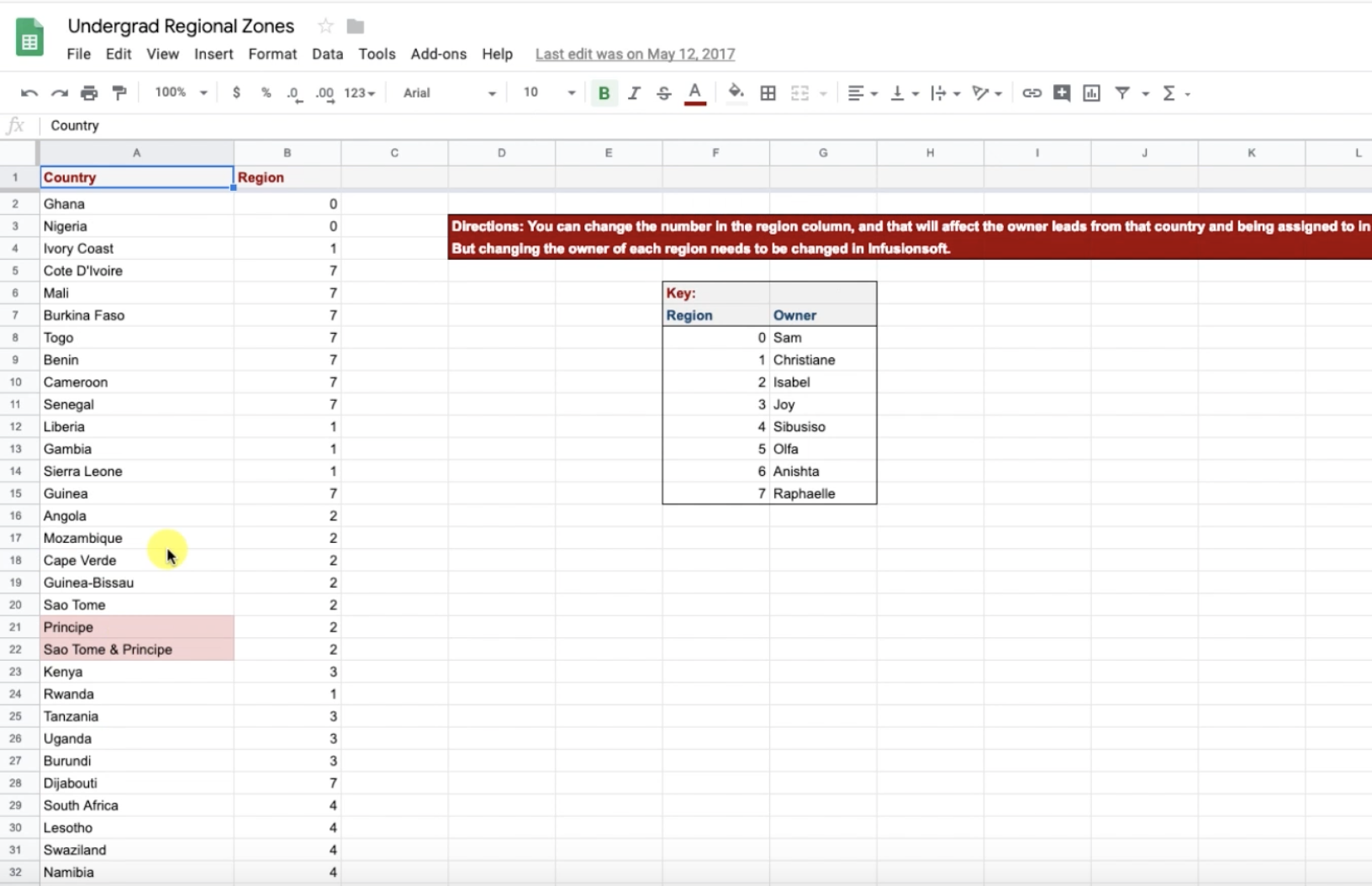
Solution: Instead of creating the decision diamond with 54 branches, we first decided to create a simple Google Sheet with all 54 countries listed, and then in the column next to them we added the “Zone” number.

zapier zone number

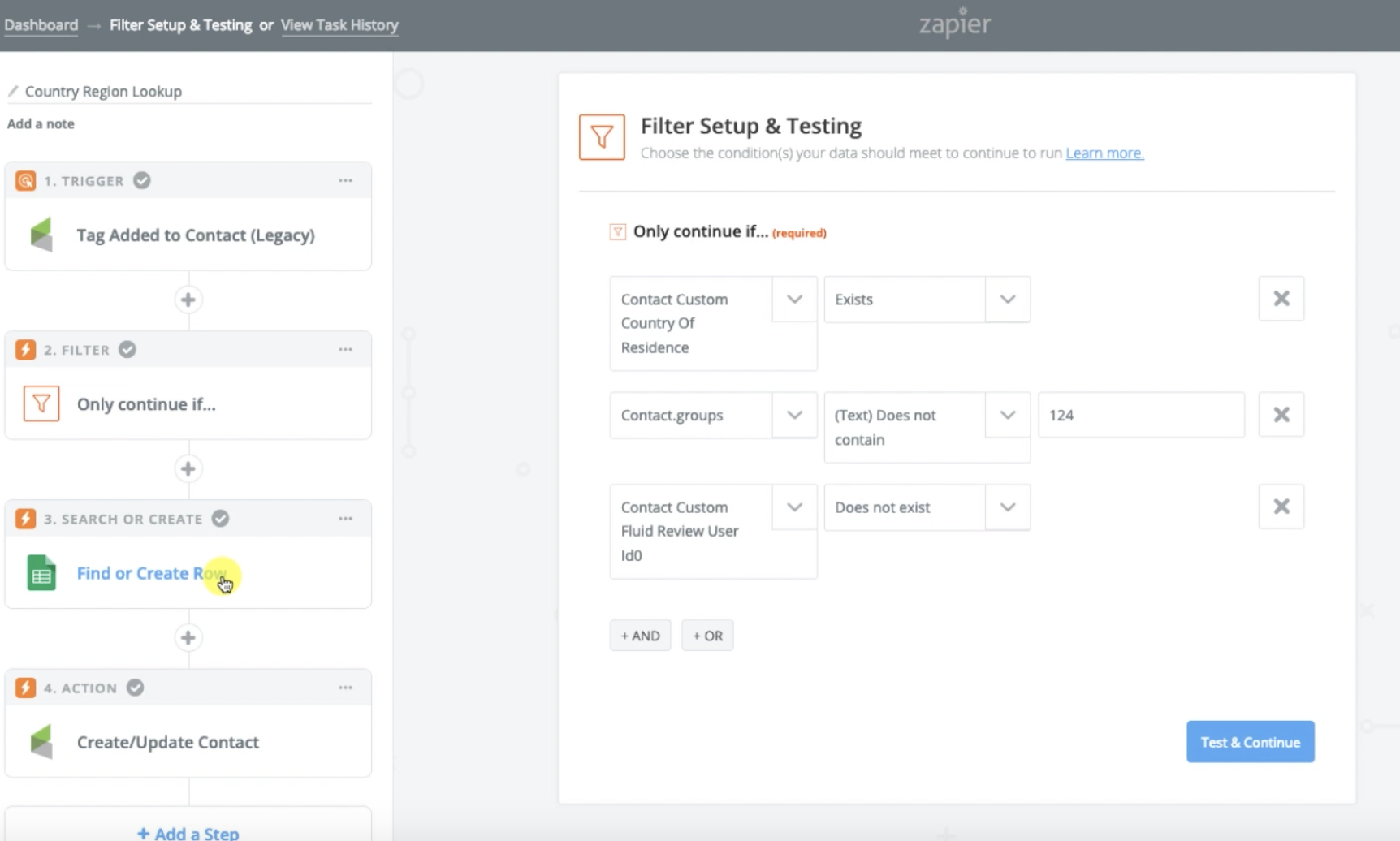
Then we used a Zap so that when a new lead is added, if they have a country, it checks that google sheet to see what “Zone” that country is assigned to, then it puts the Zone Number into a custom field, and we use that Zone number to route them into a sequence where we then assign that lead to the appropriate team.

zapier country sorter recipe

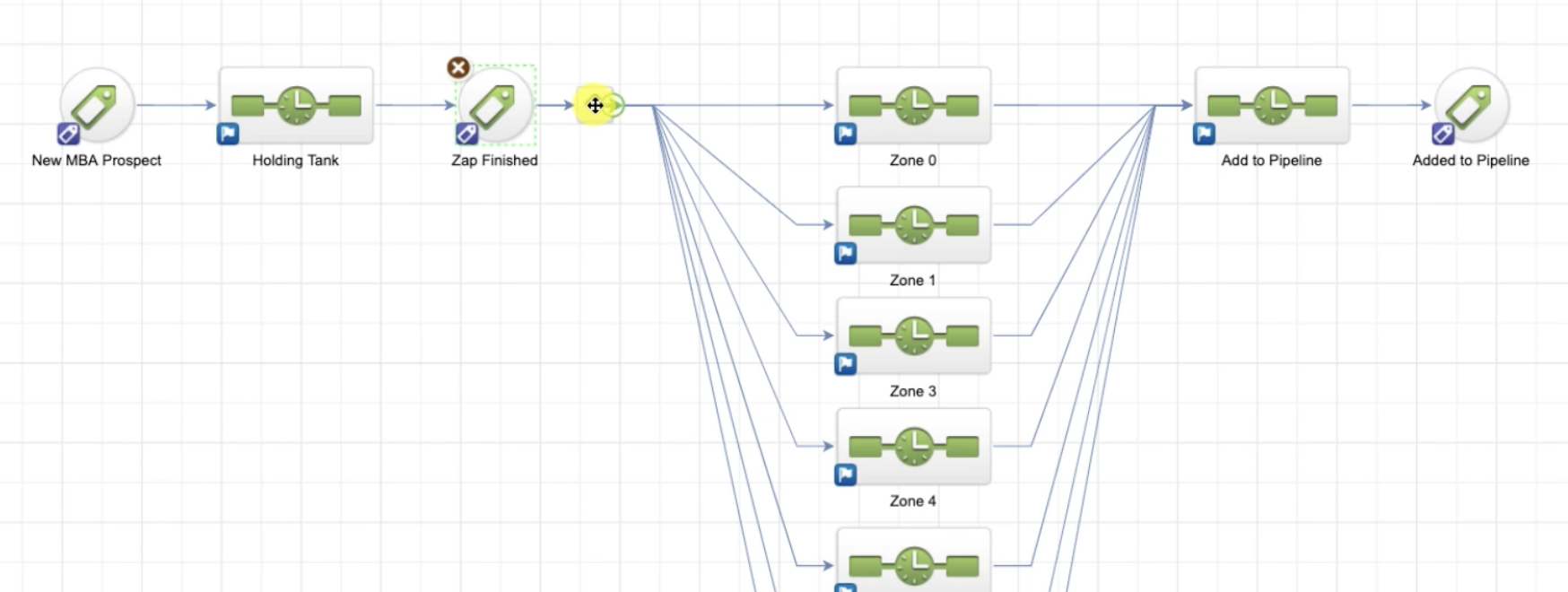
Now our decision diamond has 10 branches instead of 54, and the spreadsheet is much easier to update in case we need to rearrange how these leads are being assigned.

decision diamond image

Example 3:

Scenario: ALU also uses Zendesk to track communication and customer service inquiries. But they use one ZenDesk account to manage their undergraduate questions, as well as inquiries regarding their School of Business. However, they use separate Infusionsoft accounts for their undergraduate programme, and their School of Business programmes. So the challenge became “How do we get the ticket information and details from Zendesk mapped to the appropriate contact in the appropriate Infusionsoft account.

Solution: Whelp, Zapier saved the day again. We were able to design a zap that is initiated when a new ticket is created in Zendesk, the first thing it does is check the School of Business Infusionsoft account to see if it can find a contact with that email address. There’s a filter in this zap so that it only proceeds IF it finds someone, and the next step is to update the contact with a tag, as well as add the ticket details from Zendesk to a custom Text Area field, so any people working on that contact can easily see their most recent ticket details listed on the contact record.

Listen everyone, I’m not pretending to be a Zapier wizard, but as my understanding of it evolves, so too does my appreciation. It’s a powerful tool.

I’m honestly not sharing these examples to brag. Heck, you may have read these examples and immediately spotted areas where I could clean them up a bit. My hope is that you’ll get a few ideas and maybe something will click where you see a way Zapier can save you time or money.

Oh, and how cool is this, Zapier actually has a bug bounty program. If you find and report a vulnerability in their software, they freaking write you a check. That’s an impressive statement for a company to make.

Hope this was useful! I’d love to hear your thoughts on Zapier, or cool ways you’re using it for your own business.

Streamlining Personal Communication

Streamlining Personal Communication

A week or two ago one of my OG members, Steve, had a question about streamlining personal communication through Keap.

He was trying to trigger a template to an individual contact, and he ran into an issue where Keap wasn’t behaving as expected, and I couldn’t really solve that specific problem, but it occurred to me that there might be an easier way to get the same result.

So, I recorded a quick video for him demonstrating the solution. I wanted to share it here in case it helps you too.

Scenario:

Sometimes you want to send a personal email to a contact, but you want to send it from INSIDE your Keap database.

This might be because you want to trigger actions when they click links, or because you want a record of the email, or maybe you just want to know if they opened it; but there are a handful of ways to send a personal one-off email from the contact record.

Unfortunately most of them are just a little bit clunky.

(Worth mentioning that depending on your needs, the Gmail or Outlook Sync might do the trick for you.)

So, here’s my proposed solution: Instead of creating a template, and grabbing that template from the contact record every time you want to use it, and then personalizing that template and sending it out.

Instead, let’s create an internal form that captures your message, use that internal form to trigger an email and merge in the message you just wrote. Bing, bang, boom.

Here are the steps:

    1. Create a custom field (Text Area Type) for your “One Off Email Message”.
    2. Create a new campaign, titled “One Off Email Campaign”.
    3. Add an internal form goal to the campaign, and add the custom field from step one to this form.
    4. Add a sequence after the internal form, titled “One Off Email Delivery”.
    5. Add an email inside that sequence, and configure the body of the email to look however you like, adding the merge field for the “One Off Message” wherever you need it to go. (I recommend after the salutation, and before your signature/sign-off.)
    6. Set all items to ready, and publish.

If you’re the type of person who prefers your information be delivered via in 10-minute video modules, well, buckle up, because you’ve come to the right place:

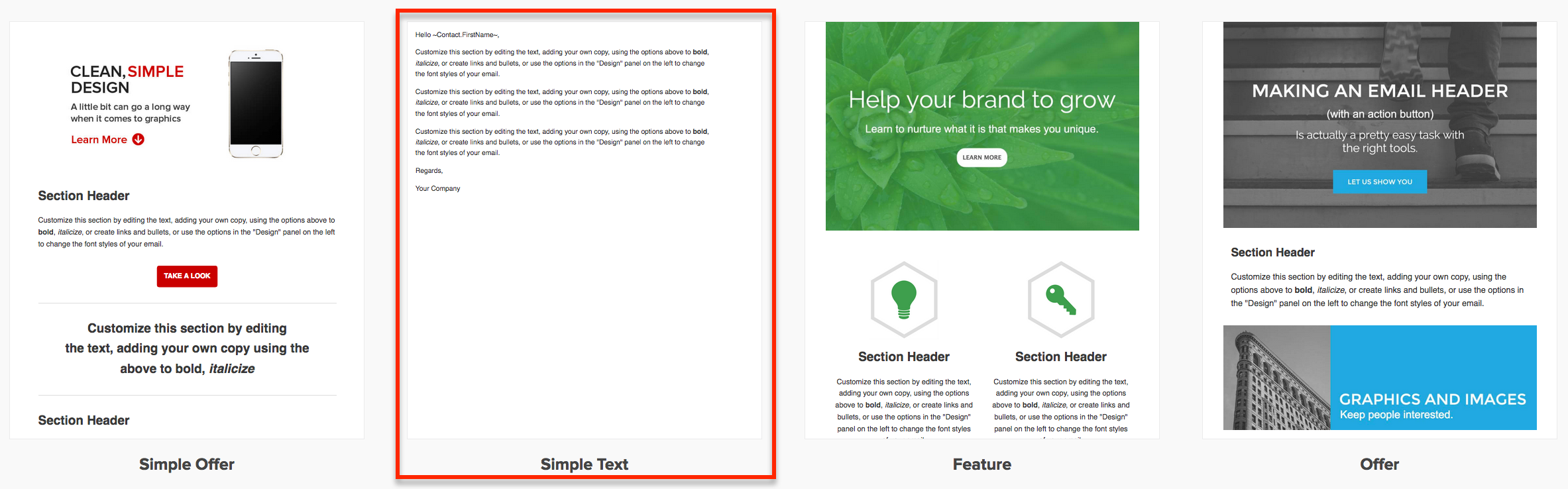
Here’s a blog post on how you can use the old builder to create a template that LOOKS like a plain text personal email. But to be honest, that’s mostly obsolete now because the new email builder has a default template for this so you can just grab and go:

Now, at the end of my video I mentioned a ninja trick for customizing this even further – if that piqued your interest and you’d like to see what else I’ve got in my bag of tricks, here ya go:

So, the above instructions basically walk you through sending an email where the entire email is custom. But sometimes you don’t want to start from scratch. Sometimes you want to grab an existing email that already has all of the information you need, and you just want to slap a different intro paragraph on it, right?

Well, all you need to do is build a handful of sequences, each holding an email with a different topic (pricing, hours, membership program, etc). And then add a radio option to the internal form so that the user can select which of your pre-crafted masterpieces to send out.

The workflow is nearly identical, but the distinction is that this new method allows you to pair your custom paragraph with one of your pre-written (and proofread, tested, refined…) templates.

That’s it for today, hope you found this useful. Leave a comment below if you made it this far!

3 Marketing Lessons from the 2016 Election

3 Marketing Lessons from the 2016 Election

Hello Monkeypodders!Sokol

It’s your favorite Mad Scientist back with another guest post that totally isn’t a newsjack 😉

Before we get into the political marketing lessons, let me assure you this is not a “political post” per se, but rather the same kind of high quality marketing education you’d normally expect from this blog.

You ready? Let’s go!

The conversation around who America’s next president will be fully dominates mainstream US media these days, and is garnering plenty of attention worldwide as well.

Even small local news stations are bound to mention it in some form or fashion. While the choice hasn’t been made by the people yet, there are some political marketing lessons emerging from which we can extract very important insghts.

Especially since we’re all probably gearing up for some holiday campaigns, right?

#1 It’s the offer, voter!

At the end of the day, Americans are going to make individual choices of who they think can lead the country best. As far as what a candidate offers, the person voting for them resonates with their message the most out of the available choices. In other words, when we step into the head of a voter, if the problem is “I need a leader for America” then the solution is candidate X because they offer Y. And that sounds the best to me personally as the voter.

Chances are the problem you help solve for people has competition. Other businesses are out there solving the same problem. Sometimes better than you, sometimes worse. What causes people to “vote” for you (you’ll see more about this later in #3) is what you are offering, and how you are offering it. Specifically, it’s the positioning of what you are offering to the audience you are targeting. McDonalds sells hamburgers to both children and adults.

Do you think they would talk to those two audiences about the same offer in the exact same way?

(Pssst, the answer is ‘No’)

If you haven’t lately, there may be some benefit to sitting down and getting really clear on the 1 or 2 ideal customers you have (you can define your avatar here). Then, look at what you offer and how you can talk about it to those customers in a manner that positions it in the most appealing way.

You may notice that political candidates often emphasize different aspects of their plans and policies depending on the audience they’re addressing, the current issues having around the world, and even the specific geographical region they’re speaking to.

Re-doing your offer’s positioning and using what you discover in your marketing can often help get better results from your efforts; unless the offer itself is truly bad.

#2 Email is still a relevant channel

In past elections, I’ve signed up for the mailing lists of the major candidates to see what they’ve been doing.

Lately, I don’t have the time to study those like in the past, but you know that candidates are still sending email because it still works. It’s still relevant. Remember, email is literally the electronic version of physical mail. That will be relevant for a long time. At least, until we get t-mail or something and stuff gets transmitted into our thoughts.Email Marketing Image

Email as a communication channel is great because you can get personalized messaging just like with a physical letter. We must always remember this when writing emails no matter how many people will see it. It should feel like it was written for the reader and only them.

Relevant doesn’t mean positive ROI though. You can still send a bunch of emails that nobody cares about. To avoid this, make sure you are considering the entire customer experience up to that email and what will occur after that email. Here’s a blog post Greg wrote a while back where he highlights a key distinction most people miss regarding email permission.

Oh, and make sure you are also tracking the important stuff too. A high open rate feels good to your ego, but if all those opens generated zero clicks, what did that actually do for your business?

More importantly, what did it do to the relationship of your business to that individual? It certainly didn’t help.

Polling Station#3 People “vote” with their dollars

Imagine if you will, for a moment, two businesses. Business A and Business B. They both offer the same product. Literally, they both source it from the same manufacturer. Who gets your business?

The one you like better.

Any election is ultimately about individuals putting down which candidate they like better for the position in question.

In the world of business, a dollar is like a vote. When you buy food from your normal place, you are “voting” for that place to stay around. When you go to your favorite restaurant, you are “voting” for them to keep doing what they’re doing. This is the reason we feel good about patronizing local shops, and farmers markets; we can interact directly with the people we’re giving our vote too.

It is good to remember that while you are doing your business thing, people also still need to like you. For some industries you cannot be in business if people don’t like you. Other times it doesn’t much matter as long as the job gets done.

For those kinds of situations, take an objective look around and see if there are small (like really small) tweaks you can make to improve your like-ability. Adjust your live phone greeting to be more friendly. Iterate a couple subject lines. Invest in a simple thank you letter in the mail.

The point is, the more they like you, the better the chances they will “vote” for you in the future.

(If you want to dig into why its important for people to like you, check out Cialdini’s book ‘Influence‘. There is a whole chapter on it and the rest of the book is a goldmine for small business owners.)

What do you think? Did any of these political marketing lessons resonate with you? If so, please “vote” by leaving a comment!

Editor’s Note: Paul is a former Infusionsoft Employee, on the Monkeypod OG Expert panel, and is generally well respected member of the Infusionsoft ecosystem. He is responsible for the design of most of the campaigns in the Infusionsoft Marketplace, and is also the author of The Infusionsoft Cookbook. If you’d like to receive content directly from Paul, you can do that by signing up here.

PCON 2016 Recap Part 3

PCON 2016 Recap Part 3

Well well well, we’re back again with some more funky fresh features. In case you missed it, I profiled a handful of features the other day (catch up here). And without further ado, here are the remaining features that were announced at PartnerCon 2016.

Buckle up sports fans, Infusionsoft isn’t messing around with these bad boys:

Feature: WordPress Plugin
Why it matters: I don’t think I need to tell you guys what WordPress is, but I will tell you that this is a PROPER WordPress plugin. Infusionsoft is developing a totally free Plugin that will automatically map web activity data back to Infusionsoft and either create a visitor record or attach it to a contact record. But you guys, that’s not even the half of it – this plugin will also allow you to add webforms to your existing wordpress site, and not just embedded ones, but pop-ups and slide-overs too. Can you say “FINALLY”? Oh man, this is going to make life so much easier for so many people. I’m really optimistic that this will completely replace Rapidology in my tool suite.

Oh, and it will support multiple languages. I wrote down Spanish, Hebrew, French and German; but I imagine it’ll be open source and will add additional language support.
When: I didn’t hear a release date on this plugin.


Feature: New Page View Goal Method
Why it matters: Lemme see if I can explain this succinctly: Infusionsoft is going to give us a brand new goal method which will enable us to trigger (or stop) automation when a contact visits a page on your website. My understanding is that it’ll work based off of cookies. So if someone clicks a link in any of your Infusionsoft emails, it’ll cookie them. Then, you can designate specific pages on your website, and if a cookied contact visits that page it would achieve a goal.

I can see this being really, really useful for a number of scenarios. For example, if you know that a contact is active in your nurture funnel, but they visit an order form or a sales page, you could trigger a task for a sales rep to call them (or a simple email follow up asking if they have any questions). It’s basically like a link click goal, but they don’t have to click from an email, they could just show up on your website and browse their way around. There are countless applications, I’d love to hear ideas for how you might use it.
Caveat: I imagine this would not be able to work someone clears their cookies, or uses a different browser or device.
When:
December Release


Feature: Crosstabbing Support
Why it matters: This one is less of a feature, and more of a fix. Lots of people don’t know this, but there has been a bug with Infusionsoft for a long time, and basically it meant that if you had multiple tabs open, and you were running actions, sometimes it would cause unpredictable results. For example, I saw a customer create an order on a contact record, but because they had multiple contact records open it ended up creating an order for each open record. Another time I remember seeing a contact delete one campaign, but because they had their list of campaigns open in another tab, well, yeah, it deleted all their campaigns.

Basically working with multiple tabs was not reliable, and Infusionsoft tried to be as clear as possible that this was a bad idea; but because this was such an obscure issue, well, lots of people still don’t know about it.
When: December Release


Feature: Scheduling in the Recipients Time Zone
Why it matters: This feature is one that I know a lot of users have requested, dreamt about, or more recently, speculated about. Recently Infusionsoft started capturing a contacts Time Zone, based on their IP when the submit a form, landing page, or place an order. This is really useful information, and it can help you in a number of ways, like when you’re reaching out to a prospect, or scheduling with a customer of yours.

Right now if you schedule an email, you’re scheduling it at a single specific time. And the email goes to everyone at that particular time. So if you are based in Los Angeles, and you schedule an email at 8:00 am, that email is going to go out at 8:00 am Pacific US Time. But 8:00 am in LA is naturally 11:00 am in NYC, 4:00 pm on London, 7:00 pm in Dubai, 11:00 pm in Perth, and 2:00 am in Sydney. So, for most of those time zones, it’s not exactly ideal.

Well, now you’re going to be able to schedule automation in the recipient’s time zone. So if you schedule an email at 8:00 am, it’s going to be delivered at 8:00 am LOCAL time for each person. That’s huge. We live in an increasingly global economy. And this is a big step in the right direction.
Caveat: Because the time zone is automatically determined by the IP when someone submits a form, there is a margin for error here too. If I fill out a form while I’m on vacation in Sri Lanka, it’s going to think that’s my time zone, etc.
When: Broadcasts in November, and Campaigns in December.

Okay, that’s it for the highlights from PartnerCon. I’m thrilled, honestly. There are so many exciting features on the horizon, and many of them are things we’ve been yearning for, but there are a few nice surprises mixed in as well. Kudos to the Infusionsoft product teams behind all this hard work. Keep up the great work!