Keap, Small Business, Software Updates
Well, if you read my post the other day recapping my experience at PartnerCon, then you probably already know that the product updates were one of the things that I absolutely loved, and I’m excited to get down to it.
But first, I’d better give a little COA. I am not an official representative of Infusionsoft, so I’m only reporting what I heard, and the way that I understood it. I did go out of my way to ask questions, and to gather as much information as I could, but it’s entirely possible that the features as I understood them may vary slightly or dramatically by the time they’re introduced into the app. Also, I’m going to project when some of the features are coming out based on either what was said, or what I inferred; but because there are so many factors that go into software development, it’s possible that some features might be released sooner or later than I predict.
Okay then, let’s party:
Feature: Campaign Categories
Why it matters: Well, right now a lot of people have developed complex naming conventions for their campaigns. The reason that most people do this is so that they can easily sort and filter their campaigns. Soon here you won’t need to do that anymore, because Infusionsoft is going to add the ability to categorize your campaigns. This is a feature I’ve heard requested for years, but because it isn’t really critical, it hasn’t made the cut. Until now.
I see this simple update making life easier, making apps more organized, and just generally saving time. I think a lot of people will create broad categories for the various stages of lifecycle marketing (Lead Gen, Nurture, Sales, Fulfillment, etc), but I’ve also talked to a few partners who plan to use categories for their various products, so that all the campaigns pertaining to one product are all in a single “folder”. Eventually you’ll be able to archive campaigns too, but for the meantime you could just create an archive folder for your retired campaigns.
When: November Release
Feature: New features coming to the Infusionsoft Sync for Gmail
Why it matters: When the Gmail sync first came out it was awesome and overdue, Infusionsoft saw the value in it and purchased it so that it could be available for all users for free. But, it had it’s fair share of issues, and my impression is that it just didn’t get a whole lot of attention internally, until now.
There are a handful of updates coming to the gmail sync app, here are the highlights:
- If you receive an email from someone who isn’t in your database, the plugin will now pre-parse information from an emails signature into the appropriate fields and give you the choice to add this contact to Infusionsoft.
- When sending an email in Gmail you’ll have two “send” buttons, one that just sends like normal, and another that sends with an Infusionsoft tracking pixel AND records that email back to Infusionsoft.
- You’ll have the option to have pop-up browser notifications (in Chrome and Firefox) when an email you sent is opened, based on that tracking pixel.
- You’ll have access to internal forms right within the gmail sidebar.
- Multiple languages will be supported in the plugin (Spanish, French, German, Portuguese, Dutch, Russian, etc)
When: My understanding is that some of these features are available as of this week, and others will be added over the upcoming months.
Feature: Changing Goal Methods on the Fly
Why it matters: With a recent update, Infusionsoft restricted the ability to quickly change the setting of an existing goal. So, if you had a link click goal and you wanted to switch it to a tag goal, you’d have to delete the first goal, drag out the new goal, and then name and configure this new goal. Depending on how you use Infusionsoft, those few extra steps could be wasting you a fair amount of time. Not anymore friends. Infusionsoft has listened to our feedback and is bringing back the ability to quickly and easily adjust goal methods without having to delete/replace goals.
When: November Release
Oh, and btw, you’ll also be able to collapse the campaign builder menu. Hooray!
Feature: Mobile App Update
Why it matters: Infusionsoft is going to update a few things in their mobile app. If you didn’t know Infusionsoft had a mobile app, you’re not alone. They’ve had it for years, but the functionality has been severely limited. The mobile app gave you the ability to look up contacts, pull up their address, or phone number, and if you wanted to, you could apply a tag. But that was really it, and as far as I could tell the mobile app was primarily used by organizations that had/have sales reps. Well, if you’re a sales rep and you’re using a mobile app on your phone, it seems pretty natural that you’d want the ability to see your contacts opportunities, and possible update an opportunity stage from your phone, right? Bingo. Sales teams can rejoice, because that’s coming.
When: My notes say that Opportunities will be in mobile in October initially, with a follow-up “full scale” release in December.
Feature: Merge Fields and API Upgraded to support UTF-8
Why it matters: This matters because acronyms are super fancy. No, jk, honestly this might not matter to you at all, but supporting UTF-8 (as I understand it) is a really big deal to anyone who uses a non-english character set. Being able to merge these characters into emails and tasks is important, and having the API support this means that information added to Infusionsoft (names, cities, etc) don’t have to be translated to English, and won’t be corrupted when being added. This one is fairly technical, but for the folks who need this, it’s a pretty big deal.
When: I think the merge field part is already out, and the API support is coming soon?
Okay, that’s a lot of awesome features, and I hope you’re as jazzed as I am. This post is starting to sprawl, so let’s break it off here and I’ll recap the last three features in the next post. In the meantime, see anything on this list that you’re excited about?
Keap, Small Business
Well, I’m back in San Diego after another exciting and exhausting PartnerCon event. PartnerCon is really awesome in the sense that several hundred partners from all over the world are descending on Phoenix and they all have the same goal: To help small businesses succeed. And to be even more specific, all of these partners have at least some invested interest in using Infusionsoft to do that.
You don’t get that anywhere else. Even at ICON we have thousands of people in the same place who all have several things in common, but their goals can vary dramatically. It’s for that reason that I think the energy at PartnerCon is so different, and so inspiring.
I wrote a series of blog posts recapping my experience at PartnerCon in 2015, and the feedback was really positive, so I thought I’d do it again. Also, I’ll be referring to PartnerCon as PCon from here on out, so, get used to it.
I’m going to write at least two blog posts about PCon 2016, the first (this one) is going to be about the overall experience. The second will be focused on Infusionsoft the product. And then if you guys want, I’ll write one about the networking aspect too.
And let me be abundantly clear that I can only talk about my personal experience, and the way things occurred to me. I would love to hear how your experience may have varied, or if the things I describing occurred to you differently.
To describe the experience, I’m going to talk about a few things that I didn’t really like, and a few things that I did.
Things that I didn’t love:
The Venue
PCon this year was hosted at the Kierland Westin in North Scottsdale. It’s a beautiful resort, there’s no doubt about that. And it’s in a part of town where you have easy access to dining and shopping. My issue with the venue was that it’s far from Infusionsoft, and the culture that they’ve worked so hard to create at the Headquarters.
Last year the theme of PartnerCon was “Welcome Home”, and Infusionsoft opened their doors at HQ to welcome hundreds of Partners for a week.Maybe I appreciated having it at the Headquarters more than most because I used to work there, but I also remember “we’ll be able to host PartnerCon here” being a big driving point as they designed the conference space in Infusionsoft’s second building on their Chandler campus. Now after only one year PartnerCon seems to have been moved back offsite (and to a more expensive part of town, as it happens).
The Breakout Sessions
Personally, I didn’t find the breakout sessions to be particularly valuable. Don’t get me wrong, I had an awesome time at PCon and I’m glad I went. Now, you might be asking “Greg, if the content wasn’t valuable, then why are you glad you went?” and that’s totally fair.
I just simply didn’t have any groundbreaking revelations from attending the sessions, and while it could be that the content wasn’t as strong as it’s been in previous years, but it could also be me. It could be that some things didn’t resonate with me because of who I am, or because my business model is a little different, or because I didn’t make an action plan and set specific goals for the conference.
I fully acknowledge that a big part of what you take away from any conference comes down to what you put into it, and how you prepare. And just to be clear, this is feedback that I’ve communicated directly to Infusionsoft through more than one channel, but if you want more details about which sessions I attended or what I would have found valuable, I’m happy to discuss further as well.
Event Identity
I think PartnerCon has the potential to be something massive. Like I said earlier, the simple fact that you’ve got hundreds of people in the same place who all have the same goal means that this event can be really powerful.
But, to me, I was a little unclear on what this event was for. Is it a demonstration of appreciation for the partner community? Is it a business development conference, where we get tips and tricks for growing our own business? Is it a networking event? Or is it a product event, where they teach us about the product, share the roadmap for the future, and gather feedback from partners to help shape the future? Maybe I’m alone in this, but it sort of seemed like this event was trying to be all of those things, and I think it would have helped me to have a little more of a defined direction.
But like I said, I still found the conference valuable. To me, the big value in attending PCon showed up in two ways – a) updates on the product, and b) networking.
So, let’s talk about some of the things I loved from PCon:
Networking
I thought there were ample networking opportunities. Between the structured happy hour events Infusionsoft hosted, and the informal time they provided for connecting (and all the bars across the street), I felt like I really got to reconnect with old friends, and also meet plenty of folks I had been looking forward to meeting.
I also thought Infusionsoft did a great job of having key employees available. I saw members of the product team, the partner team, the c-level suite, and many others floating around, mingling, and just generally being accessible. So, even thought we weren’t at HQ, I really respected that Infusionsoft brought so many folks up to the conference to make sure we got to connect with and form relationships with folks inside the building.
Product
Last year Terry Hicks was introduced as the new Chief Product Officer, and I remember his message clearly: Don’t take my word for it, let me show you what we can do.
Well, my business is very focused on the product, and I feel comfortable saying that Terry has done an excellent job leading his team over the past 12 months, and the proof is in the product improvements we’ve seen.
Infusionsoft has a history of unveiling new and exciting features at PCon, and this year was no exception. They’ve taken to calling it a “Delight-a-thon”, because last year they dedicated some development resources to work aggressively to create a handful of highly requested features and fixes during PartnerCon. This year they approached it a little differently, but the result was the same – more awesome stuff coming to the product in the very near future. (Stay tuned for the next blog post detailing these changes).
Expo Hall
The expo hall was awesome this year. In years past I’ve heard that some sponsors were tucked away from people and that definitely wasn’t the case this year. I was easily able to wander the expo area and visit with the various sponsors, or chat with Infusionsoft’s product team. I thought the layout was easy to navigate, the energy was good, and that all sponsors were set up prominently (but not intrusively).
Man, this post went down a weird path.
I want to be super clear – I don’t expect Infusionsoft to cater to me. I don’t expect them to host events designed solely around what Greg Jenkins wants (though, I’d support that…). I’m just trying to share my perspective on the week, and my hope is that it’ll start some dialog that either helps me evolve my perspective, or provides constructive feedback to Infusionsoft that might help shape things for the future.
Make sense? Good. Now that I’ve laid that out there, I’d love to hear from anyone else who attended PCon. What did you think about the conference? Where did the value show up for you? Do you agree with my assessment, or did I get it all wrong
Sidenote: I think that it makes sense for every Infusionsoft user to also be an Infusionsoft Partner. You don’t have to actively sell Infusionsoft, or anything like that, but if you interact with other small businesses then you might as well be a partner.
Think about this, if you’re an entrepreneur, there’s a pretty good chance that you might interact with other small businesses. And if you think there’s even a tiny chance that you might mention Infusionsoft to someone else, well, you may as well be a partner.
They’re pretty good at saying thank you for any sort of traffic you may send their way.
Keap, Tips and Tricks
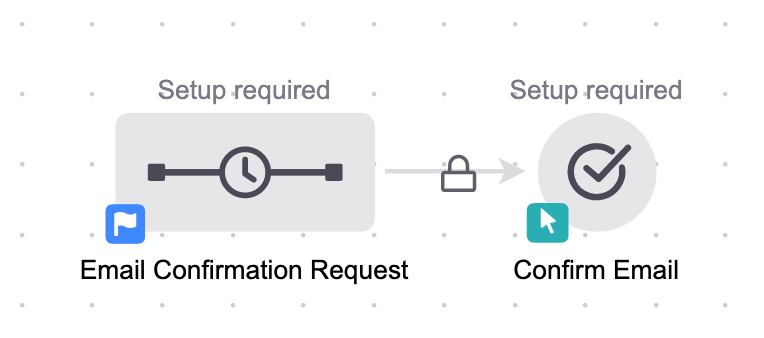
Email Confirmation is more important than ever – and full disclosure: the Email Confirmation process in Keap (formerly Infusionsoft) has a few quirks.
You may have seen the three Campaign Builder Gotchas I shared, #3 is still one of most popular posts on my blog, but today I want to highlight an issue I’ve seen people stumble on with the Keap Email Confirmation process.
If you have no idea what I’m talking about, take a look at this article for a complete breakdown of the what, how and why behind using an Email Confirmation sequence.
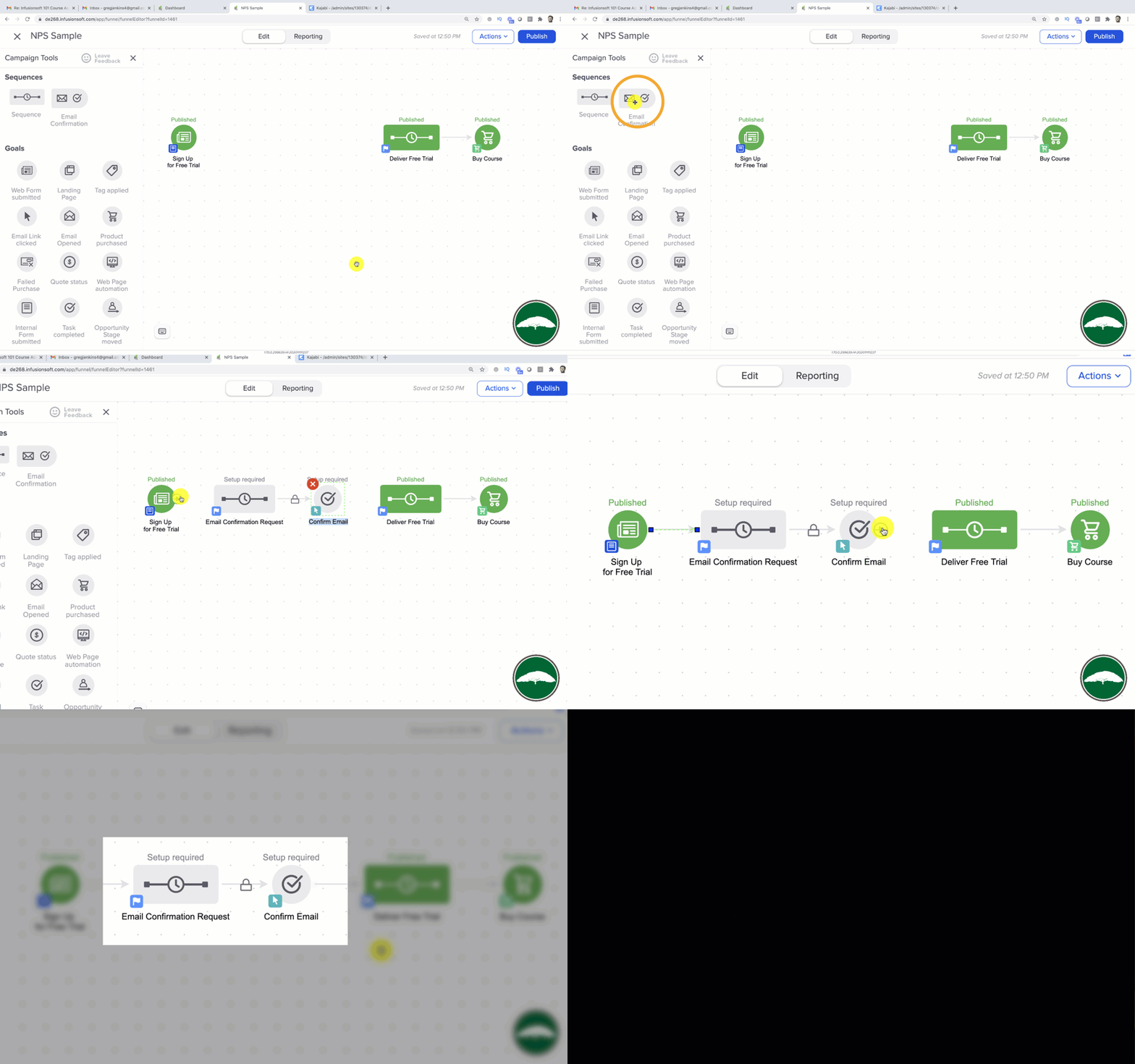
Now, I strongly recommend giving your prospects the chance to confirm their email address, and it’s not terribly hard to do that. Effectively it involves dragging out a pre-bundled campaign process and adding it between two existing steps in your campaign. Then, you just configure it and you’re off to the races.
Unconfirmed folks who reach that part of your campaign will have an opportunity to confirm their email address, and people who have already confirmed will skip right over it as if it’s not even there. All good so far.
The challenge I want to address arises when you give someone the opportunity to confirm and then they don’t click the confirmation link. What happens then?
Well, by default the contact will be stuck in the confirmation sequence. That means they’ll never see the exciting stuff you’ve got planned for them after they click, and that’s not okay.
This causes a big problem if your customers are expecting to receive access to something they just requested, or worse, something they just bought.
Okay, so there are a few ways to solve this issue, and if you give me 6 minutes of your time, I’ll show you exactly what we’re working with:
Just to clarify… this blog post refers specifically to the Max Classic version of Keap (formerly Infusionsoft), but the “gotcha” and advice I’ve outlined also applies to the Pro and Max versions of Keap.
Keap, Software Updates
We’re back in action with another update on the Max Classic Version of Keap (formerly known as Infusionsoft), and there are a few features I wanted to highlight this month that will make our lives easier – and one feature that I’m not as excited about. Skip to the bottom if you want to see my video recap:
 Feature #1: Additional Currency Support
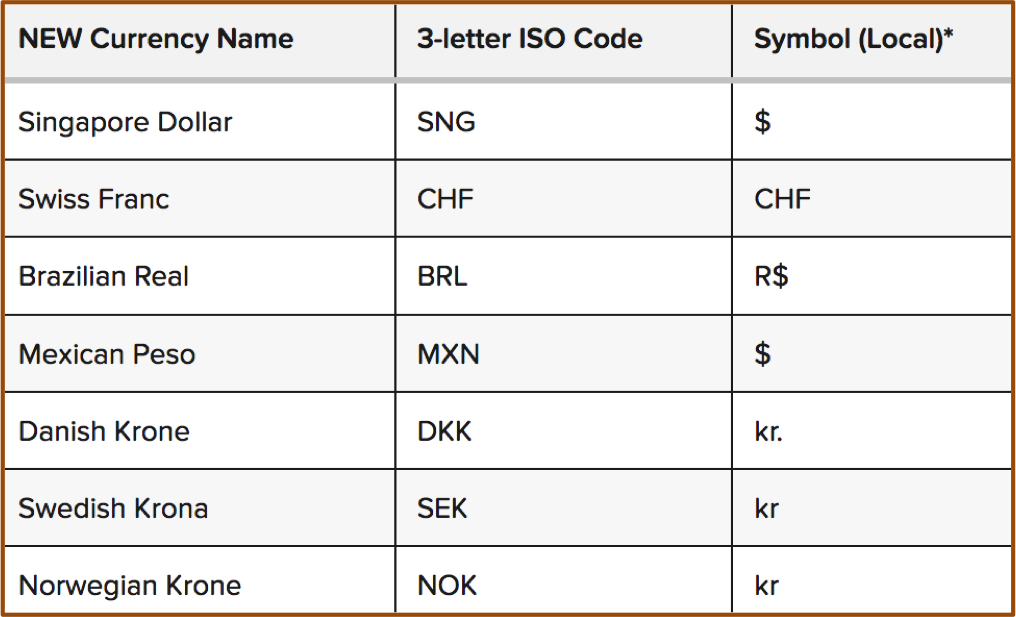
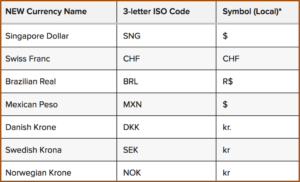
What it does: This update allows Keap users to use about a dozen new currencies that were previous unsupported.
Why it matters: Well, if you process orders in USD or AUD or the Euro, this might be less of a big deal, but if you’re in a country where your currency wasn’t supported previously, then this update just might be the ticket to allowing your customers to transact in their own local currency.
Caveat: Yes, this is exciting, and it’s a little bit of love for the normally neglected e-commerce section – but I just want to be clear that you can still only use one currency at a time.
Feature #2: The Signature Snippet
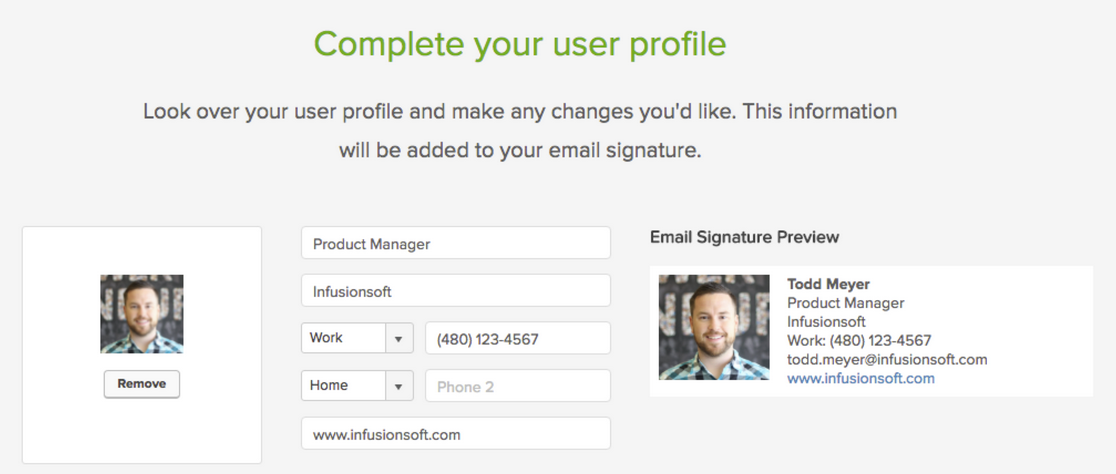
What it does: This update brings a signature block back into the email builder so you can quickly and easily drop an HTML signature into your emails.
Why it matters: This matters because if you’re sending a lot of emails, it isn’t realistic for you to have to type out your signature each and every time, and many people didn’t know about the option of using a merge field to drop in the owner’s siggy, so this makes it easy to add your information in an attractive professionally formatted way.
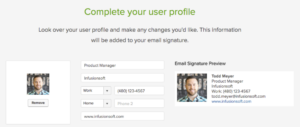
Bonus: This new signature snippet actually behaves a little differently than it did previously.
Feature #3: The Email Footer
What it does: This gives you the ability to edit the footer of all emails built with the new beta email builder.
Why it matters: This is really important, because now you can frame up the unsubscribe option to make sure that people know that they’re completely opting off your list. It also means that if you need to add a legal disclaimer of any kind, well, you can do that too.
Caveat: Yeah, I know, this isn’t really a new feature either, it’s just something that they’re bringing back – but hey, it’s pretty slick. I really like the way they’ve handled this. The one complaint I have is that the text options don’t seem to support any other fonts, sizes, colors, links, etc. You can add text language to frame up the footer, but you can’t do much more than that….yet.
 Feature #4: Automation for Quotes
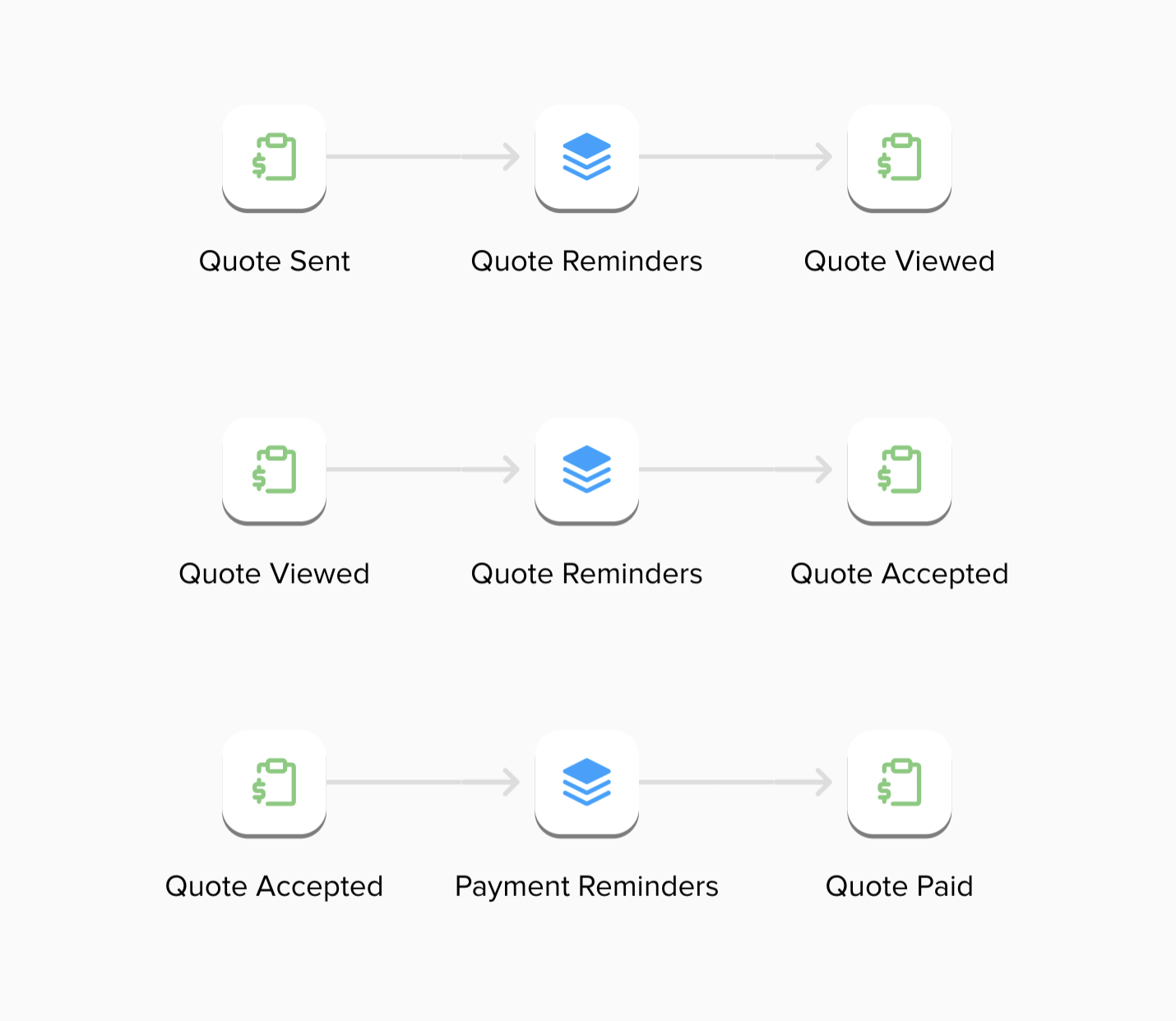
What it does: Now you can trigger or stop automation when someone interacts with a quote you’ve sent them.
Why it matters: This is HUGE. Until recently, quotes were pretty basic. In fact, I didn’t know more than a handful of users who were actually taking advantage of them. But now they’re stylin’ and profilin’. This update brings us the ability to launch automation or follow-up when someone views a quote, and if they accept it, pay it, or decline it, then we can stop that follow-up and move them to a different part of the funnel. It’s really slick and makes the quoting feature much more usable.
Caveat: The drawback I see on this one right now is that it’ll get a little hairy if you have more than one open quote sent to a customer at the same time.
 Feature #5: Campaign Builder Facelift
What it does: They’ve redesigned the campaign builder and moved the tool palette over to the left side of the screen, and cleaned up the top bar to be a little sexier as well.
Why it matters: Well, it’s mostly an aesthetic change. So, I’m not sure it actually matters all that much. But I think the goal is to bring the type of interface we use with the new email builder to the rest of the application. I imagine we’ll see this type of layout and interface showing up in the landing pages and web forms before too long as well.
Real Talk: I’m the first one to say that I’m a total Keap fan boy, and I recognize that I usually cut them more slack than most people – but I’m really not feeling this update. If you’ve been a Keap user for a few years, you may remember that when the campaign builder was first introduced, they had a menu with all the different goal types, and people could select one, and then adjust the goal method to track what they wanted. You were basically just choosing the picture, because you could configure the goal however you liked.
Then at some point they cleaned it up, and trimmed it down to just one goal. And you’d drag out that goal icon then choose what you wanted it to track. Once you had selected the goal, it would automatically adjust the icon image to reflect what you had selected. I didn’t love this update because some people had gotten really attached to using different goal icons to reflect different parts of their customer journey, and this removed the ability to choose what you wanted the goal to look like.
Well, now they’ve updated it again, and with it we’ve lost some additional functionality. And here’s where I take my issue: With this new update we can no longer change what a goal is listening for, or the image that represents it. Each goal has a dedicated “method” and a dedicated “icon” and if you change your mind, you can’t click on the little badge and change it; you have to delete the goal, grab a new one, name the new one, and reconnect it to all the various pieces.
It’s not the end of the world, but I’m having a hard time understanding why this is better. Maybe it’ll grow on me with time, but so far I’m not swooning.
Alright, all in all, a pretty solid release. It’s not perfect, but that’s okay, it has a lot of things that we’ve been asking for; and that demonstrates that Infusionsoft is listening. I believe it’s our job as the user community to help guide where the product goes – and the easiest way to do that is through constructive and thoughtful feedback. If you are loving what they’re doing, tell them. And if you are concerned about something you’re not seeing, tell them that too.
Thanks for reading, I’d love to hear what your favorite aspects of this release are
Campaign Builder, Guest Posts, Keap, Software Updates
 Buckle up sports fans, I’ve got an awesome blog post comin’ in from one of the best and brightest in the Keap building. Today’s post comes from Brett Fairbourn, a fellow automation geek and Keap educator. You may recognize Brett (or his voice) from his engaging and exciting update videos when Keap has a new software release, but today we’ve asked him to dig a little deeper and give us some insight into how some of the newest features might be used for your business. Brett wrote this post and created these videos exclusively for the Monkeypod readers, enjoy!
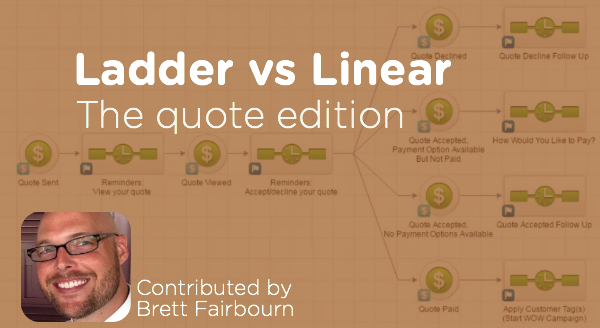
I was recently re-reading this gem from Reyna Bovee as I prepared to record the September 2016 product update video for Keap. I wanted to double check my logic, because the old linear vs. ladder conversation just got a little larger. The September 2016 update introduces the “Quote Status” goal to the campaign builder, and quotes work a lot like opportunities in that you can have several of them attached to one contact.
Here’s more on the quote status options.
But wait, first of all, can I just geek out for a second?
Quotes in Keap were, until very recently, freaking terrible. Man it feels good to get that off my chest. They were practically useless. BUT NOW, oh man, if you have a hands-on process, the quote-to-invoice-to-payment is so streamlined. And if your business is compatible with a more automated approach, now we have that, too!
You just have to keep a couple things in mind.
Like I said, as with opportunities, you can have several quotes attached to a single contact. But it’s not the quote that goes through the campaign, it’s the contact. So 5 quotes sent to 1 contact = 1 contact in the campaign, and that contact is going around viewing quotes and clicking on things all willy nilly. This can get confusing, and it can cause problems, especially if you’re using the linear approach to building your quote automation campaign.
The problem with the linear model is that any downstream goal will stop all upstream sequences. In other words, if I’ve viewed one quote but haven’t acted on it, and then you send me another quote, acting on either one of those quotes will stop all preceding automation. That means no more reminders to view the first quote if I haven’t done that yet.
Do I sometimes have multiple quotes pending for one contact at the same time?
If yes, you might want to use a ladder-style quote automation campaign.
If no, then the linear campaign will work great for you (and it’s easier to conceptualize and build, so that’s nice).
To be honest, it probably doesn’t matter in most scenarios, because we’re only talking about a two-stage process: the stage between “Quote Sent” and “Quote Viewed,” and the stage between “Quote Viewed” and the customer’s response. In most cases, it’s not going to be vital to run both of those stages of automation at the same time. But hey, maybe for your business, it IS vital. So here’s the scoop:
First, here’s the rundown on the linear campaign:

Next, here’s the ladder campaign:
So there you have it – two different automation structures using the Quote Status goal that can help support your quote sending and payment collection process. The linear process isn’t wrong, per se, but the ladder methodology has a range of benefits it offers. And in case you missed it, here’s a great post outlining the ladder process you can use for supporting a sales pipeline.

Customer Experience, Marketing, Small Business
Marketing automation is a powerful way to help businesses scale processes that would otherwise require additional headcount, or an inordinate amount of time. In fact, that’s true about automation in general; not just marketing automation.
When I ran my first business, installing draft beer systems in Lansing, Michigan; well, I didn’t do the best job. You may have heard this story before, but the point is that I wasn’t very efficient. I did the things I did, and when I wanted my business to grow, I hustled harder instead of trying to improve my processes. I didn’t know that tools like Infusionsoft existed. I didn’t know that marketing automation was a thing.
Even if I had known, I still would have been resistant.
And here’s why:
Most people treat automation as a way to remove themselves from their businesses. And I don’t think that’s the best use of automation at all.
Let me explain.
Yes, automation is a way to make systems and processes happen more easily.
It’s a way to ensure that things happen in a certain order, or a certain cadence, or with a level of consistency that would be impossible to create if you were solely depending on human assets. And the nature of introducing automation into these processes means that you’re likely no longer spending as much time on it yourself; which, means that you might have more time available.
It’s that reality that creates the dangerous idea that automation removes you from your business. The truth is, it can; but it doesn’t have to. It can also put MORE of you into your business.
Let me make my case: Marketing automation can remove you from your business. And if done poorly, it can create a cold and robotic experience.
But when done the right way, it can create a really effective and personal customer path; one that reflects exactly what you’d like your customers to experience. And it can do it with uniform consistency. (If you’re looking for a full and comprehensive Infusionsoft Review, this is by far the best one I’ve seen.)
This is true for two big reasons:
- You’re designing the automation, so you get to create what you want your customers to experience. That means you’re just doing more of what you would have done anyway, and hopefully that gives you some peace of mind.
- The second reason is that automation frees you up to do the things you are best at, or the things you enjoy. I have a stack of 16 thank you cards here for people who have bought the IS Starter Kit this week; and I fully recognize that I could outsource this and have someone else write them – but I have automated enough of my business that I have the luxury of choosing to write these myself. Now, I don’t have the best handwriting, but the fact is I enjoy writing out the name and address, I like seeing where people are from, and I like writing a unique message to everyone who buys. It makes me feel a little more connected. So, I’ll probably continue to do this for as long as I can.
My point is this:
Automation should create the confidence that your customers are experiencing what you intended.
It should increase the freedom for you to choose how you spend your time.
If this resonates with you, or you still do something silly like writing thank you cards by hand just because you can, I’d love to hear it. Or, if you feel differently and think I missed the mark, I’d love to hear that too.
What should I automate?
If you’re on board with the idea of automation but aren’t sure where it would fit – we’ve built a course specifically designed to help you identify opportunities in the customer journey where we’ve seen automation solve problems and create momentum.