If you’ve ever met Dave Sherman, you probably noticed that he’s a genuine people-person. He’s a talented networker – but he doesn’t do it solely to be strategic, he does it because he loves people. He has a magnetic personality, one that naturally says “Come talk to me”. So, when I asked Dave to contribute to my blog, it only makes sense that he chose to write about attracting people to your business.
Attract More Prospects Today
If I were to ask a small business owner what he needs most in his business, more sales would probably be the most popular answer. However if he truly wants to grow a successful business, he needs to spend less time focusing on more sales and more time focusing on more prospects.
One of the most powerful ways to attract more prospects to a business is by creating lead magnets. Lead magnets focus on the idea of attracting people toward your business by providing them with value added information that can benefit prospects.
If you are like most small business owners, you tell everybody about the features of your business. How long you been in business, where you are located, who your best clients are, why you are so wonderful, etc.
Unfortunately, that is not what your prospects want to be hearing.
They want to hear how your business will directly benefit them.
Most people agree with this. You’re probably reading it, and saying “Yeah, that makes sense”, or maybe even “Duh”. But the reality is that acknowledging it, and executing on it are quite different.
When it comes to creating successful lead magnets, you need to focus on topics that will directly benefit your prospects. You need to focus on things like how they can avoid common mistakes, avoid competitor frustrations, achieve underlying goals, etc.
But how? That’s the million dollar question, right?
Based on those three topics, here are three templates you can use to generate a powerful lead magnet that will attract lots of interest from your prospects.
Avoiding Common Mistakes
Three mistakes most people make when___________________________.
Do you make these three mistakes when__________________________?
Three common _________________ mistakes you don’t know you’re making.
Avoiding Competitor Frustrations
Three questions to ask your ______________________________ before hiring them.
The three biggest problems with________________________________.
Three important things to consider when_________________________________.
Achieving Underlying Goals
Three things you absolutely need to know about___________________________.
Three keys to fixing your _____________________________ problem.
Three proven techniques to better_____________________________.
There are dozens of ways to generate a lead magnet – and as simple as it sounds, you may start with what your prospects are already asking. What questions do you answer on a regular basis? If you were in your prospects shoes, what would you want to know? What are the most common objections people have?
Remember, you’re the expert in your field. Your prospects want the knowledge that is in your head, you just have to be willing to put it out there!
People want to be guided by someone who knows what they are talking about, but small businesses are often to humble to really embrace this. Sometimes we get too close to the knowledge we have, so close that we can even forget that it’s valuable, and unique. You are an expert, and people want your guidance. Take the information that you have – turn it into a lead magnet – and share it with the people that want it.
By incorporating powerful lead magnets into your small business marketing, you will start generating much more interest in your business which will lead to more prospects in your funnel.
Always remember that people don’t care about your business. They only care about what your business will do for them.
Last week I wrote a post about a gotcha that can trip people up as they’re building campaigns in Keap. Well, this week I want to tackle another common misunderstanding I see.
By default, what happens when a goal is achieved?
The sequence before it is stopped.
The sequence after the goal is started.
This brings us to gotcha number two.
NOTE: To cover this gotcha in with the level of detail it deserves, this blog got a little longer than I anticipated. So, I recorded a quick video overview as well, if that’s more your speed, scroll to the bottom for the TL;DR version.
Gotcha #2:
The key part of that question above is “by default”.
And the reason I’m emphasizing that phrase is because that isn’t always the case.
Keap has specific sequence settings, and goal settings that can affect the expected behavior, and can make number one or number two above untrue.
If you don’t thoroughly understand the different settings, then it’s really easy to think you have things figured out, and be totally caught off guard when something doesn’t work the way you expected.
First, let’s talk about sequence settings.
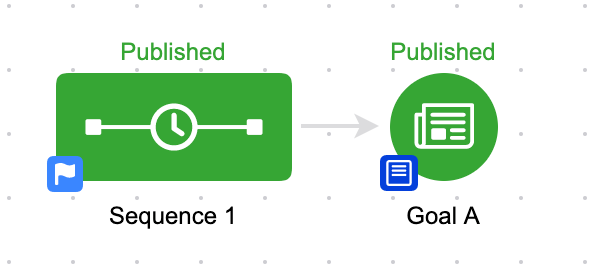
Have you ever noticed how each sequence in your campaign has a little badge in the lower left hand corner?
By default, it looks like a white flag on a blue background. This little graphic is the indicator as to whether or not this sequence will stop when a goal downstream is achieved, or whether it will keep going.
If you ever went to the dentist as a kid, you probably remember paging through Highlights magazine while in the waiting room – and if you were like me, you took great pride in your ability to dominate the “Spot the Differences” game.
You know, they’d show you two similar images, and your job was to identify that in one picture the kid had an extra freckle, or an untied shoelace.
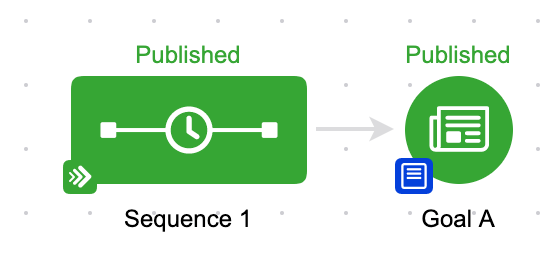
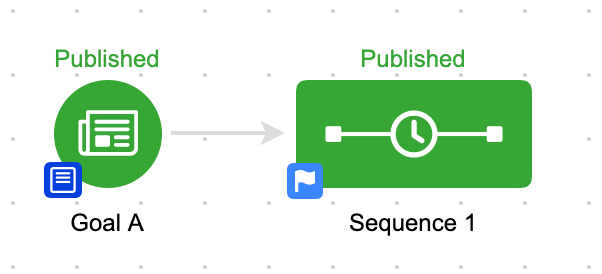
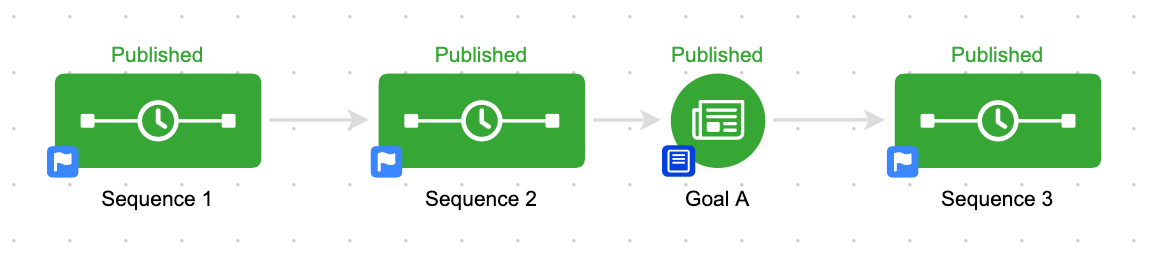
Anyway, this is kind of like that. The campaign is identical, with the exception of the little colored badge on the lower left hand corner of the sequence.
In the first image the sequence WILL stop when Goal A is achieved, in the second sequence it WON’T stop when Goal A is achieved.
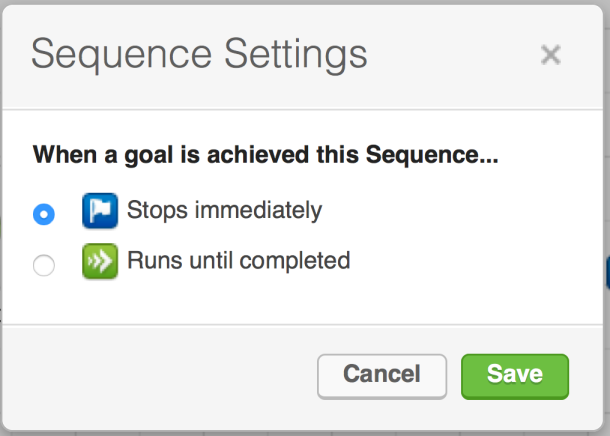
The reason this confuses people isn’t because it happens frequently. Most people have never clicked on that flag, and have never changed this setting:
I’m covering this here because it breaks the commonly accepted rule “sequences stop when goals are achieved”. When things break the rules we’re used to, it can get confusing.
Now, the natural question at this point is “Why wouldn’t I want my sequence to stop?” – and the best answer to that is that sometimes you’ve set certain expectations, and you need to deliver on what you said you’d do.
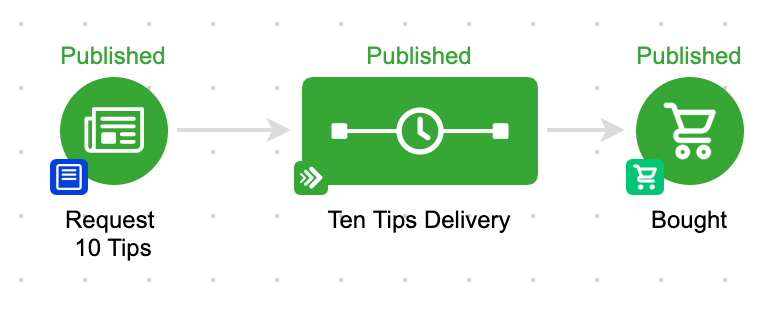
Like in this campaign here:
If we’ve set the expectation that we were going to send someone ten tips, well, even if they buy the upsell we’re offering, we still want to deliver the ten tips we’ve promised. (Yes, there are dozens of other ways to handle this specific scenario, but I’m illustrating a point here guys…)
If you find this type of stuff valuable, or you want a place to ask questions – then you might get a lot of value from our private community. Check out the OG Membership details here >>
Okay, let’s move on to the second half of this Gotcha. Goal Settings.
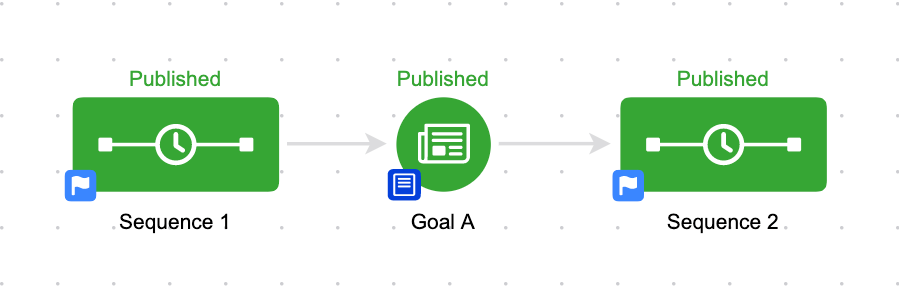
When a goal is achieved, a contact starts the sequence following the goal, right?
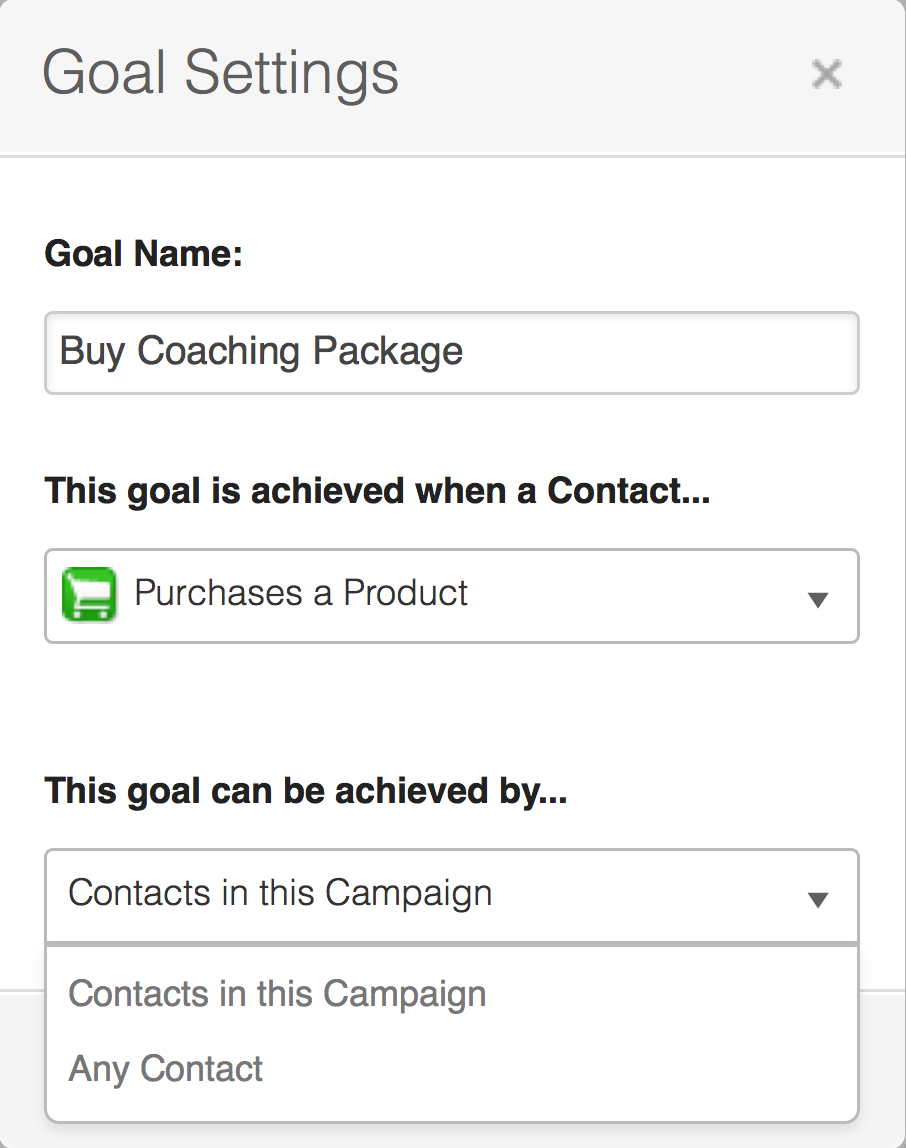
Well, yes. Normally. But again, there is a setting that controls this. You see, goals work either globally, or locally. By that I mean they can either be configured for all contacts anywhere, or only for contacts who are already in that campaign.
What this means is that you can build goals that are listening for anyone anywhere, but you can also build goals that are only listening for contacts already in that campaign to take an action. The global goals are commonly referred to as “entry points”.
Trust me, this sounds a lot more complicated than it actually is.
Let’s look at a few examples:
We’ll start with a really easy one. In the above scenario, if any contact achieves Goal A, they will be added to Sequence 1. In this scenario, this goal is considered an entry point to the campaign because there isn’t anything prior to it. So, if a goal doesn’t have a sequence before it, then it is automatically an entry point, and is fair game for any contact.
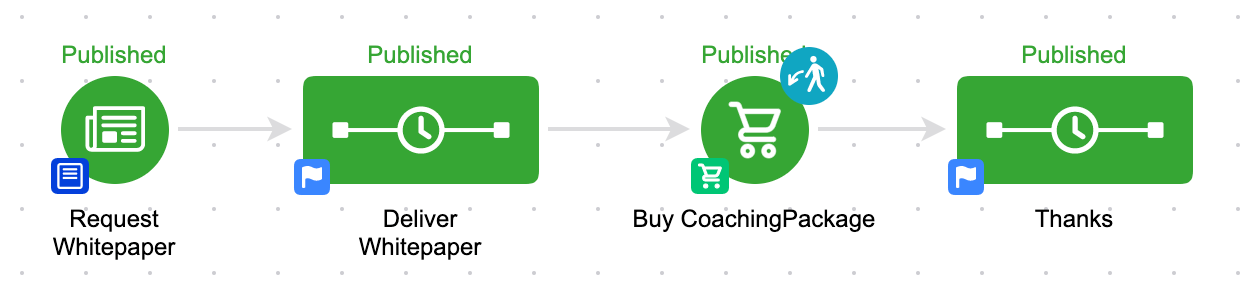
But for goals that are “landlocked”, they are not naturally entry points. Check this one out:
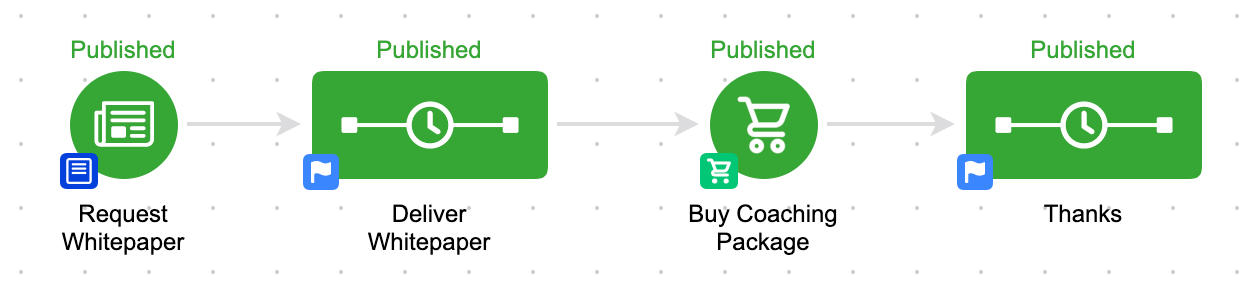
In this scenario, if someone requests my whitepaper, they’ll get the whitepaper delivered in the next sequence, and then they’re driven to purchase, and after the purchase they’ll get some sort of thank you.
But, if someone buys my coaching package who is not in this campaign, then they will not be added to the thank you sequence. The purchase goal is landlocked, and is not currently an entry point. So that means that the goal is only listening for purchases from the group that is already in this campaign.
Again, the natural question is: “Wouldn’t I want the thank you sequence to go to all people who buy, even if they skip the whitepaper part?” And the answer is that “Yeah, you probably would”.
But what if you wanted to have some sort of specific follow up, and you wanted to craft your thank you message to be really specific. Something like:
“Hey, thanks for buying my coaching package. As you probably saw in the whitepaper, I’m really focused on three things, X, Y and Z. And this coaching package is the perfect way to take the methodologies I talked about in the whitepaper and translate them into results for your business.”
Well, the way it’s currently configured, you could be that specific because you know the only people who can get into the “Thanks” sequence, are those who also came through the whitepaper sequence.
But, let’s say for a moment that you didn’t want that. Well, if you click on the colored badge in the lower left hand corner of any goal, you can denote whether or not you want that goal to be an entry point. It’s called Goal Settings.
This one little setting is often overlooked, but it can be really useful for your more complex campaigns; where you may need to have multiple entry points throughout the campaign.
One thing to note, is that some goal types don’t permit you to make the goal an entry point.
For example, link click goals, and task completion goals don’t allow you to configure them as entry points, because in order for someone to achieve one of those goals they would have to have been in the sequence prior to the goal.
Additionally, if there isn’t a sequence prior to the goal, it also won’t let you set it as an entry point. It’s an entry point by default.
So, now that we’ve changed the goal setting, let’s take a look at that same campaign.
You should notice that the Purchase goal now has a visual indicator letting us know that it’s now an entry point. The little icon in the top right, a dude with a green arrow, shows us that contacts can achieve that goal, and be added to the campaign at that point.
Okay, so, here’s the last twist to all this.
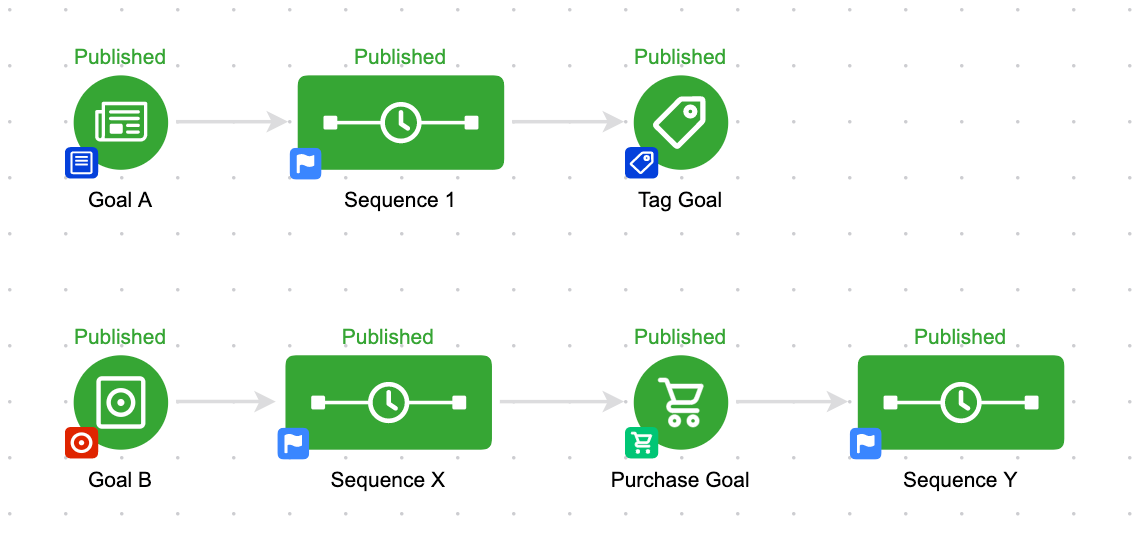
When we talk about a “Campaign” – we’re talking about EVERYTHING that is on the same canvas. So that means if they are anywhere in the campaign, that all goals in that campaign are considered entry points. Even if they are seemingly unrelated, and there’s no connecting lines between them at all.
Here’s an example:
This is one campaign. Even though there are separate and parallel processes, because they’re built on the same campaign builder canvas, the system thinks of them as being the same campaign. So, if someone is in Sequence 1, and they achieve the Purchase Goal, they’ll not only stay in sequence 1, but they’ll also start Sequence Y.
Okay. Like I said originally, this sounds more complex that it actually is.
What I’ve found with things like this, is that it can be hard to understand these concepts before you actually need them because the information seems rather abstract.
So, that’s why I’ve included so many examples, with the hopes that if you come across one of these you’ll have an idea of what the expected behavior looks like.
But please, ask questions if you’re unclear on any of this. I’m happy to elaborate.
If you love this stuff, and you want to dive deeper, I strongly recommend checking out the Advanced Automations Complete Collection course from Keap Academy, covering the fundamental basics and bells and whistles – everything you need to know about the campaign builder.
Oh, and if you’re the type of person who prefers a video tutorial, here’s an overview:
Where do I learn more?
The Keap Academy platform features a robust course, The Advanced Automations Complete Collection, covering the fundamentals for building campaigns, from basic to advanced features and settings.
Back in the saddle this week is my friend, and Infusionsoft’s campaign builder Mad Scientist. For a more thorough introduction check out one of his other posts on the Monkeypod Blog. Ladies and gentlemen, the man, the myth, the hair, Paul Sokol.
The Teenage Mutant Ninja Turtles Email Marketing Pet Peeves
As a child, I remember reading about the “pet peeves” of the different ninja turtles in a book I had about the movie. This was a new term for me so I asked my mom about it and she explained “its stuff you don’t like”.
Nothing to do with your pets. Strange term but alright.
For the rest of my life, I’ve always thought about the ninja turtles whenever I saw the term “pet peeves”. So, when Greg asked me to write about my email marketing pet peeves, naturally I thought about those four turtle dudes.
Today, I’d like to have some fun and offer some actionable insights based on fictional characters. Think of it like fan non-fiction for your small business.
Here is what I believe would be the pet peeves of each ninja turtle if they used email today:
I’m going to start with my favorite ninja turtle because its my blog post and you can’t tell me what to do. Side-note: He’s the reason my favorite color is purple 🙂
Donatello is the smart nerdy guy. He definitely understands the value of good working systems and how things interact with each other. This means he would definitely not enjoy too little too late transactional messages
A “too little too late” transactional message is when the company follows up WAAAY to long after they should have for some interaction.
A common offender is when restaurants have a little card for you to join their email list for monthly offers and such when you are paying the bill. Then you completely forget about it. Then, months later, you get an email that thanks you for joining the list.
“Um, what? Oh yeah, I ate there in March…”
This is bad for a few reasons. First, it puts you at much higher risk for spam. If someone doesn’t remember signing up because you waited too long, you aren’t a welcome visitor in their inbox. Spam button activate!
Next, this actually is demonstrating your lack of concern for the inbox relationship. If I owned a restaurant, I’d be unreasonable about adding all new emails that I got every night after closing. By waiting too long, it reduces the impact of your welcome message. And if you wait for much too long, it basically conveys the message, “Oh yeah, you gave us your email huh? Well, here you go I guess…”
Doesn’t leave you with a warm and fuzzy feeling at all.
Lastly, it actually puts your lack of systems front and center for your customers to see. As a consumer, I’d expect to be added to the list within a week at the most. By waiting too long, it just shows that you really don’t have your shiz in gear behind the scenes. So what does that mean is going on behind-the-scenes in the kitchen…
I know I used a restaurant example this whole time but this is something to avoid for any business. I can’t tell you how many times I’ve signed up for a newsletter, never received a confirmation email, then months later I get something that I don’t recognize. Know what happens then? I unsubscribe and mark as spam.
Raphael was the hot head; the guy with a temper. Really, he’s a super unique guy and expects to be treated as such. This is why being treated the same regardless of inbox interaction would be his biggest pet peeve.
Here is what I mean: In this day and age, with how advanced email marketing technology is, there is simply NO EXCUSE to treat everyone the same. For every email, there are (primarily) three outcomes. First, someone can never open the email. Second, they could open the email but never click through. Third, they could open the email AND click.
Why should you treat those three types of people the exact same? You shouldn’t. And that’s the point.
In fact, consumers today are hyperconnected and expect to be paid attention to. If you have an important email going out that someone really needs to read, you would be remiss to assume they have read it. Its easy enough to track open rates, so if they need to know this information, re-send it but ONLY to those who didn’t open. If you really want to let people know you care about the inbox relationship, address the fact they didn’t open the email. Don’t be creepy and big brother-ish about it, but by being authentic and up front about it can only bolster the relationship.
Here is one final example that, I hope, will drive the point home. Let’s say you create an event on Facebook and invite a bunch of friends. Then, lets say after a week you have a group of people who said they are going, a group who said maybe, and a group who said they couldn’t go. Would you really send the same message to all three of those groups? When you aren’t paying attention to inbox behavior, this is exactly what you are doing.
Michaelangelo was the cool guy. The laid back party dude. Just because he is a chill guy that doesn’t mean you can assume his interest which is why I believe his biggest email pet peeve would be assumed opt-in just because you are on the list.
Doing launches and promotions are great. They get important products and services into the hands of customers that can benefit from it. Quite often, introducing new products/services can be done to your exist email list.
There is nothing wrong with that. The problem is when you ASSUME they are interested.
If you have a whole email series ready to go, just because someone is on your list doesn’t mean you can assume their interest. Meaning, you can’t just start hammering them with emails without putting yourself at a severe spam risk and, more importantly, hurting the existing relationship.
Even worse, sometimes I’ve seen people do a reverse opt-in. Someone will send an email that effectively says, “Hey I’ve got this launch coming up and you’re going to be getting those emails. If you aren’t interested, click here”.
I can understand why someone might want to do that, but from the recipients standpoint its the wrong side of the coin. Rather than assume interest, tell people about it and have them take some action to choose to receive it.
You know who does this? Some more elite A-list marketers out there. Frank Kern is selling stuff all the time, but if you aren’t clicking and opting into his new stuff, you’d never know. Its all behind the scenes stuff. He NEVER assumes you are interested in what he has to offer even though you are on his list. And I’m pretty sure Michaelangelo would appreciate that 🙂
Leonardo was the fearless leader. He got things going and kept everyone safe. When it comes to email, the subject line can definitely be thought of as a message leader which is why I’m pretty sure he would be against useless preheaders.
Most email clients will show a small snippet of the email’s body after the subject line. A preview of the content.
You know what’s annoying? Seeing the dreaded “Can’t read this email. View in Browser” as the email preview. Giving people a different way to read the email is not a bad tactic. Its a good one. But its not the best way to leverage that exclusive preheader real estate.
I tend to think of things in terms of classic direct marketing. The subject line is the headline. You know what the preheader is? The sub-headline. The whole point of those two elements are to get the viewer reading further.
Use your email preheader as an extra nudge to get people to even open the email. Just like direct mail, if nobody opens it, it doesn’t matter how good the content is.
The preheader should further bolster the promise of the subject line while still remaining intriguing enough to get people to open and read.
This one tactic alone can boost open rates dramatically when done right. So why not make Leo proud and give it a shot?
What do you think? Can you relate to some of these? Let me know what you think in the comments below, cowabunga!
The Campaign Builder is the single most powerful marketing tool I have ever seen. For me, there’s no question about it.
It can solve so many problems, and can work for so many different businesses. But the very nature of having a tool that is this robust, is that there is a level of complexity associated with learning it.
I want to highlight three of the most common “Gotchas” that I see with the Keap campaign builder. I chose the to use the term “Gotcha” carefully- these aren’t bugs.
They aren’t myths. They’re just intricacies for using the campaign builder, and once you understand them, things will work a lot more smoothly for you.
Gotcha #1:
Goals start and stop sequences. Most people know that, right? But their impact can extend beyond the sequences to their immediate left and right.
Let me show you what I’m talking about.
This is a pretty basic scenario here. If you have contacts in Sequence 1, and they achieve Goal A, they’ll go into Sequence 2. No brainer.
Now let’s step our game up just a little bit. Have a look at this one:
This is effectively the same scenario, with just one twist. Sequence 1 is not directly connected to Goal A.
It doesn’t matter.
If someone is in Sequence 1, and they achieve Goal A, they’ll jump over Sequence 2 entirely, and they’ll be added to Sequence 3.
This is because, by default, goals stop everything “upstream” from them. So, if the contact is in this campaign, and the sequence connects to the goal (directly or indirectly), then by achieving that goal, the contact is extracted from their current sequence and added to the appropriate new place downstream from the goal.
Let’s try this one more time. Check this one out:
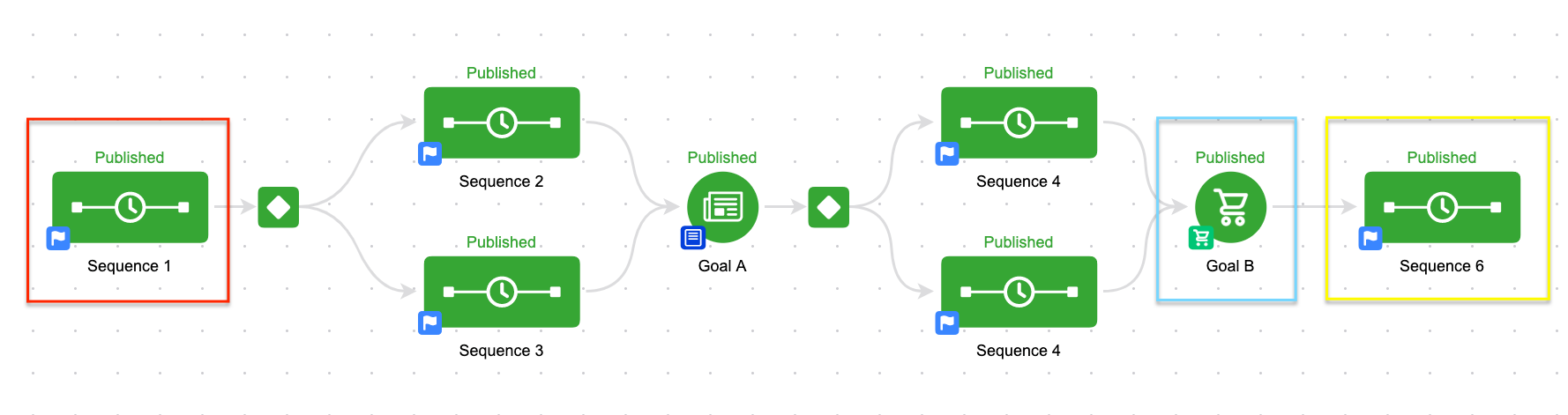
So, now things have gotten a little more complex. But the logic doesn’t change one bit. If you’re in Sequence 1 (red) and you achieve Goal B (blue) you’ll be removed from Sequence 1 and added immediately to Sequence 6 (yellow).
The reason this works is because these two icons are connected. I know there isn’t a line connecting them directly, but they’re indirectly connected. Sequence 1 connects to Sequence 2, which connects to Goal A which connects to Sequence 4 which IS connected to Goal B. Right, kind of a round-about way, isn’t it?
Think of it this way. Goals are things we want our prospect to do. And sequences are the things we do in order to encourage them to achieve those goals. So, if someone is in Sequence 1, and they achieve Goal B, the campaign builder just says “Oh, okay, great. We don’t need sequence 1, 2, 3, 4 or 5. We can just skip all that jazz and push them into Sequence 6.”
In the above campaign, they could be in any of the first 5 sequences, and if they achieve Goal B, the outcome will be identical. It’ll stop them where they are, and will add them to sequence 6. If it helps, you could draw lines connecting Sequences 1, 2 and 3 to Goal B, but functionally the campaign won’t work any differently, and aesthetically it’ll be…um, painful.
I’ve been mentally preparing this post for a while now, but this facebook post, and an awesome conversation with Christopher Sutton this morning was just the impetus I needed to finally write it.
Here’s the reality: The campaign builder has quirks. Nuances. Intricacies. Call them whatever you like. If you’re going to use it, you’re bound to come across them from time to time. The only solution I know to prevent frustration is to arm yourself with education. Once you know how it works, even if you don’t agree with it, you can at least plan for it.
If you don’t educate yourself, then there’s a higher likelihood that you’ll think something is a bug, simply because you don’t understand it. Or you’ll hire someone to build something for you, but not be able to use it because you don’t understand how it was built. If you’re looking to understand the campaign builder from the very basic fundamentals, to the more advanced features and nuances, there are a number of ways to do it – start with the Advanced Automations complete collection from Keap Academy.
The Keap Academy platform features a robust course, The Advanced Automations Complete Collection, covering the fundamentals for building campaigns, from basic to advanced features and settings.
My goal is to save you money in this post. (Strong opener, right?)
To run a small business, you need to be good at a lot of different things. Sure, you want to be good at whatever your trade is, that’s probably most important.
But it’s no longer enough to just be awesome at whatever you’re awesome at.
There’s a whole spectrum of other skills that are required in order to make your business hum; copywriting, graphic design, blogging, SEO, website management, newsletters, social media, email marketing, hiring and the list goes on and on.
And your options are to either hire someone to do those things, or to learn to do them yourself.
Hiring them out can get expensive. And doing them yourself can be really time consuming.
Having a basic level of comfort with creating graphics (or any skill) can be really liberating for you.
Too many times I’ve seen small businesses who feel shackled by a designer who isn’t getting back to them. Whether with web design work, with graphics, or video editing, the fact remains – it isn’t fun to be dependent on someone else.
And I’m not suggesting you devote weeks or months learning one of these new skills, but I am proposing that a basic foundation of knowledge will help tremendously. You might find that there are fewer projects that you end up outsourcing. Or, you might find that you’re able to reduce the number of design iterations it takes to get something done, because you can communicate your request more clearly. The list of benefits is pretty long.
So, today I want to introduce you to one of my favorite tools, Pixlr. (And it’s free)
Pixlr is a photoediting tool, and I’ve used it for years. It can do a lot of the basic things you can do with something like photoshop – apply filters, add captions, resize images easily and remove an unwanted background. There are thousands of uses for it, so I won’t even attempt to show you all the things it can do – instead, I’ll show you one thing you can use it for, today.
Here’s the scenario:
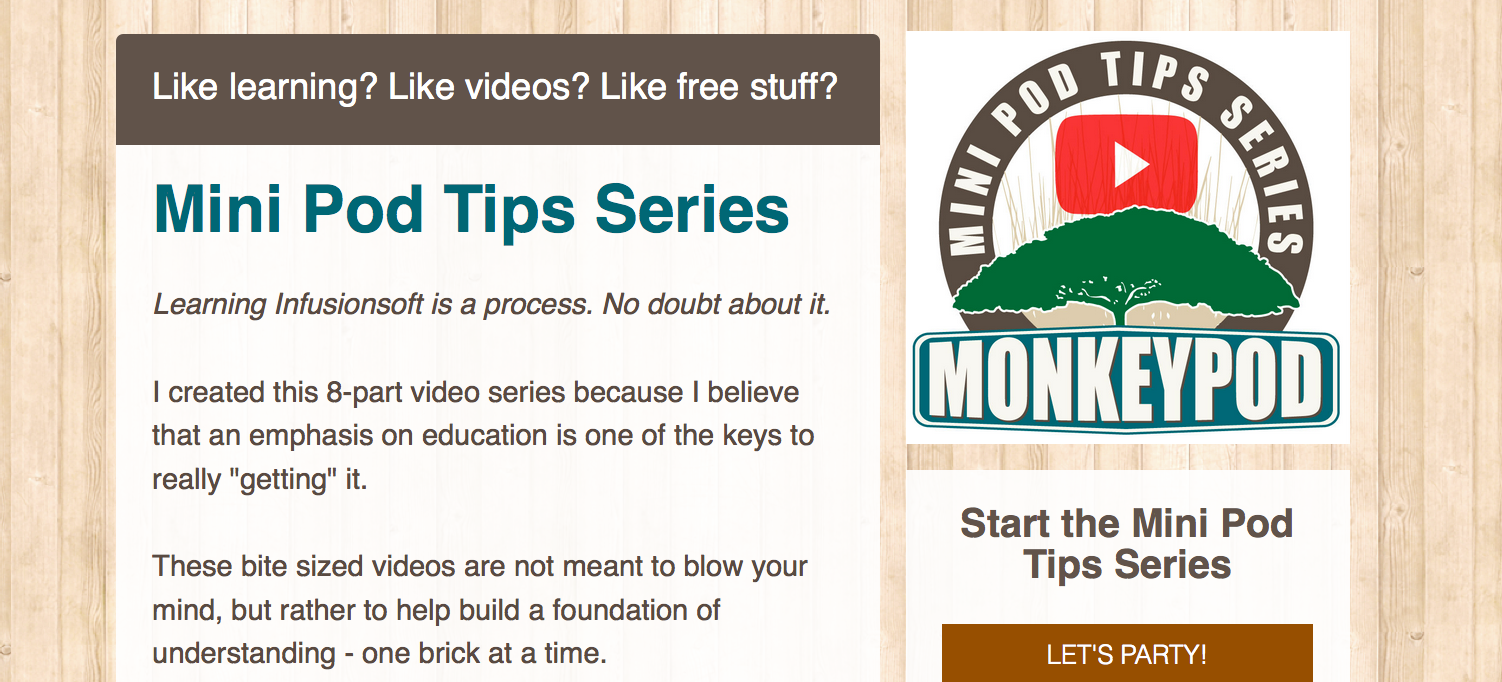
I created a series of 8 free Infusionsoft tips (grab them here). And I wanted a fancy graphic to go along with it. So I hopped on Fiverr and submitted a graphic request then boom, a few hours and $5.50 later I had this bad boy.
Not bad right?
Pretty stylish graphic. But here’s the problem, when I uploaded this to leadpages it had this awkward white background on it that totally ruined the aesthetic appeal the page had.
So, I reached back out to the designer and asked if she could create a version without the background. She kindly informed me that this was a paid service, and would cost $20 more. (She really was super nice, I’d use her again in a heartbeat)
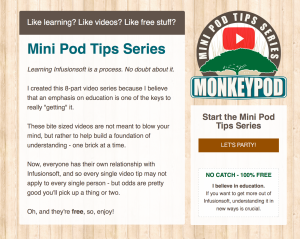
Well, fortunately I have pixlr in my back pocket, so I hopped in there, made the changes I needed and in a few minutes I had a landing page that had the look and feel I was going for.
Not a big deal, right? It’s such a small thing, I know. But having little tricks up your sleeve like this can add up, and the more I use pixlr the more comfortable I feel tackling other tasks I would have otherwise outsourced. (I recently used Pixlr to create the graphics for this FB ad campaign you may have seen)
This simple trick saved me $20 on the spot. Hopefully adding Pixlr to your tool belt can save you time or money as well.
Here’s a tutorial with a detailed breakdown of exactly how to accomplish this with Pixlr:
My philosophy toward these types of topics is that I want to learn as much as I reasonably can, enough so that I can understand the project, and that I can identify when it’s out of my reach and I need to bring in an expert. Plenty of people take that approach with Infusionsoft. They want to learn the campaign builder basics so they know how it works, or learn enough so that they can confidently edit campaigns, or run reports – but they have no intention of building all their own campaigns.
I’m not a graphic designer. This should come as no surprise to anyone. But I also know the value of having attractive graphics to supplement my blog posts, my facebook ads, or to use on my website. For the most part, I just use free images I find online, but occasionally I need something a little more complex, and for these types of things, I balance between hiring out a pro using a service like Fiverr, and dabbling in the design space myself a little bit.
I’d love to hear how you approach these necessary ancillary skills!
Small businesses often struggle with knowing how to grow their team; especially without compromising what they deliver, or what they stand for. If you’re an entrepreneur, you’ve probably poured yourself into your business, and you probably take an immense amount of pride in your company. As you should. It’s that fact that makes hiring people who reflect your brand so important.
When it comes to finding talent, hiring, and growing companies, Lauren Hodgson is in her element. Lauren is a good friend of mine, and I asked her to share some of the wisdom she’s collected throughout her career, which included helping Infusionsoft grow from 200 to 600 employees, in the hopes that it’ll help your team grow.
3 Keys to Designing a Employment Branding Foundation
If you’ve ever been fishing you probably had to select what bait you wanted to use. And depending on how much you know about fishing, you may know that you should select your bait carefully, as it can attract different fish. If you’re fishing for salmon in lake Michigan you’re going to use a very different bait than if you’re fishing for yellow fin tuna off the coast of San Diego.
Let’s take it one step further: If you were a fisherman, wouldn’t you prefer that fish swam right up to your boat? Life would be a little easier if they were just jumping onto the deck instead of you having to seek them out. Of course. By attracting fish to your boat, you’re able to get a larger selection in less time. This saves you time and gets you more of what you want.
You likely already apply this principle to your business with your marketing & lead generation. It’s called inbound marketing. Good news! You can apply it to your hiring, too. In fact, when you do, you’ll find more of the right people for your business. More of the right people is a brilliant thing.
When you apply this principle to hiring, it’s called employment branding. It’s one of my favorite things in the world. It does the hiring for you. When you build an attraction machine, it brings in the right people who want to be a part of what you are creating. Plus, the better you are at proactively attracting people, the easier it is to find (& captivate them) when you need to hire. Employment branding is the magnetic force that helps you constantly fill the pipeline with people who are champions of you and your business. And those are the types of people you want on your team.
Here’s the kicker. It’s a proactive strategy, not a quick fix. Once you do it, though, you’ve got a machine humming in the background, doing the work for you.
By creating this attraction machine, you spend less time sifting bad resumes, asking unnatural interview questions, and crossing your fingers that interviewees are going to work out. This work goes side by side with your current marketing – it’s actually extension of it. In fact, the 3 biggest things you can do for your employment brand are things that should already be doing for your business. This work will attract customers, partners, and employees alike.
Quick recap: You invest the time upfront, it’s work you should already be doing, and it gets you more of the right people for your business.
Here are the top 3 things that create a strong foundation for your employment brand, getting the right people knocking down your door:
#1 Get super clear on who you are and what you stand for
But, seriously. SUPER CLEAR. When people interact with you (in person, on your website, etc.), you want them, in less than 30 seconds, to know what you stand for- your purpose. Not what you do, but why you do it. Tap into why you started. What problem are you trying to solve? What dent do you want to make? What do you want to be known for? The answer to these questions should be jumping off your website.
If you haven’t spent the time on deliberately articulating this or if you need a refresher, you may like the HBR article with the great Jim Collins on Building Your Company’s Vision. Clarity on your vision and purpose is the #1 thing in attracting the right people to you. Great people connect to purpose – they want to be working for something larger and they want that something larger to align with what they care about.
#2 Align every inch of the business to your purpose
Once you are crystal clear on why your company exists, you want every piece of your business to be a mirrored reflection of that existence. It should be evident in how your business behaves – your business model, client interactions, partnership pay structure, how you choose Partnership A over Partnership B, community involvement, website messaging, etc. Align everything to it because these decisions, these consistent behaviors over time, become your culture. Your culture is what attracts certain people and detracts others. Your company culture already exists (even if it’s just you!) – the goal is to intentionally design it in such a way that it is effective in driving what you want. One of the truest principles of culture, represented in a model by Ann Rhoades, former Chief People Officer of Southwest Airlines, is this:
“Leaders drive the values, values then drive the behaviors, the behaviors drive the culture, and the culture ultimately defines the performance.”
Your leadership dictates the culture. Be intentional about how you operate the business. When it aligns – living, breathing, and sleeping it’s most integral form of its existence – the right people can’t help but notice.
#3 Your people are your brand ambassadors
Your employees, including you, are your brand ambassadors. If you don’t have employees yet, think of your vendors, customers, investors, and partners as your ambassadors. Set and share the vision with them. When you’ve got the right people on your team, give them ownership, let them co-create the plan, and they will multiply your efforts way past what you alone can do. When your people have purpose, autonomy, & mastery in their work with you, it creates a multiplying affect that ripples throughout their life and in networks, communities, and people far past your own. This is the employment brand spreading organically. It’s also where you’ll generate employee referrals, hire recommendations, and make coffee connections, matching up you with amazing people to join your team. These “leads” are coming from your network of champions for your business, so they’ll likely be more qualified. More of the right people; it’s the beauty of word of mouth in action.
You are able to create a company that is simply irresistible to work for by focusing intently on the core of who you want your business to be in the world. This work generates the most authentically fitting people that want to be a part of what you are creating. Nothing overcomes a poor fit. Be clear on what you stand for, align your business to it, engage and empower your people to be your champions. This is the foundation of having an employment brand that is constantly filling the pipeline of people who want to partner up and do the amazing work you set out to do.
About the Author: Lauren Hodgson
I am a big believer that when we get clear on what we stand for and partner with others that stand for the same, we can create some pretty rad shit. As an Employment Brand Strategist, I help teams share the mission that they’re on and help them create a machine that magnetically attracts the right people to join their mission. I believe in fit because we are a better world when people can contribute their full selves. Plus, status quo is for the birds. In the past I led the hiring for a fast-growing tech company, Infusionsoft, growing it from 220-650 employees in 3 years. I’ve also led in the space of people development and culture at lululemon athletica and Apple. I am all about exceptional leadership, strategically designed company culture, and living into dreams. In late 2015, I start a new journey, traveling parts of the world for about a year with Peter, my husband and partner-in-adventure.

 If you’ve ever met Dave Sherman, you probably noticed that he’s a genuine people-person. He’s a talented networker – but he doesn’t do it solely to be strategic, he does it because he loves people. He has a magnetic personality, one that naturally says “Come talk to me”. So, when I asked Dave to contribute to my blog, it only makes sense that he chose to write about attracting people to your business.