Campaign Builder, Keap, Tips and Tricks
Part of what makes Infusionsoft so powerful is your ability to be laser targeted with your communication. You can leverage not only what the person has told you about themselves, but also the actions they’ve taken. By using demographic and psychographic information you can really dial in on what might be of interest to a person.
And, naturally, the more targeted your communication is, the more impactful it will be.
When you’re using the campaign builder, this type of segmentation is primarily done through using decision diamonds. A decision diamond, or decision node, appears on the campaign canvas when Infusionsoft decides it needs some logic in order to progress.
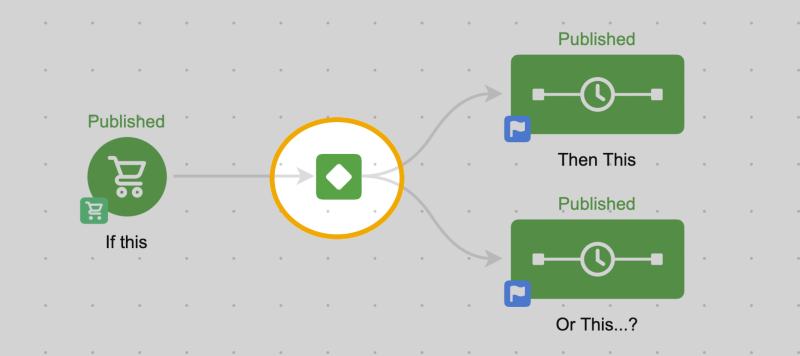
In other words, if you give Infusionsoft two paths, it’s asking “When do I send them where?”
The beauty of the decision diamond is that because you’re setting it up, you get to define the rules. It’s not arbitrary. It’s very much the opposite. You get to predict the potential scenarios and script the various outcomes you’d like to happen.
This allows you to be really detailed in your messaging because you know the exact set of criteria that a contact must have met in order to be receiving particular messages.
But, the decision diamonds aren’t exactly user friendly. In fact, they’re one of the more complex elements in the application.
That’s why I have this robust blog post answering seven important questions about using them.
As you build rules you’re expected to use logic statements, and time and time again I’ve seen these types of rules trip people up. Let’s look at an example…
If you make the following rules:
Rules for Sequence One
If Contact’s Tags doesn’t contain TAG A or TAG B or TAG C or TAG D.
Rules for Sequence two
If Contact’s Tags contains TAG A or TAG B or TAG C or TAG D.
On the surface, these rules look like they’d be opposites. If they don’t have any of the tags they go into sequence one, and if they do have any of them they’d go into sequence two, right?
Wrong. This is a real scenario posed in the community forum, and graciously answered by Infusionsoft Developer Mike Daniels.
The way the first rule actually breaks down is like this:
If Contact’s Tags doesn’t contain TAG A…
OR If Contact’s Tags doesn’t contain TAG B
OR If Contact’s Tags doesn’t contain TAG C
OR If Contact’s Tags doesn’t contain TAG D
It’s as if they are four separate rules. And therefore if the contact is missing any of those tags, then they would go into the first sequence.
So, because you’re saying “doesn’t contain” it means you need to use AND instead of OR. The new rules would look like this:
Rules for Sequence One
If Contact’s Tags doesn’t contain TAG A and TAG B and TAG C and TAG D
Rules for Sequence Two
If Contact’s Tags contains TAG A or TAG B or TAG C or TAG D
Anyway, the logic statements are a little confusing, and I’ve seen some really bright people get tripped up by this stuff. So, that’s where today’s post comes in. I’ve got a little hack for you that my colleague Paul Sokol has elegantly dubbed Cascading Logic (Originally I called it “Strung Out Logic” which makes it sound more like a junkie drug addict and less like a useful strategy…).
So, here’s how it works. Basically, you take what would be a complex decision diamond and you break it down into multiple simple decision diamonds. In a row.
This first occurred to me as I was building the teaser campaign I used to introduce Monkeypod back in May. Basically, after I announced the blog, I wanted to set expectations about what was next for everyone. But based on the relationship I had with them or the actions they had taken, I wanted to speak to them differently. This is how it would have looked:
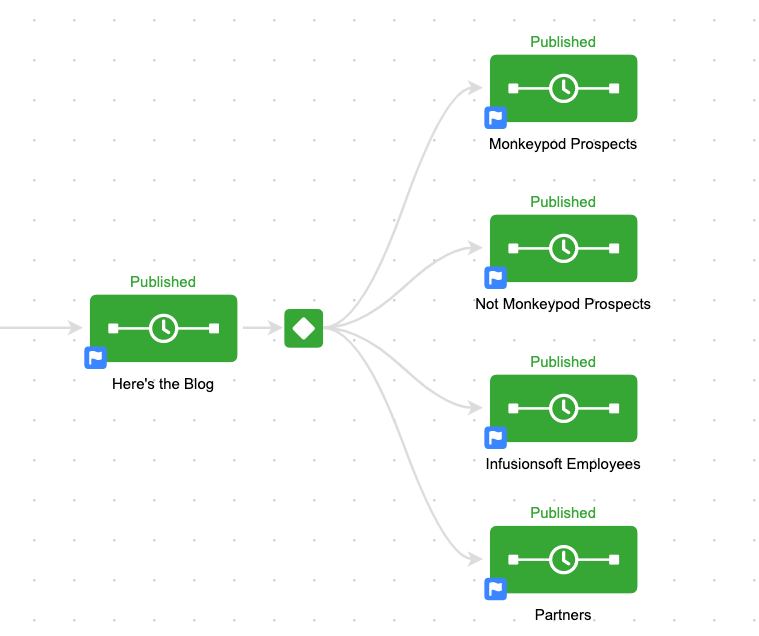
Pretty straightforward, right? I’ve got four categories: Monkeypod Prospects, Not Monkeypod Prospects, Infusionsoft Employees, and Partners.
But the challenge I was running into is that I only wanted people to end up in one of the four buckets.
So, my rules would have quickly gotten complex with things like “Send them here if they have the Uses Infusionsoft tag, but only if they don’t have the Infusionsoft Employee tag, AND if they don’t have the Infusionsoft Partner tag”.
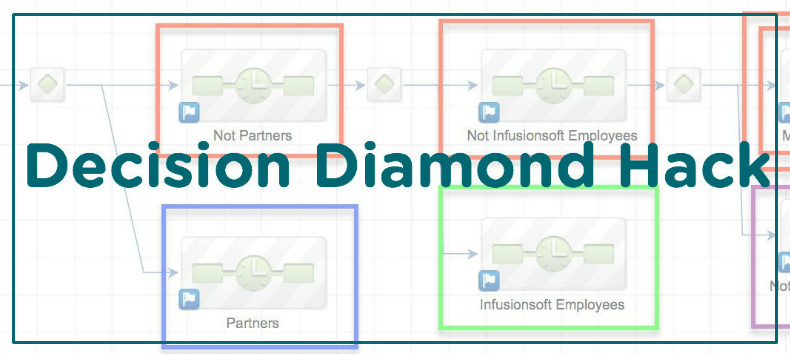
To avoid that I used a cascading logic approach and built this structure:
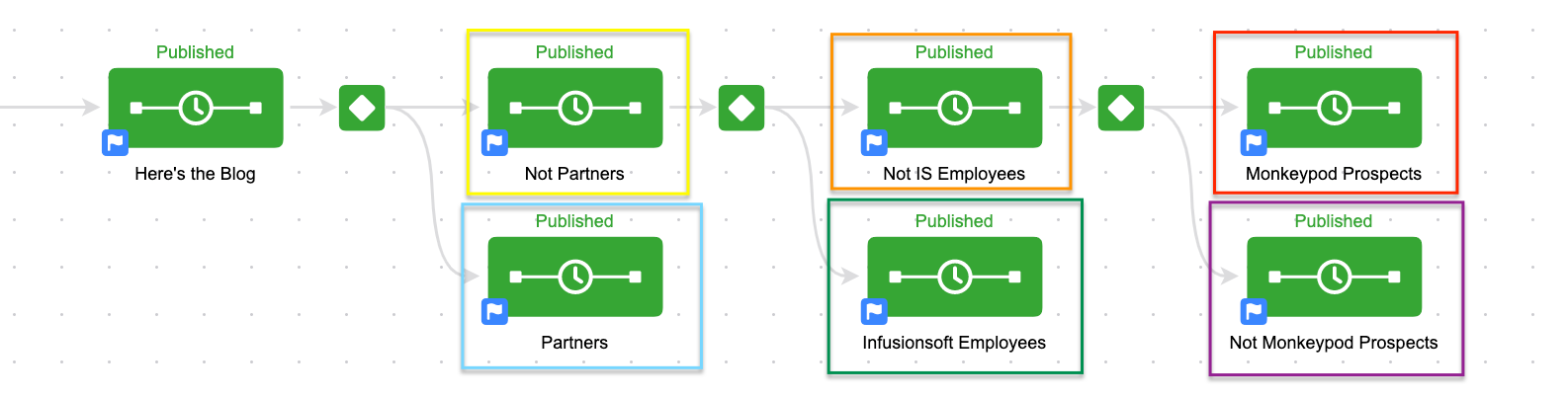
Each decision diamond had one rule. Send anyone with the partners tag here (Blue) and anyone who doesn’t have that tag stays up top (Yellow).
Then the next diamond looked to see if they were tagged as being an Infusionsoft Employee, and if so it sent them down (green), and if not, they stayed up top (Orange).
Then the final diamond checked to see if they had the Not Infusionsoft User tag, if they did, they dropped down into the final sequence (Purple) and if they didn’t, then they went to the last sequence on top (Red).
By setting it up this way I could speak specifically to the partners. Specifically to the Infusionsoft employees. Specifically to the people who don’t use Infusionsoft and specifically to the people who do (and also aren’t partners or employees).
I didn’t have to second guess my logic at any point, and I didn’t have to worry about anyone ending up in multiple sequences because every single diamond was an IF A/IF NOT A type combination.
This is also a great way to end up with a catch-all sequence. More than once I’ve heard people asking why they can’t set up some rules, and then for their final sequence just say “If they don’t go anywhere else, send them here”. Well, with this scenario, you almost build that by default.
Anyway, I know this may not work for every scenario, and it might get cumbersome if you have an overly complex decision diamond. But I wanted you to have it in your back pocket in case you ever need it.
If have more questions about decision diamonds, or the campaign builder in general, then check out one of these resources:

Customer Experience, Small Business, Tips and Tricks
Just the other day a friend published an article based on some nurture advice that I’ve given, and I realized that with as strongly as I feel about nurturing your leads, I still hadn’t written a post for my own blog about nurture.
I’ve written for a few other blogs, like that of the Australian Businesswoman’s Network, and PureChat, but I hadn’t taken the time to craft something on the ole Monkeypod domain.
Well, nurture is a really complex subject. And there are plenty of angles from which you can approach it. Eventually I’ll address as many as I can, but today I wanted to talk about one specific lead nurture myth I’ve seen circulating in the small business community.
Nurture Myth #1: Your nurture process has to take place over a long period of time.
When people think about nurture they almost always think about a drip sequence of some kind. Something that follows up with leads over a period of weeks, months or even years. And yes, that’s usually how it works. Nurture exists because someone expressed interest in your product or service; and if they aren’t ready to buy today we need to have a process in place that follows up with them so that when they are ready, we’re the brand on the top of their mind.
This makes total sense if you’re selling something requires a lot of information and deliberation before someone makes a purchase. Like, real estate for example.
But the reason that this is a problem is because not all businesses have a long buying cycle. Plenty of businesses have a very quick and transactional sales process. And unfortunately these businesses tend to recognize that their business model is different, so they assume that nurture can’t (or won’t) really play a role in their Lifecycle Marketing strategy.
But it can. And it should. Nurture exists no matter the length of your buying cycle.
(Disclaimer: If you ever came to Infusionsoft University while I was running it, this story may sound familiar.)
In January of 2012 I moved to Arizona, and prior to moving I had lived in Lansing, Michigan, where I ran a business servicing and installing draft beer dispense systems. Like, installing and cleaning draft beer lines for bars, restaurants and country clubs. And because of the nature of my job I was in and out of a lot of bars on a daily basis. My job took me to a lot of bars, some of which I’d probably never have patronized on my own, but because I got to see these charming little hole-in-the-wall dives so regularly, they kind of grew on me.
So when I moved to Tempe there was a dive looking bar around the corner from where I lived. So my girlfriend and I decided to check it out. So we pulled into the parking lot, and we actually bottomed out as we pulled in. Now, I drive an SUV, so to have us scrape the bottom of our car as we’re pulling into this parking lot was a little unusual. But, “No matter” I thought. We were in the parking lot, may as well park.
 As we went to park, I noticed there was some shattered glass in the “spot” in which I intended to park, so we readjusted, and we parked further back along the side of the building. (I say “spot” because the parking lot had no real discernible lines of any kind) As we got out of our car, I noticed that there was an empty lot behind the bar, and through the chain-link fence I could see several big black garbage bags. This was 2012 and Sara and I were avid fans of the TV show Dexter, so I made a mental note of the garbage bags just in case.
The entry was had one of those two door entrances, where you step into like a small alcove, and then open another door into the actual bar. So, as we step into the first one, I notice there’s a Cinco de Mayo poster hanging up. I remember thinking to myself “Wow, 4 months early. That’s some really solid commitment. But, this is Phoenix afterall, so maybe its a bigger deal down here than it was in Michigan. Oh, wait, that says 2011. It’s not 4 months early, it’s 8 months late…”
Yup, they had a poster in their entryway that was advertising holiday specials from 8 months prior. Doesn’t exactly send the message that they’re on top of this stuff.
Then as we opened the second door and stepped into the actual restaurant Sara and I were both stopped in our tracks by a very pronounced and specific odor. It was one I quickly recognized as urinal cakes.
Which is not a terribly unusual odor when you are in the men’s room. But for this to be the first and strongest thing that we both smelled the moment we stepped into their restaurant was more than a little unsettling.
We looked at one another, walked outside, got in our car, and drove away.
Here’s the moral of the story: This whole process took place in less than 90 seconds. We pulled in, we parked. We walked into the restaurant’s entry way, and opened the next door, and then we never made it any further.
Prankster’s might have excellent food. They might have an awesome beer list. Or any other number of redeeming qualities. But for us, it didn’t matter. We never made it that far. Between the ill-maintained parking lot, the visible trash out back, the outdated poster and the overpowering odor, there were too many strikes against them in the simple process of entering the restaurant.
I’d challenge you to look at your buying process. Nurture exists even in the most mundane ways. It could be the music playing while folks are in line at your store. It could be the color scheme of your website. Or the number of clicks it takes to get where I want to go. Put yourself in your prospects shoes and see what hurdles they have to clear to become a customer. How can you make this process more fluid?
Nurture is the single most cost effective way to grow your business. It’s all about doing more with what you already have. (Oooh, tweet that.)
Here’s a free download with 11 questions to help guide your nurture.
Now, I use Infusionsoft to run my marketing campaigns and carry out my nurture. You don’t have to use Infusionsoft, but you should use something. If you’re looking for a comprehensive Infusionsoft review, this is the best one I’ve seen.
Small Business, Tips and Tricks
I was scrolling through Facebook this morning, as I do most mornings. And afternoons. And evenings. And I noticed this article that someone had shared, and two of my friends (Jeryl and Shelley) had commented on, so I read it.
It’s a list of 12 things that they say only people who work from home will understand. And man, they really hit the nail on the head with a lot of them. But it occurred to me that just as all offices are not the same, all home offices are not the same either, so I wanted to adapt it and give you my version.
Yeah, I’ve been warned that working from home isn’t all it’s cracked up to be, and I’ve been told that you get really lonely, and that you need to make an effort to maintain a normal schedule, and regular contact with humans and sunlight, and on and on and on. I even read a handful of these articles with their own tips and suggestions. But still, I couldn’t have predicted some of this stuff.
So, here are 6 ways my life has changed since I started working from home (and I mean changed on a day-to-day basis, not on a higher philosophical level. Although, that’s happened too.):
Yes, I wake up later than I used to. For the past three years I was up between 6:30 and 7 am, and I was usually in the office by 7:30, or 8 am at the absolute latest. Now, I wake up between 8 and 8:30 and I’m in the office by 8:33 am. So, it’s really not too dramatically different. But it’s nice that I can manage my own schedule; although if I was keeping track of hours, I would wager that I’m averaging more hours per day of work now than I ever have before.
 I never deal with traffic. Never, ever, ever. Because I work from home my commute is literally a walk from my bedroom to my office/kitchen. So as a result, the only times I drive are if I am taking Gatsby to the vet, or meeting someone for lunch, or running to the grocery store. And because I have this luxury, I am very strategic about driving at times when I know I won’t hit traffic. It’s nice. On the downside, sometimes I’ll go several days without moving my car and it’s really easy to forget where I parked. (In my neighborhood we don’t have dedicated parking, so it’s just on the street “somewhere”)
I’m acutely aware of the small things, like the mail man. Because Gatsby barks at him nearly every single day I always know when the mail has come. And it usually comes between 10 and 11 am. But sometimes it’s as late as 2 pm and I find myself thinking “Man, where is that guy…”. It’s not that I need my mail, I mean, who really gets mail anymore? It’s more just that I wonder what could have happened that his route is so far behind. Oh, and some days I’m convinced the mail man just skips us altogether. Jerk. When you’re gone all day and you get home your mail is usually there. End of story, but when you work from home it becomes a benchmark in your daily life.
I wear a tank top every single day. Or, a singlet as my Aussie friends might say. And it’s not because I’m some dirty bearded hippie. I get up, and I shower, and then I choose to put on a fresh clean tank top. I live in San Diego; and 99 times out of 100 a tank top is appropriate for the weather. Or for wherever I may be going that day (if I’m going anywhere). Now, if I’m filming a video that requires my face, or if I’m skyping with someone I haven’t met before I’ll put on something with sleeves (Sleeves are fancy, right?). I’m not a crazy person. But usually after that 30 minute call I’ll change back into something normal people wear on a jog.
 I find myself talking to Gatsby more and more. It started with the usual stuff you say to your dog, you know, asking them if they want a treat. If they’re hungry. If they need to go out. If they want to take an extremely long walk to that one burrito shop with the best guacamole. That sort of thing. But now I find myself carrying on full conversations with him as I deliberate about the structure of one of my blog posts. Or consulting him for advice as I’m fervently trying to troubleshoot something technical that isn’t making sense. It’s really useful that he’s here because it makes me feel a lot less like an insane isolated hermit.
Social Media. I’ve always been a really active participant in the social media space. I love tweeting my random thoughts, and I love interacting socially on Facebook and LinkedIn. But now I spend more time on Facebook than ever, and it’s not just because I’m reading Buzzfeed articles that Jeryl shares (although I do that too). It’s because I am legitimately working. You see, part of how I keep my Infusionsoft knowledge sharp and polished is by trying to answer questions, and solve puzzles that pop-up in the various Facebook groups. In fact, a few months ago I started my own private group as part of my Monkeypod OG Membership. And I spend a lot of time curating resources and providing support for that group. So, Facebook is pretty much always open, but it’s not because I’m avoiding work, it’s because I can’t stop working.
I could go on and on, but I think that’s a pretty decent snapshot. All in all, working from home has been awesome.
Yes, you need to be disciplined about setting boundaries or you can accidentally work until 2 am. One of my biggest struggles has been that because I work from home, I literally could be working at any time. And so if I’m doing anything but working, I feel like I’m not being productive. It’s been about five months now and I’ve developed a little more of a rhythm and a structure now, so that happens a little less.
But as with anything, developing a system and structure is key. I miss interacting with real live people, but at the same time, no one is stopping by my desk to interrupt my when I have noise cancelling headphones on and am wearing a look that says “don’t bug me”. I think that is something to which we can all relate.
That’s it, there’s no deep and meaningful lessons to this post. I just wanted to share what my experience working from home has been like. I’d love to hear yours!
Campaign Builder, Keap, Marketing, Tips and Tricks
If you’ve got a social media account of any kind you probably couldn’t help but notice the excitement generated by a few select football plays this weekend.
First, there was the wild conclusion to the Michigan v Michigan State game. (As you may know, I’m an MSU alum and was pretty pleased about this)
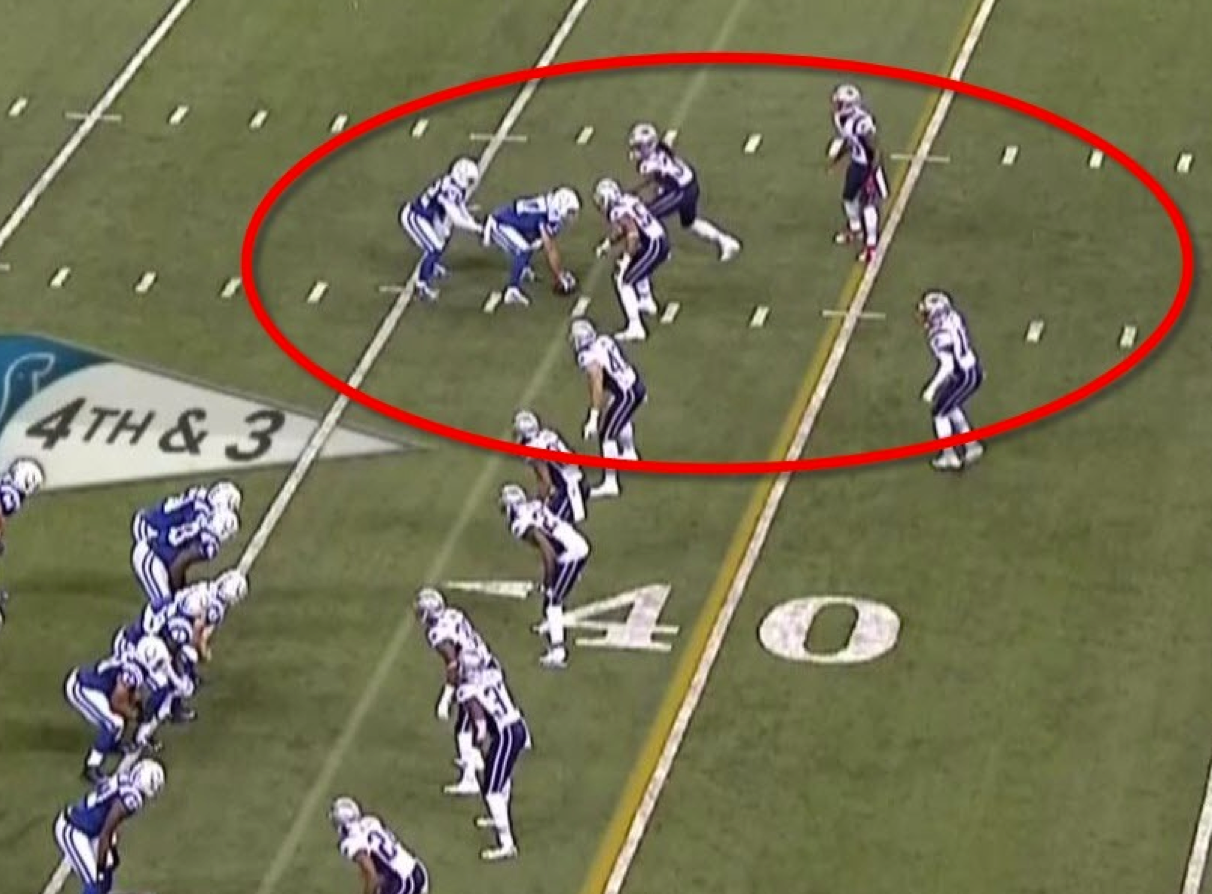
And then there was another play with the Indianapolis Colts trying some trickery with an unconventional line-up.
As I sat down to finish writing a blog post this morning I kept getting distracted by posts about those plays. They were popping up in my Twitter feed, my Facebook feed, and I even got a few texts and emails from people rehashing the excitement in one way or another.
So, I decided to postpone the blog post I had been writing, and tackle this one instead. (See what I did there?)
I want to talk about the importance of having a contingency plan.
Now, the U of M play doesn’t really deserve to be bashed too hard. They were punting the football away, on fourth down, with 10 seconds left in the game. One way or another, the ball was mishandled and MSU was able to get to the kicker; and the ball flew almost directly into the hands of an MSU player who was already streaking toward the end-zone.
Really tough luck.
Yeah, the kicker probably should have fallen on the ball instead of trying to handle it, but hindsight is 20:20 and it was a broken play once the snap was mishandled. 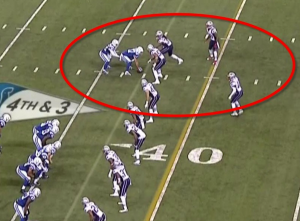 So that one may not illustrate my point as clearly here, but as an MSU fan, I felt like I needed to mention it. It’s the Colt’s fake punt play that really baffles me. They were trying to trick the defense. The coach even said so after the game.
They had a play designed to move some players around, and the whole goal of the play was to catch the defense unprepared, perhaps to lure them into some sort of penalty, and generally cause confusion which they could then exploit.
But as players shuffled around and then settled into their spots, it became clear (to most people anyway) that this play wasn’t going to work out very well.
In fact, it looked like it would certainly be a loss of yardage as the Colts were now set to snap the ball to a seemingly undefended player. They stood for a few seconds…and then they snapped the ball anyway.
And sure enough, they were sacked for a loss of yards and gave the ball to the Patriots with excellent field position.
Now I’m not saying you shouldn’t practice and run trick plays.
Some coaches and teams have made their names running unorthodox plays. What I’m suggesting is that whether it be with football, or with marketing, you need to have a contingency plan.
You need to have a safety net in place.
Let me share a real life example from a campaign my friend Tyler recently launched. You see, Tyler runs a successful business where he teaches strategies for how to trade stock options. Recently he launched a membership program so that he could make himself available in one-to-many typesetting, instead of his usual consulting packages.
So, Tyler sent out an email message to his audience announcing the new membership he’d be building and driving people to the page where they could learn more about it.
He built it like this:
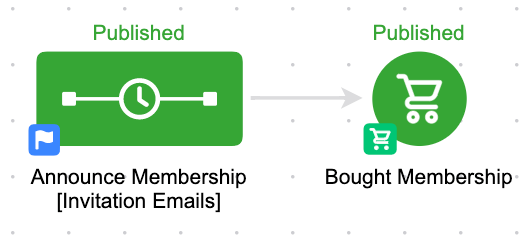
Pretty straightforward. Totally functional.
He built it as a campaign instead of a broadcast because he wanted to send more than one email plugging the membership and the benefits, and he wanted all the emails to stop in someone signed up. We had a conversation around this scenario, and decided to drill in a little deeper.
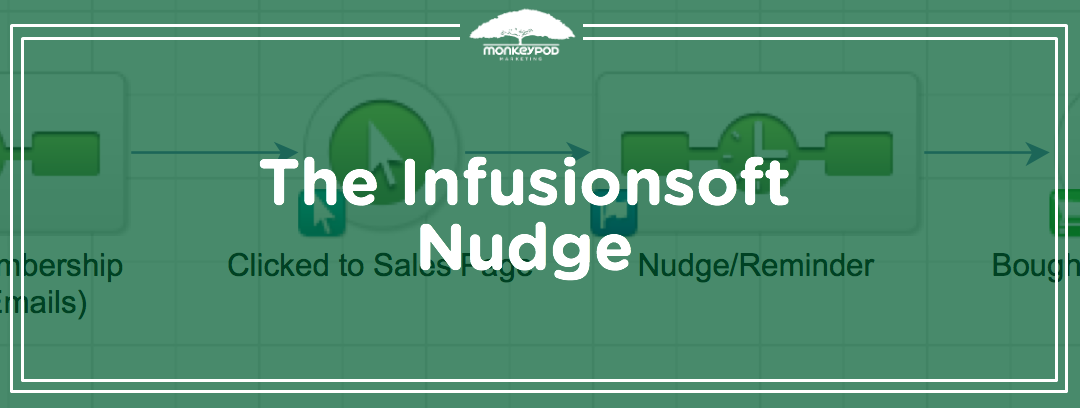
If we want someone to buy, first we need them to click through to the sales page. And because we know that clicking is something Infusionsoft can track, that gives us the ability to add in what I like to call “The Infusionsoft Nudge”. You see, if you ever have two actions you want someone to take, you can (and should) always include a nudge. So that if they take action number one, but don’t take action number two, they get a reminder prodding them to move along.
Here’s how it looks for Tyler:
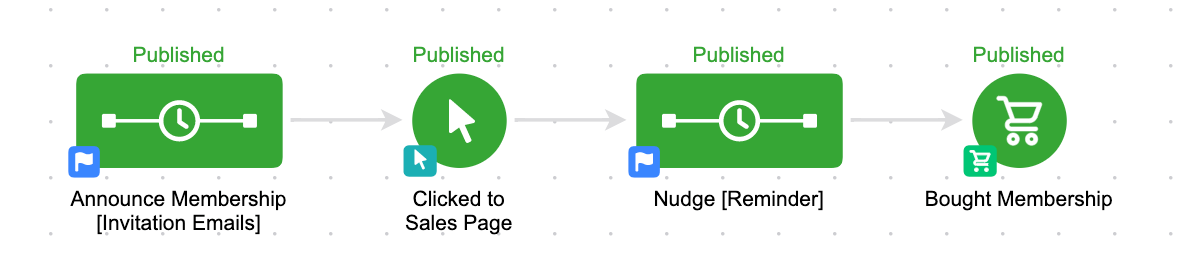
The first sequence and the last goal are still identical. But now what we’ve done is we’ve added a follow-up for those people who click but don’t buy.
This is our safety net.
We’ve still built out what we’d like to happen ideally, but we’ve also structured our contingency plan in case it doesn’t happen exactly as planned.
This simple strategy can be employed literally any time you need someone to do two things.
Like, click and then register. Register and then attend. Buy and then buy again. Submit the first part of a form, then submit the second part. If you are designing any sort of strategy, you should always ask yourself:
What do I want to happen? What are the other scenarios that could happen? What will I do in each of the scenarios?
And then practice your plan B, your plan C and your plan D. If the Colts had simply said “We want this to happen, but if it doesn’t, we’ll call a timeout” they’d probably have been much more successful.
If you’d like to learn more about this concept, or see it in action, you can download the Abandoned Cart Recovery sequence from the marketplace, or check out my CB: Trilogy course where I cover this concept (and much more) in depth.
Guest Posts, Keap, Tips and Tricks

Paul Sokol, PLS Consulting
Editor’s note: Back with another stellar contribution to the ole’ Monkeypod Blog, one of our most popular guest authors, Paul Sokol. If you want Paul’s background or a full info, check out the first post he wrote for Monkeypod way back when.
An Expert’s Opinion On The 5 Most Underused Features of Infusionsoft
Look at all the cool bells and whistles on your car. Are there ones you almost never use?
For me personally, living in the desert, it’s rare to use my windshield wipers. Its even rarer to use the defrosters because it typically isn’t cold enough to use them.
However, those features are still really important in the right circumstance.
Infusionsoft is very similar. There are so many things you can do that may not be very well known OR simply aren’t fully understood from a tactical standpoint.
What follows are five features that I believe can provide great value for about 80% of small businesses using Infusionsoft. I’ll bet for you, fair reader, that you can use at least one of these to innovate and improve 🙂
Underused Feature #1 – Buy Now Links
In general, Opportunities (sales pipeline management) in Infusionsoft are typically misused. Most small businesses don’t deeply understand the theory behind what a pipeline actually is. Or if they do, they often aren’t super clear on the different stages for their specific process.
 (For a great sales pipeline starting point along with training on properly pipeline management, download the Sales Pipeline Starter Kit from the Marketplace).
From a 40,000 foot standpoint, Opportunities are intended to help a business track its sales pipeline and make money. The “Buy Now” link functionality is where the rubber meets the road on that last part.
On an Opportunity, you can indicate which products and/or subscriptions someone may be purchasing. A “Buy Now” link comes in an email to a prospect and when they click it, they are taken to the shopping cart pre-populated with the products/subscriptions on that specific Opportunity. It will also include any discounts, payment plans or subscription free trials.
This way, you can talk to someone on the phone and then send them a link for them to make the purchase. Making money with Opportunities in this manner is definitely not used as much as I would like to see. But if you haven’t, now is your chance 🙂
To learn how to send a Buy Now link, see this tutorial.
Pro-Tip: If you look in the CRM Settings for Opportunities, there are action triggers for when someone clicks on a Buy Now link AND for when someone successfully purchases through it. If you create a unique tag for each of those triggers, you can build an advanced follow-up campaign for cart abandonment. For example, when someone clicks, you can add them to a sequence that waits 15 minutes and sends the sales rep an email with the prospect’s phone number telling them to call them right now. If they purchase within 15 minutes, that sequence can be exited based on the buy now trigger.
Underused Feature #2 – Expiring Credit Card Automation
Making sure you get paid is really important, especially when your business has subscription revenue. Following up and collecting on failed auto-bills is a part of this kind of business. However, we can minimize the number of credit card fails by being proactive and having customers update credit cards that will soon expire.
Under the Billin g Automation in eCommerce Settings, there are expiring credit card triggers. You can automate whatever you want. Maybe you do a task to call and update. This may be a great touch point to also take a sentiment check with the customer and handle any potential issues.
For a more automated approach, you can actually send an email with a link that allows the customer to update the credit card on file. In addition to this, you could also apply some functional tag to start an expiring card campaign (like the task idea above). However, for the email itself, it has to be built directly into the billing automation trigger.
To learn how to create one of these card update emails, see this tutorial.
Pro-Tip: Similar to the Buy Now automation triggers, there are triggers in eCommerce settings for when someone clicks on a card update link and when someone successfully updates their card. This can be used to notify a customer support person of any activity that needs to happen.
Editor’s Note: I actually spoke on this topic at ICON in 2015, and if you’re interested in setting something like this up, I’d recommend grabbing the free download from my talk here.
Underused Feature #3 – Lead Sources
Everybody on this planet has one mom. The person that brought them into this world. Lead sources are like the “mom” for a contact in your database. An attribution of who “brought them into the world” of your database.
What makes lead sources so powerful is that you can associate expenses with each lead source. For example, if you spend $200 on some direct mail, you can record that. Then, for each contact associated with that lead source, the system can generate ROI reports based on how many orders have come from that cohort of contacts.
Not knowing which of your marketing efforts are effective is a surefire way to throw away a marketing budget and, probably, not get the results you were expected. Unfortunately, when you don’t use lead sources, you have no data to indicate which channels are producing paying customers.
The topic of lead sources could be an entire blog post (or even series of posts) by itself because it is such a critical distinction to understand. It is absolutely worth your time to learn how they work and begin incorporating them into your marketing efforts.
For some articles on lead sources, see this tutorial and the other articles on the side there
Pro-Tip: If you create a hidden lead source field on a web form or landing page and leave the value blank, you can append ?inf_field_LeadSourceId=xx to all links pointing to the form (where “xx” is a specific lead source id) and it will attribute the lead source to any leads that opt in. This way, you can drive many different kinds of traffic to the same page and, as long as you have a different lead source ID in the URL for each traffic source, you can have one capture point and still track which channels are the most effective. For a tutorial on this tactic, read more here.
Underused Feature #4 – Note Templates for Workflow
There are definitely instances where you need to trigger some automation, but have no earthly idea how to ACTUALLY automate it. For example, when someone asks you a frequently asked question. You have a pre-written email for it, but how can you automate the delivery of it when someone asks you. Artificial intelligence? Some fancy natural language processing on your emails?
 Maybe, but this is where note templates shine brightly!
Think of a note template like a big red automation button. You need automation, just press the big red button and rest easy knowing what you need to happen will occur.
Using the FAQ example above, it is super easy to build a note template that, when applied to a contact, sends out the pre-written email. This can save you time and streamline your workflow down to the 5-10 seconds it takes to physically apply the note. In fact, Greg actually has a YouTube video outlining this exact example.
For a campaign template you can use as a starting point for FAQs, use this campaign and replace the task step with an email.
Pro-Tip: The name of the Note Template goal in the campaign builder is how it will display to the end-user. For a better user experience, use prefixes to group similar notes. If you are making a bunch of FAQ emails, start each note’s name with “FAQ – ” so you can quickly find them all.
Underused Feature #5 – Internal Forms for Workflow
If a Note Template is a big red automation button, an Internal Form is a big red automation button that also allows you to add or update a contact’s data at the same time.
This is particularly helpful when someone needs to make a choice or indicate some outcome. For example, having an internal form that you use to approve or decline a new referral partner. Based on the choice, you can automate and follow-up accordingly.
They are also very helpful for adding a new contact because you can, obviously, also automate whatever might need to happen (tagging, create an opportunity, etc).
Another handy use for internal forms is to personalize a templated email. Take the example of an email offering two possible times for an appointment. The only thing that changes from person to person are the times being offered, but the rest of the email is the same. You can create an internal form that collects the two times and then those are merged into an email. Talk about saving time!
For a campaign model that demonstrates this idea of personalizing a templated communication, see the Post-Appointment Follow Up campaign.
Pro-Tip: If someone needs to be submitting an internal form as the result of a task, explicitly put the name of the form in the task body to minimize human error. For example, if there is a new lead task and an internal form to indicate how the first contact attempt went, in the task body you could say “When you have made this call submit the ‘LEAD – First Call’ Internal Form”, by being this specific and clear it reduces the chance someone will forget, or be unsure which form to use.
What do you think? Can you use any of these? Did I miss a feature? Let me know in the comments! Thanks for reading.

Customer Experience, Small Business
At thirty years old, I’ve been well aware of George Zimmer and his Men’s Wearhouse brand probably since renting my first tux for high school prom. Since that awkward and memorable evening, I’d say I’ve rented or purchased items from Men’s Wearhouse between 5-10 times.
Well, recently I got fitted for another tuxedo at Men’s Wearhouse for a wedding, and it was memorable and awkward in a much less endearing way. I stopped in to get fitted, and 65 minutes later I left frustrated and annoyed. It wasn’t until I parked at home that I recognized the silver lining of the situation. I had had a negative customer experience, but the reasons it was negative could easily be translated into valuable lessons – which, subsequently, I thought would make a very nice blog post. (Sidenote: Sometimes I rewrite sentences to avoid saying “had had” or “that that”, but I’m working to embrace it and put more trust in the reader)
So here we are.
I arrived at Men’s Wearhouse and wandered over to what I deemed must be the rental section. I had never been to this particular store, and while there wasn’t anyone there to greet me, the stores are all roughly the same so I was able to quickly find the rental counter and make my way over there.
After a few minutes of standing around looking lost and puzzled among a handful of other equally confused guys, one of the busy clerks told me that I should add my name to the sign-in list.
Sign-in list? Okay, I’ve never been to a Men’s Wearhouse with a sign-in list, but sure. Why not? So I signed in, and after another few minutes, one of the guys waiting near me said “You’re gonna wanna fill out one of those forms” as he pointed at a note-pad with some sort of rental agreement form on it. Something about the tone he delivered this directive with gave me the impression that I was in for a treat.
My experience continued as such– vague and delayed instructions offered to me lazily by other gentlemen who also had better places to be.
After 15-20 minutes of standing around, I gathered that most of the other gentlemen hadn’t yet been helped either. And because I knew who had been waiting longer than I had, I surmised that I could safely run next door to Target to grab a few things and be back before they called my name.
I notified one of the (well-dressed) attendants that I’d be back shortly, and asked if my assumption about my position in “line” was correct. Her exasperated response was that they were working as quickly as they could, they wouldn’t come get me at Target, and if I wasn’t here they’d have to move on.
Noted.
After returning from Target, I resumed standing about with the other gents watching slowly as one after another was called for various measurements and fittings, and eventually my name was called. I stood awkwardly in between floor displays as they proceeded to take one measurement every few minutes in between rushed trips to the back to grab a different size shoe or shirt for other renters.
 During my analysis while waiting I thought I had figured out that one employee was handling measurements, another was responsible for assisting the guys picking up tuxedos, and the last was collecting deposits; but when it was my turn to be measured my careful observations quickly fell apart. There was no longer a discernible rhyme or reason to their “system”.
They all were sort of doing each role. And the unfortunate result was none of the roles were being done effectively.
In fact, at one point they had taken measurements, written some numbers down and walked away to leave me standing long enough that I had to seek someone out just to ask “Am I all set here? Or, is there something else you need?”
There was more they needed. I resumed my ranks among the other impatient, dejected patrons.
Eventually, someone came back, summoned me again, and after trying on some shoes I gave them my credit card and they eagerly accepted my deposit. I got my receipt and as I (equally eagerly) turned to leave, I realized we hadn’t discussed where or when my Tuxedo would be ready. The wedding would be in Michigan, and I live in San Diego. The logistics of picking up my Tuxedo in a state other than the one in which I had been fitted seemed to be an insurmountable obstacle for the attendee at the rental desk.
So, I quickly googled the stores in the greater Lansing area and decided which one would be best for me, located the store number, and spoon-fed her the details to finalize and update my reservation. Then I quickly left, without an ounce of confidence that my tuxedo would arrive where I needed it, or in proportions that matched my own.
Listen, I’m not an unreasonable guy. And in the grand scheme of things I realize that 65 minutes isn’t that long. But that’s also kind of the point. This minor interaction is a fundamental part of their business. Men’s Wearhouse sells suits and men’s clothing, but they also do a fair amount of business renting tuxedos. So for a business who does this regularly, I’d expect them to have worked out an iron-clad system to get me in, fitted, and out.
At it’s very core, I’m paying $200 to rent clothing that other people have worn for a single evening. If I’m willing to accept that, it seems like making my experience as fluid as possible is the least they can do, right?
Yes, I gathered that they were busy. And I pieced together what I perceived to be the process. But as a customer, I want to be told exactly what is happening, and I want to be kept up to speed if that changes.
We could probably dive in to their whole rental process and identify a number of areas where it could be improved, but before we even go there I want to call out a much lower hanging piece of fruit for them. Communication.
(Nevermind the fact that I rented a Tuxedo 3 months prior and they insisted that I still needed to come in to be measured again…)
If Men’s Wearhouse had simply said “Hey, welcome, we’re really busy right now. But if you sign up here, and start filling out this paperwork, we’ll call you when we’re ready to get your measurements. We’ve got 4 people ahead of you, I’d guess it’ll be 30 minutes before we get started with you.” I think I’d have been just fine with it.
I don’t expect perfect service. It doesn’t have to be immediate. I totally understand what it’s like to be stressed, busy, or overwhelmed. But I’ll be much quicker to forgive mediocre or even poor service if you set the right expectation with me, acknowledge ownership and communicate clearly with me as things change.
I don’t want to bash Men’s Wearhouse too thoroughly, because they’re probably doing some things really well. I recognize that this was a single isolated experience. And because they’re a massive organization, there are things like this that can probably be overlooked without severe long term damage.
But that’s rarely the case for small businesses. It’d almost certainly have a much longer-lasting impact for my business. What about yours?
Things won’t always be perfect. And inevitably some of your customers will end up frustrated. But if you’re transparent with them you’ll find that they’re much more likely to accept your imperfections in stride. Or even go so far as to defend you to others (should you need it).
Sidenote: The Tuxedo arrived at the store it was intended to. And it didn’t fit originally, but the in-house tailor was able to make a few modifications and we ended up pretty sharp-looking bunch.