“The more I learn, the more I realize I don’t know.”
-Albert Einstein …. or someone
Atop Angels Landing, Zion National Park
Every time I learn something new, or uncover a new tool, it’s a motivating mixture of excitement and frustration.
Yes, I now know something new, which is good. But it’s almost always accompanied by a new perspective, through which I can also see a brand new lineup of things I don’t know.
So, it’s double edged, right? Because yes the destination (functionality) is exciting, but sometimes the journey (learning curve) is intimidating. And often times that’s the process for learning Infusionsoft as well. Just when you reach the next crest you can see another one towering over you. In hiking they call these false summits – and as with in business, they can be equal parts demoralizing and inspiring. (more…)
Reyna Bovee, Certified Partner Trainer, Infusionsoft
I’ve got a blog post this week from Reyna Bovee, another friend of mine from inside the walls over at Infusionsoft. Reyna Bovee is a Trainer for Infusionsoft’s Certified Partners. She trains on advanced Infusionsoft elements and some fun ninja tricks. It’s safe to say that, like many of us, she totally geeks out on Infusionsoft.
Outside of the software, she’s pretty cool as well. She’s a sucker for inspirational Pinterest quotes and festivals (mostly because of the funnel cake). And she loves traveling, too. She boasts that she’ll take you up on a travel offer anywhere (I say challenge her).
Reyna uses Infusionsoft in her everyday life as she supports her husband and family with their entrepreneurial dream – a blooming home remodeling company. She handles the Infusionsoft end of things, and any other marketing pieces, which keeps her Infusionsoft and Marketing chops polished so that her trainings always shine.
Ladder vs Linear Sales Pipelines
A sales pipeline is a way to organize opportunities through a sales process. So, if you have a process that your prospects go through before they buy, and if it involves manual interaction, you might be well suited to build a pipeline to help support this. And Infusionsoft’s sales opportunity module is just the tool to make it happen.
This is different than regular ole’ campaign builder automation.
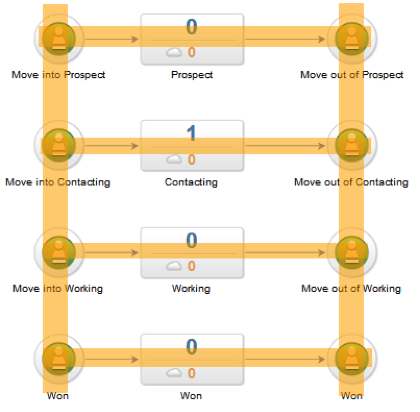
Ladder Pipeline
Sale Pipeline Opportunities require manual work to move from stage to stage. In other words, sales pipeline is best used with sales reps who have to physically touch their customers (maybe not literally).
These two images are the same exact pipelines, we just rearranged them inside of campaign builder.
They look like they operate the same, but there is one missing link that you need to know.
Linear Pipeline
Cutting to the chase, ladder style is going to slay linear style every time.
If you’re shocked and feeling like you have been misled this whole time, dry your eyes, dear.
Let’s get down to the logic to ease your tears.
Here’s a super basic, ideal sales pipeline:
New Opportunity > Contacting > Working > Won > Lost.
Ideally, our customers hit each stage in order, according to plan.
Ha. Yeah, right. This is what actually happens.
We get request for a Free Consultation. (Prospect Stage)
After a few rounds of phone tag, we finally get in touch with that customer. (Contacting Stage)
We start working the opportunity like no one’s business. (Working Stage)
But then! Gasp! They fall off the map. What to do…
Rewind. We start phone tag again. Dang it! (Contacting Stage)
See what happened there?
The customer went backwards.
Does this happen in real life? Oh, heck yeah.
Let’s see how Campaign Builder performance view handles such interference.
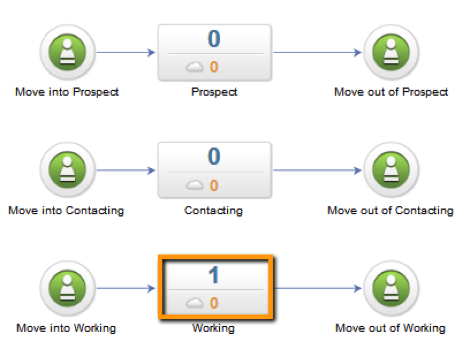
Step 3: We start working the opportunity like no one’s business. (Working)
Ladder: So far so good…
Linear: All good over here too..
The two above images are saying the same thing. You’re right – no difference.
But wait – oh, just wait.
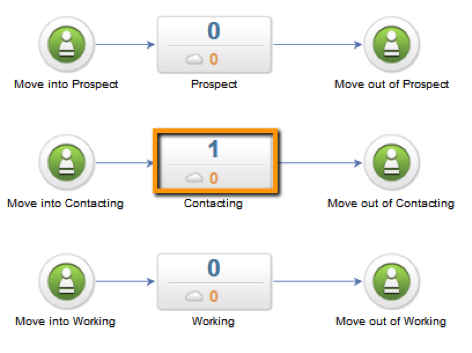
Step 4: Rewind. We start phone tag again. Dang it! (Contacting Stage)
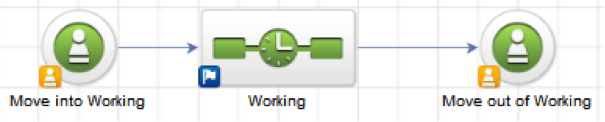
The ladder stage handles it just fine. Because in moving them back a stage, we move them out of working (which stops that sequence) and into contacting (which starts that one).
Ladder: Rewind, no problem.
But life’s not quite as easy over in linear land.
If you move them back into a previous stage, they’ll go back to that stage, but they also stay in their current stage. So now that contact is in the same pipeline in multiple stages. This can cause serious confusion and mixed up reporting.
Linear: Oops…
Yikes. Problem.
If we move a prospect backwards in a sales pipeline using the linear model, the opportunity record gets stuck in two different sequences.
This gives you entirely inaccurate reporting. It makes life harder for the sales rep. And it can certainly create some confusion for the prospect too.
However, when you build in ladder format, you don’t end up with any of those issues.
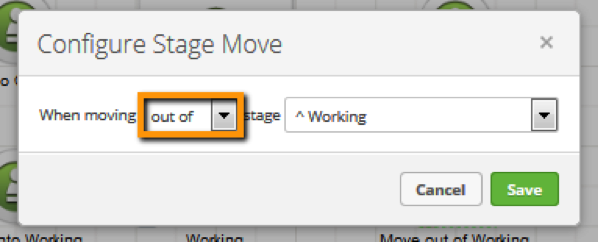
The key difference here: Using the “Move Out Of” Opportunity Goal setting.
Each stage of the ladder style pipeline has a “Move Into” and a “Move Out Of” Goal at either end.
Easy-peasy lemon breezy. You just learned a new party trick. The key to configuring your sales pipeline is to remember that the pipeline is an accountability tool for an otherwise manual process. Any automation you introduce should be there to supplement what your reps should already be doing. (Tweet that!) And, if you build your stages with bookend goals (into and out of) then you’ll have a nicely contained, easy to manage, reporting friendly, sales process.
Oh, and if you want to save yourself a little time getting things set up, start with the Sales Pipeline Starter Kit from the Infusionsoft campaign marketplace.
And now you’re smarter than the gent down the block. I’d love to hear your thoughts in the comments below!
Let me start by acknowledging that I don’t have all the answers. I’m gonna make some recommendations in this post, but I’m also going to ask some questions.
Starting Monkeypod Marketing has been an absolute roller coaster for me. I’ve learned a number of lessons, and I’m sure I’ll learn countless more, but today I just want to briefly talk about the importance of balance.
I think if you talk to any entrepreneur you’ll hear them emphasize the importance of balance in your life. Without it, you risk quickly burning out, growing to resent your business, or seriously jeopardizing relationships with your family and friends. This concept isn’t groundbreaking, I get that. I mean, a quick google search can show you dozens of articles emphasizing work-life balance.
It’s harder than I anticipated. But here’s the twist – it’s not difficult for the reasons I thought it would be.
Yes. I have plenty to do. At all times. But that’s not terribly unusual for me. I’m the type of person where I’ve always kept myself busy.
No, the challenging part is that there isn’t a clear line between work and the rest of my life. I work out of my home (as many entrepreneurs do) and so here’s my struggle: At literally any time, I could be working. And if you could be, you start to feel like you should be. That means if I’m doing anything but working on Monkeypod, I feel a sense of guilt.
This initially led me to working out less, eating less, and sleeping less. There have been multiple nights where I toss and turn until 2 am, and then get up to work for three hours in the middle of the night. Again, I don’t think this is unique to me. I think plenty of entrepreneurs struggle with this, but recently I’ve been honing a “life hack” that helps me introduce some new balance and dramatically increase productivity.
The productivity hack is simple: Multi-tasking
But don’t worry, it’s a little different than just doing multiple things at once. What I’m describing is a little more strategic.
I’ll give you three habits I’ve developed as examples.
1. I edit videos while I make lunch.
It’s really easy for me to work right through lunch when I get in the zone. And, it can be hard to pull myself away to make something to eat because I literally don’t want to take the 20 minutes away from my computer to build a hummus and turkey sandwich (my go-to). But, I’ve found myself recording a lot of video content for my Infusionsoft courses lately, and before I create the final video I have to listen through it, trim out any foul language I utter in frustration, highlight certain sections, or speed up other parts. But what I realized was that I don’t need to be sitting at my desk the whole time, I can just as easily set my laptop on the kitchen counter and listen for any audio cues while I toast the bread, build the sandwich, or eat lunch.
2. I make phone calls while I walk Gatsby.
Gatsby is our Australian shepherd, and if you know anything about that breed you probably know how energetic they are. He gets a little stir crazy just watching me work all day (although you can hear him in the background of a few videos), so naturally I try and walk him once or twice a day. Well, again, I was feeling guilty taking these walks, and even cutting them shorter than I wanted to because I felt like I needed to get back to my desk to work. So, my solution has been to make or schedule phone calls while we’re out walking. Now, obviously it only works for some calls – and if I need to be at my laptop then I can’t do that while walking around the neighborhood.
3. I listen to podcasts while I run.
Again, not groundbreaking, right? Listening to music is something plenty of people do when they run. But the academic in me wasn’t okay with music, I felt like the 3o minutes I was out running was wasted – even though I was working out. So, my solution was to use this time to listen to something educational. Something I would have spent time listening to anyway, and this way I’m killing two birds with one stone. (My favorite podcast is Stuff You Should Know, what’s yours?) Also, I’m a really lousy runner, so if you want to feel better about yourself, or just support a swimmer trying to train on land you can connect with me on strava.
Like I said, it’s more than just doing several things at once. For me it’s about planning, and coordinating, so that I use my time as effectively as possible. And so far with each hack I explore, I feel like I’m able to instill a little more balance into my life.
Not having a regular routine or rhythm can be really liberating, but it can also be really disorienting.
I talked about having an outlet for your entrepreneurial gene in the post on the entrepreneur’s paradox – now I’d like to hear how you keep yourself balanced? What hacks have you discovered to get more done?
Hey all, my good friend Paul Sokol or PLS consulting is back with another post this week, and predictably, it’s a good one.
When I was first hired at Infusionsoft I remember being impressed by Paul’s knowledge and professionalism as he helped small business owners get started with the software, then I remember being even more impressed as I learned that he’d only been hired a few months before me. As I did then, I continue to learn from him every chance I get.
3 Things (Most) Infusionsoft Users Get Wrong
Ahoy hoy everyone! Its your favorite mad scientist guest back with another post 🙂
Greg and I were chatting on the interwebs and he tossed out the idea for a post on the 3 things most Infusionsoft users get wrong. Now, wrong is a strong judgement because REALLY, even if you commit the automation sins below, its not so bad. Rather these are simple adjustments we can make to get better results.
Thing the First: Brick Wall Thank You Pages
Submitting a web form is exhilarating. Think about it, you are interacting with someone or some company digitally. After you hit “Submit” it gets exciting…
…what’s on the other side?
And then BOOM!
A static page with nowhere to go.
This is one of the leakiest, yet simple to fix, things I see. The thank you page someone sees upon submitting should further guide the relationship. Here are a couple things you can do:
* Drive people to your Facebook page
* Give them a ‘click to tweet’ link (Use this tool)
* Drive them to a sales page or order form
* Drive them back to your blog
The whole idea is you don’t want to waste the momentum achieved from a form submission. Guide them to the next logical place.
Strategically, you could drive them to their inbox too if they were opting in for some lead magnet. This is a great example of guiding the person. This one trick alone can boost lead magnet redemption rates.
For an example of this tactic in action, check out the “Free Resource” campaign in the Marketplace.
Thing the Second: Misusing Opportunities
I probably sound like a broken record to all my friends, but seriously, Opportunities in Infusionsoft are one of the most powerful tools in the whole program. The reason why most people don’t use it more is because the configuration and workflow isn’t the most intuitive. And so, Opportunities are misused all over the place 🙁
Here is the general idea. An Opportunity is merely a manual accountability tool that hooks into a User’s calendar. Opportunities exist to track a process. An end-user simply has to indicate what they did, what they plan to do, and by when. The User’s calendar will have an event based on that “by when”. Everything else is designed to support those functions.
Once someone understands this general workflow, they can begin to use Opportunities to manage a pipeline. If it is a sales pipeline, there is an extra layer of functionality that makes selling a breeze.
Usually, people are using Opportunities to track a sales process. To make this as easy as possible, Infusionsoft created the “Sales Pipeline Starter Kit”. This provides you with the basic process stages, training on how to setup your dashboard and how to work an opportunity.
Back in the dark days, before Campaign Builder, there was this thing called “legacy”. Its functionality was still very powerful, but not as easy to setup. As a result, the community adopted the habit of using Tags for tracking basically anything.
However, there is a downside to this tactic: it can legitimately slow down your app’s performance. Too many tags on too many people simply takes longer for the database to query.
A great example of this is link click tracking. In legacy, the notion of a Link Click goal didn’t exist, so you had to tag any links you wanted to track. This habit is often brought over into the Campaign Builder.
Realize that you can use Link Click goals to track activity and then use Campaign Goal reporting to see the behaviors. Yes, you could do the same thing by tagging a link and then just searching for people with that tag, but its not necessary.
I also realize that there are certain circumstances that require applying a tag to control a campaign. These functional tags should be removed once they have done their job. Again, this is to keep the database fast and lean. The good news is we don’t lose any reporting 🙂
So there you have it. Three things you can do today to boost your use of Infusionsoft. Let me know what you think in the comments!
A while back I wrote a post about how most people think about email permission the wrong way, and they see it as a barrier, instead of as a tool that they can leverage. I made the recommendation that you could start gathering interest as your audience expresses it by clicking links, or opting in for certain things. Well, today I want to take it one step further, and make our lives even easier.
Let’s Build an Infusionsoft Email Preferences Center.
You can design a pretty accurate customer profile based on what you infer about your customers from their behavior; but, you’ll get a much better picture if you just let the customer tell you what they want. Right now, if a customer receives an email from you that they don’t love, and they decide they want less of that particular type of email, their options are to reply to the email, and tell you. Or, they can unsubscribe. And honestly, most people will simply unsubscribe (Wouldn’t you?).
And unsubscribing in Infusionsoft means that they are considered opted-out across the board. So they won’t receive any more emails like that one, but it also means they won’t receive any other automated emails from your system at all. It’s an all or nothing kind of thing.
So, you can see how this might present some problems. What if your prospect decided they don’t want your newsletters any longer, but they do want your promotions. Or, they don’t want your products, but they do want to know about your services. There are countless scenarios where someone might want some communication, but not all, and there’s no native way to let your subscribers manage their preferences.
But wait, I said “no native way”.
Fortunately, the solution is pretty easy. You simply build a webform, or landing page, and create your own email preferences center, and allow your customers to manage what type of communication they receive.
Then you add the link to the footer of your emails so that they see the option of opting out, and the option of adjusting their preferences.
I built one for my own business, and I decided to record the process so that if you’d like, you can follow along.
Also, I need to give a shout out to Paul Sokol, he did a training on this a few years back which was the inspiration behind implementing this for my own business.
Enjoy! And if you have questions about anything in this process please let me know in the comments below! Oh, and please note that the landing page builder has changed since this video was initially recorded, but the process and concept will still be nearly identical with the new tool.
Update: I’ve recorded a new video outlining the steps to build an Infusionsoft Email Preferences Center with the new landing page builder.
If you met me while I was training at Infusionsoft University, you may remember that one of my favorite sessions was all about email permission. This often stood out to people because email permission isn’t exactly a sexy topic. When compared to teaching lifecycle marketing concepts, saving people time with internal automation, or learning the intricacies of the Infusionsoft campaign builder it doesn’t even compare. But, the reason I like it so much is because I think most people are thinking about email permission all wrong. And I love helping people think about things differently.
Email permission is a tool.
But unfortunately most people see it as a barrier. A hurdle they have to clear, or a box they have to check. When in reality it’s a powerful tool if you wield it appropriately. It’s not JUST to protect the recipient’s inbox. It is that. But it’s more than that.Think about it this way: Your prospects are willing to tell you exactly what they want. They’ll raise their hands and say “This is what I’m interested in.”
And all you have to do is listen; then you can send them information, details and promotions that are tailored for them. It’s a win-win. From the prospects point of view, they’ll feel like they’re being heard, and that their preferences are respected.
They’re getting fewer emails, and the emails will resonate with them more. They’ll trust your brand more. And they’ll start to see that you “get” them.
From your side of things, you’ll notice that email opens and clicks will go up. Unsubscribes and spam complaints will go down. All in all, you’ll have a happier, more engaged list. Remember, I said “All you have to do is listen”.
The problem here is that most people don’t listen.
Most people segment their list poorly, or worse, don’t segment them at all. If you’re emailing your entire audience anytime you have anything to say, you’re doing a couple of things:
You’re rubbing your list the wrong way. You’re showing up and crossing your fingers hoping it happens to be something they want. Your relationship with their inbox is too valuable to just roll the dice like that.
You aren’t letting them tell you what they want. If you send everyone everything, then you aren’t taking into account what they want from you. Nothing says “I don’t care about what you like, Greg” like Banana Republic emailing me whenever women’s purses are 20% off. (Go ahead, make your jokes)
You’re conditioning them to ignore your messages. By emailing them more frequently, about less relevant subject matter, you’re training them that your brand isn’t for them. And even if you do have messages that they’d love to receive, they could easily be lost in all the other noise you’re creating.
So, like I said, Email Permission is a tool. And here’s how you can use it:
It’s a measure of engagement. Someone who has requested your newsletters, your promotions and your blog updates is much more engaged them someone who has only requested your free whitepaper. The good news is that people are already telling you what they want. By clicking links in your various broadcasts and messages, they’re raising their hand and saying “This is who I am” or “This is what I’m into“.
All you have to do is start listening.
Most email marketing platforms allow you to track the links they click, by measuring this behavior you can quickly build a profile and use that information to make sure that they receive the offers that are best suited for what you know about them. I’ve gotta acknowledge the drawbacks to learning about your prospects by this method: It can take time. And there is a margin of error. For example, what if I click on a link (and you tag me) and then I realize I have no interest in whatever the topic of that link was. Or I misunderstood what it was. Or I already have that product.
Well, if you’ve captured that as me expressing interest, you have no way of knowing that I changed my mind.
But, if you send emails regularly, and you’re linking out to topics in certain genres, and if you’re tracking which links they click. Well, over the course of a few months you’ll begin to get a pretty good picture of the type of content that person is looking for. As you learn more about them, you can send them more of the stuff they like.
Keep your list happy. The old mantra “The Money is in the List” is still accurate, but it’s not in the size of the list, it’s in the relationships you’ve cultivated with it.
I’d love to hear your take, or any questions, in the comments below. Oh, and if you’re an Infusionsoft user looking to take this to the next level, check out this post where we build an email preferences center in less than 16 minutes.