Type Cast Automation

Type Cast Automation

One of my favorite Brad Martineau quotes goes something like this:

“I only have two problems with the term marketing automation. The first is the word marketing, and the second is the word automation.”

The sad truth about automation is that for too long it’s been type cast.

Too many businesses cast automation into a specific role – and then never ask anything else from it.

(Kinda like how Michael Cera has been playing the same character for over a decade.)

It’s not that automation isn’t great at capturing leads, and following up with them (it is), it’s just not the only thing automation can do for you.

Automating the Customer Journey

I believe the easiest way to understand automation, and where most people should start, is by focusing on the customer journey.

Automation should work to support and enhance the customer journey.

This means starting with traffic, flowing through to lead capture, and every step along the way to the eventual purchase.

And if you’re doing that already then that’s a great start.

But automation can and should be used through and after the fulfillment part of their journey as well.

And if you’ve already got your customer journey dialed in, and you’ve leveraged automation to help make the experience as seamless as possible then give yourself another pat on the back.

(Here’s a case study on customer journey)

But customer facing automation is really only half of the conversation.

Automation’s other half

The second half of the automation puzzle is using automation for things that the customer never even sees.

Yes, I’m talking about internal processes – automating reminders to yourself, or to your team; but I’m also talking about using automation for aspects of your business that have nothing to do with the customer.

I’ve seen automation used throughout a hiring funnel, to find or manage contractors, to build and maintain relationships with partners, or with key vendors.

I hate to be cliche – but the truth is that the use cases for automation are probably limitless.

And as always, I’m not saying that everything needs to be automated – just that you might have opportunity in areas you hadn’t realized.

Please leave any questions or comments below – I’d love to hear about creative ways you’re using automation throughout your business.

What should I automate?

If you’re on board with the idea of automation but aren’t sure where it would fit – we’ve built a course specifically designed to help you identify opportunities in the customer journey where we’ve seen automation solve problems and create momentum.
Action Planning Framework

Action Planning Framework

This Action Planning Framework is the distillation of lessons learned from a handful of consultants across countless projects, in a variety of industries and business models.

Suffice to say, this works – time and time again.

If you have a strategy you’d like to implement, this framework will help increase the odds (and efficiency) with which it happens.

So, here’s how this works…

It starts by identifying the strategy you are trying to execute.

The strategy is the high level objective – like, book more demos, or drive new consultation appointments, increase membership free trials.

Then, you use the action planning framework to help think through the specifics for what it will take to achieve that objective.

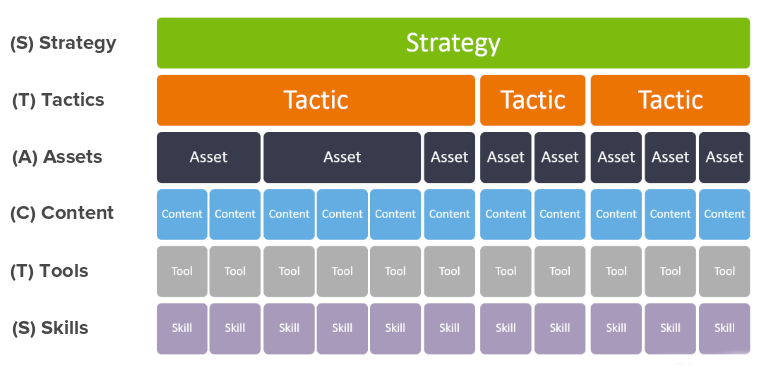
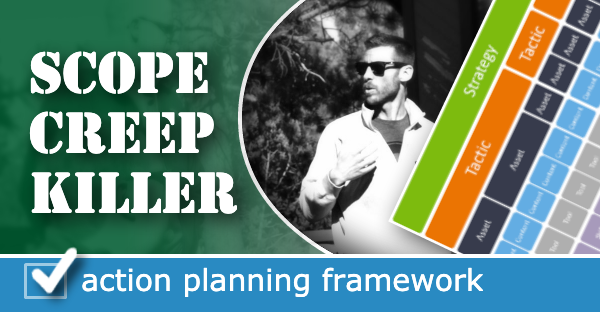
It starts with individual tactics (launching a new ebook, hosting a webinar, deploying a JV partnership promo), and then from there it drills down into the assets required, the content needed to support those assets, the tools required to create the content, and finally the skillset(s) it wiil take to operate those tools.

This is the framework:

One important thing to note is that a particular strategy may require more than one tactic – and a particular tactic will very likely require multiple assets (a landing page, the thank you page, the follow up campaign, etc), and the same is true for content, the tools, etc.

But this framework illuminates the things that we humans tend to skip over – it forces us to ask add context and detail that could otherwise derail a project.

The Scope Creep Killer?

We’re all familiar with scope creep, right?

Ambiguity breeds scope creep – clarity crushes it.

We’ve all been there – when you think you’re almost done and realize some important element wasn’t connected – or you forgot the video for the thank you page (or the thank you page entirely).

Not anymore.

Action Planning Framework Example

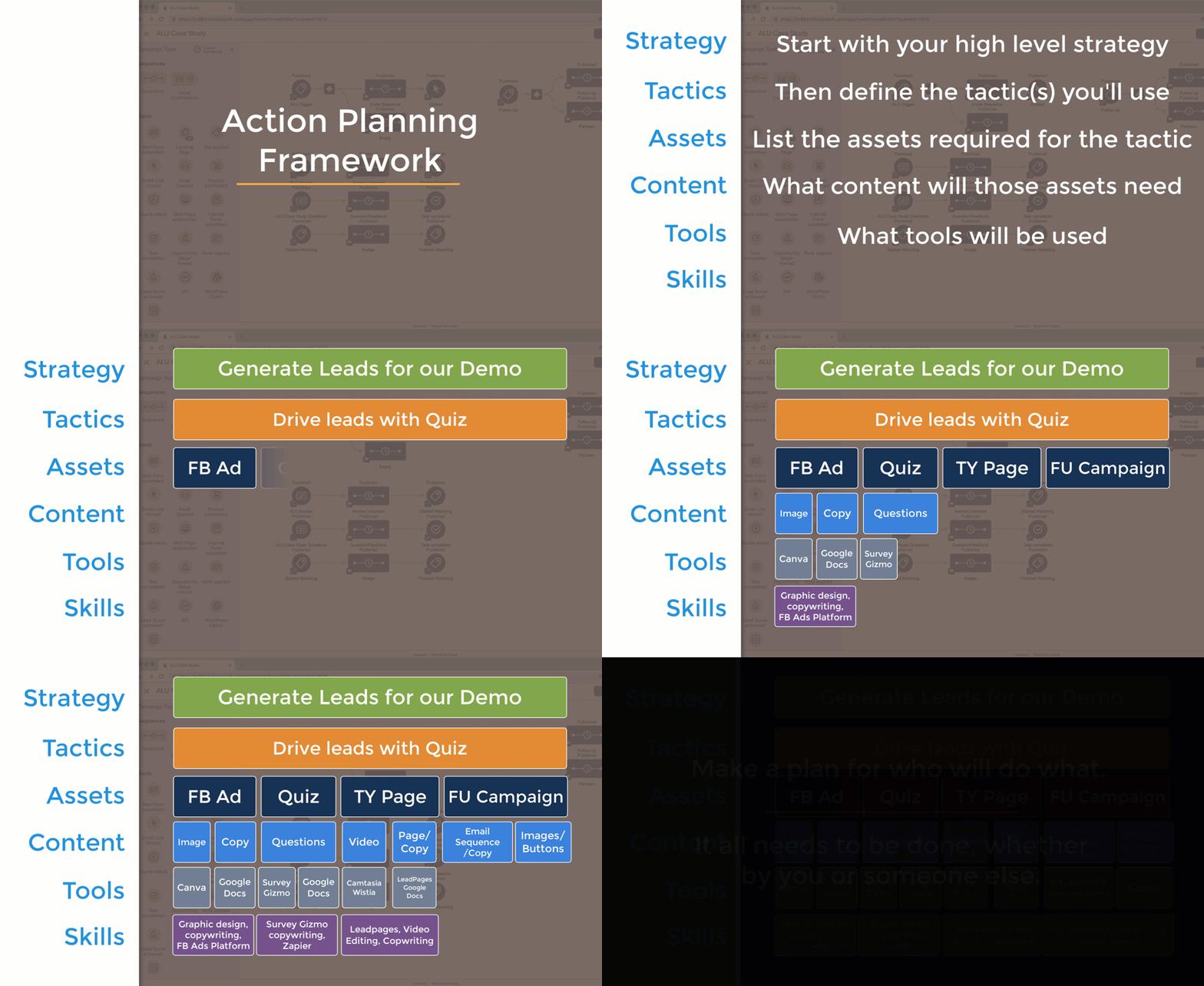
Let’s look at an example: Say you want to drive new leads to your demo

Start by defining the tactic – then the assets required to support that tactic.

But then work down from each asset working through the granular details for what it will take to bring that particular element to life.

I know, that’s kind of a rushed example – but hopefully you’re seeing how this process works.

By using a systematized framework to flesh out your approach to any strategy, you’ll increase the likelihood that you get it across the finish line.

Launching things feels good, right?

And, by methodically working through the different steps required to launch something you’ll reduce the risk that something you overlooked derails things.

Lemme hand it over to my good friend Justin MacDonald to bring this one home for ya:

Pro Tip: Not everything needs to be done by you – if you’re a one-man-band it might be exhausting to work through this and realize all of the things you need to do to launch something, but the silver lining is that by organizing a project like this it makes it easier to recognize exactly what needs to be done, and the assign out the various responsibilities to the best resource for the job (which might be you, or it might be a team member, or a contractor).

Hope you found this post valuable, if you did then please give a shout out to Justin MacDonald here.

The truth is that I’ve seen far too many good ideas stall out because the details weren’t clear. This framework actively combats that and helps you get more done swiftly and confidently.

Please leave any comments or questions you have below.

Monkeypod Retreat Review

Monkeypod Retreat Review

I just got back from the most recent Monkeypod retreat in San Diego, and I wanted to recap my experience.

I have been following Greg since 2017, when I met him at Infusionsoft PartnerCon.

What I really like is how Greg is authentic and personal in everything he provides.

His approach, and attitude makes me feel at ease. He offers advice, suggestions, and options, but he does it so I feel empowered – without pushing for a specific agenda.

I first learned about his retreats from one of his automated nurture emails.

He walks the walk as well as anyone there – wanna know about his retreats? Or just experience automated follow up done well?

Subscribe to his blog (here) – or grab one of his ebooks (here) and pay attention to how his automation is designed.

I’d thought about the retreat in the past, and decided it was time to try it out.

Put simply, it was an amazing experience.

There were four retreat attendees – myself and three other business owners. So the whole experience felt very intimate.

We were each matched with a mentor – someone who we could strategize with ahead of time, and work side-by-side with during the event.

We arrived in San Diego Wednesday afternoon and left on Saturday morning. The two days in between were exhausting – and wildly productive.

The venue was a beautiful property in the hills of La Jolla, with great views of the ocean (and serviceable wifi).

The first evening was relaxed – we took the time to get to know each other and share a little about our businesses over a nice dinner.

This warm-up set the stage for the following day – the hot seats.

Day One: Hot Seats

Thursday was broken up into two-hour hot seat blocks – one for each business.

You might be thinking – “er, what does that mean?”

Fair question – let me explain:

The hot seat is when you use the group to focus on an idea, or a pain point that you currently have in your business, and that you want to address during the retreat.

The intent is to use the people around you – the business owners, the experts, and Greg and Justin – to come out of your session with an action plan for how you’re going to move forward.

It sounds easy, right? Maybe, until your turn…

Then it’s a bit intimidating.

Because during those 2 hours we do a deep dive together.

For me – I shared what I wanted to focus on – which was optimizing the customer journey I have for my product, SchedulerLink.

And then the questions started:

Why is this important for you?
Why is this important for your business?
What is the potential ROI for this goal?
Are you sure this is the issue you want to focus on during this retreat?
What if we turn this issue upside-down?
Hey, you have 1 hour left. How are you feeling?
What if you target another industry?
Do you still feel like this is the right issue to focus one?
What if you integrate with another system?
Would you like to change gears? If you want to change, now is a good time to do it.
Ok, we have 20 minutes left – time to start prioritizing your action items for tomorrow.

Intimidating. Even uncomfortable – but not necessarily in a bad way.

You know why?

Because we’re all here for the same reason – to grow.
Because you get a lot of feedback, from supportive people who are experiencing their own growing pains.
And because ultimately you choose the action items that you feel comfortable with excited about.

And because, in the end, we’re all sharing – everyone is vulnerable.

And getting uncomfortable is how growth happens.

Then, the next day we got up early and got to work.

Day Two: Implementation

Day two is the implementation day – we went to work on crossing items off our action lists with our mentors.

That means double the brainpower – and four hands on deck, with a few extra pushes here and there from Greg, or other resources he brought in.

I got lucky – I worked side-by-side with Mike Harris – of GoldFixe Solutions (I also recorded this amazing video with the expert help of Bret Martineau).

And, when I got home, there was an email from Greg to follow-up for extra help with some copy.

On Saturday morning I had a chance to take a surfing lesson (optional). And speaking of crossing things off my list – I got up on my first wave. A pretty huge achievement for a 43 years old woman (don’t you think?).

That “dawn patrol” surf session was the icing on the cake, as one would say…as someone who loves the ocean, I can’t think of a better way to wrap up the retreat.

After the surfing lesson, we had a final gathering to update the others on our progress, and reflect on how we’re feeling, and make plans for tying up any loose ends.

I know I feel more confident about the next steps I want to take longer term.

I was also reminded of the value of taking a couple of days away from working in the business to work on the business.

Could I have done it on my own? Probably, maybe, but there is absolutely no way I would have achieved the same results.

A Monkeypod retreat, with a team of mentors and other business owners is a much better option – give yourself and your business a gift – get on the list for the next one. (Details Here)

Editor’s Note: After spending two days working with Lidiane, I couldn’t help wondering “Er, why aren’t more people using Acuity?” And since the video equipment was already set up (with the greenscreen-like backdrop), I decided to record a video covering some of what I learned about Acuity. Check it out here.

3 Email List Re-engagement Strategies

3 Email List Re-engagement Strategies

“The money is in the list!”

Something all too many email marketers have said. Now, they aren’t wrong. However, most people fail to see that the list itself isnt the money maker: it’s the relationship with the list.

What would you rather have? A million emails who don’t know you from Batman.

Or, 10k emails of rabid fans who cannot wait to voraciously devour anything you offer?

That second one, right? Especially since you know anything you release will be purchased. A lot.

So what do you if there is a list or two in your database where you’ve fallen out of touch?

It’s a common occurrence in businesses of all sizes. For a period of time you actively collect a list. Then the list is forgotten about. Heck, to me, this sounds like a common occurrence for personal relationships too.

There is no one-size-fits-all answer, as an email can become unengaged for any number of reasons. What follows are three common situations where you might need to re-engage a list.

How to Use Cold Email Addresses:

If these are un-opted, truly cold emails, technically you have no real right to email them in bulk.

There are two things you can do with a list like this. First, you can send manual emails asking people to opt-in somewhere. There are tools that can help automate these one off emails, especially if you use a Google-based email.

You may hit an upper daily limit of outbound emails for your account though.

So if you have a larger list, upload it as a custom audience and run ads to get that clean opt-in. Any other tactic puts you at a high risk for spam complaints.

(Here’s a post where Greg talks about ways you can automatically sync these contacts with a evergreen “needs re-engagement” Facebook audience.)

How to Contact Unengaged Email Addresses

There are lots of ways to define what “unengaged” means. And not just what your CRM says.

Based on YOUR business, segment out the different kinds of unengaged you might have. The unengaged for a list of restaurant patrons is going to be different than for a mortgage company.

Grab your biggest/most profitable unengaged segments first.

Then, give ’em some goodwill before asking for something. Provide actual value, help them out in some way, that way you’ll have re-earned the right to ask for something.

Here’s a re-engagement framework that might give you a running start.

How to Warm a List You Have Neglected

First off, be authentic about it. Tell the story of what happened.

For me, I hit a mental health speed bump mid-2018 and my own newsletter was impacted for about a year and a half. No sense in trying to hide what happened or make it sounds good.

Humans love humility.

From a technical standpoint, make sure the first link in the email is an unsubscribe link AND remember it isn’t personal when you get people leaving; you neglected this list and it’s reasonable that over time their needs have changed.

More importantly, provide real value, reset expectations, and start the list’s thing; whatever you might have been building it for. Or guide them to something else.

The point is, you really don’t want to neglect this list again.

Nurture Resources

Editor’s note: It probably seems obvious at this point, but the easiest way to deal with a cold or unengaged list is to maintain that relationship in the first place. I have a handful of resources specifically designed to help you craft an automated process that nurtures your audience and builds rapport while staying in touch with them.

Bonus List!

3 Best Practices for Preventing Contacts From Spoiling

First, setup automated list hygiene if your CRM supports it.

Invest in the time to build a reusable re-engagement campaign that should automatically prune your list for you. At least once a year.

Make use of the unengaged trigger(s).

This is part of your automated list hygiene journey. Whatever you do, make sure you do some kind of habitual list pruning every once in a while.

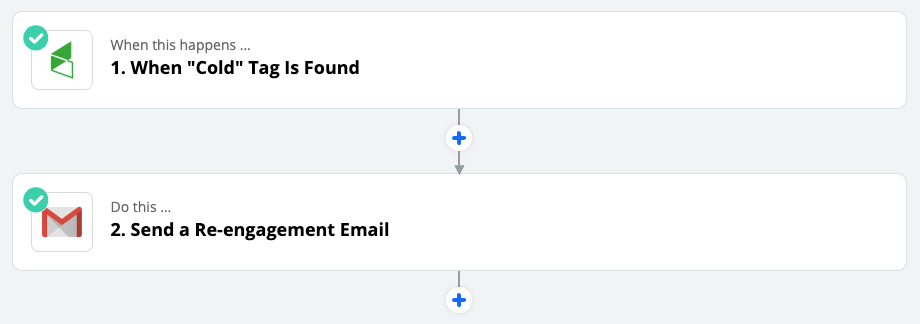
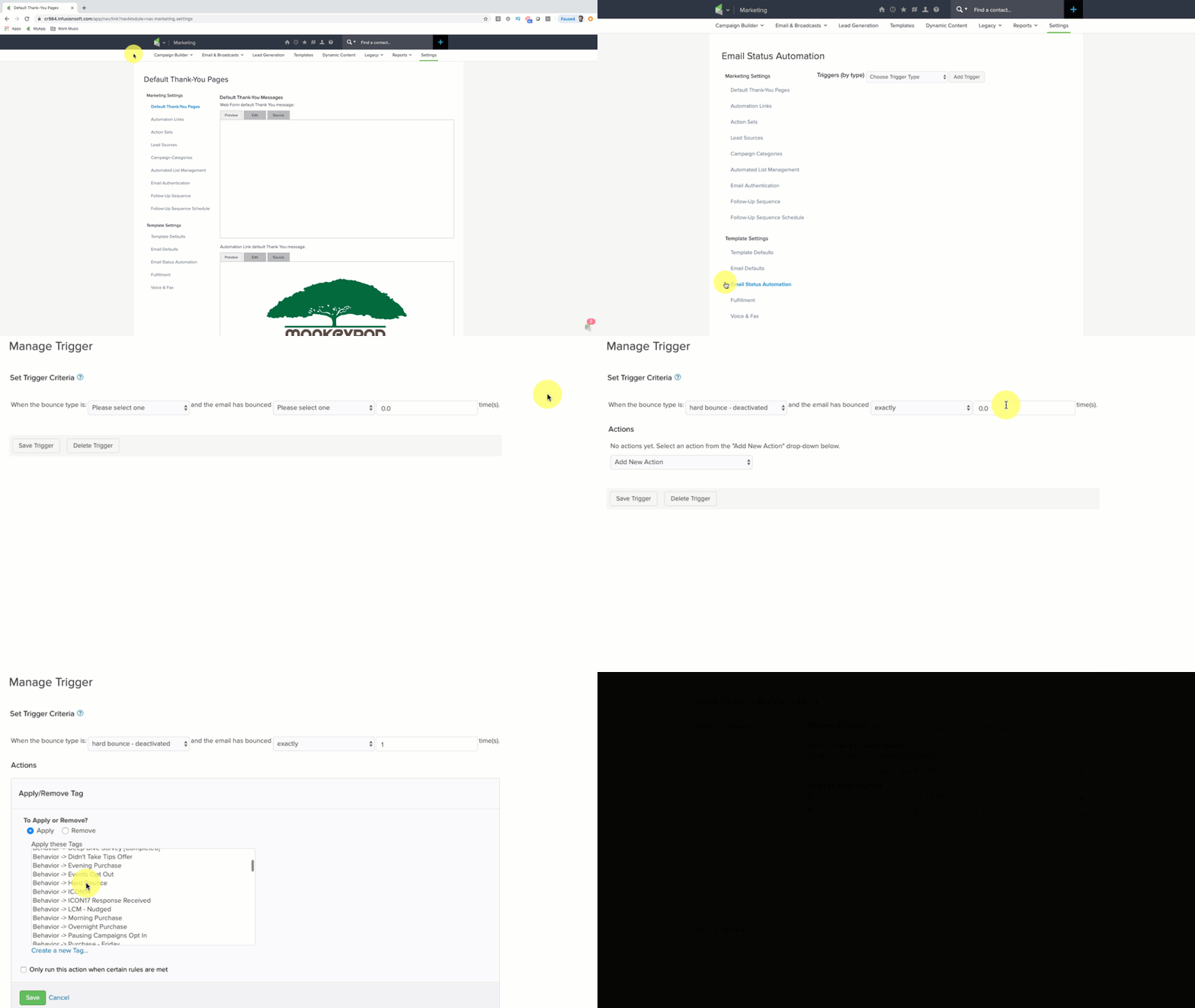
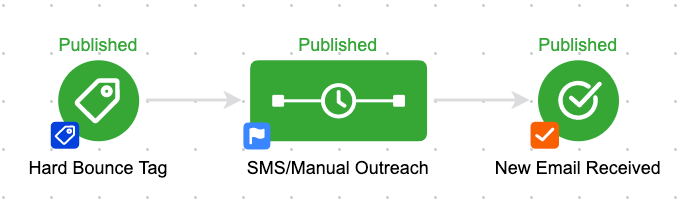
Lastly, remember another hygiene trigger are hard bounces; bad email addresses. If you use Infusionsoft, you can automatically tag contacts when a hard bounce is recorded.

And if you can tag them, then you can trigger automation.

I recommend designing an email recovery sequence if you have a phone or address (or social info) on file, or if it’s a low volume of bounced addresses, try tasking a member of your team to review them for obvious typos.

Second, go cross channel baby! If someone sees me on Facebook, they are more likely to open emails.

If they get emails, they are more likely to read my FB posts when they show up. Assuming the content is valuable and relevant.

When someone joins your list, remember to invite them to your social platforms directly. You can do this all at once in an email, or slowly drip out one social channel at a time. A short term nurture.

This will also train them to open and click on your emails. This is good for deliverability too. Email service providers love opens and clicks!

Third, always be doing something. You are up to big stuff already. Go do more big stuff. Then email people about it.

Imagine each email address is a trusted and close pen pal friend (that sometimes gives you money). Write from that lens like you are only sending to one person only even if a million people might receive it.

The inbox relationship will benefit.

So there you have it; some tactics for email re-engagement and other tips for keeping your list nice and clean.

Like a garden full of healthy growing vegetables 🙂

Re-engaging Inactive Subscribers

Inactive subscribers. Every business has them, many choose to ignore them.

But it’s no good brushing this issue under the carpet. The longer subscribers stay idle and unengaged, the bigger the problem will become.

Here's what Kenda and the Automation Ninja's suggest you do about it.

[Read More Here]

Why Queued Contacts Matter

Why Queued Contacts Matter

When it comes to Infusionsoft campaigns your contacts can have one of three statuses, they are either Active, Queued, or Done.

Active and Done are fairly straightforward, but understanding queued contacts isn’t quite as straightforward.

(More on those status types here)

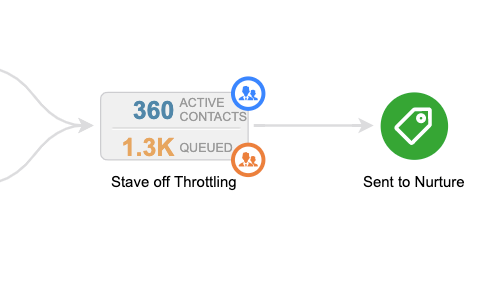
When you’re looking at the reporting tab of the campaign, queued contacts are represented by the orange number you see in each sequence – in the image below there are 1.3.k queued contacts (and 360 active ones).

Okay, Queued Contacts are contacts that are in a sequence, but they haven’t moved on – right?

So they’re just kinda hanging out – which on its surface seems pretty straight forward, but there are two reasons why I think getting super clear on this concept matters.

Why do Queued Contacts matter?

Two main reasons – they represent risk, and also opportunity.

Why are they risky?

If you don’t understand what queued contacts are and how they behave, then you could inadvertently trigger automation to someone for whom it isn’t appropriate, or that they aren’t expecting.

Beyond just being embarrassing, this can also adversely affect your relationship with that contact, and your email reputation in general.

What about that opportunity?

If you understand that goals act as milestones in your campaigns, and they’re designed to help people progress along the journey you’ve built for them, then you can think of queued contacts as the people who for one reason or another stalled out before they hit the next milestone.

There are plenty of reasons why this might happen, but when I see queued contacts in my campaigns I think of it as a place where contacts are getting stuck and treat it as an opportunity to add another touch point.

Pro Tip: Unless they move on or you remove them, contacts can stay queued indefinitely – so, if you’re adding new steps to a sequence which contains queued contacts make sure you’re clear on which contacts could be affected, and whether or not that’s what you would like to have happen.

Here’s an article from the Infusionsoft help center that digs into making changes to sequences with queued contacts.

Hope you found this post valuable – please leave any comments or questions you have below.

If you want a deeper dive on this – or anything to do with the campaign builder, check out the CB Trilogy Course, or grab the free trial below.

SEO for YouTube Channels

SEO for YouTube Channels

The inspiration for this post came from this very thorough SEO for YouTube experiment I followed from Matt Giovanisci over at MoneyLab. He has his own YouTube channel (a few of them actually) and documented the process he went through as he focused on optimization.

He covers a lot more in his post than I do here, but rather than wait until I felt confident taking the exact same approach, I figured I’d tackle what I could for now.

I spent a little time on my channel page, but most of my effort was focused on tidying up the following things for individual videos.

SEO for YouTube Checklist

  1. Update Video Title
  2. Update Video Description
  3. Update Video Tags
  4. Update Video Thumbnail
  5. Add End Screens
  6. Add Captions

I recorded a video summary of my approach on this project so you could see exactly what it takes – tackling all these items for a single video takes less than 10 minutes (with the bulk of the time being spent creating the thumbnail graphic).

Updating the video title, tags, and description were all pretty straightforward – and to be honest, I probably could still go back and make them even more strategic, but since this was something I had spent almost no time on in the past it was easy for me to make a significant improvement without a whole lot of effort.

I tried to answer “What is this video” and “Why is it valuable” and then “What would this person want after this” – then I used the description to answer as much of that as I could.

YouTube Thumbnails

Updating the thumbnails took a little more time, because I had to actually create the graphics. As you know I’m far from a graphic designer, but this post outlines my very amateur method for creating graphics.

Here are a few of the thumbnails I created for this project:

YouTube Thumbnail Example 1
YouTube Thumbnail Example Number 2
YouTube Thumbnail Example Number 3

As you can see I chose bright colors (purples, oranges, blues, etc), and I avoided using the normal YouTube colors because I wanted to make the videos stand out from the rest of the YouTube platform interface.

In Matt’s post he gives 5 rules for his thumbnails:

1. Must include a human face that conveys an emotion
2. Colors must contrast AND stay on brand
3. Must include a pool or hot tub elements (this was for his Swim U brand)
4. No more than three words AND they can’t repeat the video title
5. Create separation with the use of drop shadows – no outlines

I didn’t follow his advice to a tee – but I used it as a guideline. I chose bright colors, I limited the text I used – and I tried to pick graphics that either represent Infusionsoft or the particular topic of that video.

But when it came to using a human face that conveys emotion, that was one of those things that I felt like would slow me down, so I decided to get version one out there and maybe I’ll do my own greenscreen photoshoot at some point when I’m ready to level up again.

If you’re interested, he did a video recap of his thumbnail design process here.

Adding End Screens

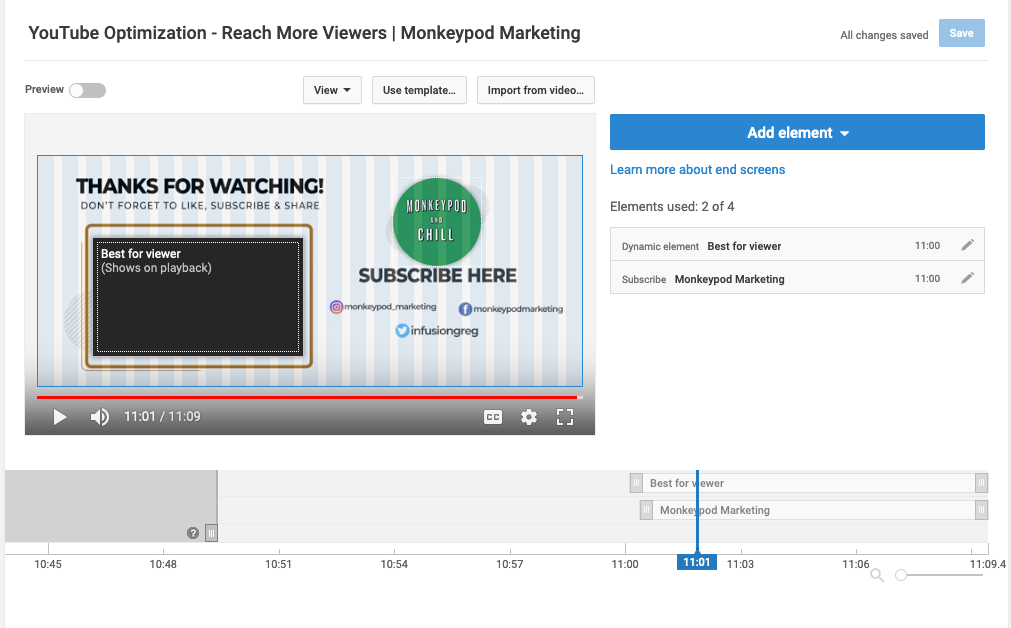
This one was totally new for me. End Screens are the little tiles that pop up at the end of a video to recommend another video, or to encourage the viewer to subscriber.

It’s a native YouTube feature, and it was easy to use – I just had never even tried.

Youtube screenshot

So, for my end screens I mostly just added the subscribe button, and then either a) a video that was related to the topic or b) I used the “best for viewer” option to let YouTube guide them.

I started by just added these over the video itself and had to pick and choose where to place them because the videos I was retroactively updating hadn’t been created with that in mind – so in some instances, the tiles are over my face.

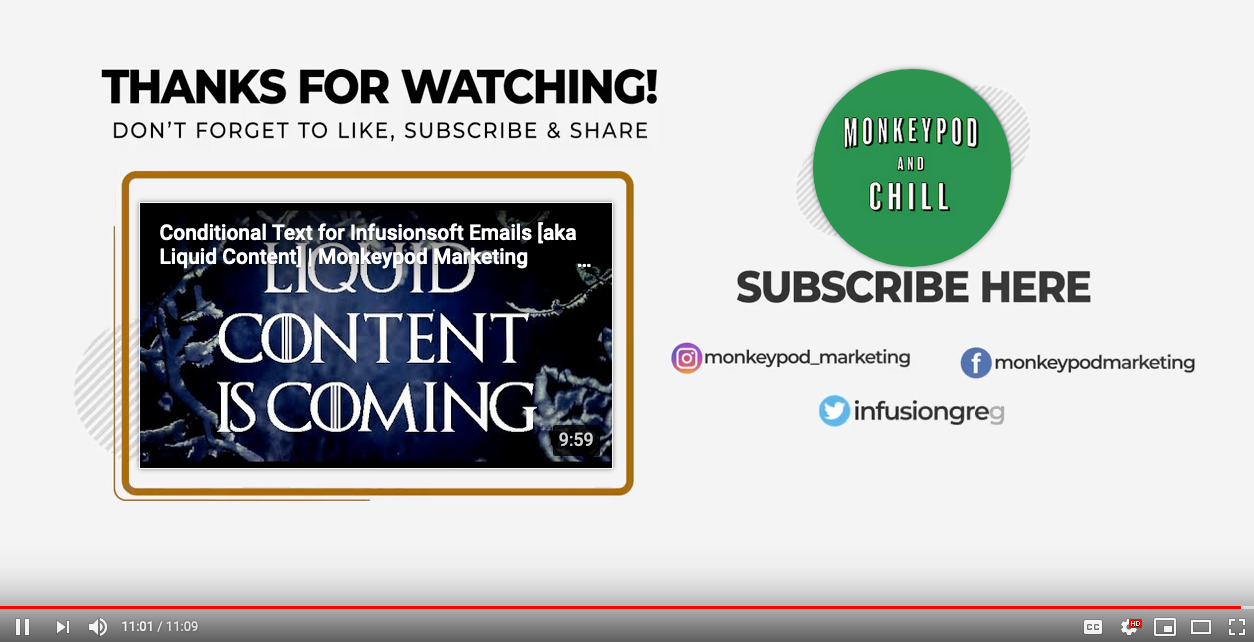
I figured long term I’d create a specific section that was designed for this purpose – and as I got into this I decided I’d better tackle it sooner than later. So, at the end of the video above you can see there is an outro animation designed to frame up both the recommended video as well as the subscribe button (thanks to Bret Martineau for whipping that up for me).

End screen YouTube Example
YouTube Endscreen screenshot

End Screens were much easier to add than I expected.

Sometimes I think I tell myself something is going to be harder than it actually is – which makes it easy to justify putting it off. Which brings me to captions…

Adding Captions

I had known about Rev.com as an option for getting videos transcribed and adding captions, heck I had even recommended it to others – but it took Matt’s experiment for me to actually try it out.

I thought it was going to be a “whole thing” – it was not.

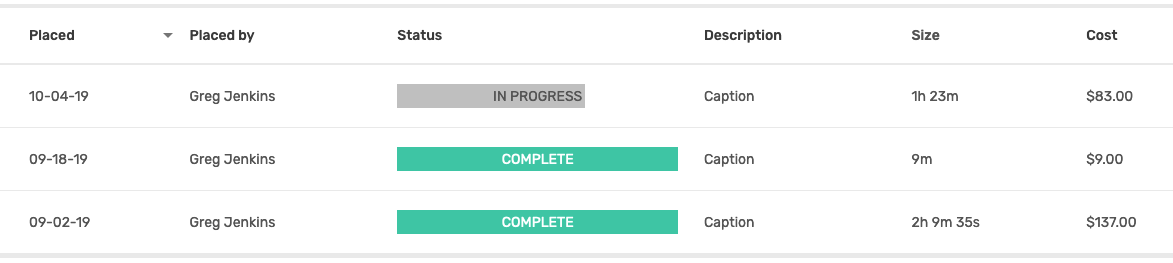
Rev.com was stupid easy – a full-on delightful customer experience. In fact, just this morning I placed another order with them (my third) and as I type this the completion notifications are coming through.

I knew that captions would make it easier for people to watch videos when they’re somewhere and don’t want the audio on – like a waiting room or, ahem, somewhere more private.

But it always felt like a “nice-to-have”, what hadn’t occurred to me was that YouTube actually takes this into consideration when deciding which videos to show someone. That was all I needed to hear.

Oh, and they upload the captions right to your YouTube channel – so I literally select the videos I want them to transcribe, pay, and then I’m done. Stupid simple

YouTube captions example
REV order email snapshot

So, there you have it – I’ve started optimizing SEO for my YouTube channel with the hopes of getting my content in front of those that it can help – and if you’ve got a YouTube channel of your own then I invite you to do the same.

Takeaway Lessons

YouTube rewards you if you help people stay on their platform – this was the big light bulb moment for me.

If you make it easy for people to keep watching videos, then YouTube will help people find your content.

Obviously I’m not done – I’ve only updated a few dozen of my videos, and there is plenty more I’d like to do – but I wanted to get the ball rolling so I can start experiencing whatever results my tweaks may have, rather than wait until I feel comfortable tackling everything on Matt’s list before I get started.

Progress > Perfection

If SEO for YouTube channels interests you then I strongly recommend digging into the full experiment over on his MoneyLab site, but before you do – go ahead and subscribe to my partially optimized YouTube channel here: