Keap, Software Updates
We’re back in action with another update on the Max Classic Version of Keap (formerly known as Infusionsoft), and there are a few features I wanted to highlight this month that will make our lives easier – and one feature that I’m not as excited about. Skip to the bottom if you want to see my video recap:
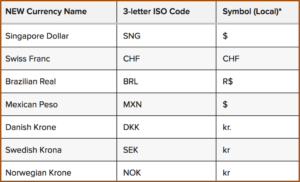 Feature #1: Additional Currency Support
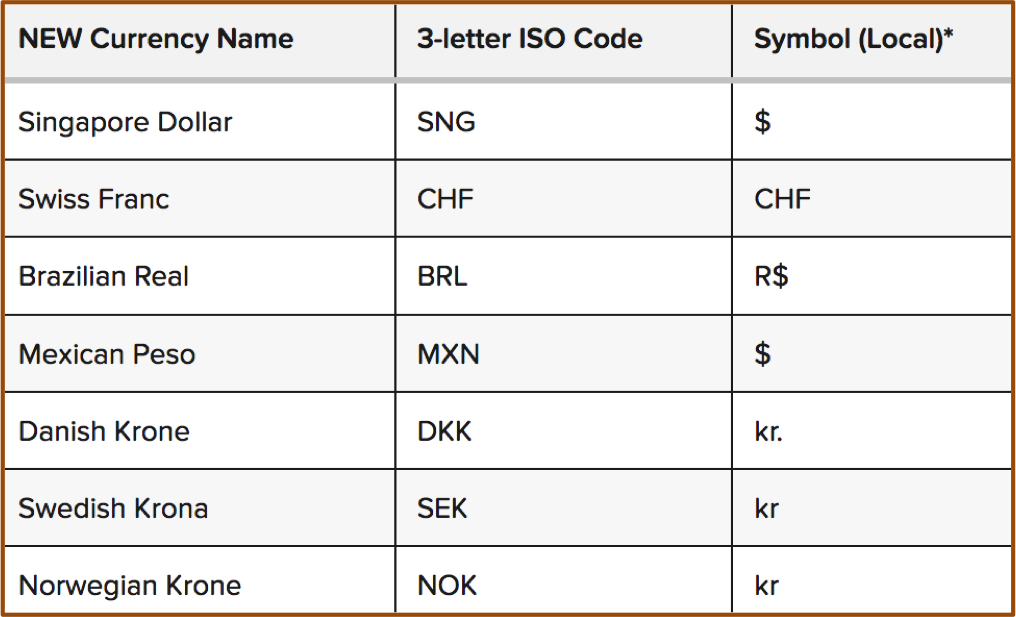
What it does: This update allows Keap users to use about a dozen new currencies that were previous unsupported.
Why it matters: Well, if you process orders in USD or AUD or the Euro, this might be less of a big deal, but if you’re in a country where your currency wasn’t supported previously, then this update just might be the ticket to allowing your customers to transact in their own local currency.
Caveat: Yes, this is exciting, and it’s a little bit of love for the normally neglected e-commerce section – but I just want to be clear that you can still only use one currency at a time.
Feature #2: The Signature Snippet
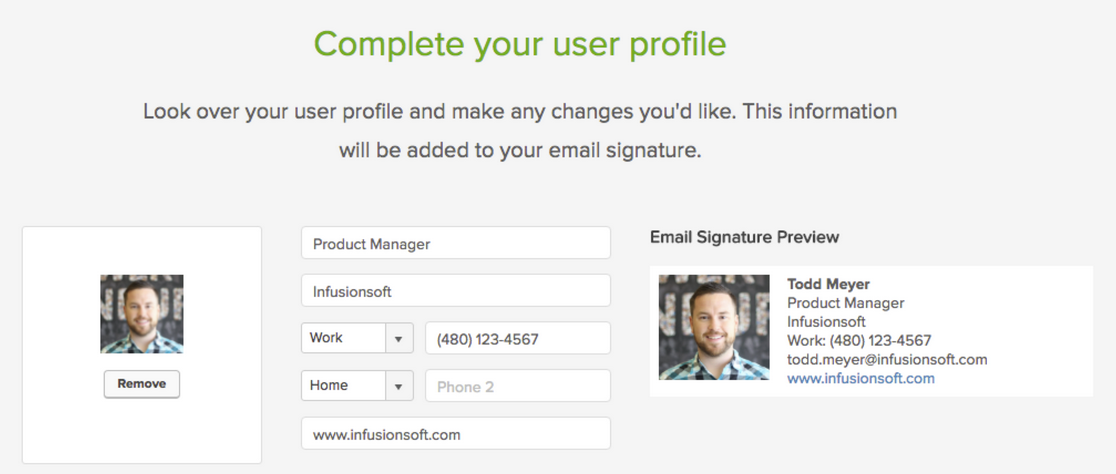
What it does: This update brings a signature block back into the email builder so you can quickly and easily drop an HTML signature into your emails.
Why it matters: This matters because if you’re sending a lot of emails, it isn’t realistic for you to have to type out your signature each and every time, and many people didn’t know about the option of using a merge field to drop in the owner’s siggy, so this makes it easy to add your information in an attractive professionally formatted way.
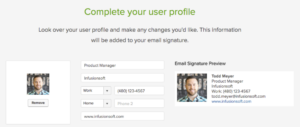
Bonus: This new signature snippet actually behaves a little differently than it did previously.
Feature #3: The Email Footer
What it does: This gives you the ability to edit the footer of all emails built with the new beta email builder.
Why it matters: This is really important, because now you can frame up the unsubscribe option to make sure that people know that they’re completely opting off your list. It also means that if you need to add a legal disclaimer of any kind, well, you can do that too.
Caveat: Yeah, I know, this isn’t really a new feature either, it’s just something that they’re bringing back – but hey, it’s pretty slick. I really like the way they’ve handled this. The one complaint I have is that the text options don’t seem to support any other fonts, sizes, colors, links, etc. You can add text language to frame up the footer, but you can’t do much more than that….yet.
 Feature #4: Automation for Quotes
What it does: Now you can trigger or stop automation when someone interacts with a quote you’ve sent them.
Why it matters: This is HUGE. Until recently, quotes were pretty basic. In fact, I didn’t know more than a handful of users who were actually taking advantage of them. But now they’re stylin’ and profilin’. This update brings us the ability to launch automation or follow-up when someone views a quote, and if they accept it, pay it, or decline it, then we can stop that follow-up and move them to a different part of the funnel. It’s really slick and makes the quoting feature much more usable.
Caveat: The drawback I see on this one right now is that it’ll get a little hairy if you have more than one open quote sent to a customer at the same time.
 Feature #5: Campaign Builder Facelift
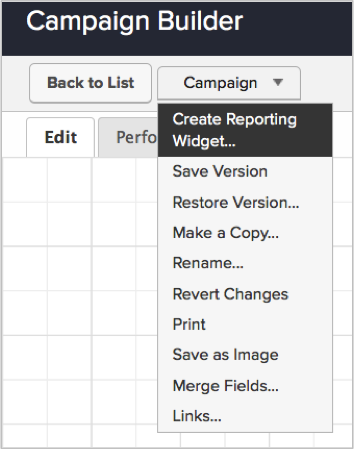
What it does: They’ve redesigned the campaign builder and moved the tool palette over to the left side of the screen, and cleaned up the top bar to be a little sexier as well.
Why it matters: Well, it’s mostly an aesthetic change. So, I’m not sure it actually matters all that much. But I think the goal is to bring the type of interface we use with the new email builder to the rest of the application. I imagine we’ll see this type of layout and interface showing up in the landing pages and web forms before too long as well.
Real Talk: I’m the first one to say that I’m a total Keap fan boy, and I recognize that I usually cut them more slack than most people – but I’m really not feeling this update. If you’ve been a Keap user for a few years, you may remember that when the campaign builder was first introduced, they had a menu with all the different goal types, and people could select one, and then adjust the goal method to track what they wanted. You were basically just choosing the picture, because you could configure the goal however you liked.
Then at some point they cleaned it up, and trimmed it down to just one goal. And you’d drag out that goal icon then choose what you wanted it to track. Once you had selected the goal, it would automatically adjust the icon image to reflect what you had selected. I didn’t love this update because some people had gotten really attached to using different goal icons to reflect different parts of their customer journey, and this removed the ability to choose what you wanted the goal to look like.
Well, now they’ve updated it again, and with it we’ve lost some additional functionality. And here’s where I take my issue: With this new update we can no longer change what a goal is listening for, or the image that represents it. Each goal has a dedicated “method” and a dedicated “icon” and if you change your mind, you can’t click on the little badge and change it; you have to delete the goal, grab a new one, name the new one, and reconnect it to all the various pieces.
It’s not the end of the world, but I’m having a hard time understanding why this is better. Maybe it’ll grow on me with time, but so far I’m not swooning.
Alright, all in all, a pretty solid release. It’s not perfect, but that’s okay, it has a lot of things that we’ve been asking for; and that demonstrates that Infusionsoft is listening. I believe it’s our job as the user community to help guide where the product goes – and the easiest way to do that is through constructive and thoughtful feedback. If you are loving what they’re doing, tell them. And if you are concerned about something you’re not seeing, tell them that too.
Thanks for reading, I’d love to hear what your favorite aspects of this release are
Campaign Builder, Guest Posts, Keap, Software Updates
 Buckle up sports fans, I’ve got an awesome blog post comin’ in from one of the best and brightest in the Keap building. Today’s post comes from Brett Fairbourn, a fellow automation geek and Keap educator. You may recognize Brett (or his voice) from his engaging and exciting update videos when Keap has a new software release, but today we’ve asked him to dig a little deeper and give us some insight into how some of the newest features might be used for your business. Brett wrote this post and created these videos exclusively for the Monkeypod readers, enjoy!
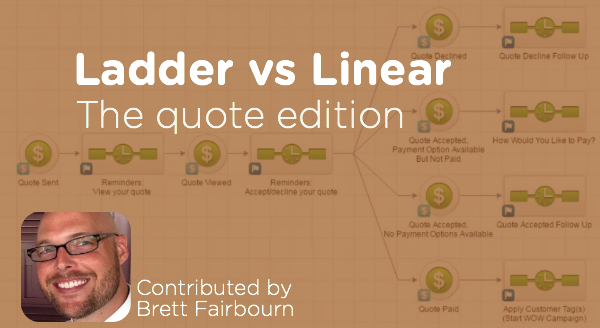
I was recently re-reading this gem from Reyna Bovee as I prepared to record the September 2016 product update video for Keap. I wanted to double check my logic, because the old linear vs. ladder conversation just got a little larger. The September 2016 update introduces the “Quote Status” goal to the campaign builder, and quotes work a lot like opportunities in that you can have several of them attached to one contact.
Here’s more on the quote status options.
But wait, first of all, can I just geek out for a second?
Quotes in Keap were, until very recently, freaking terrible. Man it feels good to get that off my chest. They were practically useless. BUT NOW, oh man, if you have a hands-on process, the quote-to-invoice-to-payment is so streamlined. And if your business is compatible with a more automated approach, now we have that, too!
You just have to keep a couple things in mind.
Like I said, as with opportunities, you can have several quotes attached to a single contact. But it’s not the quote that goes through the campaign, it’s the contact. So 5 quotes sent to 1 contact = 1 contact in the campaign, and that contact is going around viewing quotes and clicking on things all willy nilly. This can get confusing, and it can cause problems, especially if you’re using the linear approach to building your quote automation campaign.
The problem with the linear model is that any downstream goal will stop all upstream sequences. In other words, if I’ve viewed one quote but haven’t acted on it, and then you send me another quote, acting on either one of those quotes will stop all preceding automation. That means no more reminders to view the first quote if I haven’t done that yet.
Do I sometimes have multiple quotes pending for one contact at the same time?
If yes, you might want to use a ladder-style quote automation campaign.
If no, then the linear campaign will work great for you (and it’s easier to conceptualize and build, so that’s nice).
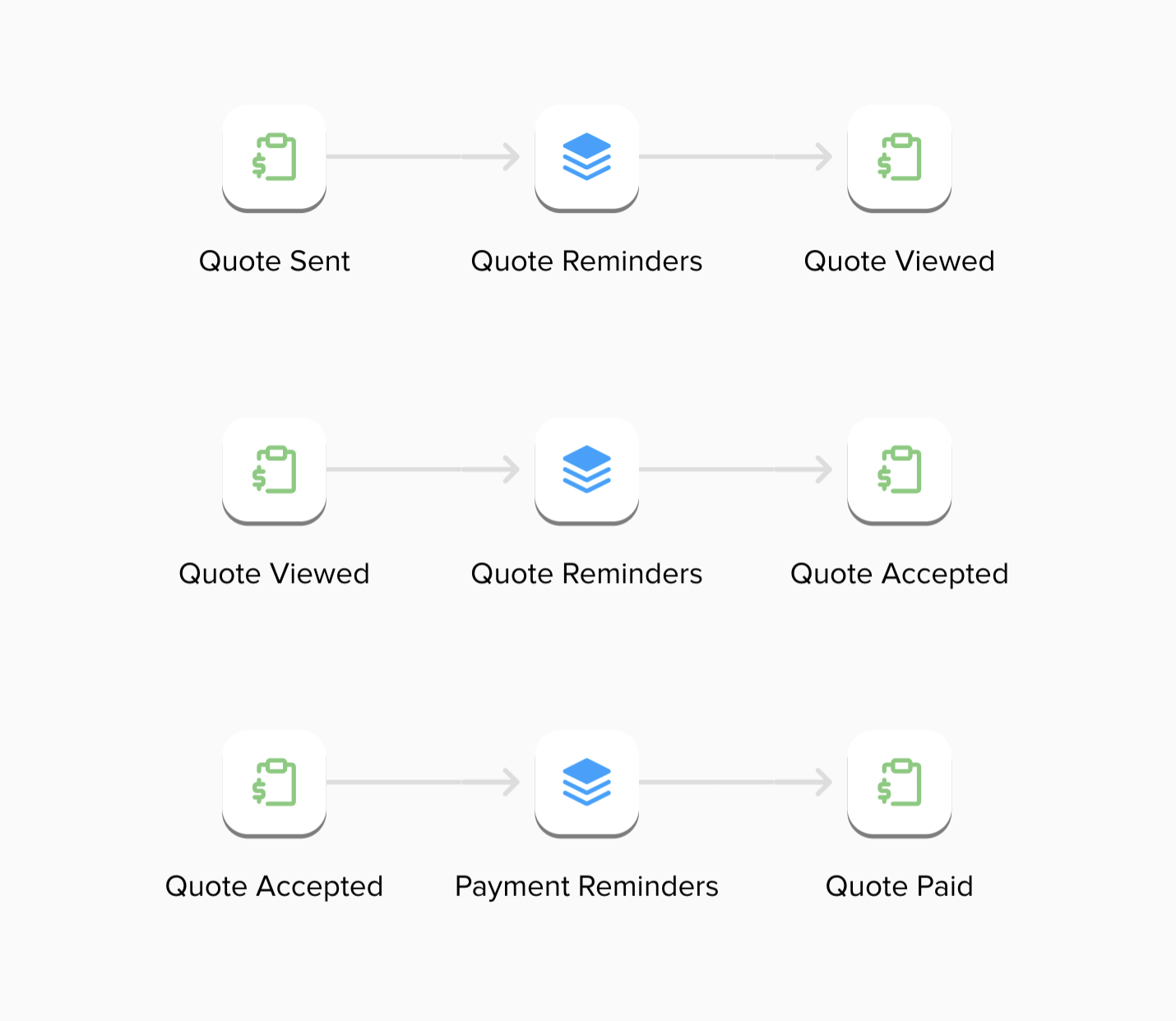
To be honest, it probably doesn’t matter in most scenarios, because we’re only talking about a two-stage process: the stage between “Quote Sent” and “Quote Viewed,” and the stage between “Quote Viewed” and the customer’s response. In most cases, it’s not going to be vital to run both of those stages of automation at the same time. But hey, maybe for your business, it IS vital. So here’s the scoop:
First, here’s the rundown on the linear campaign:

Next, here’s the ladder campaign:
So there you have it – two different automation structures using the Quote Status goal that can help support your quote sending and payment collection process. The linear process isn’t wrong, per se, but the ladder methodology has a range of benefits it offers. And in case you missed it, here’s a great post outlining the ladder process you can use for supporting a sales pipeline.
Keap, Software Updates
It’s 120 degrees or so in Phoenix these days (or so I’m told), and everyone knows that when you can’t go outside you might as well work on the Infusionsoft July Update, right?
Well, regardless of the reason, the product team is pushing out another valuable release, and I figured I’d take a moment to share the highlights:
Feature #1: Sharable Dashboard Custom Statistic Widgets
 What it does: This allows you to configure a dashboard widget for one user, and then share it to other dashboards for your other users.
Why it matters: This is really valuable for accounts who have a lot of users, or for people who have a lot of Infusionsoft accounts (ICPs, VAs, Partners, etc).
Here’s the deal – you’ve always been able to create saved searches and give other people access to those searches.
But in the past, they had to know where the search was in order to go access it. And if they wanted to add it to their dashboard, they had to know how to add a widget, and then how to configure that widget to give them the information that they wanted.
Not anymore.
With this update you can configure a custom statistics widget (RIP Lil Box O’ Stats) and then once you’ve got it just so, you can push that widget (stats and all) through to the dashboards of other users. Giving them all of the reporting insight, and none of the effort of configuring it.
Feature #2: Create Dashboard Widgets to report on Campaigns
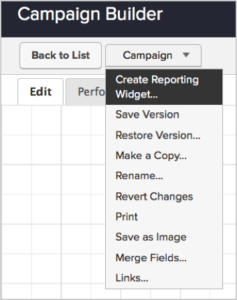 What it does: This allows you to quickly and easily create a widget on your dashboard to give you a handful of statistics from your campaign.
Why it matters: This information has always been available to us, but in order to access it you had to use the performance tab in your published campaign, or you had to create the report from scratch under the Marketing>Reports section.
Not anymore.
With this new release Infusionsoft will automatically choose 5 goals (goals only), and will a widget to your dashboard telling you exactly how many people have achieved this goal in the last 30 days.
Caveat: Yes, I’m a huge Infusionsoft fan; but I also have really high expectations for them, and this particular feature is….a good idea. It is. I think this is a step in the right direction, but I don’t think it’s quite there yet. The good news is, if their recent track record of improving is any indicator, I think Infusionsoft will get there over the next few releases.  In order for this widget to really be usable, we need a few things to be added:
- I need to be able to choose the goals that I want to track. Most of my campaigns have more than 5 goals, and having the system determine 5 random goals isn’t going to give me the insight I need.
- We need to be able to adjust the date range. Right now it defaults to show you those 5 goals and their activity over the last 30 days. I’d like to be able to switch that to 24 hours, MTD, YTD, last 7 days, etc.
- We need to be able to apply additional filters to this report. Show me how these goals are performing for those who don’t have the “customer” tag. Or who are assigned to Greg and not Craig.
- Right now it only draws goals that are exit points, or entry points. I’ll definitely want to be able to measure important milestone goals along the way.
- Finally, why isn’t this widget sharable? I mean, forgive me, I’m not a developer – but if you’re busy coding up a new widget. And you’re also busing coding up the ability to share widgets. It seems like maybe we’d be able to share the new widget. Please?
Like I said, good step in the right direction. I’m looking forward to seeing where it goes from here.
The other big features that they’re releasing with this update have to do with the beta email builder.
- They’re allowing you to select legacy templates now when you want build an email, and as you bring that template into the email builder it will automatically convert the legacy elements to the new mobile responsive equivalents. It won’t be an exact translation, because not everything from legacy has a 1:1 counterpart in the new builder, but it should be pretty close.
- In that same vein, you’re now also able to convert existing emails over to the mobile responsive beta builder. Yup, that means if you have hundreds of emails you’ve built and have been using, and you’d like to convert those over to mobile responsive emails, you don’t need to rebuild everything. You can use the converter tool to migrate the old content into its fancy new home.
Keap, Software Updates
Those rascally developers over at Infusionsoft are at it again. (Actually, it takes more than just good developers; shout out to the entire Product team.) So, let me take a moment to give you what I consider to be the highlights of the May 2016 release.
Feature #1: Trigger a Campaign from a Manual Credit Card Charge
What it does: This allows you to launch automation when you process an order manually.
Why it matters: In the past, you’ve been able to build complex fulfillment campaigns to interact with your customers after they place an order online. You know, send them a thank you email, deliver their product, and then follow-up with them to see how they enjoy it, or to ask them to purchase again; that sort of thing. Well, this type of automation would only trigger for orders that  were placed through an order form, or through the shopping cart – until now.
Now you can use manual orders to automatically trigger whatever fulfillment processes you might have in place. Remember, the sale isn’t the end of your customers journey, it’s just an important milestone where you learn something new about them.
Caveat: While I like this feature, and I’m excited about it – I also feel compelled to call out a concern I have. I’d very much like for this to be an option. I’d like the choice, but I don’t know if I want automation firing every single time I process a manual order. I mean, we’ve been building campaigns for a few years now, and unless you’ve been manually triggering follow-up, its plausible that everything you’ve designed is set-up to speak to customers who purchased online. So, if this release rolls out and now a new set of customers (manual purchasers) are being added to those campaigns, I could see it causing a little confusion.
Feature #2: Date/Time Fields are Useful Now
What it does: You can use Date/Time Fields for Field Timers
 Why it matters: This is really, really important. Field timers are critical to delivering automation that feels personal. Think about it, field timers allow you to build a campaign that delivers it’s messaging at intervals unique to each particular contact. You know, 3 days before their birthday, or 5 days before their membership anniversary. That sort of thing. But the massive glaring drawback has always been that it doesn’t give you the ability to send those messages at a unique time of day – until now.
The Date/Time Field houses not only the Date that something is happening, but also the Time. And with this release, we can now use the date and time to schedule our communication – so, we can send appointment reminders 1-hour before someone’s appointment. Or we can send consultation reminders 4 hours before their consultation takes place. There are plenty of situations where this will make our scheduling that much more flexible, and therefore our messaging that much more impactful.
(EDIT: As of the first part of this release, we’ll be able to run actions at 24 or 28 hour intervals before an appointment, but NOT 30 minutes, or 2 hours, etc. That part will be completed and included in a future release.)
Feature #3: Beta Email Builder Improvements
What it does: You can search images, create tags, search tags, and there are new link types.
 Why it matters: This matters because it makes the beta builder that much more usable. If you told me that you had decided not to adopt the new email builder, I wouldn’t call you crazy. As I’ve said in the past, there are some really nice improvements that it offers; but there are definitely still a number of things I’m excited for them to add. Well, this release definitely checks a few more off that list.
Previously, there was no way to easily search through your images – so you’d end up scrolllllllllllling until you found the one you wanted. Now you can search just by typing the name of your image. (Need to rename some images? I gotcha covered.) This is a big time saver.
 Creating and searching tags – another big time saver. This means that if you have hundreds of tags (or thousands), now you can type the first few letters of a given tag instead of scrolling through them all. And, if the tag you want to use doesn’t exist yet, you can create it on the fly. Now, I may be wrong – but I don’t think you can assign that tag a category (which would be annoying). So, before I celebrate this one too hard I’m gonna cross my fingers that I’m wrong – or that they’re going to add that part in soon.
 And finally – there are a few new link types. In addition to linking directly to a URL, you can now also link to an email address, or a phone number. This is useful if you got used to using those previously, and hit a hiccup once it was removed. This is definitely a step in the right direction, but personally I’m really reaching for the ability to link to (and create) a quick thank you page, and to link to a campaign link.
Those are the three that I’m most excited about, but it’s by no means the end of the release list. There are a few more features that are going to make a lot of people very happy.
And, once again, because Brett did a killer job on the recap video, I’m going to use the Infusionsoft release video instead of reinventing the wheel with my own. Enjoy:
Keap, Software Updates
Infusionsoft keeps the momentum going with another strong update (scheduled to release over the next week). Lots of goodies in this update; some that we’ve been waiting for, and some that I didn’t even know I wanted. I’m gonna profile a few of the new features to let you know which ones I’m most excited about and why:
Update #1: New Email Builder in Campaigns
What it does: This gives you the ability to use the new Email Builder inside the campaign builder.
Why it matters: Um, because its amazing. Now you can send mobile responsive emails in your campaigns. It’s freaking here. (Maybe a little late, but it’s here, okay?) You just drag out the Email Beta snippet like you normally would when building an email inside a sequence, but this time when you go to configure it, it’ll open the new builder environment instead of the traditional one.
(Oh yeah, and templates. We can now create, save, and use our own templates for the new email builder. Yahtzee!)
 Update #2: New Unengaged Marketable Email Status
What it does: This release introduces a new email status to tell you which of your marketable contacts have disengaged for 4 or more months.
Why it matters: This allows you to see how effective your marketing is doing, and target segments of your list with waning engagement levels. I think most people will agree that marketing to contacts who are interested in what you have to say will definitely yield better results than marketing to folks who have totally tuned you out. At the very least, this will allow you to differentiate so you can speak to those two groups differently. Oh, and they’ve added the ability to filter and search by this criteria via the Email Status Search.
Update #3: New Quote Status Filters
What it does: This gives you some additional filters by which you can search your quotes.
Why it matters: Did you know Infusionsoft has the ability to send quotes? Well, it does. And it is rapidly getting better. A few months ago they gave us the ability to accept payment on those quotes; and now they’re adding some new filters to the quote reporting so that you can find the data you need regarding your outstanding quotes. If you’re using quotes (I’m looking at you Delane) then this is great news.
Update #4: Auto-Update Credit Card (For Infusionsoft Payments)
What it does: This new feature means that when a customer receives a new credit card, the system will automatically start billing the new card and stop trying to bill the one that was expired or cancelled.
Why it matters: I don’t think I need to explain….but really, this means you that Infusionsoft will communicate directly with the credit card issuer to gather and bill the new credit card details rather than having you reach out to your customers to try and get the new details or trying to get them to update their info. NOTE: This is only available for people using Infusionsoft Payments, and only for MasterCard and Visa. But still, this is amazing. No more need for billing automation to collect for those folks. It doesn’t hurt to have them update it manually, but now that’s the fallback instead of the standard.
There are a handful of features in this release, so I’m not going to profile all of them. In fact, I’m not even going to record a video outlining the new updates because Infusionsoft has already created this video; and it’s freaking awesome (Kudos Brett). Enjoy:
Keap, Software Updates
ICON is always a really exciting week, and in the years past they’ve gone out of their way to announce big changes to the software. Well, this year definitely gave us a glimpse into what we can expect from the software over the next few months, but they really didn’t lay out a long term product road map like I had hoped they would.
First of all, Terry Hicks spoke from stage – and in case you haven’t heard, Terry is the new Chief Product Officer. I like him. I met him at PartnerCon and I was impressed with his “take-action” mentality. His message at PartnerCon was “Don’t take my word for it. Let me show you results.” That’s something I can get behind. But even if I didn’t like him – it’s hard to argue with the traction that they’ve got in the core product lately. Month after month we’ve been seeing powerful new features and updates roll out (albeit, not without a handful of bugs). Check out the January, February and March updates in case you missed them.
Okay, so to learn about the product (which I figured would be important to everyone…) I had to track down the Product Showcase session, which was held in one of the smaller breakout rooms at the same time as 11 other sessions. There were roughly 100 people in the room during the one I attended (they may have held that session more than once, I’m not sure).
The showcase was exactly that, it was a series of product managers sharing the result of whatever they’d been working on. And for someone like me, it was basically a buffet of deliciousness.
Update #1: The New Email Builder is coming to Campaign Builder
When it is coming: Soon. They didn’t commit to a date, but conversations I had led me to believe we’d start seeing it within the next 6 weeks.
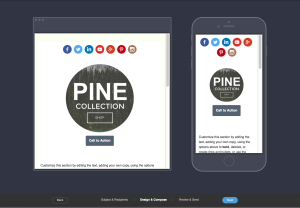
What it does: The new email building environment, which was recently rolled out for broadcasts, will soon be released for the campaign builder.
Why it matters: When they rolled out this new builder I know there was a lot of excitement around it, and many people were disappointed when they realized it was only for the broadcast environment. So, this update will bring that same builder to the rest of the application. This means that you will be able to build uniform and mobile responsive emails across your entire system. Oh yeah, and templates. Did I mention you’ll be able to create and save templates?
Update #2: Physical Credit Card Swipe
When it is coming: TBD or “Soon”
What it does: This is an attachment that you can plug into your mobile device or tablet which will allow you to swipe a credit card, process an order, and trigger automation as a result of a successful payment.
Why it matters: This will be a huge benefit to anyone who does live conferences or events. Now, you’ll be able to create and process orders in real time. No more asking your customer to type in all their information, just swipe the credit card and it pulls the data and runs the payment. They demoed this live during the session and it was pretty slick. You could also add tax or discounts in real time to adjust the order as needed.
Update #3: The New Marketplace
When it is coming: TBD or “Soon”
What it does: This will be a new version of the existing marketplace, but with easier and more intuitive search and navigation.
Why it matters: The current Marketplace is nice, but it can be tough to navigate. Often times you’ll end up searching and you’ll get either 0 search results, or dozens of results. This new marketplace will be easier to operate, and should provide a more customer friendly experience to help you find the tools and solutions you need without the hassle.
Update #4: Infusionsoft Payments are coming to the UK
When is it coming: 3-6 months
What is it: Infusionsoft Payments will be available for customers in the UK.
Why it matters: Infusionsoft Payments is the Merchant Gateway that Infusionsoft announced at ICON last year, and has since been available only in North America (US first, and more recently Canada); but now they’re bringing this payment solution to Infusionsoft Users elsewhere. First up will be the United Kingdom, and I would expect Australia and New Zealand will follow later this year. If you have a merchant gateway that you use and are happy with then this may not be a huge deal for you; but if you’ve had trouble with your gateway, or live in an area where they’re hard to come by, then this could be really big news. I’ve use Infusionsoft Payments since I started Monkeypod and have been thrilled with the experience and the rates.

Update #5: Delight Enhancements
When it is coming: It’s already happening.
What it is: Infusionsoft has recognized that there are some aspects of the platform that just simply aren’t delightful; and recently they’ve been really intentional about addressing these things. My understanding is that we can expect more of this. Infusionsoft wants to make sure that each release that comes out has something in it that customers can see and feel.
Why it matters: This matters because we can all agree that the structure or code base of the software is important, but as a user community it’s also our expectation that this will work as expected without us noticing that it’s being maintained. So, Infusionsoft is making an effort to deploy releases that people can feel and appreciate more easily. This means that hopefully we’ll see more things like the email reporting in the campaign builder, the ability to use internal forms for the quick-add feature, and simple stuff – like being able to clone an order form.
Okay, well, those are the big PRODUCT related announcements from ICON. I wish I had a more specific timeline for when we can expect all of these features to be released; but the reality is that Infusionsoft has been burned in the past by announcing a timeline and being unable to stick to it; so this year their language was unclear about when they’ll be able to deliver these things – and personally, I respect that. They’ll deploy them when they’re ready; and I’ll be thrilled when they do.
If you have questions about any of these, or if you attended a session I missed and want to share something you’re excited about please feel free to comment below! This post was specifically about the Infusionsoft software – you can expect another post in the next week or so recapping the rest of the conference and my favorite sessions and take-aways.