Keap, Marketing, Tips and Tricks, Tools
If you bring up marketing automation or email marketing with someone, it seems to be just a matter of time until split testing comes up.
And if you use Keap (formerly known as Infusionsoft), you may or may not have noticed that there isn’t an easy split testing feature built into the campaign builder.
Well, fortunately some smart people have already solved this with third-party solutions like MyFusionHelper and PlusThis.
Those tools are great, and there are dozens of use cases for either one, but just last week I realized that you could use use Zapier to implement split testing in Keap as well.
I’m sure I’m not the first person to figure this out, in fact there may even be an easier way, but this was the first time I’d stumbled onto this and so I wanted to share in case it helped you out too.
Anyway, without further ado; here are the steps for using Zapier to split test in Keap:
- Create a custom field (whole number type) in Infusionsoft, and name it Split Test.
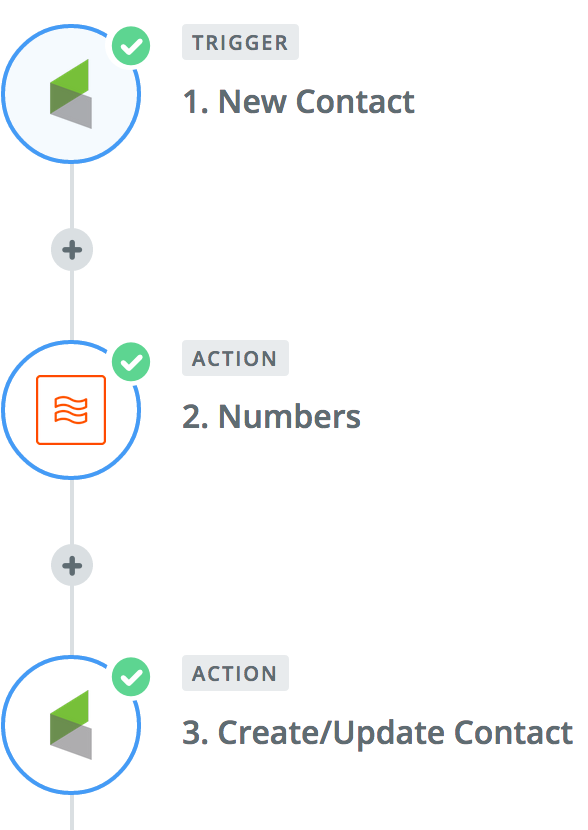
- Choose the trigger for your zap: This will be what initiates the zap, you could choose to have it run when any new c
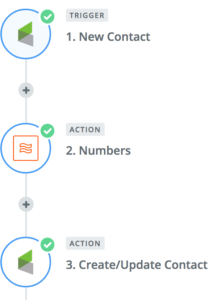 ontact is created, or when a specific action takes place, like a tag is applied.
- Use the built in Zapier formatter function: This step will use the Spreadsheet Style Formula option to randomly generate a number. For that part you’ll use the RANDBETWEEN(min, max) formula. If you want to split into two groups you’d use RANDBETWEEN(1, 2), and if you wanted to split into thirds, or quarters you’d just change the second number.
- The third step will be to update the contact record in Infusionsoft by mapping this new value to the Split Test field you created in test one.
- Then, use this value to branch contacts between your various sequences, or in searches to determine your broadcast groups. (Yes, this will require a little manual effort.)
For those of you who are more visual learners, enjoy this short video walking you through the process:
Yes, this isn’t a perfect solution, and it may not be as elegant as some of the other options out there – but if you already have a Zapier subscription then this is one way to get a little more bang for your buck. We’d love to hear if you end up using this, or if you have clever ideas to simplify this further.
And if you like stuff like this, then download our Monkeypod Toolbox ebook for the full list of tools we trust:

Guest Posts, Marketing, Small Business
Hi-diddly-ho reader-inos!
Besides promising not to channel my inner Ned Flanders for the rest of this post, I’m excited today to share a post that isn’t my usual technical ninja stuff.
Rather, since I see a lot of businesses and technologies, I wanted to share what I believe are the trends you’re going to see more in Marketing Automation for 2017.
Why do you care? Well, for starters, some of this stuff is really cool and could probably benefit your business. Next, knowing what is possible with technology is very important to stay competitive. That doesn’t mean you have to master using the technology, you can always hire people for that, but its good to have a general understanding so you can strategize properly.
Marketing Automation Prediction #1 for 2017: Automated social funnels
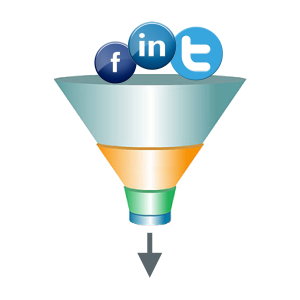 In the past year or so, the savviest of marketers have begun aligning their social ads with their sales funnels. Basically, if you are in the middle of a launch (for example) and getting hit with launch emails, when you are trolling around Facebok you also see the same launch messaging via ads because you are in that part of the funnel.
True omnichannel marketing used to be really hard, if not nearly impossible. Thanks to Google’s and Facebook’s tracking pixel we can now do remarketing easier than ever which is the key tactic for these automated social funnels.
If you give your name/email for some free resource and you don’t download it right away, you’re going to start seeing ads reminding you to download it until you do. That kind of stuff is going to become more common in 2017.
Marketing Automation Prediction #2 for 2017: More robust and meaningful data centralization
Technology is great. However, in our modern age of digital tools, getting data from the different systems into one holistic view can be a severe challenge. Especially for small businesses.
 These past few years we’ve seen more and more tools that exist solely to connect different systems together. A great example is Zapier. It is a platform that allows you easily connect different services together automatically without writing any code.
For a more ground level example, if an order comes in through Infusionsoft, Zapier can push an invoice into your accounting system whether or not there is an official integration with Infusionsoft.
The next evolution of these services that act as a connection platform is the reporting aspect. That is why we’ll see centralization of all this data as a big trend over the next 12 months.
As more and more of these Zapier-like services crop up (IFTTT, Workato, etc), the data visualization and reporting functionality is going to become a critical feature (if not THE most important feature).
Because at the end of the day, if you are spending money on tools and cannot trace that expense to inbound revenue, you can’t make educated business decisions.
Marketing Automation Prediction #3 for 2017: More push notifications
This was one that I think is going to be the next “big thing” for marketers. Push notifications are those little messages that show up on your phone from different apps. You got a text. CoolGuy333 made a comment. That kind of stuff.
Push notifications can also exist for browsers too.
In the past year I saw a few big names test this technology and saw a handful of services show up. If you see the big dogs testing stuff, its worth keeping your finger on the pulse to  see what happens.
Turns out there are many ways this kind of technology can be used. On the website it can be used to engage prospective buyers into a conversation or drive them to a particular resource. For any kind of software or app, it is one of the most powerful engagement tools in your arsenal.
Case in point: I have some apps on my phone that I NEVER use. But every once in a while a notification will crop up and I’ll open it because why not. Boom! That notification just got the user back into the app 🙂
This is not the “silver bullet” that the gurus probably will make it out to be. Rather, it is another digital messaging channel that can be customized and used to enhance the customer experience. Put simply: your strategy needs to be sound if you are going to use push notifications (just like any other channel).
What do you think? Do you disagree? Leave a comment and let’s discuss!
Marketing, Tips and Tricks
When your email arrives in someone’s inbox, it’s often showing up between an email from Grandma, and a twitter notification that Beyoncé just retweeted you. Safe to say you’ve got some competition, and your subject line may just be the difference between being read, and being deleted.
Well, with all that emphasis on subject lines, I thought it’d be fun to look back at the last 12 months of Monkeypod emails and see which subject lines of mine performed the best, and then try and figure out why.
The folks over at Digital Marketer have done a list like this every year for the last few years, and they seem to know what they’re doing so I’m not going to reinvent the wheel. I’ll just borrow their structure and use my own findings (Here’s their 2016 list).
Feel free to steal these subject lines for your own business, or use them as inspiration when you’re writing new ones.
Note: I don’t have a massive audience, but I sent 58,000 emails in 2016. For the sake of this list, I’m only going to look at emails that were sent to 250+ recipients.
Another note: Open rates and averages can vary dramatically from business to business, and from industry to industry. I’ve worked hard to keep my list really targeted, and to set the appropriate expectations for subscribers. As a result, my audience is pretty engaged. Don’t get discouraged if your open rates aren’t as high as you’d like, it’s an opportunity.
10. 0% discount and you don’t have to open it before midnight.
- Open Rate: 51%
- Click Through: 15%
- Content: Cyber Monday Anti Sale
- Analysis: I sent this email on Cyber Monday, knowing that most people are buried in email that day, and I was surprised it did as well as it did. I think it performed better than average because a lot of people are a little burnt out on all the promotions and sales that emerge during the Holidays, especially the weekend after Thanksgiving. Rather than run a promotion of any kind, I decided to offer a free video outlining the changes and updates that had been made to the campaign builder over the past few months.
9. ICON: The Good and The Meh (BLOG)
- Open Rate: 53%
- Click Through: 54%
- Content: Blog Post (read it)
- Analysis: ICON is Infusionsoft’s annual user conference, and Infusionsoft spends a lot of money advertising and promoting ICON. I’d estimate that less than 10% of Infusionsoft users attend ICON, and probably a similar or slightly higher percentage of my audiences does. So, that leaves an overwhelming number of people who know about ICON, but didn’t go for one reason or another. From there, it’s not a huge leap that my readers were curious for some of my notes and perspectives from ICON, and this blog post scratched that itch. Oh, I also know that I can be a bit of a “fan-boy” when it comes to Infusionsoft, and people seemed to like that I called Infusionsoft out on a few things instead of just showering them with praise. The open rates were good, but the click through was incredible on this one.
 8. Time to tidy up. [BLOG]
- Open Rate: 54%
- Click Through: 25%
- Content: Blog Post (read it)
- Analysis: This email was announcing a blog post with an Ebook filled with tips for cleaning up your database – I created the ebook because nearly everyone I know who uses Infusionsoft agrees that their app could be a little tidier. And I think it’s that same reason that made people so receptive when this little ditty arrived in their inbox, plus, a little alliteration never hurts.
7. The Secret to Infusionsoft Reporting
- Open Rate: 54%
- Click Through: 33%
- Content: Blog Post (read it)
- Analysis: So, this one uses the word “Secret” which is obviously a big trigger word for people. Fun fact, that’s also why you see it in the title of buzzfeed articles, and on the cover of Cosmo type magazines. At any rate, this was one of my most popular blog posts of the year, and I think it’s success stems from the fact that Infusionsoft reporting is a little limiting sometimes, and so anything that makes it easier is quite welcome.
6. KEY
- Open Rate: 56%
- Click Through: 49%
- Content: Nurture Invitation
- Analysis: I was trying something clever with this subject line. On it’s own, it doesn’t make much sense, just “KEY”. But I also send the sender’s name to be “MON” and the first text in the email to be “POD”. That way, when you view it in your inbox, you get Sender Name, Subject Line, Preview, and it spells out MON-KEY-POD. I got a handful of replies from people who absolutely loved it, and then a handful of replies from people who were confused by it, and nearly didn’t open the email because it didn’t have my name on it. Anyway, it’s clever, but use at your own risk.

5. Where do I start?
- Open Rate: 58%
- Click Through: 33%
- Content: Blog Subscriber Welcome
- Analysis: I think the open rates were pretty good on this email because a lot of people come to my website looking for an answer to a specific question, and then when they see the other resources I have to offer, it’s natural to wonder where to turn next. Or, what order to consume things in. So this email shows up in anticipation of that question, and gives them six of my most popular blog posts as a place to start. I think the variety and number of links in the email account for the high click-through rate.
 4. New Course: The Referral Pod
- Open Rate: 59%
- Click Through: 19%
- Content: Announcing the Referral Pod
- Analysis: I launched the Referral Pod in Q1, which is a course designed to help Infusionsoft users build and launch their own Referral Partner Programs. This was the subject line that I used for the email that first announced it, and it earned high engagement and high open rates. No gimmicks on this one, I think the open rates were high because this was the first time I debuted this course, and I had dripped some teaser content leading up to it. The engagement was high because the subject line set the right expectation (and because there was a no-brainer free trial).
3. Pay to the order of: ~Contact.FirstName~
- Open Rate: 62%
- Click Through: 9%
- Content: Monkeypod Partner Program Invitation
- Analysis: I also launched a Referral Partner Program in Q1 of 2016, and in May or so I wrote my first batch of commission checks. Wow, I never thought I’d be so happy to give away money. Anyway, this email was after I wrote that first batch of checks, and was inviting another audience to sign up for my partner program in case they think they’re going to recommend Monkeypod to anyone. The open rate was solid, and the engagement seems low, but 9% worked out to be about 40 new partners.
2. Hey, I’m Greg.
- Open Rate: 64%
- Click Through: 1%
- Content: Indoctrination
- Analysis: No matter where you opt in to my list, sooner or later you’re going to wind up in my “Meet Greg” campaign. This is my version of an indoctrination campaign, and it’s designed to set expectations and introduce myself. It also gives me a chance to set the tone for who I am, and what Monkeypod is all about. This email is the first of a three part series, and so this one doesn’t have a call to action of any kind; it’s only purpose is to say Hello.
1. Just a quickie
- Open Rate: 74%
- Click Through: 41%
- Content: Survey Request
- Analysis: Last year this subject line ranked 2nd, with an open rate of 68%, and the 6% spike was enough to help it claim first place on this years list. This is a subject line that I use in a few different campaigns and it consistently performs. People like it because it’s a little suggestive, just enough to pique the recipients curiosity. And the click through is successful as well because once they open the email, it’s really quick and to the point “Hey, take this one question survey”.
Honestly, I hope you know this, but I’m certainly not sharing these subject lines and stats with you to brag. I mean, I am pretty proud of the engagement I’ve been able to sustain, but I’m also certain that there are plenty of ways I can improve, and plenty of people doing this better than I am.
I’m sharing these because I hope that you can either use them directly, or as inspiration for your own emails in the upcoming year.
Disclaimer: Yes, I know that a few hundred people isn’t a statistically significant sampling. I’m not a statistician. I just thought this would be a fun way to share some of the subject lines that have been working for me.
I’d love to hear the best or most creative subject lines you’ve ever seen. Share below, or by emailing me directly!

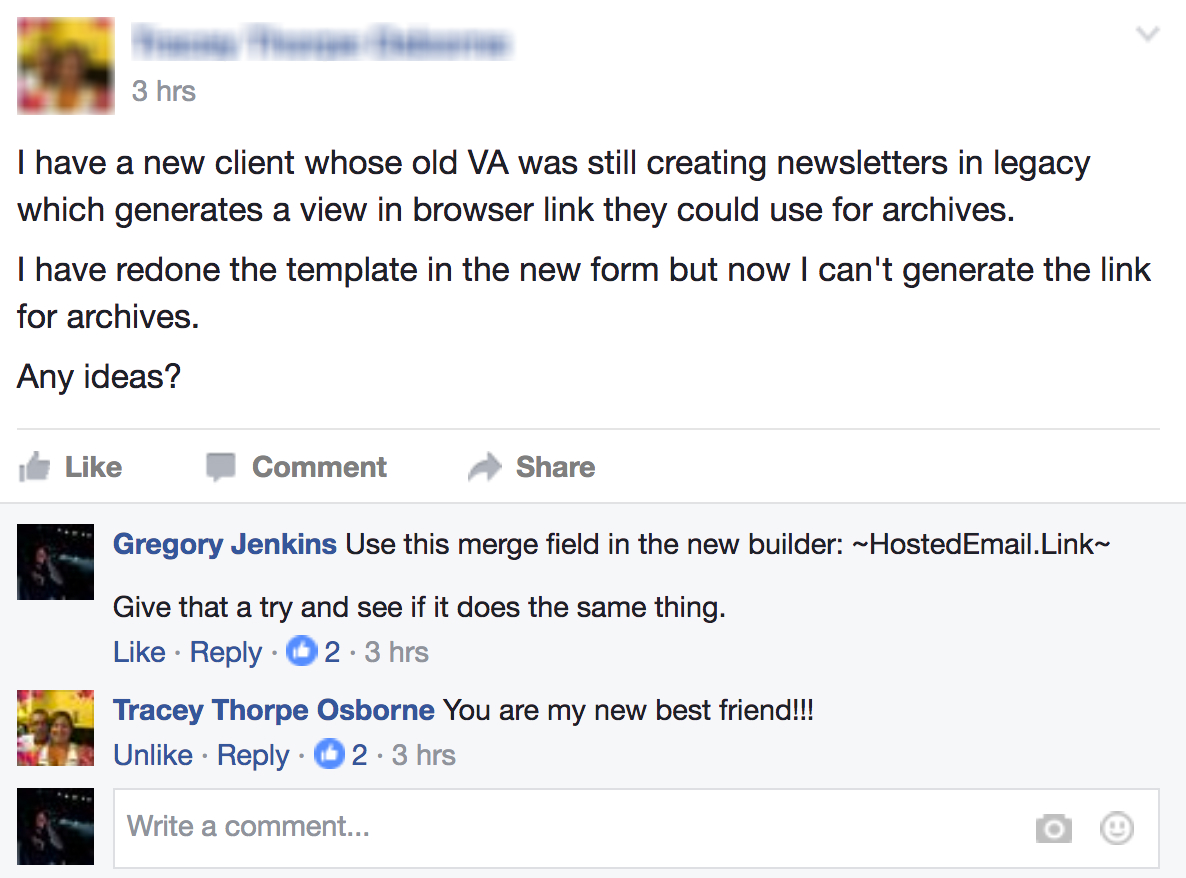 Anyway, the question from last week was essentially “How can I add a link to the hosted version of an email if I’m using the new mobile responsive email builder?”