Keap, Uncategorized
Me: Are you really going to interview yourself?
Greg: Yup, we’re doing this, let’s go.
Me: Okay, but don’t you wanna at least explain what you’re doing so people don’t think you’re weird?
Greg: Nah, they’ll figure it out. Plus, I’m excited.
Me: Okay then, you’re the boss. Tell me about the IS Starter Kit.
Greg: It’s my latest course, and it’s freaking awesome. I’m really excited.
Me: Yeah, obviously. What’s the course about?
Greg: Well, it’s an Infusionsoft course. It’s 40 modules long, and it jumps around quite a bit. The easiest way I can describe it is “It’s all the things you didn’t know you needed to know.”
Me: That sounds appealing, which was probably the goal.
Greg: Yeah, I wanted this course to be a good fit for most people.
Me: Smart. Why did you create this course?
Greg: I created this course because I realized that a lot of people just start using Infusionsoft, and they learn things the hard way. Then, the hard way just sort of becomes their status quo. I can’t count the number of times that an entrepreneur has said to me “I wish I had known that at the beginning”. But the reality is that your introduction to Infusionsoft is rapid, and can be overwhelming. This course is designed to answer 40 questions that most people skip over when they’re just getting going.
Me: Are you going to tell us what the 40 modules are? Or just keep bragging about them?
Greg: I don’t think listing 40 questions is the best use of this interview. But if anyone is curious, they can download the course agenda here.
Me: Isn’t there a risk that people will already be able to answer some of the questions?
Greg: That’s not a risk, that is a fact. There are 40 modules, and some (or most) will probably be review.
Me: What? Are you sure people will want that?
Greg: Well, that’s the whole reason this course is so inexpensive. I don’t think it’s groundbreaking. I don’t think this course is revolutionary. It’s just really solid information. And if you’re going to build something that lasts, the foundation matters. I think that Infusionsoft gets easier every time you log in. And each time you answer a question or understand a new feature, it makes the software that much more approachable, and that much less intimidating.
Me: All I heard was inexpensive…
Greg: Yeah, The course is $57 dollars (though my members are insisting that I need to raise that), and there’s a massive launch discount as well. I wanted this course to be a no-brainer for people.
Me: Is $57 really a no-brainer?
Greg: Well, I think about it this way: There are 40 modules. You don’t need 40 groundbreaking new concepts. You only need one answer, or one new feature that saves you time or earns you money; and I get 40 tries. I like those odds, in fact, I like to think that it’ll probably happen more than a few times. Plus, it’s going to get better and more valuable over time.
Me: What do you mean it’s going to get better?
Greg: Oh, right. Well, this course is going to evolve. As people give me feedback and make requests, I’m going to record and add new modules to it overtime.
Me: Cool. I like that. Will those cost extra?
Greg: Nah, as long as the course is unlocked they’ll get access to any new modules I add.
Me: So, this course is for new Infusionsoft users?
Greg: Definitely. But here’s the deal, it’s for anyone who feels like they’d benefit from understanding Infusionsoft better. Or for a team member who you desperately want, or need, to hand the reins to. Yeah, ideally we’d all learn these things as we’re just getting started – but that’s not the reality. Often times when you’re starting with Infusionsoft you’re sprinting to get something done, and you don’t take the time to really look around, or to get familiar with all the different settings and features.
This course surfaces the things you didn’t even know you needed to know. And knowing them now, whether from the beginning or retrospectively, is going to make your business and your sales and marketing more effective, more efficient, and give you more confidence and freedom to be able to do what you need and want to be doing.
Me: So, it’s for new users, but also for users who aren’t new? Isn’t that cheating?
Greg: Yeah, maybe. It’s also great for people who manage Infusionsoft for other businesses.
Me: How so?
Greg: Well, think about this – Let’s say you use Infusionsoft for your own business, and you’re really good at it. Well, maybe you’re using 50% of the software. So, you get really comfortable with that 50% of the application. But if a client of yours needs something you don’t use, then you’ve gotta figure it out.
Me: How does this course solve tha-
Greg: Haha, I was getting to that. This course isn’t built for any one specific business – it’s built to answer some of the most common questions, AND to shine a light on some of the less commonly used features. If everyone understands exactly what Infusionsoft does, and how it works, then they can make an informed decision as to how they’re going to use it.
Me: Killer. So, it’s kind of for everyone.
Greg: Exactly
Me: No one is that altruistic. What do you get out of this?
Greg: I get the opportunity to teach. I love this stuff.
Me: ….
Greg: ….and if they like learning from me, and think it’s valuable, maybe it’ll open the door for my other courses, or my membership.
Me: That makes more sense.
Me: Alright, so, how do people get started.
Greg: Well, people can buy it here – but honestly, I’d really recommend checking out the free trial. That way everyone can get a sample of the content, and they can make sure you’re not allergic to my voice or something.
Me: How long do they have to make up their mind?
Greg: The course isn’t going anywhere, in fact, it’s just going to imrpove. But the launch discount expires on August 26th, and 12:00 pm Eastern US Time.
Me: Think anyone is still reading this?
Greg: I dunno, hopefully they’re halfway done with the course by now.
Me: Do you think this was awkward to read?
Greg: Probably. But it was even more awkward to write…
Me: Good point. What are the best and worst case scenarios for someone who reads this whole post?
Greg: Geez. Worst case? They hated it, think I’m an ass, and I miss out on an opportunity to help them get more out of Infusionsoft. Best case would be they grab the content, love it, and then tell me that this blog post was the most brilliant sales copy they’ve ever read.
Me: Okay, anything else you want me to ask you?
Greg: Nah. I’m just excited about this course and looking forward to hearing how it makes a real and meaningful difference. Because I believe it will.
Guest Posts, Keap, Small Business
We’re back with more knowledgey goodness from the Mad Scientist. In case you missed the first part of this post, check it out here. But to bring you up to speed, we’re talking about the different use cases for a pipeline.
Species #2: Fulfillment Pipeline
Sometimes, the sale is relatively simple but the fulfillment process is long and involved. In these cases, you can use a pipeline to track the specific fulfillment process.

For example, in the past I worked with a company that sold solar panel installations. Obviously, that fulfillment process is very complex because it involves inspections, sourcing parts, getting permits, etc. To streamline this process, we created a pipeline tracking the key milestones such as “Inspection Scheduled”, “Inspection Complete” and other critical parts of the installation. They even used custom data fields to track fulfillment specifics such as inspection dates, part numbers and permit information.
Another fulfillment pipeline example comes from my days as an Infusionsoft Success Coach. Basically, when someone purchased our software I would work with them initially to get their system setup. To track my book of business effectively while still doing 6, one hour calls, back-to-back each day, I setup a coaching pipeline. I had different milestones as they scheduled/rescheduled and completed different calls. I even had some milestone stages to track key behavior, such as sending their first email broadcast. Those milestone stages would be used to do some data crunching in the background so I could at-a-glace see my coaching pipeline status.
Unlike the sales pipeline, these fulfillment processes can have more milestones but still keep in mind that you’ll want to minimize them down to the key components to avoid the risk of human error.
As far as automation, you’ll want to use it to supplement the fulfillment process, much like you can do with the sales process. Using the solar panel example from above, when someone moves into the “Inspection Scheduled” part of the process it can send an immediate email that says “Hey your inspection is coming up here is what you need to know”. Or something like that.
 The automation can also be used purely for data crunching too, like I did with my coaching clients. In that specific example, I had an objective to get my customers through 4 usage behaviors such as sending a broadcast or getting a web form on their site. To track how many usage points someone had, I had each of those usage behaviors as a milestone in the pipeline. Each time someone hit that milestone, the system would do some data manipulation on the backend so I could know if people were tracking to fully launch by the end of our coaching time together. Frankly, if I didn’t do this automated tracking, it would have taken me HOURS each week to report on my book of business, rather than a two minute glance at my dashboard.
Species #3: Live Event Acquisition Pipeline
 Certain products have in-person fulfillment. A live music concert or speaking at a professional conference are two examples of a product where people are buying your in-person experience.
Similar to the two previous pipelines, this kind of pipeline is tracking either the sale or fulfillment (or both). However, the product itself is the focus, not the person buying the product. In other words, you might have 50 lead records in the sales pipeline but as far as a live event is concerned, you’d only have one event record.
Let me share two examples using the entertainment-based product, and then the functional product. By day I’m a automated experience designer but at night I’m a headbanging metalhead who is also a show promoter. My company is actually the official in-house booking agent for a local venue out here. To track our show bookings and talent acquisition, we have a show pipeline. It starts from the initial outreach by a promoter/agent looking to do a show and tracks all the way down through securing the show date, contract signing, and ends with the show officially booked and ready to promote. This allows us to have many shows at different stages of development organized in a clean fashion. Plus, there is a team of 3 of us, so having a central event record ensures that everybody can be on the same page even if we cannot directly chat at the particular moment.
Regarding automation, while we haven’t built anything yet, we could easily add in automated emails to nudge a booking agent on contracts and such.
In the case of a professional speaker, acquiring speaking gigs can also benefit from having a pipeline very similar to the entertainment based product. You still have to secure dates, get contracts, etc. However, you can take further organize by including operational data too.
For example, many years ago I helped Chris Brogan build out this exact idea: a speaking engagement pipeline. In addition to the stages, we also built data fields to track the airplane tickets, hotel and rental car info. We even created Yes/No fields to indicate if those had been done and that was used for certain reports. Another example is my good friend Steve Gabriele who does sports photography. We setup a pipeline for him that, in addition to tracking hotels and such, also allowed him to track how many employees each event needed, estimated fuel costs, and all sorts of critical operational information.
Whew! Thats it for now but I’m really curious: what did YOU take out of this post? Please leave a comment below!
Guest Posts, Keap, Small Business, Tips and Tricks

Paul Sokol, Data Scientist, Infusionsoft
The original Campaign Builder Mad Scientist is back again to drop some knowledge on us all. You guys may know Paul from past hits such as Infusionsoft for Non-profits, 5 Massively Underused Infusionsoft Features or as the author of the IS Cookbook. Regardless, he’s back, and has pulled some more wisdom out from under his glorious hair. Enjoy.
3 Species of Pipeline and How To Leverage Automated Experiences
Ahoy hoy Monkeypodders! Its your favorite mad scientist and automated experience authority Paul Sokol with another guest post that, hopefully, you’ll be able to use in your business somehow. Infusionsoft user or not.
So here’s the scoop: in most businesses there is usually a long drawn out process of some kind. Now, this process may not be technically difficult but rather it simply takes time. For example, if you are providing construction services it takes time to get permits and inspections and such. To ensure smooth operations and governance over the process’ integrity, a pipeline can keep everything organized like a well-oiled machine. More on that in a second though.
A process that would warrant a pipeline can exist during the customer acquisition phase, during post-sale fulfillment or the product itself can warrant its own pipeline. In this blog post, my goal is to share more insight into these three kinds of pipelines I’ve seen in the wild (and personally used) and how you might be able to leverage humanized automation to intentionally create a delightful customer experience.
This is not to say that more species of pipeline don’t exist. To say that would be ignorant. Even in the real world we are discovering new species of life at exponential rates. Who knows, maybe in the future if I encounter a fourth distinct type of pipeline you’ll get another guest post 😉
 Before we begin I need to briefly explain the notion of a pipeline because there are some different definitions out there. I personally use the word (and thus how it should be interpreted when reading this post) as a way to describe a manual accountability tool whereas someone can track an individual customer relationship through a clearly defined process with a defined outcome.
I know that sounds wordy. Let me clarify a bit.
A process is nothing more than a series of steps in a specific order to achieve some outcome.
Steps and Order. There are certain steps you take when getting out of the shower in a specific order to prepare yourself for public appearance. You don’t get out of the shower, get dressed, and then dry off. Process = Steps in a specific Order.
A pipeline is a mechanism to track a process at a scale. The lone solopreneur might be able to keep 3 or so sales leads together in their head, but good luck juggling 50 active leads. The process only works in their head to a point.
Lastly, for a pipeline to work the process it is scaling has to be clearly defined. You can’t build a pipeline for a process that doesn’t exist.
Species #1: Sales Pipeline
 Selling a house takes time. Selling someone a $25K mastermind might take a long conversation with multiple touch points. Selling someone a $5k/month consulting retainer absolutely takes a longer more involved conversation.
When it comes to offers that have either a high ticket price (with respect to the target market’s perception of price) or something that has a long buying cycle, a sales pipeline can be very handy.
As far as the sales process, the pipeline is tracking the key milestones in the relationship. Here are the recommended pipeline stages for the beginning of any sales process.
New Opportunity – The contact has been identified as someone we should call, that’s it. No action has actually occurred.
Contacting – The sales rep has made at least one attempt to get a voice-to-voice conversation and has not reached them yet.
Engaging – The sales rep has made contact but has not yet identified if the lead is qualified to proceed further down the sales process.
Qualified – The sales rep has verified the contact has a real problem, budget and the authority to spend the budget.
Once someone is qualified, there are usually only a few milestones after that, based on how you sell. They usually happen in pairs too. For example, “Demo Scheduled” and “Demo Completed”. Or “Proposal Sent” and “Proposal Accepted”.
As a general guideline, your sales pipeline should only have 6-8 distinct stages besides the Won/Loss stages at the end of the process. This also ensures that your people will be able to easily use the pipeline without getting confused.
Regarding automation, you’ll want to use it to supplement what the sales rep should already be doing anyway.
For example, if a lead is in the Contacting milestone, there can be a series of emails from the sales rep that basically says “Hey I’m still trying to reach you”. Or, if you have a “Proposal Sent” milestone that might be a series of emails that says “Hey what’d you think?”
Bonus Super Ninja Tactic: “Invisible Sales Manager”
The “Invisible Sales Manager” is an excellent way to keep track of sales reps and their performance. It also really begins to paint the picture for how powerful good automation can actually be.
Here is how it works: For each sales milestone, have a timer that waits until long after the next milestone should have happened. For example, someone shouldn’t be in Contacting for more than about a week. You can set a timer for one month and, if they are still at that point in the process, have the system apply some note and notify the sales manager that the lead has been stale for a month. Now, there is documentation of the occurrence (in case this is a recurring problem with a particular rep; you now have hard evidence) and the sales manager knows they need to have a conversation.
This post got a little longer than expected, so we’ll bring you the 2nd and 3rd species in a day or two.
Small Business
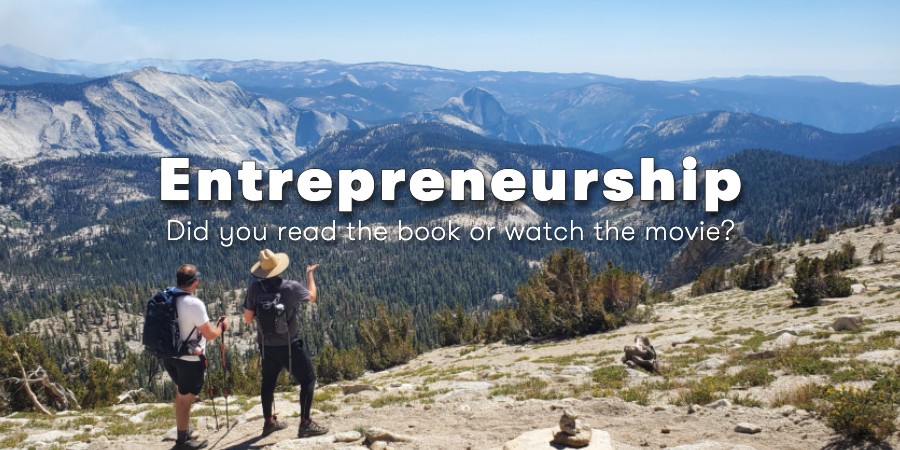
You know how when there’s an awesome movie that comes out, and it is based on a book, we suddenly divide humanity into those who saw the movie, and those who actually read the book?
I’ve been on both sides of this equation, as I think many of us have.
And I think it’s generally agreed that the book is usually better, isn’t it? I mean, think about it – when you read a book, the author can go into exhaustive detail painting a picture for you, or describing an experience and you get to imagine it in whatever way you like; and no matter how exceptional the movie is, you’re still watching someone else’s interpretation of the book.
Like, take the book Wild for example, a book by Cheryl Strayed. If you aren’t familiar, it’s the story of a woman who basically self-destructs and then goes on this 1,100 mile hike while she heals and reconnects with herself.
To be honest, I didn’t really care for the main character – but I really loved the vivid description of the journey. I loved her talking about the breathtaking views, and the debilitating pain she felt, the injuries she sustained, and the animals and people she met along the trail while pushing herself mentally and physically further than she ever had before.
And like plenty of popular books, they made a movie about this one as well. The movie version of Wild came out in 2014 and featured Reese Witherspoon. I never saw it, but that’s not important.
Here’s what is important: when I was reading the book, I found myself really inspired to go hike, to try new things, and to get outdoors.
I found myself really curious about people who had taken long hikes, or had hiked stretches of the Pacific Crest Trail, the John Muir Trail, the Appalachian Trail, or any other massive undertaking.
So, whenever appropriate I’d ask “Hey, did you read that book Wild?“, and a few people had read it, but normally I was met with “No, but I saw the movie.“
“No, but I saw the movie.”
We’ve all heard someone say that, right?
I don’t know about you, but my immediate reaction is pretty judgmental.
There is something about having put in the time and energy to actually read the book, that makes me feel strangely superior to anyone who had merely watched the movie.
I’m not proud of it, and I’m not saying it’s right or wrong, I’m just acknowledging it.
People who have spent time and energy reading the book tend to feel somehow more qualified, or accomplished than the people who saw the movie with an $8 box of sour patch kids and bucket of Dr. Pepper.
It’s kind of elitist, right?
But I don’t think it’s totally unjustified; I mean, when I watch a movie based on a book I haven’t read, I formulate an opinion of what the book probably was like.
Who doesn’t?
And in reality, I think we’ve all seen movies that were absolutely nothing like the book they were based on. So in that sense, it’s kinda fair for us to think “You have no idea…” when someone tells us they’ve seen the movie.
Anyway, the reason for this whole post is because I realized this is exactly how I felt about entrepreneurship when I worked at Infusionsoft (now Keap).
I had already owned a business, then I came to Keap where I was worked closely with small business owners for a little over three years. First it was coaching businesses one-on-one, and helping understand their struggles, and sharing in their successes. Then with Infusionsoft University I got to meet large groups of entrepreneurs, and watch as things started to click and light bulb after light bulb went on.

In a building of 600+ people whose purpose was to help small businesses succeed I believed I really, truly understood our customer.
If entrepreneurship was a book, I felt like in that building there were hundreds of people who had seen the movie, and only a few dozen who had read the book.
And I was effing proud to be one who actually read it.
It was a literal point of pride. Internally I was recognized as someone who really understood our small business owners, and I was proud that product managers came to me to ask how our customers were truly using the software, and what features they needed most.
I felt privileged to be the guy who could set them straight, and trusted to give them the pulse of the community.
But, in May of 2015 I left Keap. And while my perspective has changed in a number of ways since then, recently I’ve been more and more aware of one specific change.
I no longer feel like the world is divided into two camps; those who read the book, and those who saw the movie. There’s a third camp – those who are actively on the trail.
I’m on the trail now.
And it’s only been a year, so I figure I’m on the first leg of the trail. My boots are still in good condition, and I’ve got plenty of dehydrated meals; but I’m definitely washing my underwear in the stream, and my feet are covered in blisters.
I knew being a small business owner would be hard, and that it would stretch me; but no matter what I thought I was getting into, it has been that and so much more.
I spoke at ICON as an employee about billing automation, and now I know how frustrating it is to spend my time actually tracking down failed payments, or members with expired credit cards. I knew Keap inside and out, but quickly I realized that I also needed to learn WordPress, Zapier, PlusThis, LeadPages, PureChat, Xero, AccessAlly, Camtasia and a gaggle of other tools.
I knew that Keap wasn’t perfect, but as an employee, I was forgiving, and even defensive sometimes.
Now, when there’s a bug that takes my time – it’s also taking my money. Not cool.
All the stuff I was so proud to have read about in the past, now I’m living it. As much as I truly believed that I knew what entrepreneurship meant, and what the people I was working with were going through; I now know that I only empathized with a fraction of it.
Because just as readers will tell you that the movie rarely does the book justice, Cheryl Strayed probably feels similarly about the book’s ability to capture what she really went through.
Now, I want to be abundantly clear – this is only my experience, and I’m sharing it in case it rings true for you too. There are plenty of people who are just flat out smarter than me, or who have a greater capacity for empathy.
This is not a criticism of my friends at Keap, or of anyone other than myself.
All I can say is that personally, I see things differently now. My perspective has evolved, and I expect it will continue to do so.
In business, as with hiking, the journey is often as important as the destination.
One of my favorite parts about being on any trail is that the people you meet just tend to be friendlier. There’s an unspoken respect and admiration that strangers share when they pass on a trail – the further you are from civilization, the more profound this connection seems to be.
It’s like you share a secret every time you cross paths with another entrepreneur, I mean hiker.
And man, I wish I had some killer secret wisdom to close out this reflection. If it were catchy enough it might even turn me into a meme for 36 hours.
But the truth is that it’s hard work, and there is no silver bullet.
Sure, some of it feels easier with time, but that may just be because you’ve grown a bit.
You’re stronger. Your feet are calloused, they know better where to step and what pitfalls to avoid.
The last year has been amazing, and without ya’ll I’m basically just a dude with a website talking to himself – so, thanks.
I’d love to hear if this resonates with you, leave a comment!
Keap, Tips and Tricks
 Today’s blog post on Keap Leadsources comes to us from Mike Hilton – current member of Keap’s product team, and former member of the Keap Customer Experience team. That means that his focus was improving the experience Keap creates for their customers – and that’s something I can get behind 100%.
Turns out that Mike isn’t just a Customer Experience advocate; he’s also a pretty sharp Keap user with a mastery of a number of tools and tie-ins that help stretch Keap. Well, today’s post doesn’t require any extra integrations; and it should resonate clearly with any Keap user who has ever struggled with tracking multiple leadsources through the same opt-in form. Take it away Mike!
Simplifying for Sanity
Why do some people freak out and start to sweat when they see:
- a² + b² = c²
- Microsoft Excel™
- “?firstname=~Contact.FirstName~&lastname=~Contact.LastName~&…”
The answer could be that each of the above examples is tied to discomfort and painful memories, but more than likely it is because they haven’t felt they could benefit from understanding how they work in the real world. Today, I am not going to focus on using the pythagorean theorem, or Microsoft Excel™, but I want to demystify the junk that comes after a URL
My goal is to teach you how to use Keap LeadSources to track contacts from multiple channels without having to duplicate the same webform over and over and over again.
To understand that junk (also known as the Query String) you need to understand 3 simple characters and how they work to make your life easier:
- ? – Question Mark: tells the page that you have some important information to pass along with the URL (ie – contact information, id numbers, lead sources, etc).
- = – Equal Sign: tells the page that there is a “value pair” in the URL. The value to the left is the variable name, and the value to the right is what that variable equals. For instance, firstname=Mike would be read as “For the variable named ‘firstname’ assign the value of ‘Mike’ to it.
- & – Ampersand: tells the page that there is more than one value pair in this URL
Here’s an article from Keap’s help center that expands on this a bit more. Let’s look at how you can use the query string and make your own “junk” after the URL actually do what you want it to do…
Assigning LeadSources in Keap:
You’ll need to do 4 things:
- Create a lead source
- Capture the Lead Source Id
- Drag a hidden field to your webform and copy the hosted URL
- Create a link that has the leadsource variable in the Query String
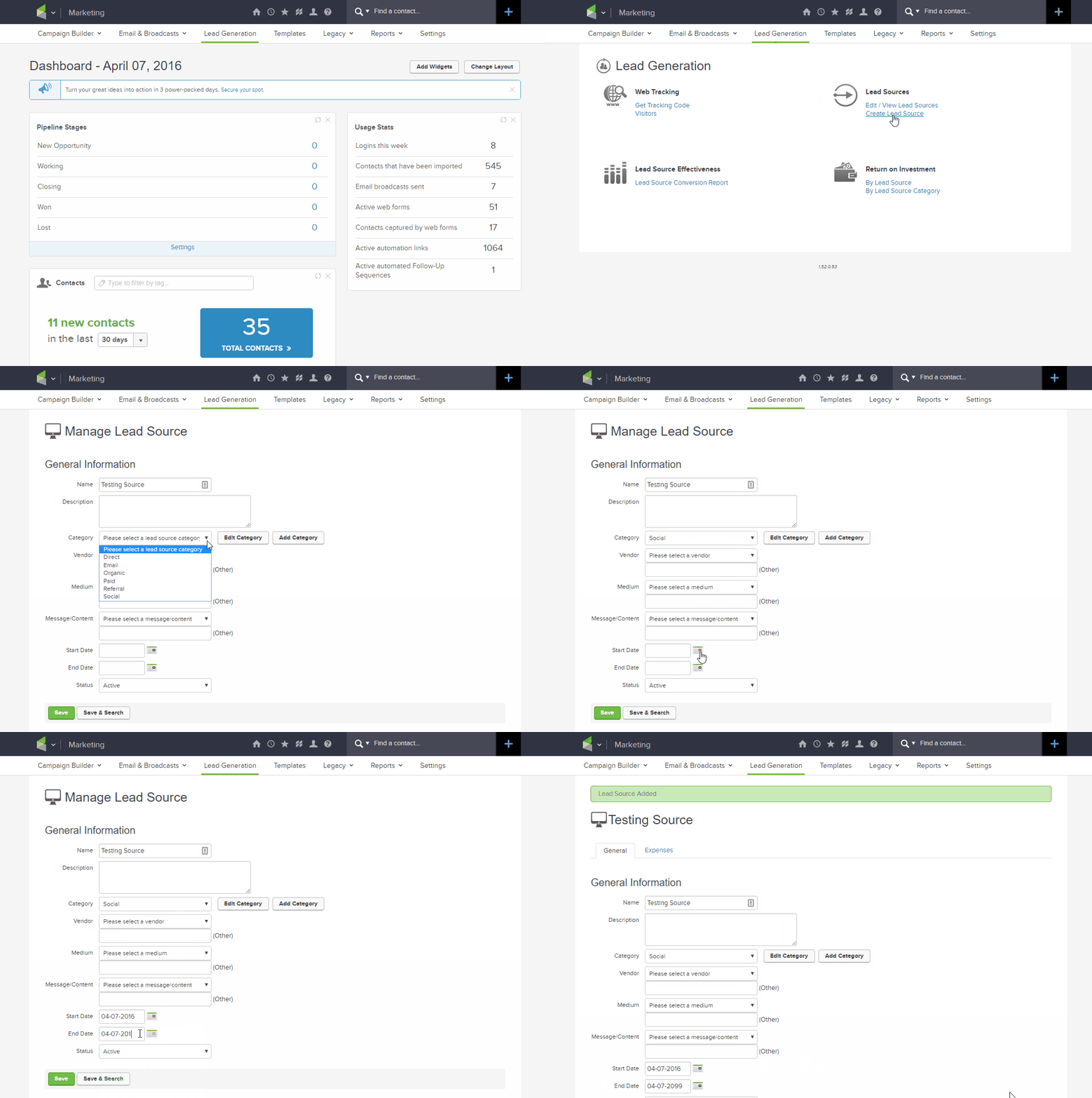
1) Creating a lead source –
From your dashboard:
- Click Lead Generation
- Click Create Lead Source
- Complete form & save
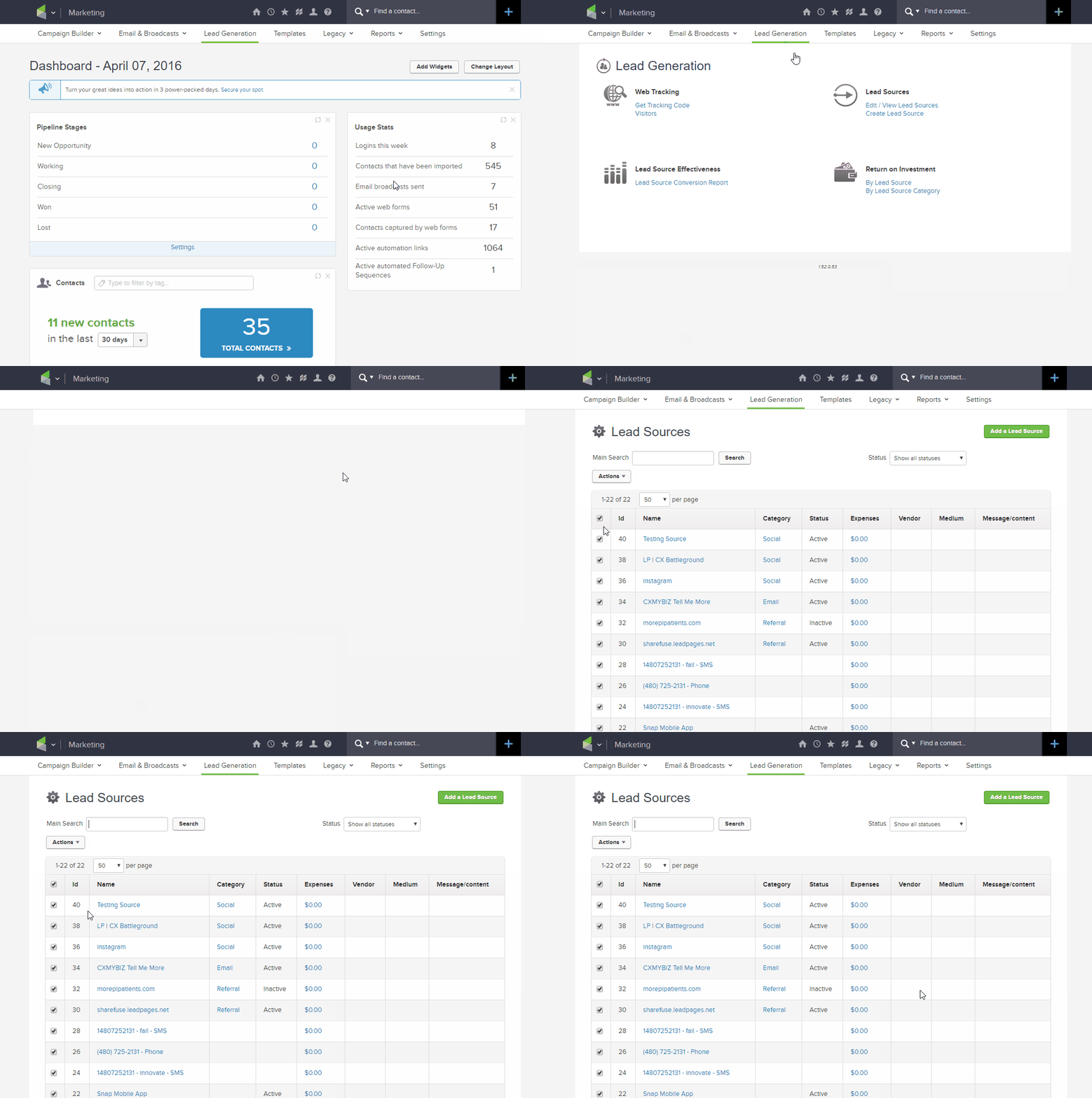
2) View the Lead Source ID-
From your dashboard:
- Click Lead Generation
- Click Edit/View Lead Source
- Identify the ID of your Lead Source
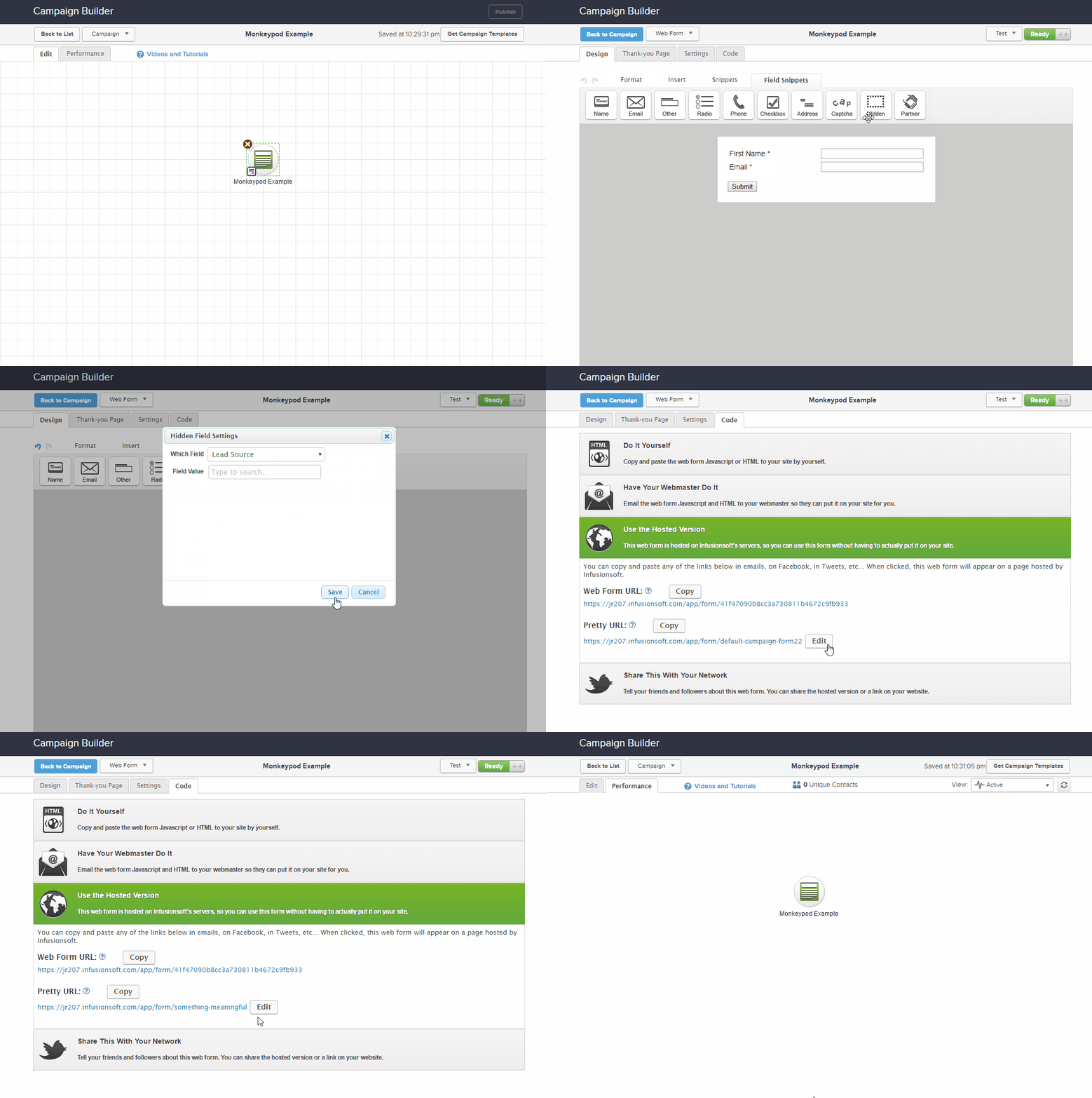
3) Drag a Hidden Field onto your Webform then copy the Pretty URL-
From within the Automation Builder:
- Create a webform
- Drag out a hidden field
- Select the Lead Source option
- Rename & Copy the pretty URL from the code tab.
- Publish the Form
4) Create a link to point to the webform and attach the variables to the URL-
- Paste the URL:
https://jr207.infusionsoft.com/app/form/something-meaningful
- Add your ? to let the page know there are variables in the URL:
https://jr207.infusionsoft.com/app/form/something-meaningful?
- Add your variable and assign its value:
https://jr207.infusionsoft.com/app/form/something-meaningful?LeadSourceId=40
Paste this URL into your ad copy (feel free to shorten or customize it as needed):
Customized: Click Here
Shortened: https://bit.ly/my_Link
That’s it! Run a few tests on the lead sources. Change up the ID’s to other sources in your LeadSource table and verify that it is assigning them appropriately (TIP: Use a new test lead each time…as this process will not overwrite an existing lead source).
The first few times, it may take you more time to set up as you commit the steps to memory.
IMPORTANT TO NOTE: For every traffic source or marketing campaign (Facebook, Twitter, Instagram, etc) you will want to have a SPECIFIC lead source so that you can tell where the leads are coming in from. Simply repeat the steps above to make sure that you create and capture the correct LeadSourceId.
If all of your traffic initially comes through the same lead capture webform, your URL will stay the same. Only the LeadSourceId will change.
Here’s an example for how you can track ROI from a Facebook Ad using Keap LeadSource tracking.
Keap, Tips and Tricks
I know that sometimes I can be a little long-winded when I write my blog posts, so today I’m going to get right to the point.
One way or another you may have wound up with contacts in your Keap database who don’t have a first name.
This can pose a challenge if you are using the first name merge field in your email content.
This video shows you how to find those contacts, how to manually fix a few of them – and how to set up a default for situations where the merge field doesn’t have a name on file it can use.
Enjoy: