Guest Posts, Keap, Tips and Tricks

Hey blog reader, it gives me great pride to publish this post because it’s written by my good friend Brett Farr. Brett and I were in the same hiring class at Infusionsoft in March of 2012. Brett, like many of us, is a self professed digital marketing nerd. He’s also an ASU Marketing graduate (Go Devils!) and was honored to be the TIME person of the year in 2006.
He is half Australian and while he grew up on an island in the Caribbean he now calls the Arizona desert his home.
Honestly, Brett knows his stuff. I strongly recommend checking him out at
Blick Digital. This article is packed with powerful small tips that can have an immediate impact on your marketing efforts. Enjoy.
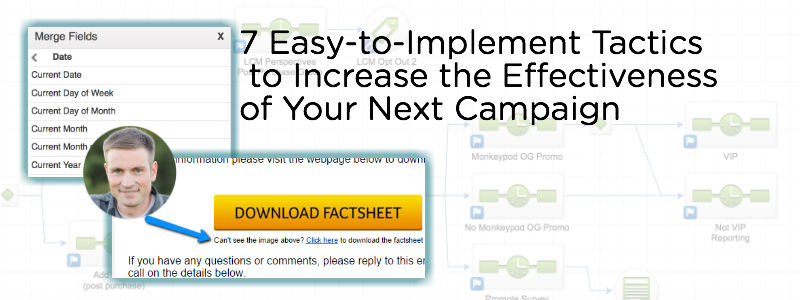
7 Easy-to-Implement Tactics to Increase the Effectiveness of Your Next Campaign
I’ve only included items here that are easy to implement in your next Infusionsoft campaign. Most take no more than
2 minutes to implement. The goal of these 7 tips is to help boost your next campaign’s performance. These tips come ‘from the trenches’ of using Infusionsoft day-in and day-out for several years with a number of clients. These are small tactical tips, not strategic. If you’re looking for a strategic approach to building campaigns, take a look at
this article.
1. Use the momentum of the thank you page
There is no better time to ask your prospect to do something than after they’ve submitted a form or opted into your list (whitepaper, webinar, guide, etc). There are all sorts of psychological reasons behind this, but the main thing here is that you continue the forward momentum on the thank you page. I’ve seen too many thank you pages that say, “Check your email for…“. Seems boring, right?
Utilize this page to make sure they’re following you on social media, joining your community or ask them to tell you a little more about themselves so you can market to them more effectively. Paul Sokol even emphasized this in
his first point here.
Pro tip: You can consider offering a low-cost, high-value product to see who’s really willing to spend money with you. Although this step might require more than my promised ‘2 minutes’.
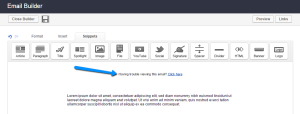
2. Remove the “Having trouble viewing this email?”
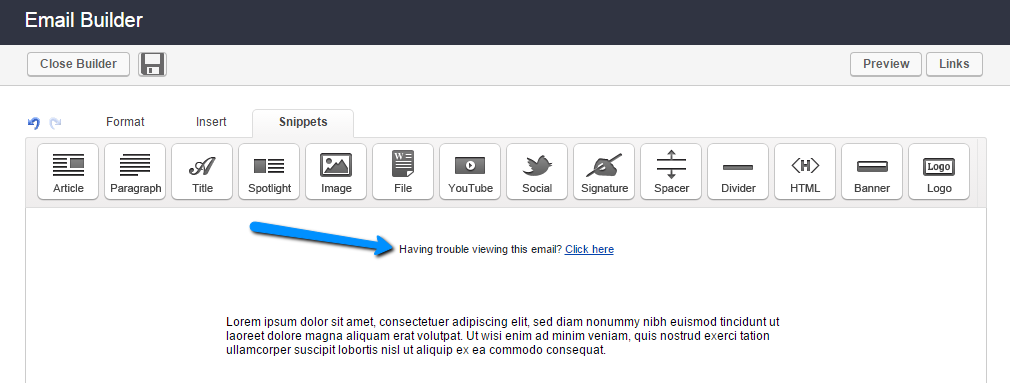
By default, Infusionsoft has a snippet at the top of your default email called ‘Having trouble viewing this email?’ Move this handy snippet to the bottom of your email or delete it all together if your email isn’t image-rich. By not moving it, your prospects and customers will see that little piece of text in their preview pane for several major email clients, including Gmail and Outlook.
3. Personalized email after a link click
I believe my good friend Greg calls this the
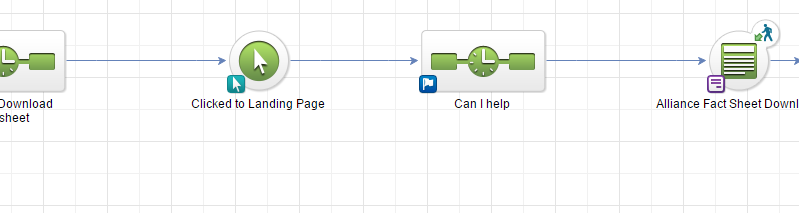
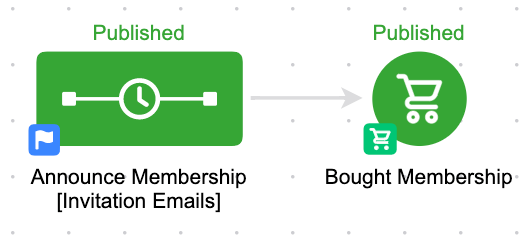
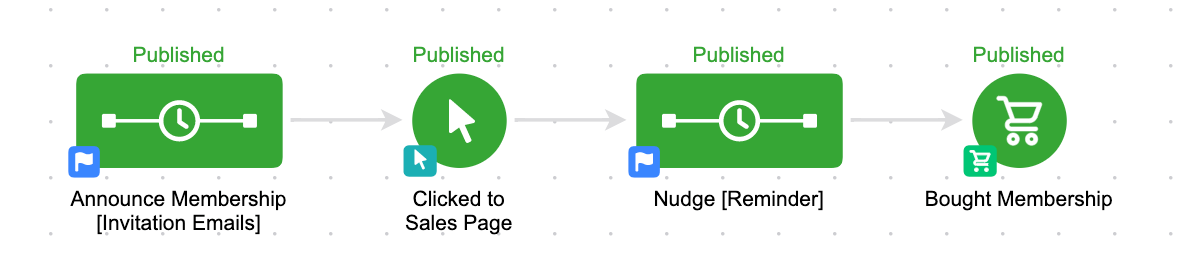
Infusionsoft nudge. If your campaign has any emails with calls to action that lead to a web form or product purchase, I highly recommend including a ‘Link Click’ goal with a 30 minute delay timer and a follow up email to ask why they haven’t completed the action yet. It could be something as simple as, “
Can I help answer any questions? Just reply to this email.” I’ll usually make sure this email is plain and non-branded as if I was writing the email from my Outlook account. When done properly, this one can have huge impact. See
this article for more specifics.
4. Occasionally insert first names into the subject line
This is a good way to boost open rates, but it’s a two-edged sword. Do it too often and it can start to annoy your email list. Use this sparingly for important emails with specific calls to action (I know, every email is important, right?).
5. Insert day of the week
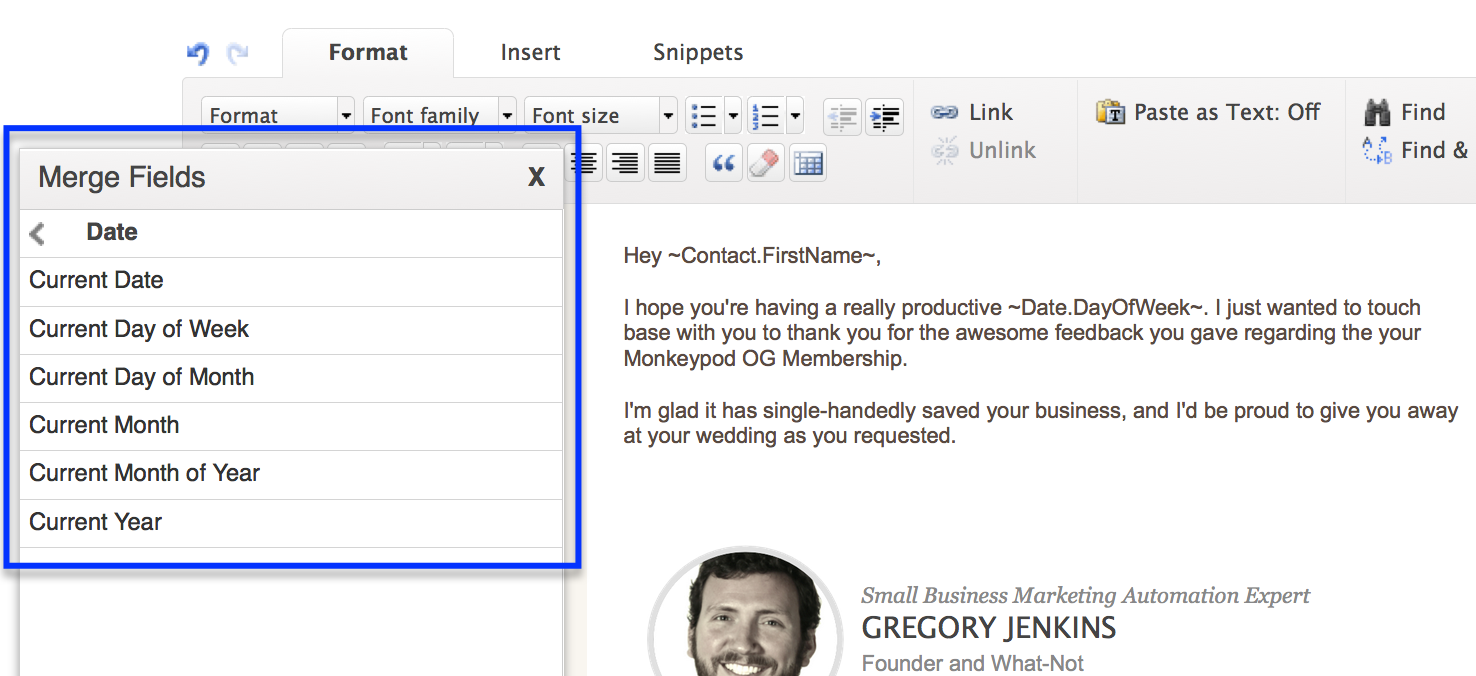
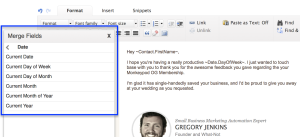
If your email is part of an automated follow up, you can make it a bit more personal by using an Infusionsoft merge field called ~Date.DayOfWeek~, which inserts the day of the week that the email was sent. This allows you to write something like “Hope you’re having a good Tuesday” instead of just “Good morning to you.” You can also use this for the current month and current year. I’ve seen this work for long-term follow up where an automated email is sent to the prospect with a message like, “You said it would be good to follow up in ~Date.Month~ (current month)“.
6. Have emails come from an actual person, not the business name
This one is pretty straight forward, but I’ve seen emails have a better impact when they’re sent from an actual person and not the business name. People do business with people. Not every situation is the same and this might not be appropriate for your business, but sending from someone’s name instead of from info@ or support@ will help increase your email opens.
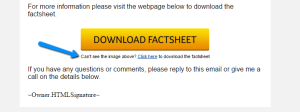
7. Make sure there are no ‘image-only’ calls to action
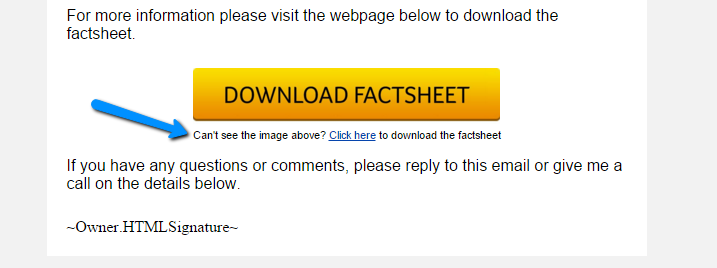
Sometimes you’ll have a button in your emails that is your main call to action. The issue with this is that if the images don’t auto-load in the recipients email client, your call to action will be missing. This happens when you see the option “Click here to download images”. If your company does mostly image button calls to action, make sure to include a small snippet of text below it that they can click on. See image below:
Looking for more ideas for your campaigns? I release ideas just like this all the time over at the Blick Digital Blog.
Click here to stay up to date.
Thanks for reading, let’s connect: Leave a comment below or reach out on Twitter – @bmfarr.

Customer Experience, Small Business, Tips and Tricks
Just the other day a friend published an article based on some nurture advice that I’ve given, and I realized that with as strongly as I feel about nurturing your leads, I still hadn’t written a post for my own blog about nurture.
I’ve written for a few other blogs, like that of the Australian Businesswoman’s Network, and PureChat, but I hadn’t taken the time to craft something on the ole Monkeypod domain.
Well, nurture is a really complex subject. And there are plenty of angles from which you can approach it. Eventually I’ll address as many as I can, but today I wanted to talk about one specific lead nurture myth I’ve seen circulating in the small business community.
Nurture Myth #1: Your nurture process has to take place over a long period of time.
When people think about nurture they almost always think about a drip sequence of some kind. Something that follows up with leads over a period of weeks, months or even years. And yes, that’s usually how it works. Nurture exists because someone expressed interest in your product or service; and if they aren’t ready to buy today we need to have a process in place that follows up with them so that when they are ready, we’re the brand on the top of their mind.
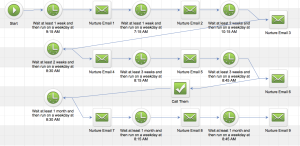
This makes total sense if you’re selling something requires a lot of information and deliberation before someone makes a purchase. Like, real estate for example.
But the reason that this is a problem is because not all businesses have a long buying cycle. Plenty of businesses have a very quick and transactional sales process. And unfortunately these businesses tend to recognize that their business model is different, so they assume that nurture can’t (or won’t) really play a role in their Lifecycle Marketing strategy.
But it can. And it should. Nurture exists no matter the length of your buying cycle.
(Disclaimer: If you ever came to Infusionsoft University while I was running it, this story may sound familiar.)
In January of 2012 I moved to Arizona, and prior to moving I had lived in Lansing, Michigan, where I ran a business servicing and installing draft beer dispense systems. Like, installing and cleaning draft beer lines for bars, restaurants and country clubs. And because of the nature of my job I was in and out of a lot of bars on a daily basis. My job took me to a lot of bars, some of which I’d probably never have patronized on my own, but because I got to see these charming little hole-in-the-wall dives so regularly, they kind of grew on me.
So when I moved to Tempe there was a dive looking bar around the corner from where I lived. So my girlfriend and I decided to check it out. So we pulled into the parking lot, and we actually bottomed out as we pulled in. Now, I drive an SUV, so to have us scrape the bottom of our car as we’re pulling into this parking lot was a little unusual. But, “No matter” I thought. We were in the parking lot, may as well park.
 As we went to park, I noticed there was some shattered glass in the “spot” in which I intended to park, so we readjusted, and we parked further back along the side of the building. (I say “spot” because the parking lot had no real discernible lines of any kind) As we got out of our car, I noticed that there was an empty lot behind the bar, and through the chain-link fence I could see several big black garbage bags. This was 2012 and Sara and I were avid fans of the TV show Dexter, so I made a mental note of the garbage bags just in case.
The entry was had one of those two door entrances, where you step into like a small alcove, and then open another door into the actual bar. So, as we step into the first one, I notice there’s a Cinco de Mayo poster hanging up. I remember thinking to myself “Wow, 4 months early. That’s some really solid commitment. But, this is Phoenix afterall, so maybe its a bigger deal down here than it was in Michigan. Oh, wait, that says 2011. It’s not 4 months early, it’s 8 months late…”
Yup, they had a poster in their entryway that was advertising holiday specials from 8 months prior. Doesn’t exactly send the message that they’re on top of this stuff.
Then as we opened the second door and stepped into the actual restaurant Sara and I were both stopped in our tracks by a very pronounced and specific odor. It was one I quickly recognized as urinal cakes.
Which is not a terribly unusual odor when you are in the men’s room. But for this to be the first and strongest thing that we both smelled the moment we stepped into their restaurant was more than a little unsettling.
We looked at one another, walked outside, got in our car, and drove away.
Here’s the moral of the story: This whole process took place in less than 90 seconds. We pulled in, we parked. We walked into the restaurant’s entry way, and opened the next door, and then we never made it any further.
Prankster’s might have excellent food. They might have an awesome beer list. Or any other number of redeeming qualities. But for us, it didn’t matter. We never made it that far. Between the ill-maintained parking lot, the visible trash out back, the outdated poster and the overpowering odor, there were too many strikes against them in the simple process of entering the restaurant.
I’d challenge you to look at your buying process. Nurture exists even in the most mundane ways. It could be the music playing while folks are in line at your store. It could be the color scheme of your website. Or the number of clicks it takes to get where I want to go. Put yourself in your prospects shoes and see what hurdles they have to clear to become a customer. How can you make this process more fluid?
Nurture is the single most cost effective way to grow your business. It’s all about doing more with what you already have. (Oooh, tweet that.)
Here’s a free download with 11 questions to help guide your nurture.
Now, I use Infusionsoft to run my marketing campaigns and carry out my nurture. You don’t have to use Infusionsoft, but you should use something. If you’re looking for a comprehensive Infusionsoft review, this is the best one I’ve seen.
Small Business, Tips and Tricks
I was scrolling through Facebook this morning, as I do most mornings. And afternoons. And evenings. And I noticed this article that someone had shared, and two of my friends (Jeryl and Shelley) had commented on, so I read it.
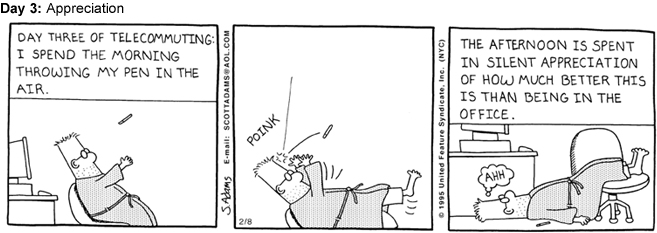
It’s a list of 12 things that they say only people who work from home will understand. And man, they really hit the nail on the head with a lot of them. But it occurred to me that just as all offices are not the same, all home offices are not the same either, so I wanted to adapt it and give you my version.
Yeah, I’ve been warned that working from home isn’t all it’s cracked up to be, and I’ve been told that you get really lonely, and that you need to make an effort to maintain a normal schedule, and regular contact with humans and sunlight, and on and on and on. I even read a handful of these articles with their own tips and suggestions. But still, I couldn’t have predicted some of this stuff.
So, here are 6 ways my life has changed since I started working from home (and I mean changed on a day-to-day basis, not on a higher philosophical level. Although, that’s happened too.):
Yes, I wake up later than I used to. For the past three years I was up between 6:30 and 7 am, and I was usually in the office by 7:30, or 8 am at the absolute latest. Now, I wake up between 8 and 8:30 and I’m in the office by 8:33 am. So, it’s really not too dramatically different. But it’s nice that I can manage my own schedule; although if I was keeping track of hours, I would wager that I’m averaging more hours per day of work now than I ever have before.
 I never deal with traffic. Never, ever, ever. Because I work from home my commute is literally a walk from my bedroom to my office/kitchen. So as a result, the only times I drive are if I am taking Gatsby to the vet, or meeting someone for lunch, or running to the grocery store. And because I have this luxury, I am very strategic about driving at times when I know I won’t hit traffic. It’s nice. On the downside, sometimes I’ll go several days without moving my car and it’s really easy to forget where I parked. (In my neighborhood we don’t have dedicated parking, so it’s just on the street “somewhere”)
I’m acutely aware of the small things, like the mail man. Because Gatsby barks at him nearly every single day I always know when the mail has come. And it usually comes between 10 and 11 am. But sometimes it’s as late as 2 pm and I find myself thinking “Man, where is that guy…”. It’s not that I need my mail, I mean, who really gets mail anymore? It’s more just that I wonder what could have happened that his route is so far behind. Oh, and some days I’m convinced the mail man just skips us altogether. Jerk. When you’re gone all day and you get home your mail is usually there. End of story, but when you work from home it becomes a benchmark in your daily life.
I wear a tank top every single day. Or, a singlet as my Aussie friends might say. And it’s not because I’m some dirty bearded hippie. I get up, and I shower, and then I choose to put on a fresh clean tank top. I live in San Diego; and 99 times out of 100 a tank top is appropriate for the weather. Or for wherever I may be going that day (if I’m going anywhere). Now, if I’m filming a video that requires my face, or if I’m skyping with someone I haven’t met before I’ll put on something with sleeves (Sleeves are fancy, right?). I’m not a crazy person. But usually after that 30 minute call I’ll change back into something normal people wear on a jog.
 I find myself talking to Gatsby more and more. It started with the usual stuff you say to your dog, you know, asking them if they want a treat. If they’re hungry. If they need to go out. If they want to take an extremely long walk to that one burrito shop with the best guacamole. That sort of thing. But now I find myself carrying on full conversations with him as I deliberate about the structure of one of my blog posts. Or consulting him for advice as I’m fervently trying to troubleshoot something technical that isn’t making sense. It’s really useful that he’s here because it makes me feel a lot less like an insane isolated hermit.
Social Media. I’ve always been a really active participant in the social media space. I love tweeting my random thoughts, and I love interacting socially on Facebook and LinkedIn. But now I spend more time on Facebook than ever, and it’s not just because I’m reading Buzzfeed articles that Jeryl shares (although I do that too). It’s because I am legitimately working. You see, part of how I keep my Infusionsoft knowledge sharp and polished is by trying to answer questions, and solve puzzles that pop-up in the various Facebook groups. In fact, a few months ago I started my own private group as part of my Monkeypod OG Membership. And I spend a lot of time curating resources and providing support for that group. So, Facebook is pretty much always open, but it’s not because I’m avoiding work, it’s because I can’t stop working.
I could go on and on, but I think that’s a pretty decent snapshot. All in all, working from home has been awesome.
Yes, you need to be disciplined about setting boundaries or you can accidentally work until 2 am. One of my biggest struggles has been that because I work from home, I literally could be working at any time. And so if I’m doing anything but working, I feel like I’m not being productive. It’s been about five months now and I’ve developed a little more of a rhythm and a structure now, so that happens a little less.
But as with anything, developing a system and structure is key. I miss interacting with real live people, but at the same time, no one is stopping by my desk to interrupt my when I have noise cancelling headphones on and am wearing a look that says “don’t bug me”. I think that is something to which we can all relate.
That’s it, there’s no deep and meaningful lessons to this post. I just wanted to share what my experience working from home has been like. I’d love to hear yours!

 Hey blog reader, it gives me great pride to publish this post because it’s written by my good friend Brett Farr. Brett and I were in the same hiring class at Infusionsoft in March of 2012. Brett, like many of us, is a self professed digital marketing nerd. He’s also an ASU Marketing graduate (Go Devils!) and was honored to be the TIME person of the year in 2006.