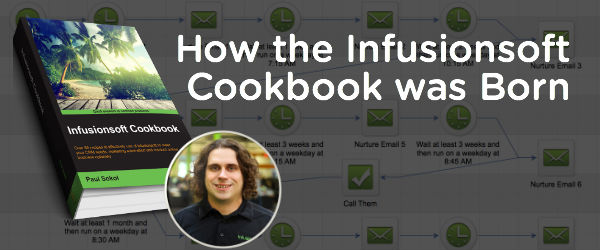
How the Infusionsoft Cookbook Exists

How the Infusionsoft Cookbook Exists

Paul Sokol, Data Scientist, Infusionsoft

Paul Sokol, Data Scientist, Infusionsoft

Another awesome post from the one and only Paul Sokol. Check out this post, or this one, or this one on the Ninja Turtles if you want to a formal introduction to The Mad Scientist.


Hello fair Monkeypod reader, good to see you again!

Some people are curious about this Infusionsoft Cookbook thing you might have seen floating around. If you hadn’t heard, I recently wrote a book about Infusionsoft strategy.

My fellow Jedi Greg (aka the dude who owns this blog) asked an excellent question, “Why did you write it?

The literal reason is that someone presented me with the opportunity to do so, and I chose to pursue it. Why did I choose to pursue it? Because I want as many people as possible to succeed with their small business and writing a book seemed like a great opportunity to push that agenda.

Its a fascinating story of manifestation actually.

You see, back in early 2014 I was blessed with an opportunity to speak at ICON14 on the topic of workflow automation. To accompany the talk, I included a PDF (here ya go) that was a workflow cookbook with some “recipes” for different Infusionsoft campaign models. It was fun playing around with the recipe idea in the writing.

The talk happened and people downloaded it. Around that time, I recall saying something to the effect of, “I’d love to write an entire Infusionsoft cookbook some day“. How powerful those words were. The download rates dwindled soon after ICON14 and that was the last I thought about it.

ISCookBookTowards the very beginning of 2015, Packt Publishing in the UK reached out to me with a tremendously appealing offer: Do you want to write an Infusionsoft Cookbook? Of course, in my head the answer was an emphatic “Yes!“. There was an interesting dilemma though. Being a proud Infusionite I am unable to get paid for my Infusionsoft knowledge outside the building. In other words, there would be a conflict of interest if I did any outside consulting or implementation.

This opportunity was too good to be true, so I had to at least try for it. After getting approval to ask the CTO from my manager, it received a blessing to ask the legal team. That team verified it was ok with the CMO and I was given the green light to get a publishing contract. Gotta love working for a company that believes in people and their dreams 🙂

The marathon of writing and editing began. About 9 months later, the drafts of all chapters were in the hands of the publisher. Soon after the final drafts were completed and it went to print-on-demand.

Which is how we get to this post today, fair Monkeypod friends.

What can you learn from this? Why did you even just read this?

Hopefully, it provided some hope and inspiration for you to tackle a big dream of your own. No idea how to start? Perfect! Start researching and meeting others who might know how to do it. Know what you have to do but simply aren’t for whatever reason? Perfect! Make the choice to spend 15-30 minutes on it today. Not tomorrow, today. Writing this book was a marathon; and not writing for a single day pushed it back exactly one day every time.

Shameless Self-Promotion Section: If you want to get my Top 3 Marketplace campaigns along with the Infusionsoft Cookbook, please visit https://www.iscookbook.com

What big dreams do YOU have? Leave a comment and maybe we can help each other out as a community!

Editor’s Note: I reached back out to Paul to try and dig in on how the connection came to be. Did they really randomly reach out to you? Seemed far fetched to me, and the reality is, yes. They did. This opportunity just happened.

So, I think the takeaway is that by putting himself out there, by speaking at ICON, or writing for Infusionsoft’s blog, or being generally active on social media, someone saw something they liked, and it sparked an idea somewhere that ultimately manifested as this book. What are you doing to put yourself out there?

5 Infusionsoft Tips to Level Up

5 Infusionsoft Tips to Level Up

Anjie Mote

Anjie Mote, Marketing Strategist, Infusionsoft

I’ve got a blog post here from my friend Anjie Mote. She and I were consultants together at Infusionsoft for a while, and she’s great at what she does. She loves working and strategizing with entrepreneurs, it’s far and away her favorite part of being a Marketing Strategist at Infusionsoft. In her own words, Anjie lives for those moments when they contact her and share their success stories with her.

I LOVE Infusionsoft!

Infusionsoft is hard. It takes a lot of patience and commitment to learn how to use and implement the different areas of the application. And doing it in a way that makes sense beneath the surface level is even harder.

I had the opportunity to speak about the Infusionsoft product and deliver some good strategies for Infusionsoft users at a conference in Dallas a couple years ago, and I bombed.

I was like the software nerd with my laptop in the front of the room explaining campaign strategy and content in the driest way possible and I the attendees were listlessly drifting in and out. They didn’t really understand these complex things that I had been explaining for the past hour in confusing and excruciating detail.

Then my colleague Brad got up to speak and the first thing he said was, “My name is Brad, and I’m going to talk about some stuff, and when you don’t understand or you have a question, I want you to raise your hand and yell ‘I LOVE INFUSIONSOFT!”

Everyone laughed. But as Brad was speaking, hands started shooting up and cries of “I LOVE INFUSIONSOFT” rang through the room

Brad’s message was almost exactly the same as mine. But he made it fun, and made it engaging.

I firmly believe in the powerful impact that marketing automation can have on a small business. But it takes work. And perhaps more importantly, it takes positivity in the face of adversity.

Having said that, I have a few Infusionsoft Tips that you can use as a new Infusionsoft user to level up, and to set you up for long term success:

LCM PNG_ClearBackground1. Evaluate your business as it relates to Lifecycle Marketing.

Map out how Lifecycle Marketing looks in your business. Identify your gaps. Whether you need help with lead generation, or follow up, or implementing a referral program; Infusionsoft has a solution. But you need to identify what you need before you can start.

Sheldon_Whiteboarding2. Whiteboard everything prior to setting up any campaigns or templates.

You don’t want to start adding contacts into the app and designing campaigns before you have a clear plan of action and an idea of how you’ll organize everything. Organization is KEY. There are plenty of articles out there that can help you plan things out (like your tags).

3. Use your free resources!

The Help Center and the User Forums are full of valuable tips and tricks. They are searchable and if you can’t find what you need quickly, you can always get on with support over the phone, or through chat. Beyond the official Infusionsoft support resources, there are also some really valuable Facebook groups and LinkedIn groups.

Editors Note: The Monkeypod OG Membership just happens to include access to our private Q&A group on FB…

Marketplace Logo4. Download some free campaigns from the Marketplace.

Study them and sort out how they work. Here are three campaigns the Mad Scientist recommends. Learn the basics, like the difference between a goal and a sequence. There is a lot to learn for mastering the campaign builder, but once you understand goals and sequences, you are ready to start and the Infusionsoft world is your oyster!

5. The best way to learn how to do something is by starting.

The second best way is probably by watching. Get into the application and get your hands dirty. With very few exceptions, everything that you do can be undone (except for sending an email). TRY. Build. Test. Add yourself as a test contact and play with every feature. You won’t break it (Check out #3 here).

If you do these things, and you invest time and effort into learning the software you might just find yourself yelling “I LOVE INFUSIONSOFT!” for a different reason.

Be creative, make it fun, have confidence in your ability, and when you have success – share that story! Your success can have a powerful ripple effect across the community.

7 Easy-to-Implement Tactics to Increase the Effectiveness of Your Next Campaign

7 Easy-to-Implement Tactics to Increase the Effectiveness of Your Next Campaign

profile-roundHey blog reader, it gives me great pride to publish this post because it’s written by my good friend Brett Farr. Brett and I were in the same hiring class at Infusionsoft in March of 2012. Brett, like many of us, is a self professed digital marketing nerd. He’s also an ASU Marketing graduate (Go Devils!) and was honored to be the TIME person of the year in 2006.
He is half Australian and while he grew up on an island in the Caribbean he now calls the Arizona desert his home.
Honestly, Brett knows his stuff. I strongly recommend checking him out at Blick Digital. This article is packed with powerful small tips that can have an immediate impact on your marketing efforts. Enjoy.


7 Easy-to-Implement Tactics to Increase the Effectiveness of Your Next Campaign

I’ve only included items here that are easy to implement in your next Infusionsoft campaign. Most take no more than 2 minutes to implement. The goal of these 7 tips is to help boost your next campaign’s performance. These tips come ‘from the trenches’ of using Infusionsoft day-in and day-out for several years with a number of clients. These are small tactical tips, not strategic. If you’re looking for a strategic approach to building campaigns, take a look at this article.


1. Use the momentum of the thank you page
There is no better time to ask your prospect to do something than after they’ve submitted a form or opted into your list (whitepaper, webinar, guide, etc). There are all sorts of psychological reasons behind this, but the main thing here is that you continue the forward momentum on the thank you page. I’ve seen too many thank you pages that say, “Check your email for…“. Seems boring, right?


Utilize this page to make sure they’re following you on social media, joining your community or ask them to tell you a little more about themselves so you can market to them more effectively. Paul Sokol even emphasized this in his first point here.


Pro tip: You can consider offering a low-cost, high-value product to see who’s really willing to spend money with you. Although this step might require more than my promised ‘2 minutes’.

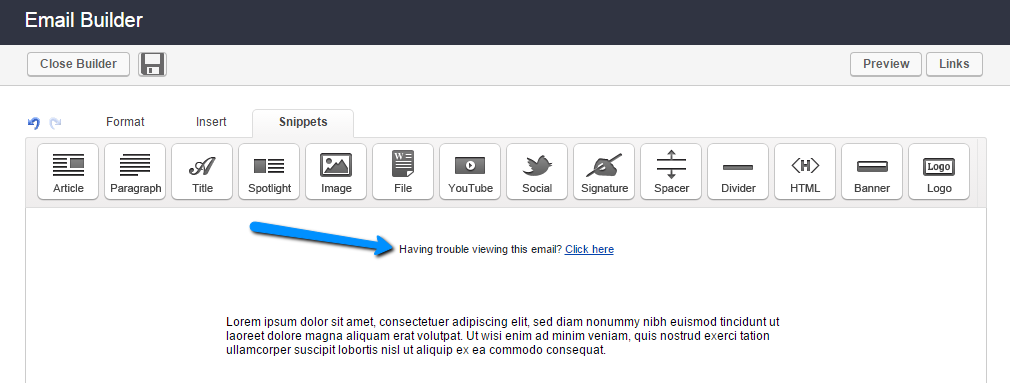
2. Remove the “Having trouble viewing this email?”
By default, Infusionsoft has a snippet at the top of your default email called ‘Having trouble viewing this email?’ Move this handy snippet to the bottom of your email or delete it all together if your email isn’t image-rich. By not moving it, your prospects and customers will see that little piece of text in their preview pane for several major email clients, including Gmail and Outlook.


having trouble viewing


3. Personalized email after a link click
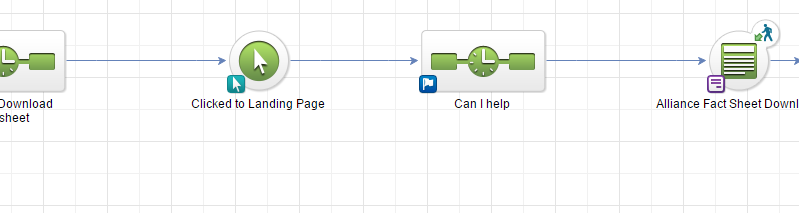
I believe my good friend Greg calls this the Infusionsoft nudge. If your campaign has any emails with calls to action that lead to a web form or product purchase, I highly recommend including a ‘Link Click’ goal with a 30 minute delay timer and a follow up email to ask why they haven’t completed the action yet. It could be something as simple as, “Can I help answer any questions? Just reply to this email.” I’ll usually make sure this email is plain and non-branded as if I was writing the email from my Outlook account. When done properly, this one can have huge impact. See this article for more specifics.


Infusionsoft nudge


4. Occasionally insert first names into the subject line
This is a good way to boost open rates, but it’s a two-edged sword. Do it too often and it can start to annoy your email list. Use this sparingly for important emails with specific calls to action (I know, every email is important, right?).


5. Insert day of the week 
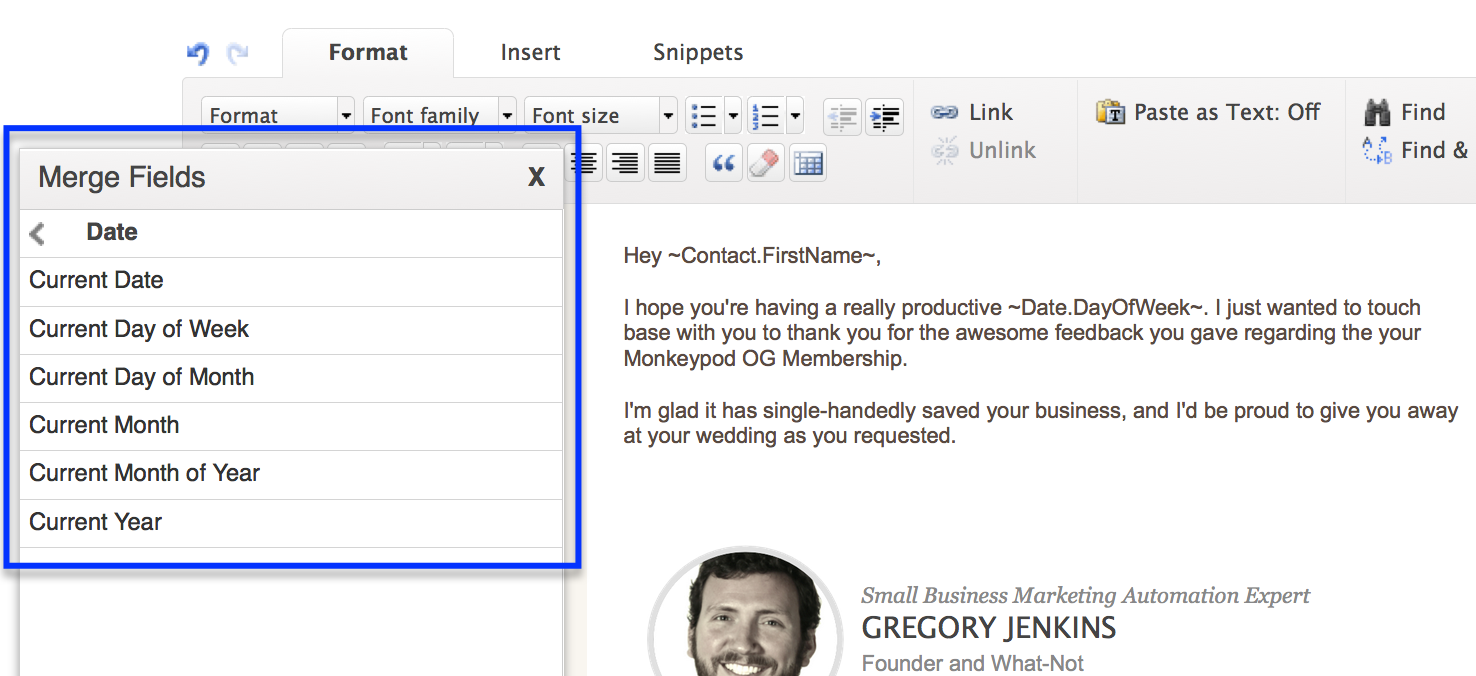
If your email is part of an automated follow up, you can make it a bit more personal by using an Infusionsoft merge field called ~Date.DayOfWeek~, which inserts the day of the week that the email was sent. This allows you to write something like “Hope you’re having a good Tuesday” instead of just “Good morning to you.” You can also use this for the current month and current year. I’ve seen this work for long-term follow up where an automated email is sent to the prospect with a message like, “You said it would be good to follow up in ~Date.Month~ (current month)“.

Merge_Date

6. Have emails come from an actual person, not the business name
This one is pretty straight forward, but I’ve seen emails have a better impact when they’re sent from an actual person and not the business name. People do business with people. Not every situation is the same and this might not be appropriate for your business, but sending from someone’s name instead of from info@ or support@ will help increase your email opens.


7. Make sure there are no ‘image-only’ calls to action
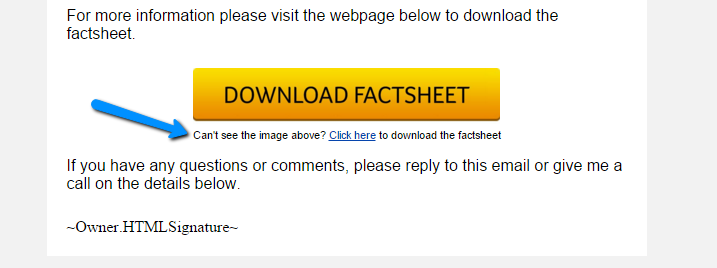
Sometimes you’ll have a button in your emails that is your main call to action. The issue with this is that if the images don’t auto-load in the recipients email client, your call to action will be missing. This happens when you see the option “Click here to download images”. If your company does mostly image button calls to action, make sure to include a small snippet of text below it that they can click on. See image below:


call to action


Looking for more ideas for your campaigns? I release ideas just like this all the time over at the Blick Digital Blog. Click here to stay up to date.

Thanks for reading, let’s connect: Leave a comment below or reach out on Twitter – @bmfarr.

5 Massively Underused Infusionsoft Features

5 Massively Underused Infusionsoft Features

Paul Sokol, PLS Consulting

Paul Sokol, PLS Consulting

Editor’s note: Back with another stellar contribution to the ole’ Monkeypod Blog, one of our most popular guest authors, Paul Sokol. If you want Paul’s background or a full info, check out the first post he wrote for Monkeypod way back when.

An Expert’s Opinion On The 5 Most Underused Features of Infusionsoft

Look at all the cool bells and whistles on your car. Are there ones you almost never use?

For me personally, living in the desert, it’s rare to use my windshield wipers. Its even rarer to use the defrosters because it typically isn’t cold enough to use them.

However, those features are still really important in the right circumstance.

Infusionsoft is very similar. There are so many things you can do that may not be very well known OR simply aren’t fully understood from a tactical standpoint.

What follows are five features that I believe can provide great value for about 80% of small businesses using Infusionsoft. I’ll bet for you, fair reader, that you can use at least one of these to innovate and improve 🙂

Underused Feature #1 – Buy Now Links

In general, Opportunities (sales pipeline management) in Infusionsoft are typically misused. Most small businesses don’t deeply understand the theory behind what a pipeline actually is. Or if they do, they often aren’t super clear on the different stages for their specific process.

Sokolpost3_1(For a great sales pipeline starting point along with training on properly pipeline management, download the Sales Pipeline Starter Kit from the Marketplace).

From a 40,000 foot standpoint, Opportunities are intended to help a business track its sales pipeline and make money. The “Buy Now” link functionality is where the rubber meets the road on that last part.

On an Opportunity, you can indicate which products and/or subscriptions someone may be purchasing. A “Buy Now” link comes in an email to a prospect and when they click it, they are taken to the shopping cart pre-populated with the products/subscriptions on that specific Opportunity. It will also include any discounts, payment plans or subscription free trials.

This way, you can talk to someone on the phone and then send them a link for them to make the purchase. Making money with Opportunities in this manner is definitely not used as much as I would like to see. But if you haven’t, now is your chance 🙂

To learn how to send a Buy Now link, see this tutorial.

Pro-Tip: If you look in the CRM Settings for Opportunities, there are action triggers for when someone clicks on a Buy Now link AND for when someone successfully purchases through it. If you create a unique tag for each of those triggers, you can build an advanced follow-up campaign for cart abandonment. For example, when someone clicks, you can add them to a sequence that waits 15 minutes and sends the sales rep an email with the prospect’s phone number telling them to call them right now. If they purchase within 15 minutes, that sequence can be exited based on the buy now trigger.

Underused Feature #2 – Expiring Credit Card Automation

Making sure you get paid is really important, especially when your business has subscription revenue. Following up and collecting on failed auto-bills is a part of this kind of business. However, we can minimize the number of credit card fails by being proactive and having customers update credit cards that will soon expire.

Under the BillinFakeCCg Automation in eCommerce Settings, there are expiring credit card triggers. You can automate whatever you want. Maybe you do a task to call and update. This may be a great touch point to also take a sentiment check with the customer and handle any potential issues.

For a more automated approach, you can actually send an email with a link that allows the customer to update the credit card on file. In addition to this, you could also apply some functional tag to start an expiring card campaign (like the task idea above). However, for the email itself, it has to be built directly into the billing automation trigger.

To learn how to create one of these card update emails, see this tutorial.

Pro-Tip: Similar to the Buy Now automation triggers, there are triggers in eCommerce settings for when someone clicks on a card update link and when someone successfully updates their card. This can be used to notify a customer support person of any activity that needs to happen.

Editor’s Note: I actually spoke on this topic at ICON in 2015, and if you’re interested in setting something like this up, I’d recommend grabbing the free download from my talk here.

Underused Feature #3 – Lead Sources

Everybody on this planet has one mom. The person that brought them into this world. Lead sources are like the “mom” for a contact in your database. An attribution of who “brought them into the world” of your database.

What makes lead sources so powerful is that you can associate expenses with each lead source. For example, if you spend $200 on some direct mail, you can record that. Then, for each contact associated with that lead source, the system can generate ROI reports based on how many orders have come from that cohort of contacts.

Not knowing which of your marketing efforts are effective is a surefire way to throw away a marketing budget and, probably, not get the results you were expected. Unfortunately, when you don’t use lead sources, you have no data to indicate which channels are producing paying customers.

The topic of lead sources could be an entire blog post (or even series of posts) by itself because it is such a critical distinction to understand. It is absolutely worth your time to learn how they work and begin incorporating them into your marketing efforts.

For some articles on lead sources, see this tutorial and the other articles on the side there

Pro-Tip: If you create a hidden lead source field on a web form or landing page and leave the value blank, you can append ?inf_field_LeadSourceId=xx to all links pointing to the form (where “xx” is a specific lead source id) and it will attribute the lead source to any leads that opt in. This way, you can drive many different kinds of traffic to the same page and, as long as you have a different lead source ID in the URL for each traffic source, you can have one capture point and still track which channels are the most effective. For a tutorial on this tactic, read more here.

Underused Feature #4 – Note Templates for Workflow

There are definitely instances where you need to trigger some automation, but have no earthly idea how to ACTUALLY automate it. For example, when someone asks you a frequently asked question. You have a pre-written email for it, but how can you automate the delivery of it when someone asks you. Artificial intelligence? Some fancy natural language processing on your emails?

bigredbuttonMaybe, but this is where note templates shine brightly!

Think of a note template like a big red automation button. You need automation, just press the big red button and rest easy knowing what you need to happen will occur.

Using the FAQ example above, it is super easy to build a note template that, when applied to a contact, sends out the pre-written email. This can save you time and streamline your workflow down to the 5-10 seconds it takes to physically apply the note. In fact, Greg actually has a YouTube video outlining this exact example.

For a campaign template you can use as a starting point for FAQs, use this campaign and replace the task step with an email.

Pro-Tip: The name of the Note Template goal in the campaign builder is how it will display to the end-user. For a better user experience, use prefixes to group similar notes. If you are making a bunch of FAQ emails, start each note’s name with “FAQ – ” so you can quickly find them all.

Underused Feature #5 – Internal Forms for Workflow

If a Note Template is a big red automation button, an Internal Form is a big red automation button that also allows you to add or update a contact’s data at the same time.

This is particularly helpful when someone needs to make a choice or indicate some outcome. For example, having an internal form that you use to approve or decline a new referral partner. Based on the choice, you can automate and follow-up accordingly.

They are also very helpful for adding a new contact because you can, obviously, also automate whatever might need to happen (tagging, create an opportunity, etc).

Another handy use for internal forms is to personalize a templated email. Take the example of an email offering two possible times for an appointment. The only thing that changes from person to person are the times being offered, but the rest of the email is the same. You can create an internal form that collects the two times and then those are merged into an email. Talk about saving time!

For a campaign model that demonstrates this idea of personalizing a templated communication, see the Post-Appointment Follow Up campaign.

Pro-Tip: If someone needs to be submitting an internal form as the result of a task, explicitly put the name of the form in the task body to minimize human error. For example, if there is a new lead task and an internal form to indicate how the first contact attempt went, in the task body you could say “When you have made this call submit the ‘LEAD – First Call’ Internal Form”, by being this specific and clear it reduces the chance someone will forget, or be unsure which form to use.

What do you think? Can you use any of these? Did I miss a feature? Let me know in the comments! Thanks for reading.

7 Steps to Create a 6 Figure Coaching Business (Part 2)

7 Steps to Create a 6 Figure Coaching Business (Part 2)

CameronRobertsIn a previous post, we had Coach Cameron Roberts outline the first four of his tips toward building a 6 figure coaching, training or consulting business. These tips are valuable for small businesses of all kind, but as Cameron has outlined, he’s dialed in to a niche within a niche, and has proven the strategies for specific business models.

The 7 Steps for Creating a 6 Figure Coaching, Consulting or Training Business in 6 Months or Less (Part 2)

Step 5 – Solve Big Problems

As a coach, consultant or trainer you are paid in direct proportion to the value you deliver to the marketplace. This value is the problems you solve.

Solve bigger problems and you can charge more in coaching, consulting and training fees.

Ask yourself these questions about your ideal clients:

  • What are their fears?
  • What are their frustrations?
  • What are their deepest desires?
  • What are their wants?
  • What causes them stress?
  • What keeps them up at night?

Then once you answer these questions get busy in creating product offerings around them to present to all your future prospects.

Nothing will build your coaching, consulting or training business faster than your ability to solve your prospects’ and customers’ biggest problems!

Step 6 – Compete to Win

An old sports coach once told me “2nd place is the first loser” – and while that may seem a bit hardcore, or not politically correct in today’s “everyone is a winner” society – it’s not too far from the truth of real life.

Think about the Olympics.

There’s 8 athletes in a swimming race final.

The difference between 1st and 8th in some races are fractions of a second.

The first place winner gets a gold medal and returns home to TV interviews, new sponsorship deals, and lots of publicity.

olympic swimmer

But what about 8th place who finished 0.50 of a second behind 1st place?

I mean they are the 8th fastest person in the world
 certainly that’s worth something right?

Realistically we all know they don’t get the same sponsorship deals and opportunities.

In your coaching, consulting and training business – you’ve got to compete to win.

Business these days is “hyper-compeitive”.

Your competition is no longer the other coach or consultant in your neighbourhood, town or city.

Your competition is all the other consultants worldwide getting the attention of your prospecting clients.

This is a game you must play to win.

Plan to dominate.

Play hard.

Get up early.

Stay up late.

Never give up.

Get up, Dress up and Show up and you’ll go up!

Compete to win.

Step 7 – Be Sales Focused

Invest 20% to 40% of your working week “on” your coaching, consulting and training business rather than “in” your business.

Consultants and coaches tend to be great technicians – this is what makes them great consultants. But it can also make them lousy business owners!

As a business owner you must Master Sales!

Create a “Sales Focused” coaching, consulting or training business.

Have a look at your current prices and put them up 10% to 20% straight away.

Stop charging “per hour” and start charging “per package” or “per month” for your services.

Make a list of the different revenue streams you could create more sales from within the next 6 months.

And stop dropping your pants when it comes to your fees when you sense an objection from a prospective client.

There’s nothing that will damage your credibility more than backing down on your fees to get a prospect over the line. When’s the last time you seen a heart surgeon negotiate their fees to their patient on the table about to get operated on?

It never happens right – and if you’re great at what you do, it shouldn’t happen in your business either.

So invest 20% to 40% of your weekly business timetable working “on” your business and always keep a sales focus!

Here’s to your success – good luck with building your 6 figure coaching, consulting and training business in the next 6 months or less!

Regards,

Coach Cameron Roberts


Contact:
Cameron Roberts
Australasia’s Leading Sales Coach and Digital Marketing Consultant
Web: https://coachcameronroberts.com/
Follow Cameron on Twitter: @CoachCameron

7 Steps to Create a 6 Figure Coaching Business (Part 1)

7 Steps to Create a 6 Figure Coaching Business (Part 1)

CameronRobertsOnce upon a time I was a nobody. And in the past few months I’ve skyrocketed to fame and I think I can trace it all back to the time I appeared on Coach Cameron Roberts podcast. Okay, so maybe skyrocketed isn’t quite true. And maybe fame isn’t the right word. But I was on a podcast with Coach Cameron and it was awesome. Here’s why: He’s super smart. Coach Cameron runs a consultancy in Australia, is an Ironman athelete, hosts a podcast, and has helped thousands of entrepreneurs. He’s a multitalented digital renaissance man and I was honored when he agreed to write a post for the Monkeypod Blog.

The 7 Steps for Creating a 6 Figure Coaching, Consulting or Training Business in 6 Months or Less

If you’re reading this, there’s a good chance you’re in the coaching, consulting or training industry.

But are you taking advantage of the opportunity to capitalize on what is a $200 Billion Global Industry?

The sad fact is many coaches and consultants never really make serious money.

Most are struggling to make $40k, $50k or $60k per year


So how do you quickly flip your consulting or coaching business around so you go from making $50k per year to $50k per month?

That’s a great question. Glad you asked.

To help you out – I’m giving you my 7 Steps for creating a 6 Figure Coaching, Consulting or Training Business in 6 Months or Less.

And it all starts with the most important step of all


Step 1 – Adjusting Your Attitude

Being a leading sales coach and marketing consultant – I love studying the human mind and the truth is that most coaches and consultants are not “sold” on their own services. They don’t back themselves. The vast majority act like a personal trainer for business owners when they should be acting like the heart surgeon.

It’s a mindset shift – you’ve got to adjust your attitude.

attitude

I recently discovered that we have 12,000 to 60,000 thoughts per day and 98% of these thoughts are the same thoughts we had yesterday!

What’s more alarming is that 80% of these thoughts are negative!

So the first and most important step is to adjust your attitude.

The reason is simple: All success starts in your mind.

You must be able to believe it before you achieve it. (I know, corny, right?)

If you can’t see yourself being a 6 figure coach, consultant or trainer – you’re limiting your own income potential.

Many years ago I adopted the habit of writing my financial and business goals down daily and it’s served me very well. I’ll also take 5 to 10 minutes out of my day, to visualise these goals “as if” they have already been achieved.

Then I’ll “act like” I’m already the person I want to become!

You should do the same thing.

Take out a piece of paper and write down all the goals you are COMMITTED to achieving in the next 3 months, the next 6 to 12 months and the next 12 months and beyond.

These form your short, medium and long term goals.

The main thing here is to only write down the goals you are 100% committed to achieving. This is not some “big dream for your life” or “vision board” – do that somewhere else.

This is an execution plan for driving your business to the next level regardless of what you go through, what the economy goes through or what your competition throws out you. It keeps you on track.

You’ll also want to listen to positive speakers, coaches and trainers who inspire you. With 80% of our daily thoughts being negative – you’ve got to be proactive about inserting some positive thoughts into your mind.

Then invest big in coaching yourself.

Here’s the odd thing about some coaches


They dream of making lots of money but they won’t invest in other coaching programs and mentoring.

How do you expect to charge your clients $1000, $2000 or even $5000 per month if you flinch about paying a mentor the same (or more) per month?

I’ve had coaches and consultants contact me asking for help to grow their business but then tell me they don’t have the “budget” for that level of mentoring


Talk about a money mindset block!

Let me make this crystal clear – your income as a coach or a consultant is capped to the level you’re prepared to invest into your own coach or mentor.

Want to charge $5000 per month to your clients?

Find a mentor you can pay $5000 per month to show you how it’s done!

Do yourself a favour – find a coach, consultant or trainer who is already getting the results you want and them pay them whatever they want to show you how to get the same results.

It’ll be the fastest way to grow your coaching, consulting and training business.

Step 2 – Define Your Niche then Drill Down Deeper!

To succeed as a coach, consultant or trainer you must specialize. No-one wants to pay big money for a generalist.

Consider the difference in fees between a general practitioner Doctor and a Heart Surgeon – even though they are both “Doctors”, which one earns the big money?

You need to stop being the “generalist” and start being the “specialist” – you need to become the heart surgeon of a niche market.

Then once you define your niche market – you need to drill down deeper.

You need a niche within a niche.

When I was a teenager I had a passion for competitive swimming
 and this is where I first learnt about becoming a specialist and competing in a niche within a niche.

In swimming there’s over 5 freestyle events ranging from 50m to 1500m and there’s 3 form strokes (Fly, Back, Breast) that have 50m, 100m and 200m races and then you have the 200m and 400m Individual Medley. So in total there’s over 16 different races you can do and each require a very different type of preparation and training.

My old swimming coach use to say to me “Cameron – you can me a jack of all trades or a master of one, but you can’t be both.”

So I “mastered” the 200m breaststroke.

My sport was swimming. My niche was breaststroke. My niche within the niche was the 200m breaststoke.

I’ve down the same with every business model I’ve ever owned and operated over the last 15 years – and I help my clients do the same, because that’s where the money is.

breaststroke

It’s like drilling for oil – sometimes you’ve got to drill deeper to strike it rich!

Step 3 – Create an Avatar

Once you define your niche within a niche and you have a clear picture of your target market – you need to create an avatar of “who is your ideal client” within that niche market.

people

The truth is, you are not right for everybody in your market.

And not everybody is right for you!

So put pen to paper and describe your ideal client.

Who are they?

Where do they hang out? What do they enjoy doing? What are some of their character traits? What problems do you solve for them?

Get a clear picture of who your ideal client is – then create all your marketing messages, your sales dialogues and your business around them and for them.

It’ll stop you wasting valuable time taking on the wrong clients and you’ll be able to get better results for your ideal clients.

Step 4 – Build Your Brand

If you’ve completed the previous 3 steps then you’re ready to start building your brand.

Consider where you’re ideal clients hang out the most and be where they can see you.

Play hard on social media, Facebook, Google and Linkedin but don’t forget about some of the more traditional ways to network and build your brand.

Join traditional “offline” networking groups, attend business breakfast events, join community groups and even consider becoming part of a business group or chamber of commerce.

People want to do business with people they know, like and feel like they can trust.

The intention is not to sell your services to the people you form relationships within these groups – but to position yourself as the “go-to-guy” or “go-to-girl” for what it is you do so they can refer prospects to you.

We’ll be back in a few days with tips 5, 6 and 7. In the meantime, start mapping out how you can integrate this first four steps into your business growth plans. And as always feel free to ask any questions below!

If you’d like to contact Cameron Roberts, Australasia’s Leading Sales Coach and Digital Marketing Consultant, you can find him at:

Website: https://coachcameronroberts.com/

Follow Cameron on Twitter: @CoachCameron