Fundamentals of Nurture Automation

Fundamentals of Nurture Automation

Let’s talk about Nurture.

It’s not flashy. It’s not new. But it’s one of the most important parts of your sales and marketing ecosystem — and too many businesses skip it entirely.

Where does Nurture fit?

The short answer is: in the gaps.

You know those little moments between major milestones in your customer journey? The space after someone opts in but before they buy? Or between a discovery call and a proposal? That’s where Nurture lives. It’s the connective tissue that keeps people engaged, supported, and moving forward — instead of slipping through the cracks and disappearing altogether.

The role of a Nurture process is to systematically follow up, answer questions, remove friction, and make it easier for a lead to say yes when the time is right. It’s about progress. It’s about support. It’s about keeping the conversation going.

Why is Nurture valuable?

This part is huge. Because the leads you’re nurturing? You already have them.

You (or your marketing team) worked hard to generate traffic. You ran ads. You built landing pages. You created offers and lead magnets. And if you’re not actively nurturing those leads, then a chunk of them are just sitting there — slowly cooling off.

A well-built nurture process helps you improve the conversion rate of the leads you’re already getting. Which means better ROI on your ad spend. Better performance from your lead magnets. Better alignment between your marketing and sales efforts.

If you’re trying to grow without a nurture strategy, you’re just leaving money on the table.

How do I actually do it?

Good news: This part is straightforward — especially if you’re using an automation platform like Keap, ActiveCampaign, HighLevel, etc.

The basic idea is that you create an automated series of helpful, supportive touch-points (emails, texts, videos, etc.), and then you set it up to trigger when a contact might otherwise be at risk of going cold.

The nurture process keeps them warm. It provides resources. It addresses FAQs. It builds rapport and trust — so that when they’re ready to buy, they think of you.

Hopefully you’re reading along and nodding your head, and if you’re thinking “…but, what should I say?” — we’ve got you covered.

This short video will walk you through some of the actual content ideas that can make up a strong nurture campaign. Real examples. Clear guidance. Stuff you can implement today.

So we’ve given you ten nurture topics – that could be the material you need for a ten day nurture sequence – if you’re sending daily, but it also could be content that is spread across ten weeks, or ten months, depending on the cadence you decide.

Let’s review, those ten topics are:

  1. Welcome, Introduction Message
  2. Business Origin Story
  3. The Core Problem you Solve
  4. Case Study (or Testimonial)
  5. Common FAQs
  1. Behind the Scenes Look
  2. Quick Demonstration of Value
  3. Signature Service/Offering
  4. Best Practice/Industry Trend
  5. Invitation to Connect

And, you may have noticed that some of these topics could easily be used to generate a handful of nurture touch-points. Like, say you had more than one case study to share, or more than one FAQ to address, etc.

So don’t be afraid to take these topics and expand on them as you develop your nurture strategy – a rule of thumb is that it’s always better to have too much nurture than not enough.

Nurture: Next Steps

If you’ve made it this far, then let me encourage you to take action.

Either build a brand new nurture process from scratch — or revisit one you’ve already got and see how it could be stronger. Because even small improvements to your follow-up strategy can lead to big wins over time.

Nurture is one of the most efficient ways to grow — and once it’s set up, it works around the clock to help your leads take the next step.

Let’s stop letting good leads go cold. Start nurturing.

Automation Expanded

Nurture is one very clear and specific automation use case – but automation is infinitely versatile, if you know where to look If you aren’t sure where automation would fit – we’ve built a course specifically designed to help you identify those opportunities.
Customer Journey: Crash Course

Customer Journey: Crash Course

If you run a business then you likely have customers (fingers crossed, right?).

And if you have customers, then they had a “journey” – even if you don’t call it that.

The customer journey is essentially the sum total of the interactions and experiences they have with your business, from the time they first hear about you, through to the point of purchase and beyond.

The single most important lesson I’ve learned in growing a successful small business is to take ownership of that journey – their experience should be strategic and intentional – something you or your team planned for them.

And there are countless ways to plan and enrich this journey and a number of tools that can standardize or accelerate it. So, if your head is spinning thinking about how you should get started, we’ve distilled the most important lessons down into this crash course – enjoy.

Here are the key things to remember:

1. The customer journey already exists. If you have customers, they had a journey. So what we’re talking about here is really just refining what already exists to make sure it’s intentional and strategic.

2. The journey spans the lifecycle of the customer – it starts when they first hear about and interact with your business, through to the purchase, and into the delivery of your products or services. There are opportunities throughout every juncture to make things easier for them and more predictable for you.

3. Automation can help with the heavy lifting. If the idea of delivering top notch customer experience feels daunting, the secret sauce is to introduce automation to the process. Automation might feel like a technical term, but the concept really just means helping things happen in a standardized and repeatable way.

What should I automate?

If you’re on board with the idea of automation but aren’t sure where it would fit – we’ve built a course specifically designed to help you identify opportunities in the customer journey where we’ve seen automation solve problems and create momentum.

What is the Customer Journey?

What is the Customer Journey?

The phrase “customer journey” is a household term for many small businesses these days, but outside of being a fun buzzword, it’s also a meaningful concept that can actually improve profitability, customer retention, and help small businesses in dozens of other ways.

What is a customer journey?

Simply put, it’s the experience an individual has with your business over time. From their very first interaction, through to the point of transaction, into onboarding, upselling, and everything else.

And so with that framing in mind, an important recognition for small businesses is that your customer journey already exists.

If you have customers, then they have had a journey.

And once we acknowledge that, the conversation starts to shift into challenging the journey, questioning if the aspects of it are intentional, and identifying areas where it could be improved.

Here’s an example of this conversation, and how you can use the Customer Journey lens to examine the experience your customers are having.

The exploration of your customer journey is a complex conversation, where myriad opportunities can emerge.

What do I do next?

My recommendation is to carve out time to have re-examine your customer journey, on your own or with your team, on a recurring basis.

If you’d like to learn more about the framework I use (and recommend) as a resource to formalize this process, check out the Lifecycle Automation course from Keap Academy.

What should I automate?

If you’re on board with the idea of automation but aren’t sure where it would fit – we’ve built a course specifically designed to help you identify opportunities in the customer journey where we’ve seen automation solve problems and create momentum.

How to use LeadSources [in Keap Max Classic]

How to use LeadSources [in Keap Max Classic]

LeadSources in Keap are definitely one of those features that most people agree are important AND wish they were better with.

Let’s start with some basic questions…

What are LeadSources in Keap?

Simply put – LeadSources are the different channels through which leads, prospects, and customers end up in your database.

This lets you know where people are coming from – so you can double down on what’s working.

Why do LeadSources matter?

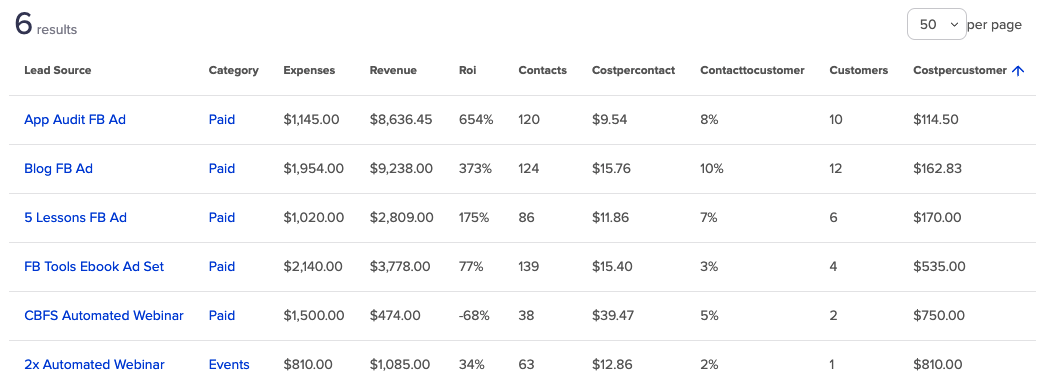
Measuring your different leadsources helps determine which of your traffic channels are producing new contacts, and new customers, and at what rates.

And if you’re recording expenses against the leadsources, it’ll also calculate the average cost per contact, and per customer.

Having a clear understanding of this helps you make confident decisions, so you know which of your efforts to invest in, and which to stop.

Keap LeadSources Screenshot

Not all leads are created equal – and not all leadsources produce equally.

So the goal is to surface up this type of info so you can determine which channels are not only producing the most leads, but the leads that then go on to spend the most money with you.

To do this in Keap you’ll need a firm understanding of the Lead Generation section of the software – this covers visitor records, as well as LeadSources, and LeadSource ROI reporting.

Here’s a video, plucked from the IS Starter Kit course that covers the various features available in this section of Keap:

If you’re tracking purchase info in Keap (directly or through an integration) then the LeadSource reports will give you an indication of your ROI on each channel (the return on your investment).

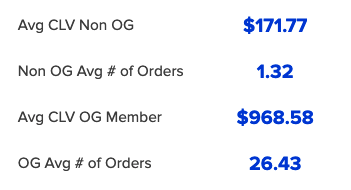
The goal is to have your Cost Per Customer (also known as Customer Acquisition Cost) less than your average Customer Lifetime Value (the amount customers spend with you over their lifetime).

The greater the difference in those two numbers, the more profitable the traffic channel.

Average CLV Screenshot

Knowing how much customers spend with you on average helps you decide how to spend your marketing budget.

How do I use LeadSources?

The simplest way to use them is just to measure which channels are adding contacts to your database.

But, if you have purchase and expense data available, you can go beyond that.

Naturally, if you are spending more to acquire the customer than you are making on it, that’s likely an indicator that the traffic channel isn’t currently viable.

What do I do with traffic channels that aren’t profitable?

If you notice that a specific leadsource isn’t producing – or isn’t producing in a profitable way, it could be for a few different reasons.

It is either a signal to revisit some aspect of it or stop running that ad altogether.

Before you discontinue it entirely, you might try refining (or expanding) the targeting to see if you can improve the flow of leads, or quality of leads you’re getting from that channel.

Or, you could revisit the ad content itself. Review the ad copy, video, and graphics – are they aligned? How could they resonate more with the audience you’re targeting?

It’s worth mentioning that paid advertising is an extremely nuanced space – so if this is an area where you feel out of your depths, it might be a good time to bring on an expert who specializes in designing or optimizing ad campaigns.

Additional Resources

If you’ve found this useful and want more on LeadSources specifically here’s a solid blog post from Jordan Hatch about using LeadSources in your business.

And another one from Tyler over at Box Out – Ad Tracking the Right Way in Keap.

If you want to take things to the next level, check out the ROI Tracker Tyler discusses in his post.

And if you want more training like this, you can unlock the rest of the IS Starter Kit course here.

Create Your Customers

Create Your Customers

I take issue with the phrase “lead capture”.

It’s not that it’s wrong, but more that I think it’s incomplete.

Yes, you absolutely can and should find leads who are already a good fit for your products and services; but if that’s all you do then you’re limiting yourself to serving the people who happen to be a good fit.

It struck me recently that we, as businesses, can also actively produce the customers for whom we are the best fit.

You can create your customers.

Let’s say you wanted sunflowers.

Well – you can either go buy yourself some sunflowers.

Or, you can buy sunflower seeds; knowing that when planted they’ll turn into sunflowers.

And if you want butterflies – yes, you can collect butterflies.

Or, you can collect caterpillars and watch them turn into butterflies.

(fun fact – that might be the first time I’ve written “caterpillars” in several decades)

The idea here is that if we want perfect customers – we can find them, and we can also create them.

This isn’t an either or – I believe you should be doing both.

You can find examples of this concept all over the place, from the winery example I gave in the video, to the premier league academy youth programs, or the NBA G-League.

I know those last two aren’t producing ‘customers’, but they’re taking an active role in producing the people that they want.

Take Karate studio for example –  if you run a Karate studio for kids it would make a lot of sense to offer a clinic where their younger siblings could come learn a few things; which would help spark some interest in a group of possible future prospects.

Heck – you might already have a progression in your business – if you offer courses or coaching programs – is there an order in which people consume them?

Does one prepare participants for the next?

All we’re doing here is taking that concept, and extending it across the entire customer journey.

Each stage should prepare customers for the next

So ask yourself – what does my ideal customer know, what do they believe, and what have they already?

Then, use the answers to those to design your content, your education, and your marketing messaging.

The example I used from my own business is the two free mini courses I launched – Marketing Automation 101, and Infusionsoft 101.

Marketing Automation 101

Marketing automation 101 CTA

Infusionsoft 101

Infusionsoft 101 CTA

Do I believe these courses to be independently valuable? You bet.

But do I also believe that they’ll help produce the people who are most prepared to take advantage of my other courses and the OG membership? Absolutely.

Create Your Customers Path

Alright party people – I’d love to hear your thoughts on this one. If you have any questions, or if it sparks an idea for you – please reach out or leave a comment below.

Oh, and if you want to learn more about the Success Path concept, Stu McLaren, or his Tribe course – check out this guide they put together.

How to link Keap Campaigns

How to link Keap Campaigns

Update: In June 2020 Keap released a new feature that offers an additional option for moving your contacts between campaigns. Check out the new feature here.

Okay, so, you know it’s important to get clear on the specific journey you are creating for your customers, right?

And you know it’s important to use Keap’s campaign builder to design campaigns that support your customer journey. Right?

(Remember – Keap is the company that used to be called Infusionsoft.)

Which begs the question – where does one campaign stop and another begin?

My philosophy, and the one Mike Harris wrote about here, is to trend toward smaller more bite-sized campaigns.

Find the natural inflection points in their journey – those are usually good spots to break one unwieldy campaign into two more manageable ones.

Great – but…

How do I link Keap campaigns together?

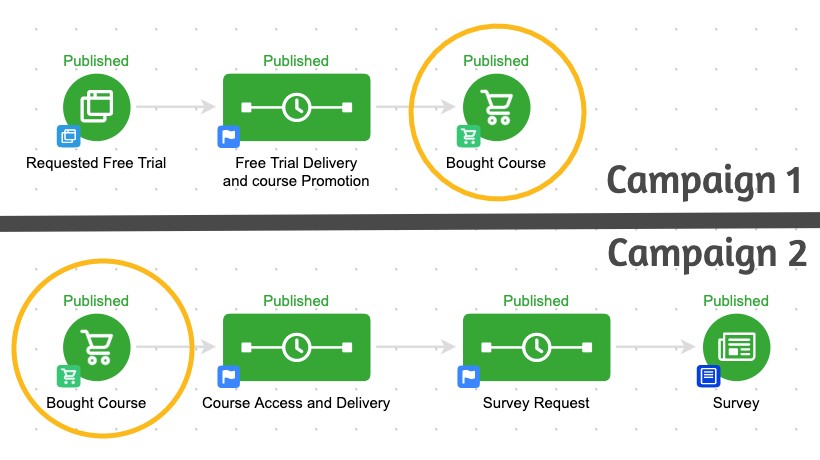
Technically speaking – the answer is goals.

You remember goals, right? They’re the triggers that are used to start and stop campaigns (need a refresher?).

So to link two campaigns together, you would configure identical goals at the end of one campaign, and at the beginning of another.

Simple – right? If they achieve the goal then it will stop the first campaign – and automatically transition them to the second.

That’s all well and good if your contacts always do the thing you want them to do, but it starts to fall apart if they don’t take the action we wanted them to take.

And that is the most important part of this concept: People don’t always do what we want them to do.

Heck, sometimes they don’t even do what they say they want to do.

But if we know that, then we can plan for it. We can use automation to create a contingency plan.

This is important people – this is how you prevent leads from slipping between the cracks.

Ya see, the cracks only exist in the first place because we designed our automation based off of what we want our contact to do.

So for those people, the ones who do what we wanted – it’s seamless.

The goal is to create a cohesive customer experience that spans the entire journey.

(Here’s a case study on what that might look like.)

And with a little extra planning we can accommodate for anyone who veers off trail, does things out of order, or takes a longer than we expected.

Remember, your campaigns exist as segments of a broader comprehensive experience – like the transformers team up to form Voltron, your campaigns team up to form the customer journey.

And if you’d like more training on the campaign builder, check out the Advanced Automations Complete Collection from Keap Academy.