Note: The landing page builder has improved dramatically since this article was written, for a more recent review of the Infusionsoft landing page builder (and other new features) check out this article.
There was some buzz at ICON surrounding Infusionsoft’s release of the new landing page builder. And if you haven’t heard, well, they’re rolling out a new landing page builder. You either already have access to it, or you will soon.
Here is the official release video from Infusionsoft.
I won’t beat around the bush – I am disappointed in what I’ve seen from the new Landing Page Builder. I think everyone knows the love I have for Infusionsoft, so I’m sharing that with the hopes of tempering your expectations, and giving IS some open and real feedback.
Trust me, it WILL get better, but the current reality was underwhelming for me. There’s a silver lining to balance my frustration, so stay with me for a minute.
And remember, this is just my opinion. Based on my needs, this isn’t going to cut it right now.
So I’m going to stick with my third-party builder until this is a little more full-featured (I use LeadPages). I don’t wanna discourage everyone from using it altogether, my official recommendation is to play with it for yourself. Draw your own conclusions as to whether or not it’ll do what you need it to do.
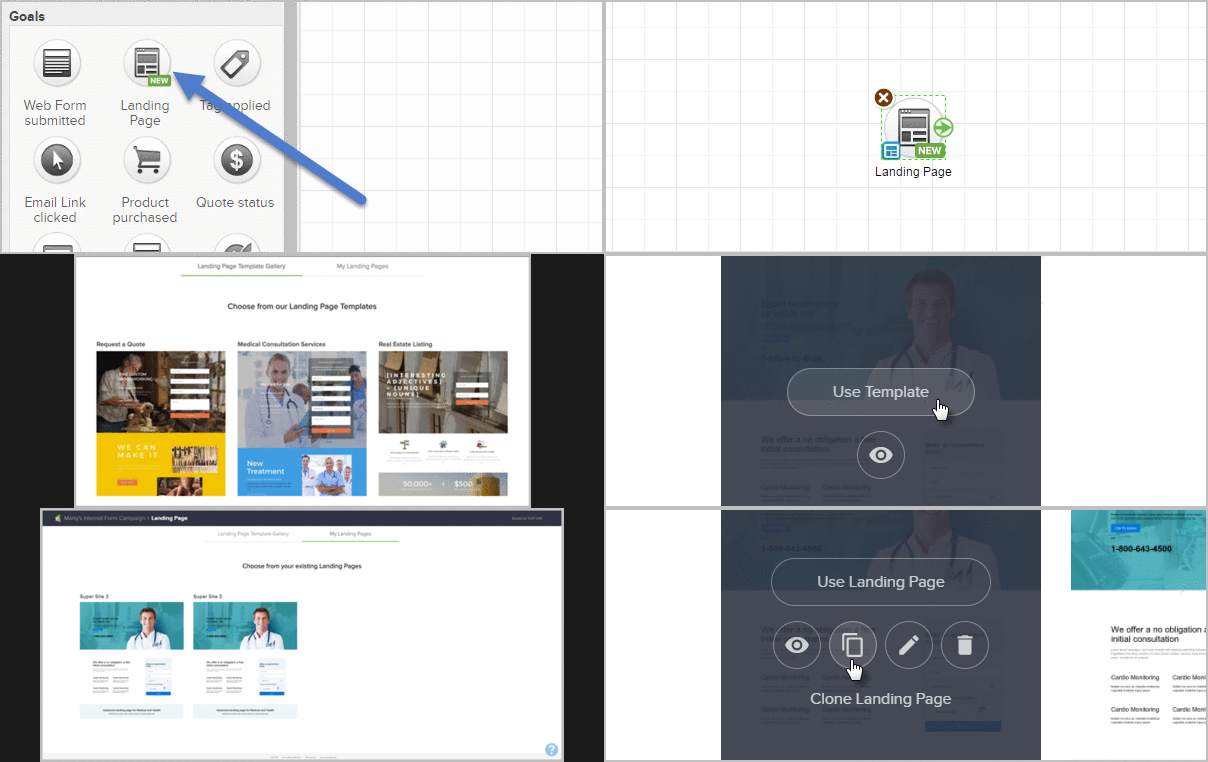
The new builder has a few things that are certainly improvements, but it also has a number of features that I see as a step backward. I’ll summarize the key changes here:
Improvements:
I think this builder can produce landing pages that are more attractive overall.
It has increased overall design flexibility (set images as background, etc).
I love that we get built-in access to royalty-free stock images, and we can easily add overlays, or crop these images into circles, etc.
I really like the idea of having templates we can start from.
I like the concept of having pre-built blocks of content that you can add and then customize.
Drawbacks:
The new builder doesn’t let you capture custom fields yet. You can use the new pages to collect first name, email, and a few other standard fields, but it doesn’t allow you to collect addresses, custom fields, and many other logical pieces of data you’d want.
I couldn’t figure out how to change the alignment of text – yup, like, I couldn’t easily center align the text widgets I added to the page.
I couldn’t figure out how to change the color of the text. It seems like some really basic fundamental formatting options didn’t make this first release.
I was surprised that I couldn’t easily drag the content blocks around.
I was disappointed that there doesn’t seem to be a way to add custom code of any kind. This means that you cannot currently add a Google analytics pixel, or Facebook pixel, or any other custom code you may want to use to enhance your landing page.
The video widget only seems to support YouTube (it doesn’t support Wistia, and I didn’t test Vimeo).
These are mostly just observations I made from the limited experience I’ve had with it. I need to be abundantly clear that I’m not an expert with this tool, so it’s possible that some of these things are just user error on my part.
Now, I’m generally a pretty positive guy, and while I’m let down by the current reality of this new tool, there is a silver lining in all this. Infusionsoft is full of bright people who genuinely care about small businesses. They recognize that we, as small business owners, need a landing page tool that meets our needs, and this is the first step in that direction.
I know for a fact that they’re looking to make improvements to this builder, and quickly. They’re actively seeking feedback, prioritizing our suggestions, and concurrently working on the next wave of improvements. According to the release video they put out we can expect the following features to be added soon:
Page Settings (Google and Facebook tracking etc)
Site colors/theming
Referral Partner Tracking
Lead Source Tracking
Reordering Content Blocks
Pre-populate Contact Information
Merge Fields
If you’re able to use this builder for your business then more power to ya, but if you aren’t, then take a moment to document why not, and what you’re waiting for, and convey that feedback to Infusionsoft so they can help get us what we need as quickly as possible.
I wrote a post after ICON last year and it got long enough that I had to split it into a part one – where I talked about product updates, and part two, where I talked about the overall experience. I’m going to try and keep this post from getting too long by being as succinct as I can. As Bud Light says, Here Wego!
The Theme
The theme at InfusionCon 2017 this year, as emphasized by Clate, by keynote speakers, and by ICON finalists, was to get back to the basics. There was a noticeable focus on the fundamentals of business, Lifecycle Marketing, and relationship building. During the opening keynote session I almost felt like Clate was my opening act for my session later that day on Nurture, as he discussed the value of building rapport with your audience, and the results that simple follow-up can create. If you missed my session and want to grab the nurture slide deck you can do that here.
The Product
Infusionsoft is a software company after all, and there were a handful of product related updates that I want to make sure everyone is up speed on.
WordPress Plugin: This plugin was first announced at PartnerCon last fall, and was delayed a few times (due to some legal troubles, from what I hear), but was finally released last week. This is a lead capture plugin that allows you to create simple (and sexy) opt-ins for your WordPress site and ties back into Infusionsoft with a new WordPress goal in the campaign builder. Here’s a tutorial from my friend Daniel Bussius on how you can use this new plugin.
Infusionsoft Propel: Infusionsoft announced they’ll be adding a new product to their line-up: Infusionsoft Propel. Propel will be designed to serve the needs of ultra-small businesses, ones that may not be ready for the flagship Infusionsoft product yet. It sounds like Propel is designed to be a gateway product for Infusionsoft, and will be competing with tools like MailChimp and Constant Contact. My two cents: I may have been reading into things too much, but it sounds like Propel will be the first release of a larger vision Infusionsoft has for their product line.
BigCommerce Integration: Infusionsoft’s shopping cart is…basic. And if that has caused you grief in the past you now have a new option. Infusionsoft has partnered with Washmo Media to introduce an official BigCommerce integration. Special shout out to Monkeypod Member and my friend, Jason from Washmo Media, for his work on this integration.
Facebook Ads Service: Infusionsoft announced that they’ll be launching a new service to help small businesses launch Facebook ads. Basically you’ll meet with a Facebook Ads expert, discuss your goals, then they’ll create the copy and the ad, and you’ll launch. Everything I heard indicated that this service would be inexpensive (~$200) and that the turnaround time would be quick (~3 days). My two cents: I have no doubt that many Infusionsoft users need help with Facebook Ads, but I also know that the reviews of the similar Google Adwords service were not all that positive. I honestly hope this one is better received, but if it isn’t, then I hope Infusionsoft learns their lesson and sticks to creating world class software, and lets the partner community help with services like this in the future.
Vimeo Integration: Yup. Infusionsoft announced an integration that is good news if you’re using Vimeo for your video hosting. If you’ve seen the Wistia integration that has been around for years (yup, that’s a dig), it’ll be really similar to that. It will allow you to gate your content, and add turn-style lead capture forms to your videos. I can’t find any active documentation on this, but honestly I also didn’t try that hard.
Internationalization: Infusionsoft is a global company, and for a long time they’ve failed to fully recognize and embrace that. It seems that with the latest round of international enhancements that they’re finally giving the user base outside the US a little love. Among the most exciting enhancements, there are now translations available in French, German, Spanish, and Brazillian Portuguese for Quotes, Invoices, Shopping Cart pages, and Order forms.
New Landing Page Builder: Yesssss! Infusionsoft has formally announced that they will be integrating with a new landing page builder. I’ve played with the new landing page builder some, and it is definitely capable of producing landing pages that are far superior to what we have now. However, like most things Infusionsoft releases, it will likely need to be improved on over time. I’ll do a formal review of the new LP builder sometime, but for now, just recognize it for the progress it represents, and be patient if it doesn’t do everything you need from it right away. I have it on good authority that if you’ve worked with the landing page builder from Convrrt, then this will feel very familiar. I’ve also heard the release date isn’t far off.
The Content
Well, if I’m being 100% honest, I didn’t go to very many sessions this year, and I’m not sure why. I usually try and attend a handful, and pick up what I can for my own business. But this year my focus was on relationship building, meeting new people, and absolutely murdering my own sessions (Check, check, and check, btw). Infusionsoft asked me to deliver two sessions this year, one on Nurture, and the other on launching a referral partner program that scales. I have a handful of things I think I could have done differently/better in my presentations, but all in all, I’m pleased. Both were better attended than I expected, and the feedback I received was very positive.
So, outside of my own sessions, I went to the opening session each day, and I went to the ICON finalist stuff to support my friend Justin, and ALU (an organization I’ve been working with for the last twelve months); and that’s about it.
The Small Business ICON finalists were, by the way, outstanding. I came into the week feeling full-on competitive, and hoping ALU would take home the trophy (or whatever), but after watching all three finalists present, I genuinely felt that I could support any of the three finalists. Justin did an impeccable job representing ALU, and it gave me goosebumps to watch him share the story I’ve watched unfold over the last year. Dierks Farms, the winner, had a great story and you could just feel how proud they were to be included. And then the guys from Kickstagram held their own too – with contradictory humble swagger that both said “we’re just trying to figure things out” and “we’re only getting started”.
Update: The ALU project wound up being a pretty strong example of how marketing automation can be used in an end-to-end customer journey, so we produced an Infusionsoft case study showcasing exactly how we used automation on this project. Enjoy.
I can say this though: In the past I’ve felt that there were too many breakout sessions, and that there wasn’t much rhyme or reason to the way the breakouts were structured. I didn’t feel that way this year, and I didn’t get that sense from others. I felt like the content was well paced, and varied nicely. The feedback I heard from most people was that they were getting good value from the sessions they attended (with a few exceptions), and equal value from the conversations they had and the connections they made.
The People
The people are the best. The Infusionsoft ecosystem is unlike any community I’ve ever known, and Infusionsoft deserves all the credit in the world for cultivating such an impressive tribe. Everywhere you turn at ICON you see people enjoying themselves, connecting over the small business experience, or sharing their strengths to try and creatively solve problems for one another; it’s powerful, and inspiring.
When I attended ICON in 2016 I had been a partner for less than a year. This year, Monkeypod was much more of my identity and I was absolutely humbled by the number of people who approached me just to say hello, or to share how one of my blog posts answered a question they had, or how a course of mine helped with how they use or think about Infusionsoft. I really enjoyed getting to meet OG members, reconnect with former co-workers, and catch up with current colleagues.
The Event
The overall event feel was excellent. I want to give the Infusionsoft events team a big shout out on this one. The check-in process seemed to run seamlessly, the expo area was arranged so that it was easy to navigate, and once again – there were puppies you could play with/adopt. I liked that they made an effort to have beverage stations at certain times of day where you could grab a pick-me-up, or a whisky neat. I thought the ICON mobile app made it easy to pick the sessions you wanted to see, and get notifications about contests, book signings, etc. I ate lunch off site each day, but I didn’t hear any major griping about what was served on location – in the past I’ve sensed frustration with both the quality and availability of meals. Once again I learned that emcee, Scott Harris, isn’t for me – but I also learned that there are plenty of people who seem to dig his style and energy, so maybe that’s more of a personal thing.
I should also mention a few other blog posts that I’ve seen summarizing ICON17, or InfusionCon 2017, through perspectives other than my own. Check out Jorge Diaz’s take here, Mandy Brasser’s here, and Jim Hacking’s experience here.
And while I do believe that Infusionsoft is the most powerful small business marketing automation tool on the planet, I also, like most of us, always have a list of things that I wish it would do differently, or better.
I love Infusionsoft, of course, but I wanted to share a list of my current frustrations for a few reasons.
My hope is that it will help raise awareness of some issues, and help you avoid them before they become problems for you.
If you’re frustrated with Infusionsoft, I want you to know that you’re not alone. Yes, I love Infusionsoft. But by my count, I’ve raised 70 support tickets with Infusionsoft since I left in May of 2015. It’s not perfect.
My goal is to model a transparent and productive way to highlight concerns, issues, and feature requests with the hope that it may help Infusionsoft address them.
Caveat: I don’t work for Infusionsoft anymore, and they may not endorse this as productive, but it should be said that I have already, directly or indirectly, communicated every item on this list to employees at IS.
Dear Infusionsoft, thanks for all you do. But also, please…
1. Give us an “Any Time” option for timers.
SOLVED: Infusionsoft addressed this in the August 2017 update. Thank you!
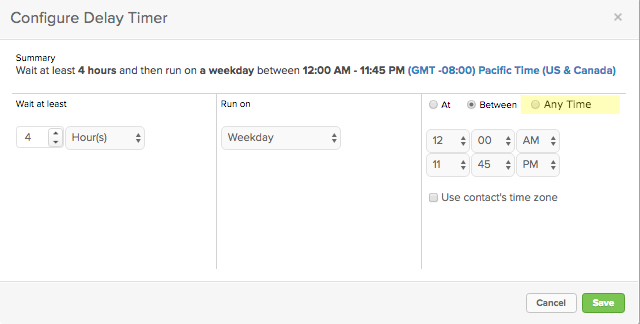
This, to me, feels like a really easy win for Infusionsoft. Right now if I want to set a delay of a few hours or minutes, I need to also choose a time or time range. If I don’t care what time it happens, and I just want to let it run after X hours, then I have to configure “Between 12:00 am and 11:45 pm”, which is just plain clumsy.
This one is a little more of an ask, but I’d really love the ability to add a snippet to the email builder, and then choose conditions under which that content appears. This would give us as marketers the ability to send one message, but include different call-to-actions for different segments of our audience.
3. Add an HTML snippet to the new builder.
SOLVED: Infusionsoft addressed this in the November 2017 update. Thank you!
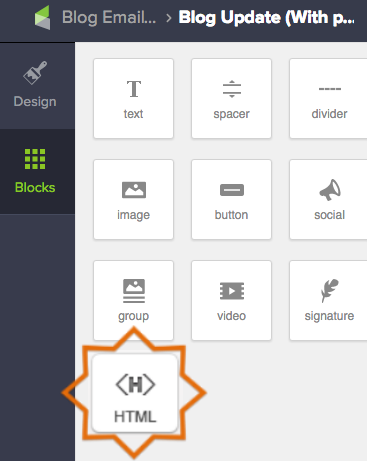
This one is straightforward. Please bring back the ability to add an HTML block to our emails. This was available with the legacy builder, and the functionality hasn’t yet been added to the new email builder. If it’s easier, I’d also accept more widgets that simulate the some of the common reasons for needing an HTML snippet (e.g. Adding a tracking pixel, embedding a table, coding untracked links, etc).
4. Stop clearing out my search results when I leave that page. Preserve them (like it used to) for when I return.
SOLVED: Infusionsoft addressed this in an October 2018 update. Thank you!
Again, I’m not asking for anything new on this one, I just want the old functionality back. Up until a few months ago my search results would stick around until I clicked “Start Over”. Sometimes that’s not a big deal, but if you’re having to rerun the same search multiple times because the system keeps dumping your criteria, then it can cost you time, and increases the opportunity for human error.
5. Let us adjust the width of our columns in emails.
The ability to easily have two and three columns is one of the best features about the new email builder. But the problem is that it always splits your columns into 1:1 or 1:1:1 ratios. It’s be nice to be able to manually adjust the width for each snippet to form our own custom layouts.
6. Let me use campaign merge fields on web forms and landing pages.
SOLVED: Infusionsoft addressed this in an update since this article was originally posted. Thank you!
I’ll be honest, I have no idea what it would take to make this real, but it feels like it should be possible. To be clear – I’m not asking to be able to use contact merge fields, but rather I want to be able to use campaign merge fields. Here’s why: Let’s say I’m hosting an event, and I have a series of emails promoting the event, and I’m driving my prospects to a landing page so they can RSVP. Well, I’m likely going to use Campaign Merge Fields to save myself time in building the campaign. That way if I need to update the date, I can just change it in one location and it updates the whole campaign. It’d be great if that updated my landing page in addition to the emails.
7. When I use a merge field in a subject line, don’t push it to the end of the subject line.
This is probably the most minor annoyance on this list, but for some reason any merge fields you are adding to your subject line get pushed to the end of the subject line, then you need to copy and paste them to where they go, or just learn to add them as you write.
8. Let me add tags to a category when I create them from within the email builder.
SOLVED: Infusionsoft addressed this in an update since this article was originally posted. Thank you!
When I create a tag in the campaign builder, on a goal or in a sequence, it prompts me to categorize that tag as I go. But, if I create a tag from within the email builder (on a link or a button), it does not prompt me to categorize that tag. Tag categories are important, and usually more important than new users realize, so emphasizing best practices as users are creating tags can save a lot of headache down the road.
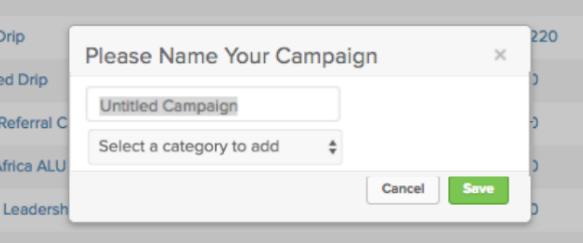
9. Allow, or prompt even, us to categorize our campaigns as we name them. (The way you can with tags.)
SOLVED: Infusionsoft addressed this in an update since this article was originally posted. Thank you!
The campaign builder was introduced roughly 5 years ago, and since then, I’ve been telling people “Don’t worry. They’ll build in folders, or categories, at some point. It’s logical. Just be patient.” And boom, I’m thrilled we’ve finally got them. But it shouldn’t be so laborious to categorize my campaigns. If this is going to be a best practice, it makes sense to me that we’d be prompted to categorize our campaigns as we create them. Something like this:
10. When I go from a list back to the campaign, don’t default to the edit tab, return me back to the reporting tab.
SOLVED: Infusionsoft addressed this in an update since this article was originally posted. Thank you!
This one drives me nuts. You’re working along, checking up on your campaigns and running reports, let’s say you’re several layers deep looking for the group of contacts who have received an email in the last 30 days, and then you click into the report, and when you click “back to campaign” you’re defaulted all back out to the edit tab of the campaign. Just take me back to the reporting tab, like it used to do, pleeeeeease.
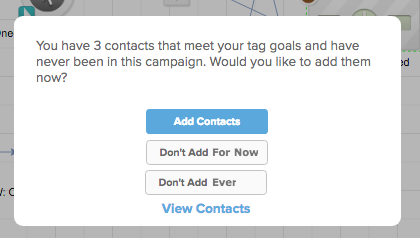
11. Give me an option to dismiss this, and not be prompted again.
SOLVED: Infusionsoft addressed this in a November 2018 update. Thank you!
I love that tag goals can retroactively find contacts who would have been added to this campaign, and that you can choose whether or not you want to add them. So, well done, and thanks for that. But, it gets a little annoying for the campaign builder to ask me every single time I publish. Seems like maybe it’d work to give me a “dismiss” option so that it doesn’t ask again? Like so:
———-
Okay, as I said previously, this isn’t a comprehensive list. It’s just a few things off the top of my head that feel like they’re worth addressing. I love Infusionsoft, and I have a number of friends who work directly on making product improvements; so I hope this blog post is received in the constructive manner in which it was intended. Don’t worry, once they’ve tackled this list I’ll be doing my best to prep another one!
For anyone wondering, I used Loom for the brief video recordings in this post. Loom is a Chrome plugin, it’s free, and it’s great. I recommend downloading some sort of free screen capture tool, it makes it easier to communicate with technical support if you’re able to document bugs or issues as you see them.
If any of these jump out at you as being important, I’d love to hear about it in the comments below! Or, if you want to share your own list, I’d love to hear that too! Thanks for reading.
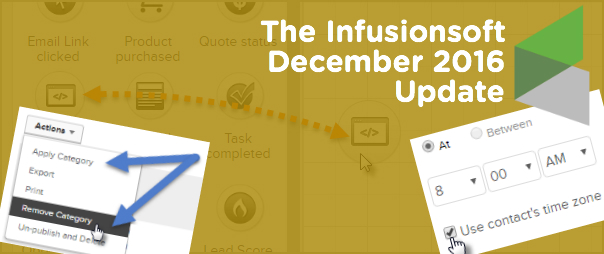
Closing out the year strong with another solid Infusionsoft update. And as you may expect, there are a few features I wanted to highlight this month that will make our lives easier. Let’s get to it:
Feature #1: Campaign Categories (Easier)
What it does: You can now add and remove your campaigns to and from categories without having to do it one-by-one. Why it matters: Campaign Categories are a recent update themselves, but in the first iteration you could only update one campaign at a time. So, if you had a list of dozens of campaigns, you’d have to go through them all, one-by-one and manually assign them to the appropriate categories. Well not anymore. As we hoped, Infusionsoft has now given us the ability to handle both adding and removing en masse.
When Campaign Categories first came out I recorded a video demonstrating what to expect and how it works, well, since this update changed a few things, I’ve gone ahead and updated my video to give you the most recent take on how this feature works and how you can use it:
Feature #2: Time Zone Timers
What it does: This update allows you to use the recipients time zone in order to schedule your campaign sequence steps. Why it matters: This matters because if you have contacts across multiple time zones, or around the world, then this means that you can have your messages show up in their inbox at the times that you know they’ll be best received. If you know that your specific audience opens email at 5:15 am, then you can make sure this message is in their inbox bright and early, no matter where they are in the world.
Caveat: Because this feature determines their time zone based on a web form submission, landing page submission, or a purchase through the shopping cart, there is a reasonable chance that you may not have time zones on record for some/most of your contacts. IF you don’t have a time zone on record, then it’ll process this step using the time you selected and the local time zone for your app (basically as it would have without this setting anyway). Furthermore, their time zone is based off of where they are when they submit your form/landing page, so hopefully they’re in their local time zone, but if they take one of those actions while traveling, it’s possible that you could have the wrong time zone on record for them.
Second Caveat: There are some circumstances where you will NOT want to use this, here’s an example: If I schedule this blog post to go live at 8:00 am Pacific US Time, and then I schedule up an email for 8:15 am Pacific Time to let everyone know that my awesome blog post is ready, well, I wouldn’t want to use the Time Zone feature because 8:15 am in Sydney happens 17 hours before it happens in San Diego, and that would mean the email was going out 17 hours before my blog post was actually live. I could see some similar concerns if you’re doing a promotion that ends at Midnight local time, etc.
Feature #3: DKIM in Infusionsoft
What it does: This gives you the ability to digitally sign your own emails, basically telling your domain that Infusionsoft has permission to send emails on your behalf. (AKA It should improve deliverability.) Why it matters: This is a fairly technical feature, but it’s one that many people have been requesting for a while. It’s mostly over my head, but recently I recorded a bonus module for my IS Starter Kit to cover setting this up, so if you’ve got the IS Starter Kit check out the bonus modules tab for a video over view, or, if you don’t have the Starter Kit course for some reason, you can learn more here.
Caveat: If email deliverability in general is over your head, and you’d like to brush up, or if you think you may have deliverability issues, there’s nothing I recommend more than The Ultimate Guide to Deliverbility from Adrian Savage at WeDeliver.Email.
Feature #4: Web Page View Goal Method
What it does: Now you can trigger or stop automation when someone visits a page on your web site. Why it matters: This is HUGE. This means that you can start or stop automation based on a contact in your database visiting a page on your website. Think about that for a moment, this means that if someone visits a check-out page and doesn’t purchase, you can send a follow up email addressing the most common objections, or offering them a discount. It means that if someone visits your FAQ page you can trigger a task for a sales rep to contact them, and on, and on, and on. The applications for this are really versatile.
Check out the recent blog article from Brett at Blick Digital for a step-by-step walk through on how to use this new feature.
Caveat: This brand new feature has already had some bugs and is currently listed on the Known Issues page. I’ve seen it work successfully, but I’ve also heard reports of people have issues with it. So, if you’re a little iffy about new stuff like this, maybe give this feature a month or two while they work out the kinks.
You may have heard me say this, but it’s worth repeating: I believe it’s our job as the user community to help guide where the product goes – and the easiest way to do that is through constructive and thoughtful feedback. If you are loving what they’re doing, tell them. And if you are concerned about something you’re not seeing, tell them that too.
Thanks for reading. Probably worth mentioning that there were a few other features packed into this release that I didn’t call out above (like Opportunities coming to the IS mobile app…). I’d love to hear which features from this update you love (or don’t love) in the comments below!
Well well well, we’re back again with some more funky fresh features. In case you missed it, I profiled a handful of features the other day (catch up here). And without further ado, here are the remaining features that were announced at PartnerCon 2016.
Buckle up sports fans, Infusionsoft isn’t messing around with these bad boys:
Feature: WordPress Plugin Why it matters: I don’t think I need to tell you guys what WordPress is, but I will tell you that this is a PROPER WordPress plugin. Infusionsoft is developing a totally free Plugin that will automatically map web activity data back to Infusionsoft and either create a visitor record or attach it to a contact record. But you guys, that’s not even the half of it – this plugin will also allow you to add webforms to your existing wordpress site, and not just embedded ones, but pop-ups and slide-overs too. Can you say “FINALLY”? Oh man, this is going to make life so much easier for so many people. I’m really optimistic that this will completely replace Rapidology in my tool suite.
Oh, and it will support multiple languages. I wrote down Spanish, Hebrew, French and German; but I imagine it’ll be open source and will add additional language support. When: I didn’t hear a release date on this plugin.
Feature: New Page View Goal Method Why it matters: Lemme see if I can explain this succinctly: Infusionsoft is going to give us a brand new goal method which will enable us to trigger (or stop) automation when a contact visits a page on your website. My understanding is that it’ll work based off of cookies. So if someone clicks a link in any of your Infusionsoft emails, it’ll cookie them. Then, you can designate specific pages on your website, and if a cookied contact visits that page it would achieve a goal.
I can see this being really, really useful for a number of scenarios. For example, if you know that a contact is active in your nurture funnel, but they visit an order form or a sales page, you could trigger a task for a sales rep to call them (or a simple email follow up asking if they have any questions). It’s basically like a link click goal, but they don’t have to click from an email, they could just show up on your website and browse their way around. There are countless applications, I’d love to hear ideas for how you might use it. Caveat: I imagine this would not be able to work someone clears their cookies, or uses a different browser or device.
When: December Release
Feature: Crosstabbing Support Why it matters: This one is less of a feature, and more of a fix. Lots of people don’t know this, but there has been a bug with Infusionsoft for a long time, and basically it meant that if you had multiple tabs open, and you were running actions, sometimes it would cause unpredictable results. For example, I saw a customer create an order on a contact record, but because they had multiple contact records open it ended up creating an order for each open record. Another time I remember seeing a contact delete one campaign, but because they had their list of campaigns open in another tab, well, yeah, it deleted all their campaigns.
Basically working with multiple tabs was not reliable, and Infusionsoft tried to be as clear as possible that this was a bad idea; but because this was such an obscure issue, well, lots of people still don’t know about it. When: December Release
Feature: Scheduling in the Recipients Time Zone Why it matters: This feature is one that I know a lot of users have requested, dreamt about, or more recently, speculated about. Recently Infusionsoft started capturing a contacts Time Zone, based on their IP when the submit a form, landing page, or place an order. This is really useful information, and it can help you in a number of ways, like when you’re reaching out to a prospect, or scheduling with a customer of yours.
Right now if you schedule an email, you’re scheduling it at a single specific time. And the email goes to everyone at that particular time. So if you are based in Los Angeles, and you schedule an email at 8:00 am, that email is going to go out at 8:00 am Pacific US Time. But 8:00 am in LA is naturally 11:00 am in NYC, 4:00 pm on London, 7:00 pm in Dubai, 11:00 pm in Perth, and 2:00 am in Sydney. So, for most of those time zones, it’s not exactly ideal.
Well, now you’re going to be able to schedule automation in the recipient’s time zone. So if you schedule an email at 8:00 am, it’s going to be delivered at 8:00 am LOCAL time for each person. That’s huge. We live in an increasingly global economy. And this is a big step in the right direction. Caveat: Because the time zone is automatically determined by the IP when someone submits a form, there is a margin for error here too. If I fill out a form while I’m on vacation in Sri Lanka, it’s going to think that’s my time zone, etc. When: Broadcasts in November, and Campaigns in December.
Okay, that’s it for the highlights from PartnerCon. I’m thrilled, honestly. There are so many exciting features on the horizon, and many of them are things we’ve been yearning for, but there are a few nice surprises mixed in as well. Kudos to the Infusionsoft product teams behind all this hard work. Keep up the great work!
Well, if you read my post the other day recapping my experience at PartnerCon, then you probably already know that the product updates were one of the things that I absolutely loved, and I’m excited to get down to it.
But first, I’d better give a little COA. I am not an official representative of Infusionsoft, so I’m only reporting what I heard, and the way that I understood it. I did go out of my way to ask questions, and to gather as much information as I could, but it’s entirely possible that the features as I understood them may vary slightly or dramatically by the time they’re introduced into the app. Also, I’m going to project when some of the features are coming out based on either what was said, or what I inferred; but because there are so many factors that go into software development, it’s possible that some features might be released sooner or later than I predict.
Okay then, let’s party:
Feature: Campaign Categories Why it matters: Well, right now a lot of people have developed complex naming conventions for their campaigns. The reason that most people do this is so that they can easily sort and filter their campaigns. Soon here you won’t need to do that anymore, because Infusionsoft is going to add the ability to categorize your campaigns. This is a feature I’ve heard requested for years, but because it isn’t really critical, it hasn’t made the cut. Until now.
I see this simple update making life easier, making apps more organized, and just generally saving time. I think a lot of people will create broad categories for the various stages of lifecycle marketing (Lead Gen, Nurture, Sales, Fulfillment, etc), but I’ve also talked to a few partners who plan to use categories for their various products, so that all the campaigns pertaining to one product are all in a single “folder”. Eventually you’ll be able to archive campaigns too, but for the meantime you could just create an archive folder for your retired campaigns. When:November Release
Feature: New features coming to the Infusionsoft Sync for Gmail Why it matters: When the Gmail sync first came out it was awesome and overdue, Infusionsoft saw the value in it and purchased it so that it could be available for all users for free. But, it had it’s fair share of issues, and my impression is that it just didn’t get a whole lot of attention internally, until now.
There are a handful of updates coming to the gmail sync app, here are the highlights:
If you receive an email from someone who isn’t in your database, the plugin will now pre-parse information from an emails signature into the appropriate fields and give you the choice to add this contact to Infusionsoft.
When sending an email in Gmail you’ll have two “send” buttons, one that just sends like normal, and another that sends with an Infusionsoft tracking pixel AND records that email back to Infusionsoft.
You’ll have the option to have pop-up browser notifications (in Chrome and Firefox) when an email you sent is opened, based on that tracking pixel.
You’ll have access to internal forms right within the gmail sidebar.
Multiple languages will be supported in the plugin (Spanish, French, German, Portuguese, Dutch, Russian, etc)
When: My understanding is that some of these features are available as of this week, and others will be added over the upcoming months.
Feature: Changing Goal Methods on the Fly Why it matters: With a recent update, Infusionsoft restricted the ability to quickly change the setting of an existing goal. So, if you had a link click goal and you wanted to switch it to a tag goal, you’d have to delete the first goal, drag out the new goal, and then name and configure this new goal. Depending on how you use Infusionsoft, those few extra steps could be wasting you a fair amount of time. Not anymore friends. Infusionsoft has listened to our feedback and is bringing back the ability to quickly and easily adjust goal methods without having to delete/replace goals. When:November Release
Feature:Mobile App Update Why it matters: Infusionsoft is going to update a few things in their mobile app. If you didn’t know Infusionsoft had a mobile app, you’re not alone. They’ve had it for years, but the functionality has been severely limited. The mobile app gave you the ability to look up contacts, pull up their address, or phone number, and if you wanted to, you could apply a tag. But that was really it, and as far as I could tell the mobile app was primarily used by organizations that had/have sales reps. Well, if you’re a sales rep and you’re using a mobile app on your phone, it seems pretty natural that you’d want the ability to see your contacts opportunities, and possible update an opportunity stage from your phone, right? Bingo. Sales teams can rejoice, because that’s coming. When: My notes say that Opportunities will be in mobile in October initially, with a follow-up “full scale” release in December.
Feature: Merge Fields and API Upgraded to support UTF-8 Why it matters: This matters because acronyms are super fancy. No, jk, honestly this might not matter to you at all, but supporting UTF-8 (as I understand it) is a really big deal to anyone who uses a non-english character set. Being able to merge these characters into emails and tasks is important, and having the API support this means that information added to Infusionsoft (names, cities, etc) don’t have to be translated to English, and won’t be corrupted when being added. This one is fairly technical, but for the folks who need this, it’s a pretty big deal. When: I think the merge field part is already out, and the API support is coming soon?
Okay, that’s a lot of awesome features, and I hope you’re as jazzed as I am. This post is starting to sprawl, so let’s break it off here and I’ll recap the last three features in the next post. In the meantime, see anything on this list that you’re excited about?