Should I use the pipeline?

Should I use the pipeline?

Should you use the Keap pipeline feature?

Maybe – I can’t say for sure.

But what I do know is that either way, it should be an informed decision.

So let’s get into it…

What is the Keap pipeline?

The pipeline feature inside Keap is a tool for tracking a process.

The most common use case is for tracking stages in a sales process, but the pipeline can generally be used to track any process (fulfillment, onboarding, etc).

What version of Keap is this for?

The pipeline is available in Keap Pro and Max, as well as Max Classic (the version formerly known as Infusionsoft).

But there are some differences between the different Keap versions.

How does the Keap pipeline work?

You start by identifying the stages that comprise your process, and then you can track individuals as they progress through those stages.

In Pro and Max, these are called “Deals”. In Max Classic, these are called “Opportunities”.

But regardless of your version, using a pipeline adds insight, accountability, and automation to your process.

Hopefully this conversation has helped add some context to what a pipeline is, and the scenarios where it may prove useful.

Where do I learn more?

The Keap Academy platform features two detailed courses covering the strategic and technical aspects of using a pipeline in your business.

There’s one course for Keap pro and max, and another for Max Classic (formerly Infusionsoft).

ChatGPT for Small Business: Example Use Case

ChatGPT for Small Business: Example Use Case

How about a practical small business example use case for ChatGPT?

ChatGPT buzz is everywhere these days, but if you’re like me, you may be dragging your feet on exploring it.

So when I saw this demo from Grady the other day, I immediately asked him if I could share it.

He graciously say “Go for it”.

Follow along as Grady asks ChatGPT to help him produce content for social, an outline for a webinar, copy for an email series, and a few other relatable small business use cases.

One thing to pay attention to is how Grady gives ChatGPT feedback when he’s not getting exactly what he needs:

Watching this ChatGPT small business example unfold was fascinating for me, I hope you enjoyed it too.

It was useful to see how the ideas blended from one medium into another, and how Grady lead the bot to wind up with content he could use, that wasn’t too salesy, and all felt aligned to the original topic.

What to do next?

If you want more on this topic, check out the webinar we hosted discussing AI trends and use cases.

And if you haven’t yet, try it out for yourself.

Here’s a link to ChatGPT >>

Feel free to take it for a spin, and let me know how it goes.

5 Lessons from building an Active Membership

5 Lessons from building an Active Membership

I started the OG Membership in 2015 and it’s been my favorite part of my business ever since.

For a variety of reasons, but first and foremost is the pride I get from serving this group, and the validation that comes from watching them grow their businesses.

5 Membership Lessons

I’d be lying if I said that 8 years I knew exactly where I was going. There has been plenty of turbulence along the way..

I’ve invested thousands of dollars and countless hours in learning about memberships, and the patterns to how and why they work.

Here are a few of most valuable the lessons I’ve learned while running my own membership, and building an engaged community.

1. Create a Success Path

I’ve written about this before, but the concept of a success path remains one of the most important membership lessons I’ve learned.

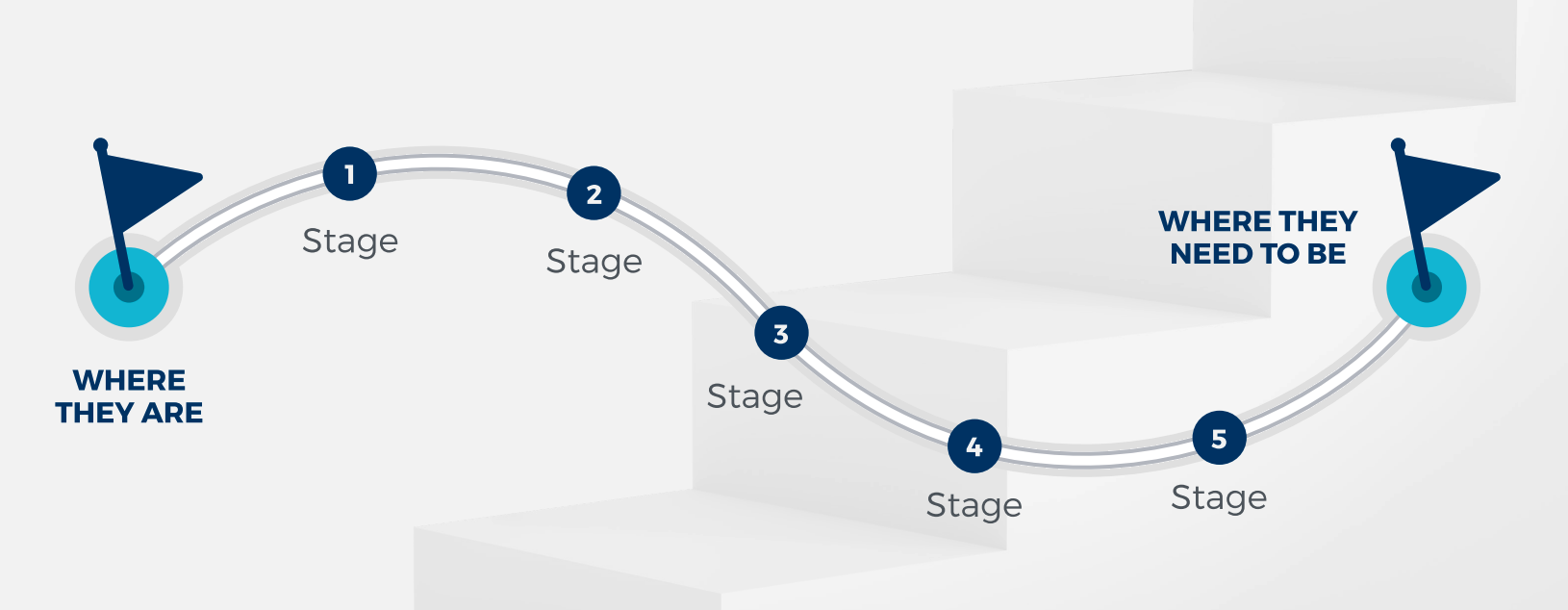
What is a Success Path? It’s effectively a set of stages that help illustrate the progress your membership helps facilitate.

membership journey

It’s the pathway that helps your members visualize the transformation they’re undergoing, but it’s also the framework for the content you produce, and the underlying north star for your marketing efforts too.

2. People pay for less content, not more

As someone who has a blog, and an active YouTube channel, and generally enjoys creating content – this was a tough lesson for me to learn.

But the reality is that if you have a membership, people aren’t looking for you to bury them in content – that’s a quick path to overwhelm.

Instead, your members are looking for help organizing the information and reducing the noise – and generally figuring out how to move forward with confidence.

3. Plan your Member Journey

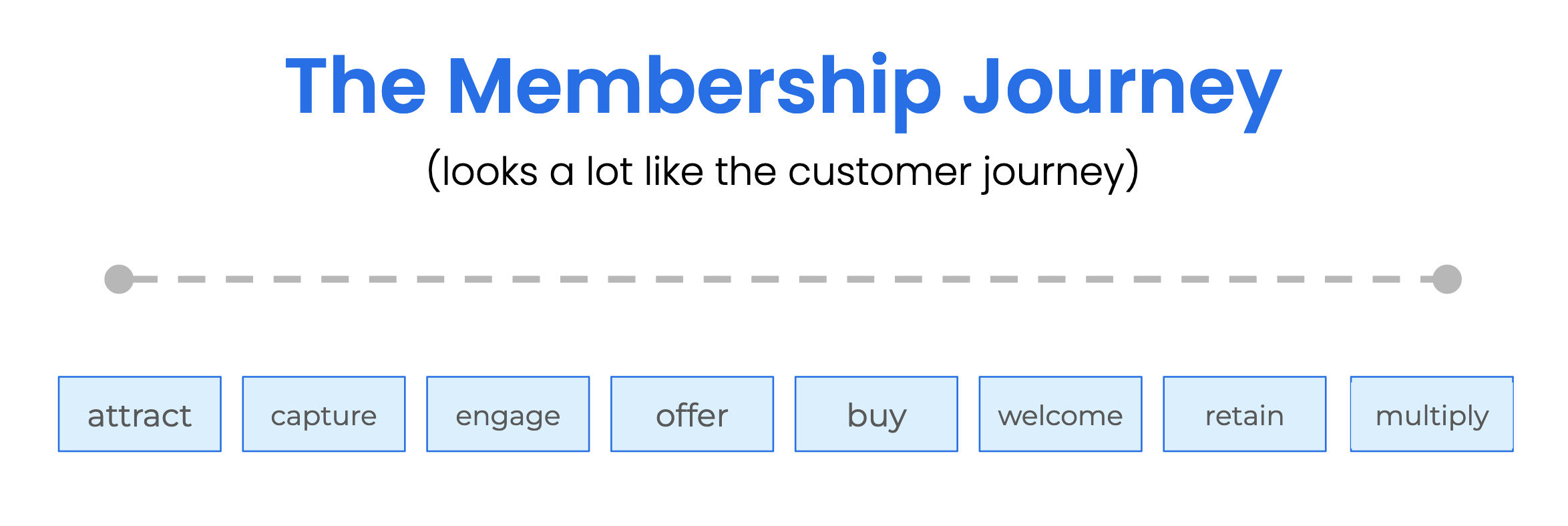
I’ve talked about the idea of a customer journey at length, but a similar concept can be applied to your membership.

Here’s an example of what those stages might look like:

membership journey

As useful as that framework can be – each of those stages can represent a weeks or months of a customer journey.

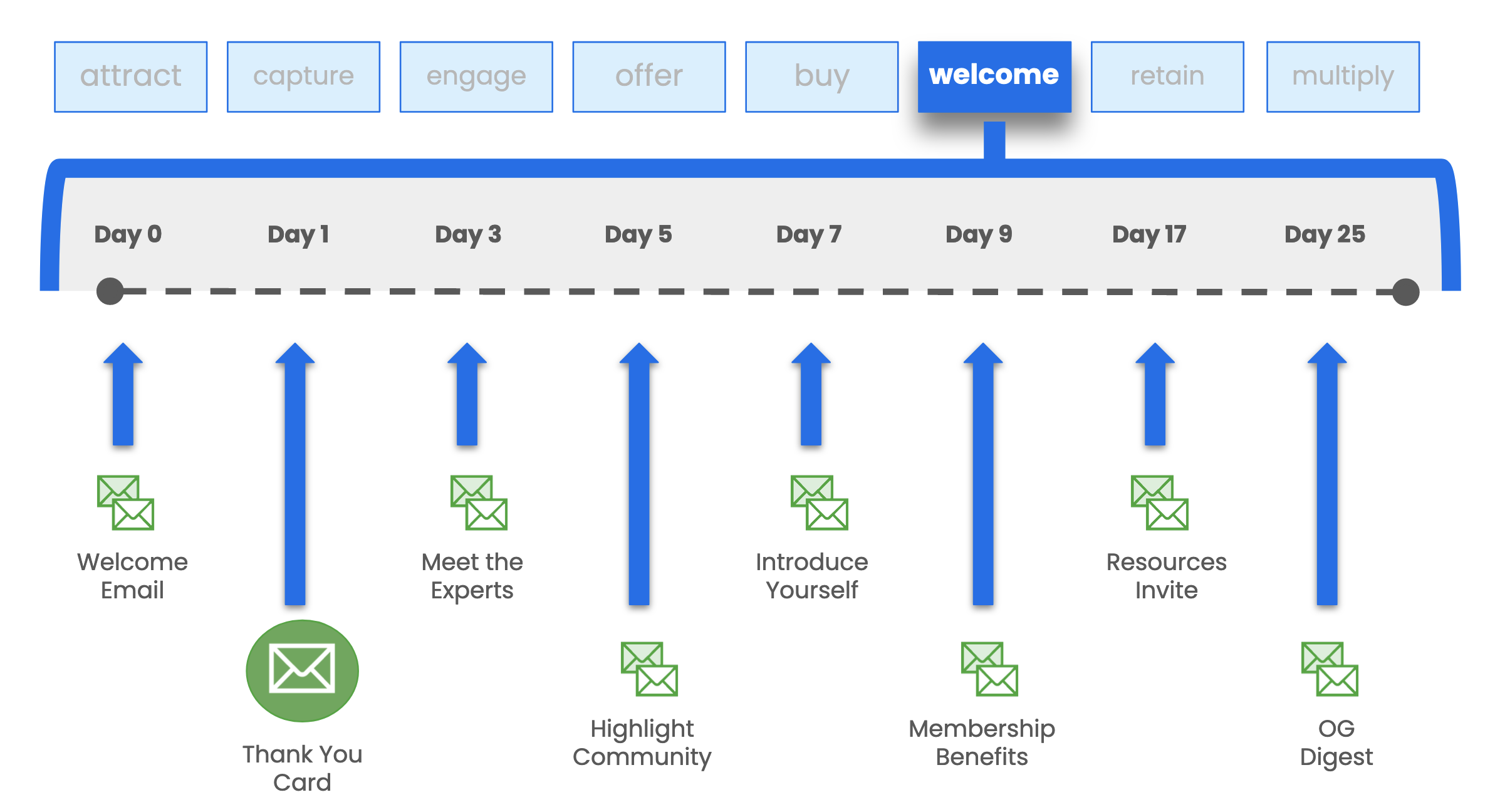
Let’s dig into the “Weclome” stage, and take a look at what a sample membership onboarding might entail.

Membership Onboarding

The onboarding is their introduction to the membership – and the sooner they engage, the likelier they are to see the value in your membership, to forge connections, and to start making progress.

But this same level of detail and planning could be applied to optimizing every stage of their experience.

4. Be the member you want

This lesson wasn’t clear to me initially, but I’ve had enough people point it out now that I feel like I have to embrace it.

This is a little uncomfortable for me to say – but the Monkeypod membership is confusingly helpful. I’m proud of that group, and I put a ton of time and energy into serving it – but the efforts I put into it are a small fraction of what makes it so valuable.

Every day I’m humbled by the way the members show up to help one another. People go out of their way to share their ideas, suggestions, recommendations, and their hard earned expertise.

The way you show up for your members, sets the tone for your membership.

If you’re quiet, your membership will be quiet.

And conversely, if you’re active, helpful, loud, fun, or anything else – it invites your members to be that too.

5. Listen to your members

This one probably seems obvious – but it’s worth saying. Ask your members what they want, and pay attention to the responses you get.

Now, I’m not saying to do everything they ask for – that may not be realistic. But consider what they’re asking, and why – you may find there are some simple changes you can make that address their concerns.

For example – at the core of the OG Membership is our private Facebook group, but it’s a pretty busy group, and not everyone is on Facebook every day – so when members asked us to do a monthly recap email we decided that was an easy win for everyone.

Like I said, I’ve learned these lessons over the past 8 years – mostly through trial and error. But a few years ago I started following Stu McLaren, and he has quickly become the single biggest influence on me for this topic.

What do I do next?

Stu is hosting a free workshop all about Memberships – it starts on April 20th, and you can register here.

It’s probably the most valuable free event I’ve ever seen (and I’ve attended each of the last 4 years).

If you’re a skeptic like me, you’re probably thinking “no one gives away valuable content for free, what’s the catch…”

Here’s the catch: This free workshop is the runway leading up to the launch of Stu’s flagship class, The Membership Experience™.

That’s it.

He way over delivers during the workshop part because it’s his audition – and if you like what he has to say, the natural next step is to sign up for his course.

Do I recommend his course?

I absolutely do.

But you certainly don’t have to sign up if it’s not a fit or you’re not ready – the free workshop is valuable on it’s own.

So, start with that – save your spot here.

Membership Masterclass
Campaign Builder: Gotcha #4

Campaign Builder: Gotcha #4

A number of years ago I published a series of three blog posts highlighting common “gotchas” that trip people up inside Keap’s Campaign Builder.

Gotcha 1 | Gotcha 2 | Gotcha 3

Well, here we are now and while Infusionsoft is now Keap, and the campaign builder is now Advanced Automations – the gotchas still persist.

And today we’re highlighting another wrinkle in the campaign builder behavior that if you don’t know about it can definitely trip people up.

Check it out:

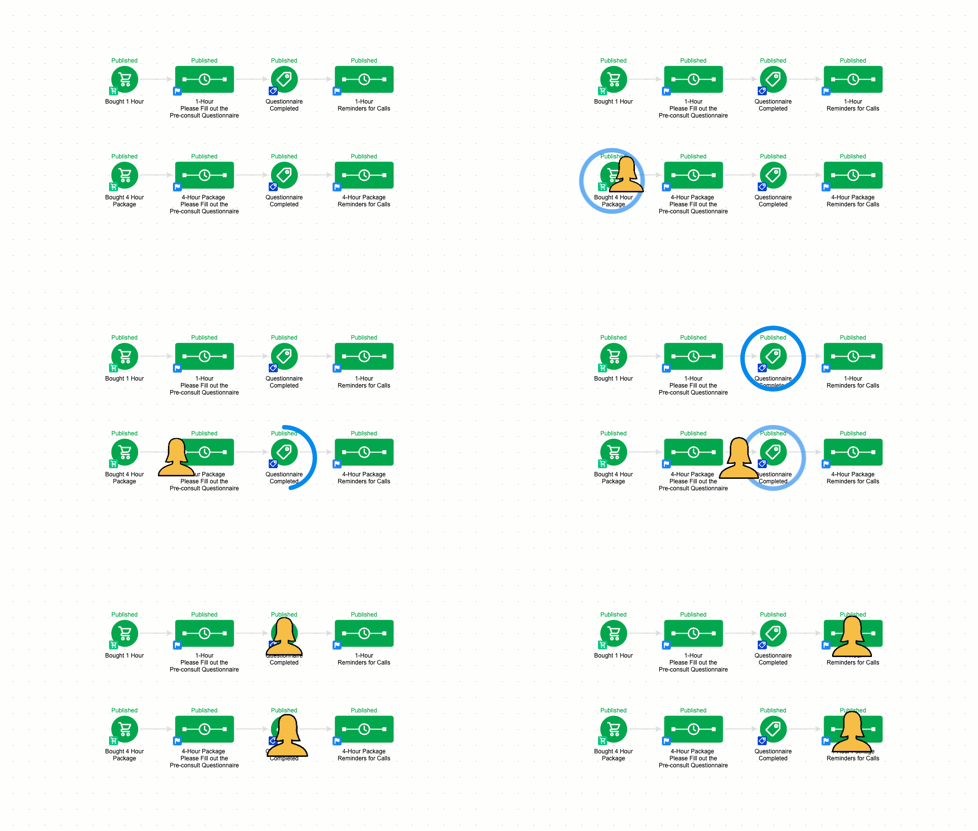
So, to summarize succinctly – if a contact is in a campaign, that means they can achieve any goal on the campaign canvas.

Even if the goal is not directly (or indirectly) attached to the sequence they are in.

gotcha for contacts inside Keap

This behavior isn’t good or bad – it’s just how it works.

If a contact is in a campaign, then they can achieve all the goals in that same campaign, even if they’re in a completely disconnected structure.

Questions? Compliments? Drop them in the comments below.

What to do next?

Well, if you’re looking to level up your campaign builder muscles (and reduce the ‘gotchas’ you don’t know about), then check out the Advanced Automations Complete Collection.

And finally, if you would benefit from a place to ask Keap questions, then check out the OG membership pricing and details here.

How to Write Off Invoices in Keap

How to Write Off Invoices in Keap

If you determine that a Keap invoice is not going to be paid, what do you do with it?

Sure, you have a brief period of frustration, or grief – but then you’ve got to figure out how to reconcile that invoice in your bookkeeping – and Keap’s write-off feature is exactly what you need.

The challenge is that the write-off function inside Keap is poorly documented, and not intuitively located – but this video shows you where to find it and how to use it.

So that’s how you write off a Keap invoice you’re not going to be able to collect.

And remember…

In case you missed it – remember to exclude write-offs from your different payment reports:

write off payment type criteria

I know that extra step is annoying, but it’s important in order to keep your reports accurate.

The “payments” report is really just reporting on transactions – and the write-off is a type of transaction.

What to do next?

And finally, if you would benefit from a place to ask Keap questions, then check out the OG membership pricing and details here.

Appointment Booking in Keap

Appointment Booking in Keap

If you use appointments in your business then you probably are familiar with the old song-and-dance to get people book and then show up for their appointment.

(And I say ‘appointment’ but this process is also true for consults, for demos, or any other scheduled meeting.)

So when this question came up the other day we thought it was worth recording a demo of how you can use a super simple Keap campaign structure to a) invite people to book and b) remind them to show up for their appointment.

This process works for ScheduleOnce, AppointmentCore, Acuity, Calendly, or any other appointment booking tool that integrates wtih Keap.

Worth mentioning that PlusThis has integrations for Calendly and Acuity. Check those out here.

And, once they’ve booked the appointment you can remind them about it – and if you conduct your appointments on Zoom then here’s a little extra detail about how to streamline that process.

What to do next?

This was a simple campaign, but if you want to learn more about using the Advanced Automations feature inside Keap then check out this free course from Keap Academy.

And finally, this question originated inside our private community, if you think you’d benefit from a place to ask questions like this, then check out the OG membership pricing and details here.