Lead Scoring in Keap

Lead Scoring in Keap

This blog post is all about the Lead Scoring feature in the Max Classic version of Keap.

(And just as a reminder, the Max Classic version was formerly called Infusionsoft.)

But before we get to how this feature works, I wanna first talk about what it does, so you can decide if it’s something that your business will use.

As valuable as Keap’s Lead Scoring feature is, it’s utility is somewhat limited for certain business types.

Kinda like the corkscrew on a swiss army knife – if you don’t drink wine, it’s probably not that important.

But if you’re part of the rosé-all-day crew, then this little feature might just be your personal fav.

What is Lead Scoring?

Simply put, Lead Scoring is a Keap feature that evaluates your database (all your contacts) and assigns them a score based on a set of criteria you define.

That score is represented on their contact record by flames.
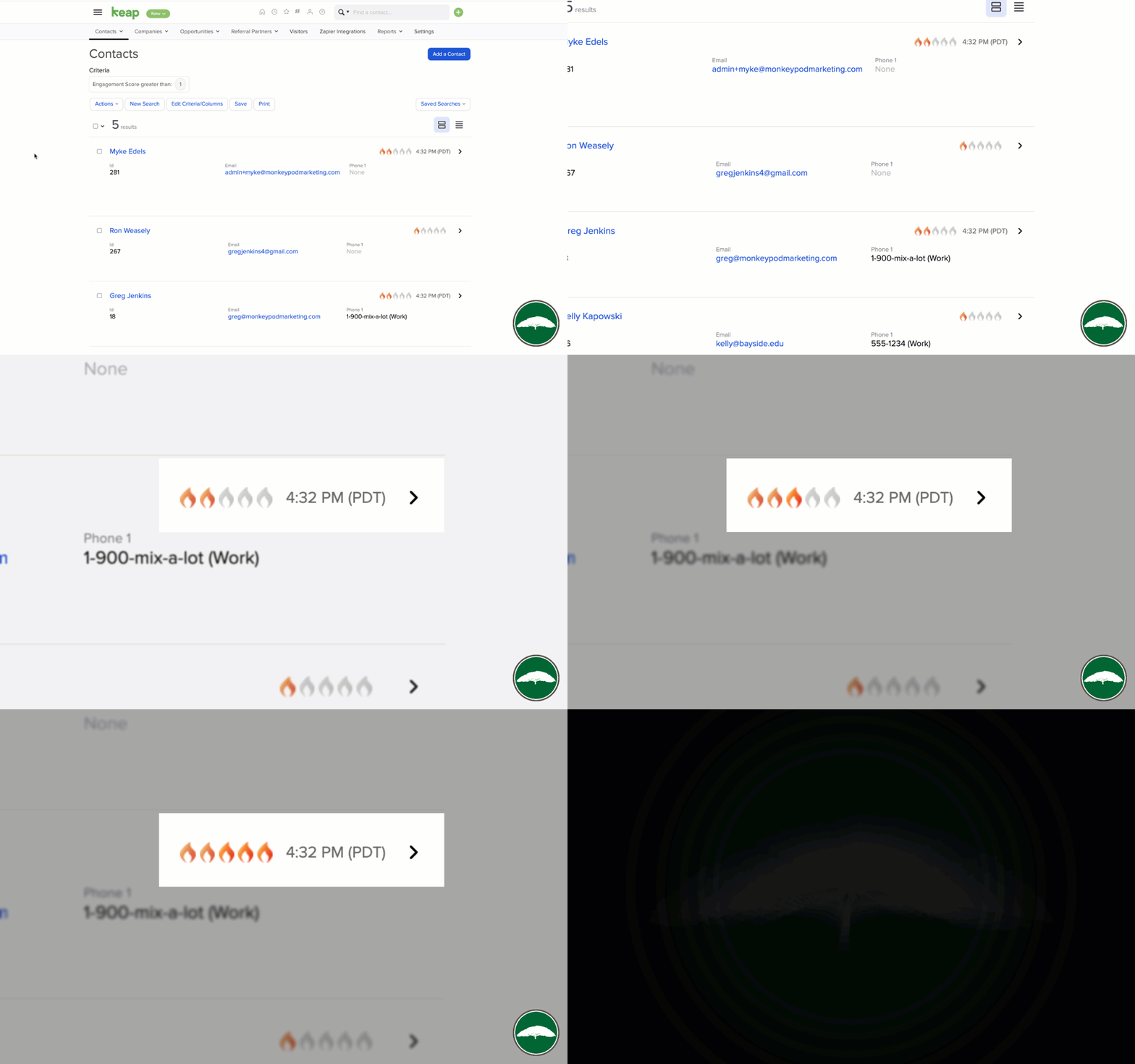
Lead Score Flames in Keap

If you’ve seen those flames and wondered, now you know.

But if you’ve never seen those flames, it could be because Lead Scoring is only available in Max Classic accounts (formerly known as Infusionsoft), or that it’s simply disabled in your account (but you can flip it on).

Which begs the question – do I need it?

Do I need Lead Scoring?

Maybe. Maybe not.

It’s a cool feature – but doesn’t mean it’s critical for every business.

If you want to keep tabs on how your audience is engaging with your content, then Lead Scoring might be the answer. Scores calculate automatically and you can get updates on your dashboard.
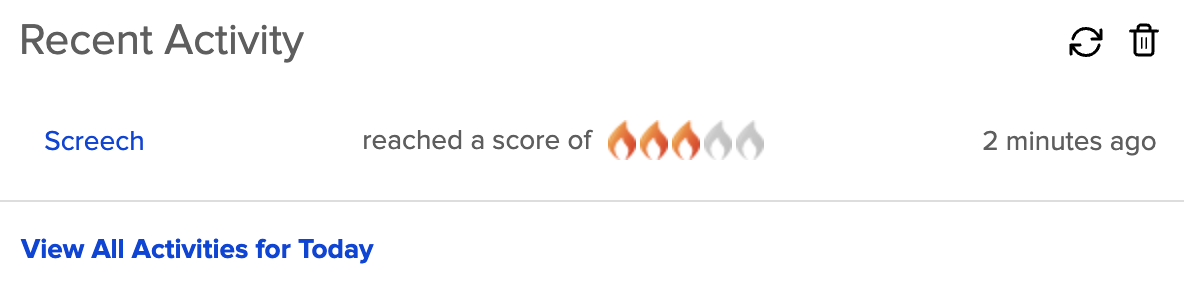
Keap Lead Score Update

If you have a team of sales reps (or even just one) who want to make sure they’re spending their time calling the most engaged prospects in their pipeline, then Lead Scoring might be the answer. It’s available to use as search criteria.
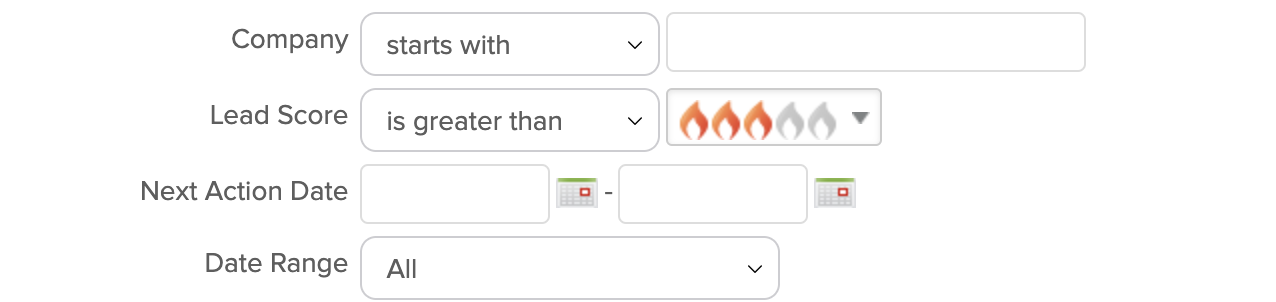
Lead Score Criteria

Or if you want to automatically start or stop automation based on the way someone does (or doesn’t) engage with your emails, then Lead Scoring might be the answer.
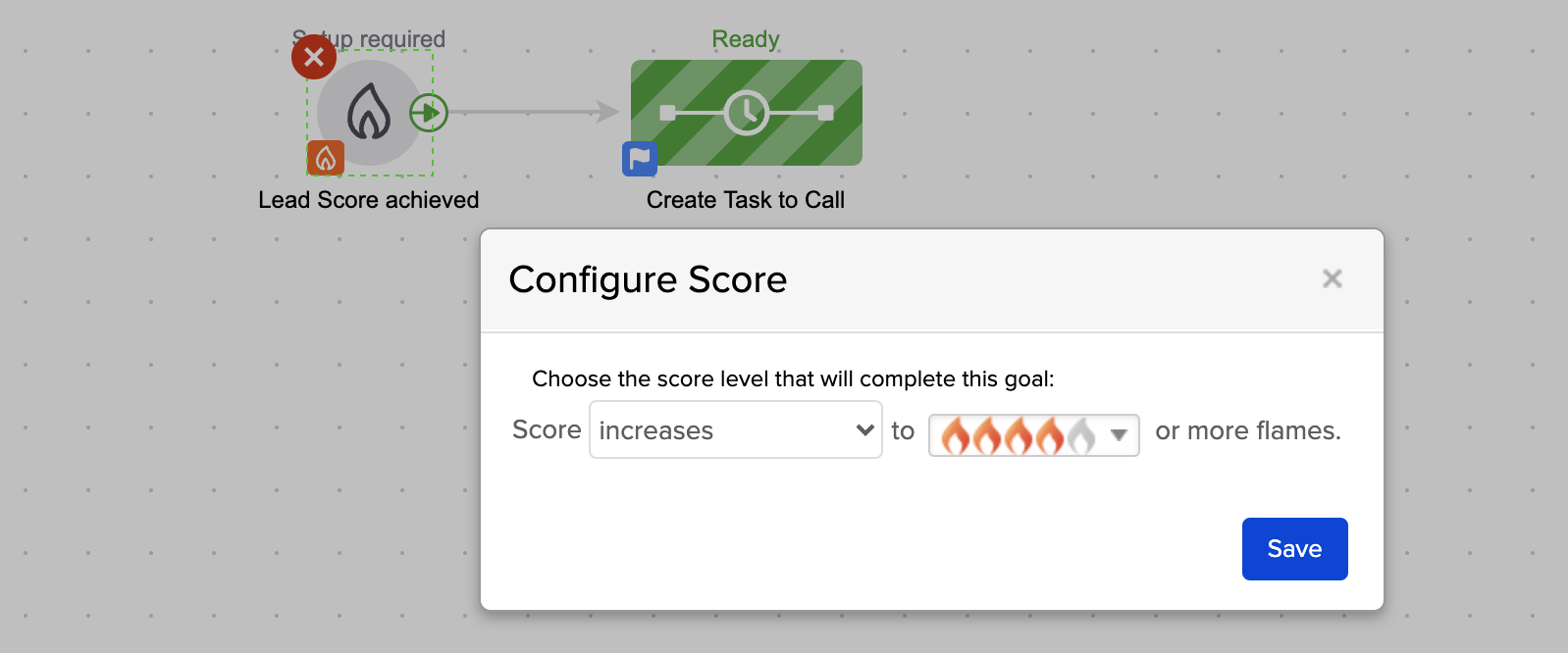
Keap Lead Score Goal

There are myriad scenarios where Lead Scoring solves real world problems – but whether or not it’s a fit for your business is going to depend on your specific set of circumstances.

But if you do decide to use it…

How do I use Lead Scoring?

If you decide it sounds interesting, or even if you’re interested-but-not-quite-sure, the next step would be to set up the initial set of criteria that the Lead Scoring feature will use to evaluate the contacts in your database.

The beauty of that is that the algorithm starts running right away, and in a matter of a few hours you’ll have a new layer of information regarding the prospects in your app.

Where do I learn more?

The Keap Academy platform features a quick mini course all about Lead Scoring, covering the how you can set it up for your business, and the different ways to start using it right away.

Multi Channel Tracking and Course Consumption Reporting

Multi Channel Tracking and Course Consumption Reporting

If you’re a brand new Keap user, or are easily overwhelmed – then this one isn’t where you should start.

But if you’re an advanced user, or you just want to see a complex configuration that solves a handful of challenges, feel free to dig in.

This video breaks down the set-up we used to track leads from multiple channels through a single opt-in, and then map their consumption with a handful of online courses back to a singular reporting doc so that we can tell not only which of our contacts are most engaged, but also which of our channels are most productive.

In this video we’ll dig into LeadSource tracking, Referral Partner Tracking, Course Consumption reporting, and the use of Zapier and PlusThis to integrate multiple systems and trigger automation based on video engagement.

Enjoy.

Now, as a reminder – this video breaks down the solution we used for our specific scenario – but I know your needs may be different.

The tactics in this video aren’t dependent on one another – you can use the channel tracking or the partner attribution on their own, or the course consumption reporting without the other aspects.

And, of course, this process uses the campaign builder fairly heavily – if you want training on that part of Keap, check out the Advanced Automation Complete Collection inside the Keap Academy platform.

Questions or feedback about this demo, drop a comment below – thanks for watching.

Campaign Builder Examples and Real World Use Cases

Campaign Builder Examples and Real World Use Cases

“Do you have any Keap campaign examples?”

This is one the of the questions I’ve heard most over the years.

Like, if you’ve never used Keap’s campaign builder at all – then I’d probably start with this Campaign Builder 101 Blog Post.

And if you are looking for a comprehensive campaign builder training course – then you’re gonna want the CB Trilogy.

(And just in case you hadn’t heard – thanks to a partnership with Keap the CB Trilogy, and all my other courses, are now free to all Keap users.)

But, even if you have a solid grasp on how the campaign builder works, that doesn’t necessarily mean you’ve exhausted all the areas it can serve your business.

3 Critical Campaigns

Here’s a great place to start, with 3 of the most common campaigns that I think can help just about any business on the planet.

Those three examples are pretty high level – and I think could be useful for any business, regardless of your industry, business model, or part of the world.

Two More Campaign Use Cases

The next video I’ve got is also a bonus from the Infusionsoft 101 mini course, and covers two more scenarios where I think the campaign builder can save the day.

Check it out:

My hope is that as you watch these videos, you’re getting ideas for automation you might be able to use in your own business.

Remember, if you need training on how the campaign builder works – the CB trilogy is where I’d recommend you start.

But I know that a big part of maximizing the ROI we get from Keap comes from our ability to spot automation opportunities, and I hope these examples have helped.

Speaking of examples, here are a few more…

More Keap Campaign Examples

Lead Magnet Campaign

Offering a lead magnet is a tried and true way to collect leads and grow your list. And if you’re dealing with any sort of volume, then automation is an essential ingredient for this process. This opt-in campaign offers an ebook, but could just as easily work for almost any lead magnet you might have.
Watch Demo >>

Gather Extra Info

I think we usually think of web forms and landing pages as being tools to collect leads – but you can also use them to gather supplementary info about the folks who are already in your database. Here’s a campaign example designed to collect extra info from your existing list.
Watch Demo >>

Webinar Campaign

Webinars are a great way to engage with prospects, or to build rapport with your existing audience. But in both scenarios you’ll want to build out automation to support the experience (and increase attendance). Here’s a detailed breakdown of the campaign I use for Monkeypod’s webinars.
Watch Demo >>

Two Things Campaign

Sometimes we need automation to happen, but only after the prospect has done two things (like sign a contract, and make a payment), so this demo shows you how you might set up a campaign to accommodate that situation.
Watch demo >>

Course Fulfillment Campaign

Generating new leads is important (obviously), but sometimes I think it gets a disproportionate amount of focus. We can also use Keap Campaigns to support our post-purchase customer experience. Here’s a demo of how you can use automation in the fulfillment part of a customer’s journey.
Watch Demo >>

Flexible Goals Example

Goals work to start and stop sequences – but occasionally we want the same sequence to be stopped when one goal is achieved (like when they buy), but we want it to persist when other goals are met (like when they open, or click), so here’s a campaign set up that can handle that.
Watch demo >>

Here are a few more, organized into a playlist on the ole Monkeypod YouTube channel. But please feel free to drop comments below withe use cases of your own, or requests for campaigns I can model in future posts or videos.

Thanks for reading.

Introducing Field Math

Introducing Field Math

That’s right – field math has been released as a native function inside of Keap.

Historically you’ve been able to set or update a contact field as a step inside your campaigns, but with this update you can now also perform basic math functions (add, subtract, multiply, divide) – which takes things to a whole new level.

There are countless use cases where this can be valuable – but a common scenario is when you want to unlock a bonus for someone after they’ve made a certain number of purchases.

Like, a punch card at a sandwich shop – or any sort of frequent flyer program.

Here’s a demo of how that campaign structure might look using this new feature:

Okay party people – that’s the new field math feature.

This isn’t quite as flexible as PlusThis, Zapier, or some of the other third-party tools that handle this – but it’s nice to have a native option that handles simple use cases.

Here’s a link to the full release notes from the Keap help site.

If you have any questions or comments please leave them below – I’d love to hear the different use cases you might have for this throughout your business.

Editing Live Campaigns

Editing Live Campaigns

“What happens when I edit a Keap campaign?”

Versions of this question come up over and over in the Keap community, and for a few good reasons.

Here are two:

First, no matter how much time you spend planning and designing your campaign, once it goes live you’re bound to notice things you overlooked, or you wish you would have done.

And second, being able to confidently edit a live campaign lets us launch a lean version more quickly – with plans to rapidly iterate.

editing campaigns

If you’re brand new to campaign building, then I’d recommend starting this Campaign Builder 101 blog post for some basics.

But, if you’ve got a few live campaigns then lets get right to the point…

Can I edit my Keap campaigns after I’ve published them?

Yes. Absolutely.

It’s normal and expected to need to edit your campaigns after they’ve launched.

But, it begs the question…

What happens if I modify a live campaign?

The answer to that one is “It depends on what changes you make”.

The behavior for editing campaigns IS predictable – as in, there is logic to how it behaves.

But it isn’t always intuitive – and so when things happen that people don’t expect, it can feel unsettling.

There are enough Keap users who have been burned by something they didn’t anticipate, that it’s created a sense of mystery and intrigue around the idea of republishing.

Here’s a video I plucked from the CB Trilogy course that details the expected behavior in some of the most common republishing situations:

So to recap – it’s safe to edit your existing campaigns.

Editing an Email

If all you are changing is the copy in an email (or the sender, or the subject line, etc), then when you publish it will start sending the new version to contacts who hit that step. But it won’t affect contacts for whom that email has already sent.

Adding a Goal

When you add a new goal – it starts listening right away. Contacts who have taken that action in the past won’t automatically achieve it* – because at the time they took that action, the goal wasn’t listening.

*the lone exception to this is tags – entry point tag goals will give you the option to pull in contacts who have previously received that tag

Adding a Sequence after a Goal

When you add a sequence after a goal, contacts who achieve the goal in the future will be added to the sequence. But anyone who had previously achieved that goal won’t automatically be added to the sequence (if needed, you can do that manually).

Adding a Sequence after a Sequence

When you add a sequence after an existing sequence, with no goal in between, active contacts will remain active until they complete the scheduled steps in their current sequence, and queued contacts from the first sequence will immediately flow into the second sequence (because now they have a place to go).

Adding or Changing Steps inside a Sequence

When you add a new step, or modify the timers inside a sequence, the system recalculates each contact’s position in that sequence.
 
If the step you’ve added is in the future (or would be, based on when they entered the sequence), then they’ll queue up and receive it at the time you intended (governed by the timer).
 
But if the step ‘would’ have happened in the past, then it won’t schedule it for them. It would run the same logic check, and decide “oh, that WOULD have already happened, so don’t run it”.

The video above is part of chapter three in the campaign builder trilogy course, which is a comprehensive deep dive training on Keap’s campaign builder.

Thanks to a partnership with Keap, this course is now available free of charge. If you’d like to learn more about the campaign builder, you can unlock the course today.

Automatically Sending a CC or BCC Email with Keap

Automatically Sending a CC or BCC Email with Keap

Every now and again I see questions pop up when someone needs to use Keap to send an email and CC (or BCC) someone else.

CC or BCC email with Keap

There are plenty of use cases where you might want this type of functionality – most commonly introducing two peoeple, connecting someone to their account manager, or looping in a third-party.

And while the Keap email builder doesn’t have a native option to CC someone else, there are a few ways to do this.

Can Keap automatically send an email and CC (or BCC) someone?

With a little creativity, the answer is “Yes”.

This video demonstrates two methods – one native option for Max Classic users, and an option for all Keap users through Zapier.

So to recap – it is possible.

Method One:

If you have access to the legacy templates section, you can set up a template that includes a CC or BCC, and then trigger that email with an Action Set.

This route is totally native.

Method Two:

Or, you can use an HTTP post to trigger a zap – and send the email through another service that way.

This option does require a paid subscription to Zapier.

But either way, hopefully you’ve got an option to have Keap automatically send your CC or BCC email.

Feel free to share any other methods you’ve used for tackling this scenario in the comments below.