Keap, Marketing, Tips and Tricks, Tools
This post is about tracking Facebook Ad ROI in Keap – but let me tell you how we got here…
When I started Monkeypod I was optimistic. But I realize now that I was also fairly naive.
I think plenty of entrepreneurs feel this way. I started this venture after having worked at Keap HQ for 3+ years, helping and learning from businesses of all shapes and sizes. Before that, I had run a business for 5 years in my early twenties. I really felt like I was prepared to do it again, and better this time.
And while I’m pretty solid with marketing automation tools, I quickly learned just how much else I needed to know. And it was humbling. Right out of the gate I needed to learn WordPress, video editing, how to do my books, and the list goes on and on.
Among the new skill sets I was to acquire was how to use Facebook Ads. And I don’t mean, strategically how to use them, I just mean functionally “How do I get a paid ad in front of people”.
And I was proud when I figured it out.
I was even prouder when I figured out that I could use Keap (formerly Infusionsoft) to track my ROI from Facebook if I added my $100/monthly ad spend as an expense to the LeadSource in Keap (more on that here).
But here’s the problem – the LeadSource ROI report told me I was getting 1500% return on my investment.
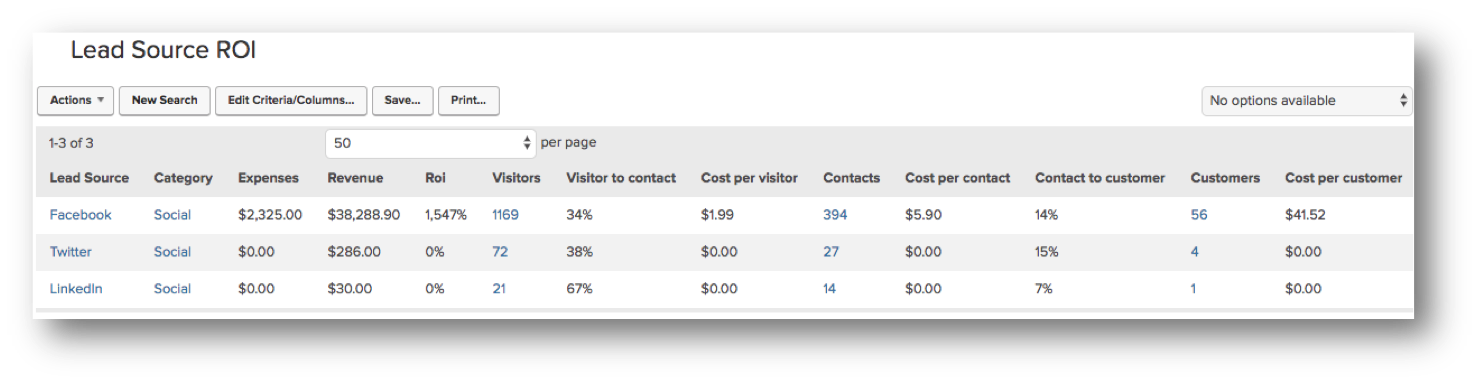
Normally that’d be great, and I’d be pourin’ tequila shots for us all, but this wasn’t right.
I’m good – but not that good.
I knew that with my limited experience, and ability, this just couldn’t be right. And it wasn’t.
You see, I spend a lot of time on Facebook hanging out in various Facebook groups (heck, odds are that may be where we first connected!), and I regularly answer questions, or link people back to resources on my website.
And this ROI was giving my a total return on ALL my Facebook efforts, not just my paid ads.
For a while, I didn’t do anything about it. It was sort of technical, and intimidating, so I just didn’t prioritize it.
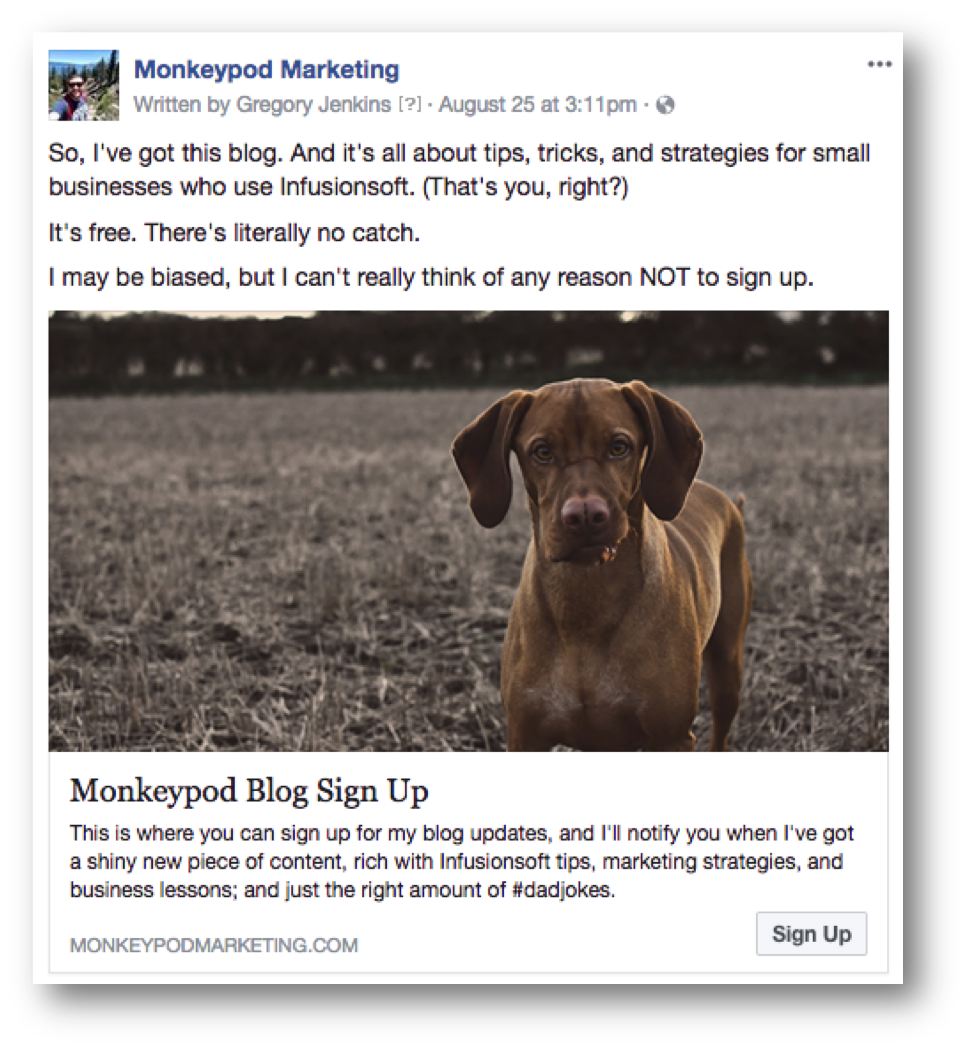
But overtime, as I ran more Facebook ads, I developed an appetite to know how those ads were doing. I wanted to be able to definitively point to an ad and say “Here are the results it created for my business”.
Odds are you might want that too (we’re almost there).
Facebook Ad ROI in Keap:
- I started creating LeadSources in Keap for each specific Ad that I’d run.
- And then I’d append the LeadSource ID to the URL that I was sending traffic to (step-by-step tutorial), so that if those folks signed up, it’d attach them to the LeadSource I had created.
- I’d add my ad spend to the LeadSource as an expense.
- And then I’d watch the ROI to see how that ad was doing (and dial up or down the amount I was spending).
And it’s working.
I’m not convinced I’m doing everything right, in fact I’m sure I’m not, but at least I’ve got individual results on an ad-by-ad basis, and that’s progress.
And at the end of the day, progress is a win – I have more info now than I used to, which will give me a solid baseline to start improving on.
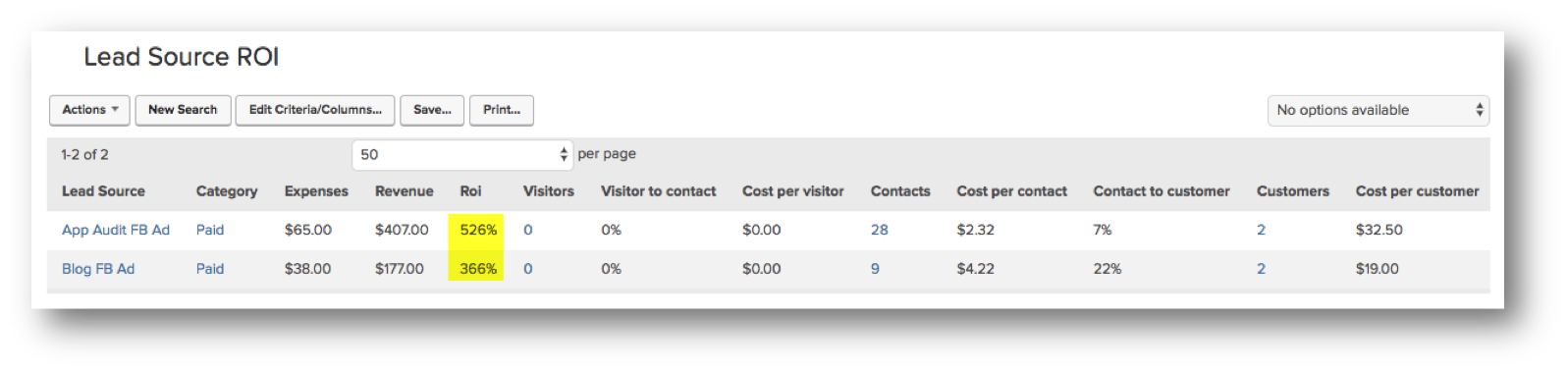
I put this off for too long, and my hope is that by publicly talking about it I can a) help you start if this sounds appealing to you, and b) hold myself accountable to keep doing this, and refining it as I learn more.
And as one final tip – if you’re running ads on Facebook you might want to set up custom audiences for various segments of your Keap database.
This lets you target hyper specific segments of your list, which means you can run an ad specifically for people who have started a free trial but haven’t bought the full course, or you can run an ad promoting your membership but make sure that you exclude your existing subscribers.
There are a few methods for syncing your Keap database with your Facebook custom audiences, and I outline my favorites in this post here.
Keap, Marketing, Small Business
In my experience, Keap users tend to fall into one of three categories. And I find that plenty of people either haven’t thought about this at all, or they have but things have changed since they last considered it.
The good news is that there isn’t a right or wrong answer, and one type of user isn’t in a more likely position to be successful.
Type 1: Hands On
This type of user is excited about learning new things, geeks out when they figure something out, and has an appetite for learning the nuances of a new tool. This person generally wants to learn how to use Keap on their own, and is happy to roll up their sleeves and read articles, watch videos, run tests, and make mistakes.
Type 2: Hands Off
This type of user understands the value of something like Keap, but generally doesn’t want to log in and do it themselves. They recognize that setting up automation probably isn’t he best use of their time, and they’re comfortable conveying their vision to an expert who can help them implement it.
Type 3: Hand Holding
This final type of user tends to be a hybrid of the other two. They’re not necessarily technology adverse, but they also recognize that it doesn’t come all that easily to them. They want the help of an expert, but they also would like their own level of understanding; either so they can build their own campaigns in the long run, or just maintain it and run reports when they need to.
You may already know what bucket you fit into, but if you don’t, then watch this brief video:
The whole purpose of this conversation is to help you identify and accept what user type you are, so you can get clear on the best path forward for you and your business.
And, if you’re wondering which of the Keap training courses to start with – here’s a video to help you decide.
Oh, and for those of you who serve small business owners, or Keap customers, having a conversation like this one can help you understand your audience and connect with them differently as your tailor your messaging or behavior based on who they are.
Marketing, Small Business, Tools
Here’s a presentation at the San Diego Keap User Group a few weeks back, we wanted to share it here in case any of the tools we mention are able to save you time, or simplify your life at all. (Special shout out to Shoan for thinking to set up a camera and record this!) The video is roughly an hour long, so feel free to use the time stamps below the video to jump to the parts that you’re most curious about.
Timestamps:
(Note: We would never recommend something we didn’t endorse just to earn a commission, but a few of these products have partner programs, and so we’ve used affiliate links below for a handful of these recommendations; if you decide to sign up we may earn a commission. And thanks for that.)
00:05:40 PureChat – LiveChat for your Website
00:13:10 Wistia – Video Hosting
00:19:45 Pixlr – Free Online PhotoShop
00:25:00 PlusThis – Infusionsoft Add-On
00:33:10 Video Tracking Campaign Breakdown
00:42:20 WordPress Plugins (Yoast, OneSignal Push, Rapidology, SumoMe, WPSmush, etc)
00:55:20 Zapier – Automated recipes for everything
00:59:15 Aussie Zap Breakdown
01:00:25 PureChat Zap Breakdown
01:00:45 Split Test Zap Breakdown
01:02:30 Social Media Zaps Breakdown (Everyone can and should do this)
01:11:12 Infusionsoft Mobile App
01:12:05 SyncSumo/Sync2CRM – Facebook Audience sync Tools
01:13:38 Spiffy Order Forms – Infusionsoft Order form wrapper
01:14:30 Royalty Free Images – Royalty Free Music
01:16:30 Social Sharing Link Generator
If you like tools and are into this sort of thing, here are a few additional resources for you to take a look at.
Hope you found this valuable, and if you want to share your own favorite tools, please comment below!
Oh, and if you dig stuff like this, then feel free to download the Monkeypod Toolbox ebook for a complete list of tools that have earned our trust:
Marketing, Small Business
“Do you have any tips for a first timer attending ICON?”
I do.
I attended my first ICON back in 2012, as a brand new Infusionsoft employee. And I’ve been every year since, and have been fortunate enough to speak at the last three (a snippet from 2014 and 2015, and a recap from 2016). I’ve attended both as an employee, and now also as a partner, and someone relying on Infusionsoft to run my business.
As such, I thought I’d share a few tips for making the most out of your ICON experience:
1. Set Goals
If you just sit back and wait for ICON to “happen” you’ll probably have a good time, and you’ll probably learn a few things; but you certainly won’t get as much out of it as you could. Spend some time before the conference thinking about what you’d like to walk away with – are you looking to make strategic connections, are you looking to focus on one specific part of your business, are you hoping for product training, etc. The more targeted you can get with your approach to the conference, the more it’ll deliver in return.
 2. Visit the Expo
The expo area is where all the ICON sponsors are set up, and it’s usually centrally located so that you walk past it, or through it, as you’re navigating the conference. Yes, many of these people have something for sale, and it can be tempting to pull out your phone and pretend to check your messages in hopes that you don’t have to have a conversation, but hang on – we all need to remember that these businesses are all there because they solve a problem. Every partner who sponsors ICON offers a service, or software, or a solution to an articulated point of pain that real Infusionsoft users were struggling with. They do, or they wouldn’t be in business. So take a moment to check out the various solutions that are on display and see if there isn’t something that could make your life simpler, or your business more efficient.
 3. Download the App
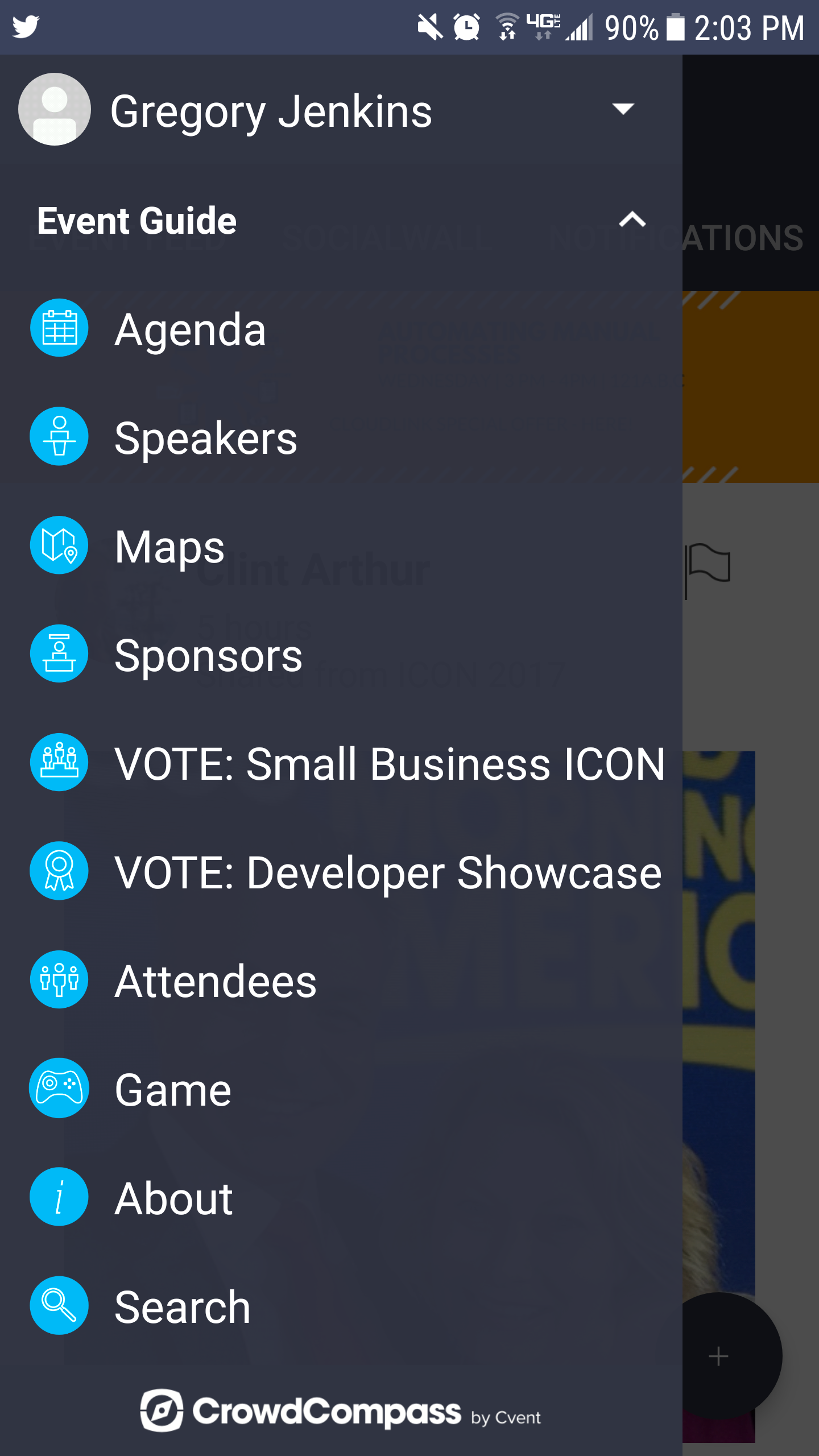
Yeah, there’s an ICON app, and you should download it. It makes it easy to track and plan an agenda, connect with other attendees, and vote for ALU in the Small Business ICON award. I say that sort of tongue in cheek, because I’m sure all three finalists are very deserving, but for real – I’ve been working with the African Leadership University for the last twelve months, and if their story compels you then I know they’d appreciate your vote!
4. Keep an Open Mind
This one is kind of obvious – but if you go into this event already having decided how or where it’s going to be valuable, then it’s very possible that you’ll completely miss something that could have been a game changer for you. All I’m suggesting is that you keep an open mind. In reflecting on my conference-going history I find I’m regularly impressed that some of the most valuable sessions I’ve attended were the ones that I stumbled into at the last minute, or even mistakenly, and not the one I had starred on the program ahead of time.
5. Save some Space to Network
Listen, ICON can be exhausting, as any conference can. But this is literally the largest Infusionsoft assembly on the planet. There are thousands of people who all have something in common – and the more you’re able to connect with the other attendees, the more likely you are to learn something, or forge a meaningful relationship that changes the future of your business, or the way you think about it. I’m not saying you need to stay out all night drinking lemon-drop martinis (though you certainly can), but I am saying that you should be open to connecting with people, going out to dinner with someone you meet, or attending one of the many networking functions hosted by the community surrounding this event.
6. Take Notes with Context
Take notes – obviously. But make sure to also include context for these notes. I don’t know about you, but I’ve certainly had my fair share of ideas where I think to myself “I’ll definitely remember that” and then later I recall I had an idea, but I don’t remember what it was – well, this underscores the importance of writing things down. Leaving crystal clear instructions for your future self increases the likelihood that you’ll actually get shiz done. The reason I emphasize context is because when you’re listening to a presentation, or chatting with a fellow entrepreneur, it’s really easy to jot something down shorthand that makes complete sense to you – but then later when you’re looking at your trapper keeper full of notes it’s much harder to decipher your memento style scribblings.

7. Prioritize Comfort
I’m not saying you should show up in your favorite pair of lululemon sweatpants (though I wouldn’t blame you), but I am saying you should consider prioritizing your own comfort. It’s Phoenix, and it’ll probably be fairly warm – but most of the time you’ll likely be inside. This time of year is challenging because it cools down in the evenings, and breaks 100 during the day. So, between the cooler ends of the day, and the air conditioned conference center you’ll want a light sweater, or some sort of layer. Oh, and since you’ll be walking a fair amount, so you’re going to want comfortable shoes. It’s a tech conference, so you can reasonably expect a full spectrum from business casual to flip-flops and a t-shirt. Oh, and maybe toss an extra phone battery or charger in your bag, that’s saved my tail more than once.
8. Build a Follow-Up Campaign
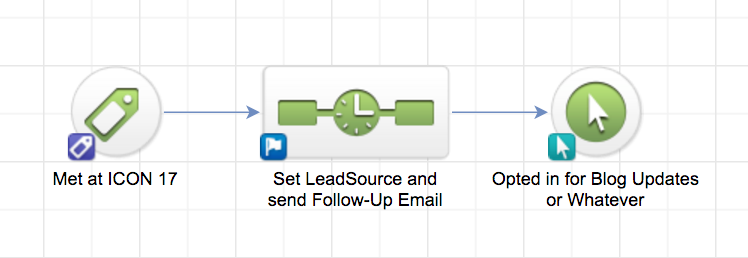
You’re going to meet people and you’re likely going to exchange business cards. One easy thing to do is create a follow-up campaign for those you meet. I’m not saying you should automatically subscribe them to all your promotions, but maybe create a simple follow-up to make sure they know what you do, and have your contact information – then, make sure that campaign is triggered by a tag so you can snap a picture of their business card and easily launch it from the Infusionsoft Mobile App on your phone.
Here’s a simple campaign structure you can use (or you can download this one): Create a trigger tag for people you meet at ICON, build a campaign where that tag starts things off – use a sequence to set their leadsource (if they don’t already have one), and to send a follow up email – possibly one with a soft call-to-action for something like your blog updates.
9. Book Time to Take Action
You’re more than likely going to have a handful of ideas during the course of ICON, but when you get back to your business, how are you going to find the time to implement those ideas? It’s really easy to get caught up digging through your inbox once your out-of-office comes down, or tackling the list of things that piled up while you were gone – so make a plan. Find space on your calendar to implement new ideas. You may not know what the ideas are yet – but reserve some time to research interesting topics you may want to look into, to install new plugins for your website, or to build out a nurture campaign structure you heard Greg Jenkins outline at 1:30 on Tuesday in room 120D.
Many of these ideas have been circulated recently and in years past, throughout the Infusionsoft community and various Facebook groups as advice for first-time ICON attendees – and while I wrote this list on my own, I can’t ignore that it certainly overlaps with some of the suggestions you may see floating around. But regardless of where each suggestion originated, the fact remains that this is pretty sound advice for attending any conference, and I hope it helps make your ICON experience as productive (and enjoyable) as possible!
Guest Posts, Marketing, Small Business
Another valuable contribution from Patrick Foster, an ecommerce consultant and writer at ecommercetips.org. If you missed the first part of this post, you can read that here.
In our last blog, we looked at how ecommerce marketing is in constant flux. It’s important as marketers to stay true to core brand values, but also explore new avenues where we can. These next three ecommerce marketing trends are all about using social media and video to create a sense of connection with customers. Read on to find out how you can move on from simple personalization.
Ecommerce marketing in 2017 is not just personalized, it’s personal; competition is hot, and creating an emotional connection is critical to success. We’re going to look at the most people-centric marketing techniques of 2017 and introduce some new concepts that might challenge your idea of what ecommerce marketing is capable of.
User generated content
US clothing brand ‘Free People’ let their customers do they talking with product reviews and photo uploads of themselves wearing garments. This simple, user generated site content is helpful for other customers, it builds a sense of community and it aids in attracting loyal customers.
 Image Credit: Free People
User generated content comes in many forms, but the premise is that it creates a personal connection between brand and consumer, and so long as the content is positive, it provides a peer to peer recommendation/approval platform that money just can’t buy. The personal picture uploads can also be tagged on other platforms like Instagram and Pinterest creating multi-channel content that’s more likely to reach people via the platforms they prefer.
The personal power of video
Where Free People have used the photo craze to engage their customers, other ecommerce brands use video very effectively. Take ASOS as a point in case. Online shoppers can see a desired garment modeled in front of them by using the catwalk feature. This is a great way to communicate more about your products and give your customers something that’s useful and may well lead them on the path to a purchase.
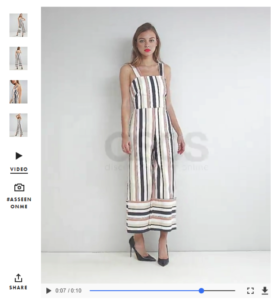 Image Credit: ASOS
But video can be used by brands in incredible ways – imagination is the only limit. Thought leadership content is often created using video as a medium; product unboxing and beauty reviews as well as a ton of user generated gaming content is all available at the touch of one or two small buttons and a screen. A mobile phone is often the only piece of equipment required to make engaging, quality video that’s easily shared. Social channels like Instagram, SnapChat and Facebook are owning this format and making it very personal indeed. In fact all social channels have become more video oriented in response to what audiences want.
If you’re ready to jump in a little deeper, why not seek out a local freelance videographer or content agency,or social strategist and talk about how video could be used to help increase sales. Video is fun, engaging, accessible and incredibly popular. It can often say everything you want to in seconds rather than minutes or even hours – and it’s great branding.
Chatbots
A chatbot is effectively a program that translates a user’s command or question and returns an answer. Lots of digital companies use chatbots to more efficiently help customers on their website. Those little bubbles you see pop up when you’re browsing a site, asking if you need help, or if you want to talk? They aren’t there so you can chat to a random stranger about your day, they’re a bot that is there to efficiently move you on to the next stage of your buying journey.
Of course, we also have voice activated chatbots like Siri, Cortana, Alexa and others. These bots are becoming more and more sophisticated, and as your connected devices collect more data about you, they’ll be even more effective at responding to your requests. AI is the next leap in the technology of our lives and it will have a massive impact on the way we shop. Chatbots are already being used effectively in marketing around the world and this Nordstrom mobile chat bot, reported on in December 2016 via GeekWire is a great example of how.
For now, get familiar with chatbots and how they may be able to help you more effectively meet the needs of your customers when they are browsing your ecommerce site.
Hopefully that’s given you some food for thought and you’ve enjoyed our ecommerce marketing series! I’d love to hear what kind of marketing technology and software you’re using to scale your ecommerce stores, and if you’ve used any of the methods mentioned in this post?
 Patrick Foster, ecommerce entrepreneur, coach & writer.
I currently create and share ecommerce content for entrepreneurs and business owners. I’m especially interested in the emerging technology for online marketers.

Guest Posts, Marketing, Small Business
Today’s contribution comes from Patrick Foster, an ecommerce consultant and writer at ecommercetips.org.
We are already into the third month of Q1 2017 – gasp. And there are a lot of emerging ecommerce marketing trends you should be considering as part of your strategy. Building and defining a loyal customer base is critical to the success of your ecommerce brand, and keeping up with the latest trends in communication methods can be tedious. With so many channels, platforms and content types – how can you ensure your marketing is personal and effective? Here is the first blog of our content series looking at ecommerce marketing and personalization in 17/18.
Ecommerce marketing in 2017 is not just personalized, it’s personal; competition is hot, and creating an emotional connection is critical to success. We’re going to look at the most people-centric marketing techniques of 2017 and introduce some new concepts that might challenge your idea of what ecommerce marketing is capable of.
Email is in vogue
Before we get into the really crazy stuff, let’s not forget the humble, yet effective email. You heard it here first kids — email is back in vogue.
It’s always been there, doing its job and not taking much of the limelight. And despite suffering through somewhat of a dark period of black hat tactics like spamming and phishing, the simple yet effective email has redeemed itself.
There are such a huge range of CRM systems and specialist email platforms on the market, such as Infusionsoft – that there really isn’t any excuse not to be collecting your customer’s basic contact details, and communicating with them regularly. A streamlined CRM system is the first step toward making your online data work for you. It will save you time, effort and hassle and you’ll be able to make much more granular decisions based on the conversations you have with your customers.
Email is a really simple and often underrated way to offer added value during the purchase journey of your customer.
Actionable data and AI
Big data, the IOT (Internet of Things), targeting, re-targeting, tracking, advertising and cookies: it’s all ecommerce marketing – and it’s all based on data analysis.
Collecting data on your customers and your site are crucial for your brand; but what is data if it can’t be actioned and properly deployed? It’s nothing but a useless bunch of names and numbers. In 2017, data is about helping brands get even more personal with and closer to consumers.
Marketing is driven by data — this isn’t a new concept. But with more connected users and devices globally, data is driving advanced personalized marketing and advertising. The IOT is making it possible for ecommerce brands to learn about customers in real-time, and send marketing instantly to consumers in the right place at the right time.

Smart devices, AI and Wi-Fi connected gadgets can read data in a room, from temperature to light, and pass it on to other connected devices. The IOT has gone well beyond personal to the point where our tech is making choices for us. For marketers, harnessing the data and using it in the right way is going to be the real challenge.
Facebook and social shopping
Have you noticed the little shop front icon on your Facebook page? That’s Facebook Marketplace. Relaunched in 2016, Marketplace connects users in your locality with items for sale. The feature makes product suggestions based on search history and other data that Facebook collects from your personal profile.
Marketplace is yet to achieve any impressive milestones, but that’s not to say social media hasn’t already begun to change the way we buy and sell online. Peer to peer recommendations, product shares, page likes, Facebook advertising, in-stream video advertising, Instagram advertising: the list goes on. And brands are loving it. But being in front of your audience when they want to research products or make purchases is key.

There are a number of out-of-the-box website solutions you can either purchase, or use for free, to set up your ecommerce brand. Great. But not only can you sell via your integrated website, you can now sell directly through native applications. As audiences walk around or sit at their desks constantly connected to brands via their mobile devices, it makes sense their shopping habits should shift there too. To be in front of your audience and have a personal connection with them, join the native-revolution of engaged ecommerce brands who are connecting via social channels and apps.
Pinterest’s buyable pins are driving ecommerce sales founded on a deep understanding of visual content, where selling and social stories become almost unrecognizable. But it’s not just the social channels muscling in on online sales, even the big ecommerce brands are ‘going native’; Shopify’s integrated Facebook store allows subscribers to reach their audience, via – you guessed it, Facebook. The Shopify integration allows customers to buy and track orders through messenger – another interesting development in conversational commerce.
You now have the opportunity as an ecommerce business to integrate with native applications via standalone ecommerce platforms and with social media platforms’ own marketplaces. Which one will prevail as the most popular for audiences is something to keep an eye on, and to conduct brand strategy conversations around.
Native developers and brands are coming together to make ecommerce simpler for the consumer, and much more highly targeted. Brands will have to decide whether to leverage the opportunity of selling directly to customers via native platforms, or put their efforts into keeping them on site, where the data is, and leverage that data to increase revenue.
Some of these personal marketing tactics, especially AI influenced, are still a little too close to home for some of us, but it’s interesting and exciting to think what the not too distant future of ecommerce will look like. Ecommerce marketing is a dynamic mix of getting the most out of tried and tested methods like email, and exploring new ground like AI. Whatever you do, make sure that you focus on bringing in customers; keep evaluating your marketing ROI. Read on in blog number two!