Single Sequence Opt-Out

Single Sequence Opt-Out

A few months back I wrote two blog posts about the importance of email permission, and the value of designing an email preferences center so that your prospects can tell you exactly what they want and what they don’t. Trust me, they’re more interesting than they sound.

Tactics like this are especially valuable for a number of reasons; but primarily because it helps ensure that your prospects are only hearing about the things they’ve told you they’re interested in, and as a result, your audience will be that much more engaged

Well today I’d like to show you a simple way to take this concept one step further. I’m going to show you how to create an opt-out link for a single sequence, or a single campaign.

Yup, that means if you’ve got 10 emails promoting a special offer of yours, and after email number two the recipient decides it’s just not for them, this will allow them to opt-out of that particular promotion, while still remaining eligible for future specials and promotions you may offer.

It’s actually pretty simple, but most people don’t do it because they’re working hard enough to make the campaign builder function and this takes a little bit of extra planning.

[Jump to the video]

So let’s look at an example:

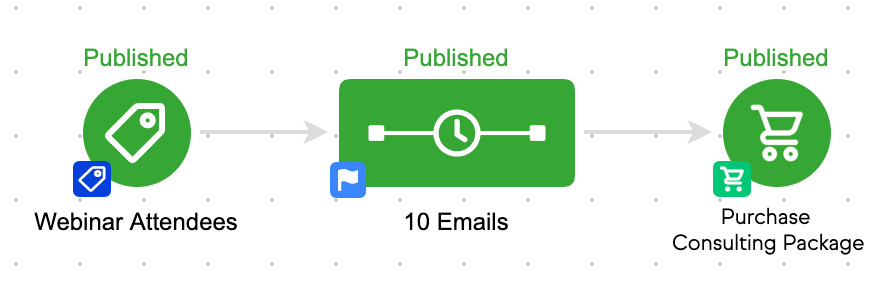
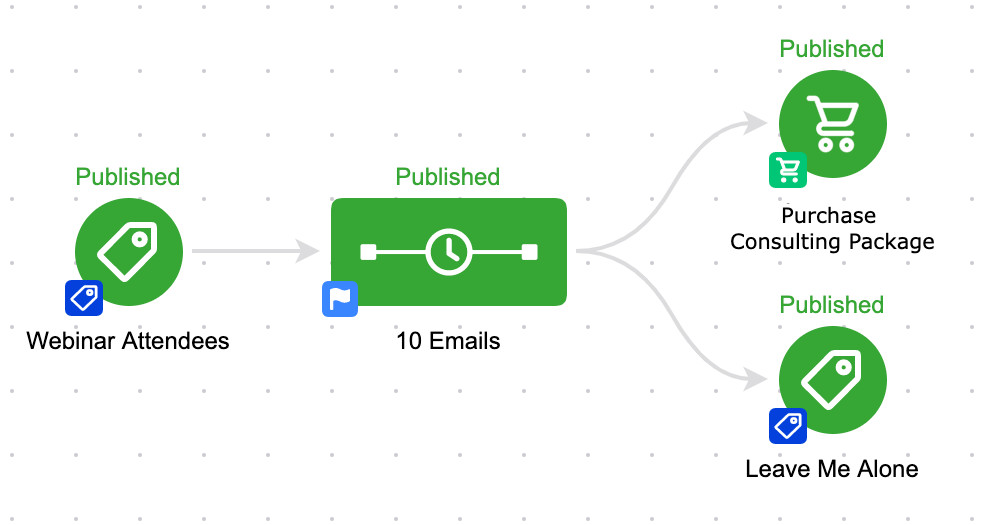
Here’s our campaign – we’re taking everyone who attended our webinar, and we’re driving them toward buying our consulting package.

Pretty straight forward, but in this scenario if someone doesn’t want those emails, their only choice is to unsubscribe completely.

Even if we have an email preferences center, if they express their preferences it won’t pull them out of this campaign.
Single Sequence unsubscribe

So what we need to do is something that’s becoming more and more common place in the Keap space – we need to add a “kill switch”.

This usually refers to a goal that you add at the end of the campaign, so that in the case of emergency you can achieve it in order to pull your contact(s) out of the campaign entirely.

But the twist in this case, is that we’re creating a kill switch, or stop trigger, that the contacts themselves can achieve if they decide they don’t want any more promotions.
Unsubscribed
Unsubscribed

So there it is. We’ve added a second goal (labeled “Leave Me Alone”) listening for contacts who no longer want to be bothered by this sequence – and we’ve configured it to listen for a tag.

But wait…

Where and how does this tag get applied? Glad you asked.

Well, in each of the 10 promotional emails we have to add a link. It doesn’t really matter what the link points to (I usually link it to a generic thank-you page).

But the value of adding this link is that when it’s clicked, we can also apply a tag – and by applying the tag, we then achieve the goal, and pull them out of the campaign.
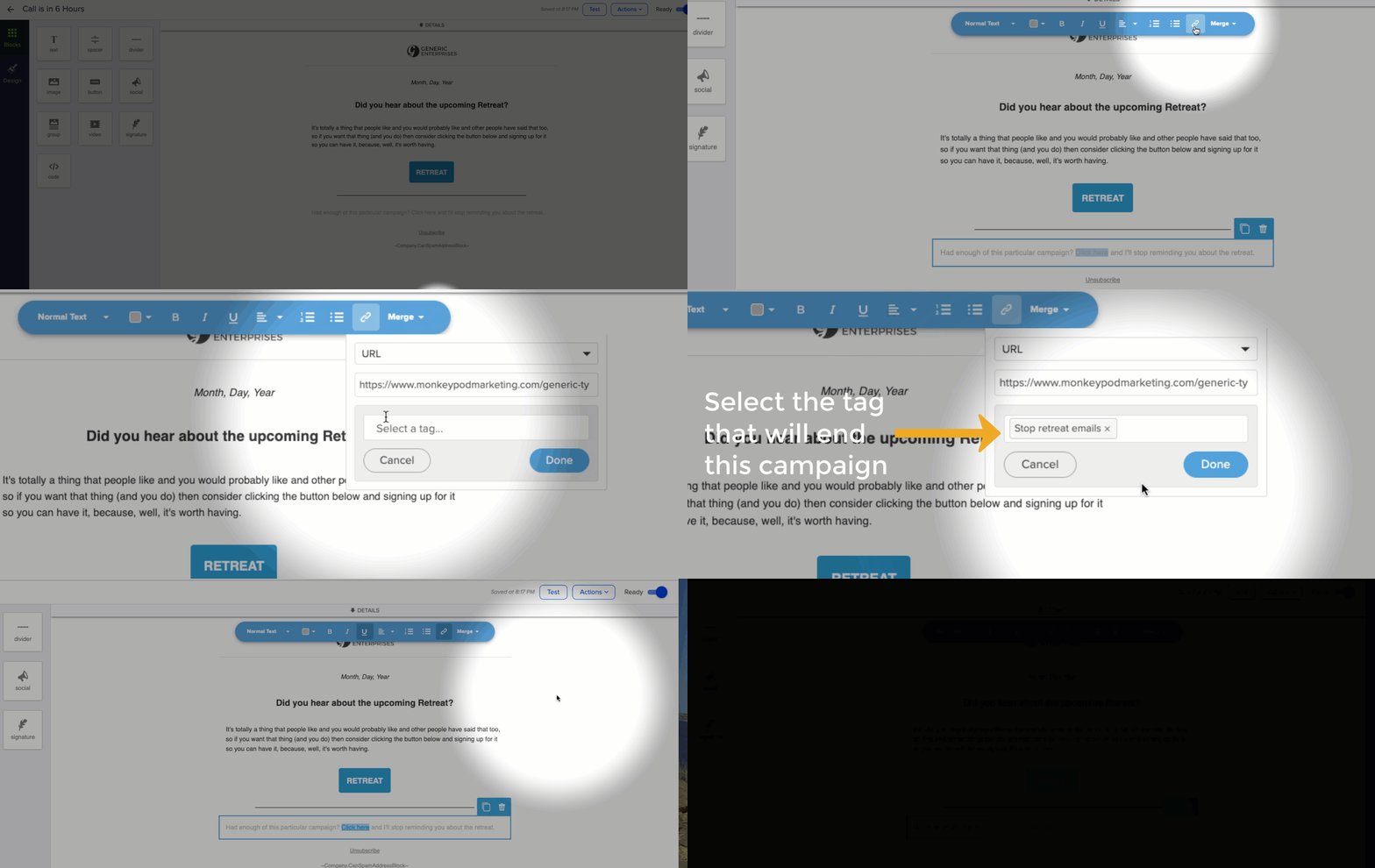
Yes, you’ll need to create a unique tag for each time you want to set this up. I usually create a category called “Trigger Tags” for things like this.

Now, for those of you reading along judging me because I decided to use a Tag Applied goal instead of using a Link Click goal, let me explain why. Yes, you could use a Link Click goal in the above scenario and it would have worked just fine.

But, what if the campaign was a little more complex?

Good point. Link Click goals can only track links that are in a sequence they are directly attached to.

So, if your campaign was longer, or had a few extra sequences or steps, it’d quickly get difficult to keep everything organized. Like, let’s say you have been paying attention and you decided to include The Keap Nudge
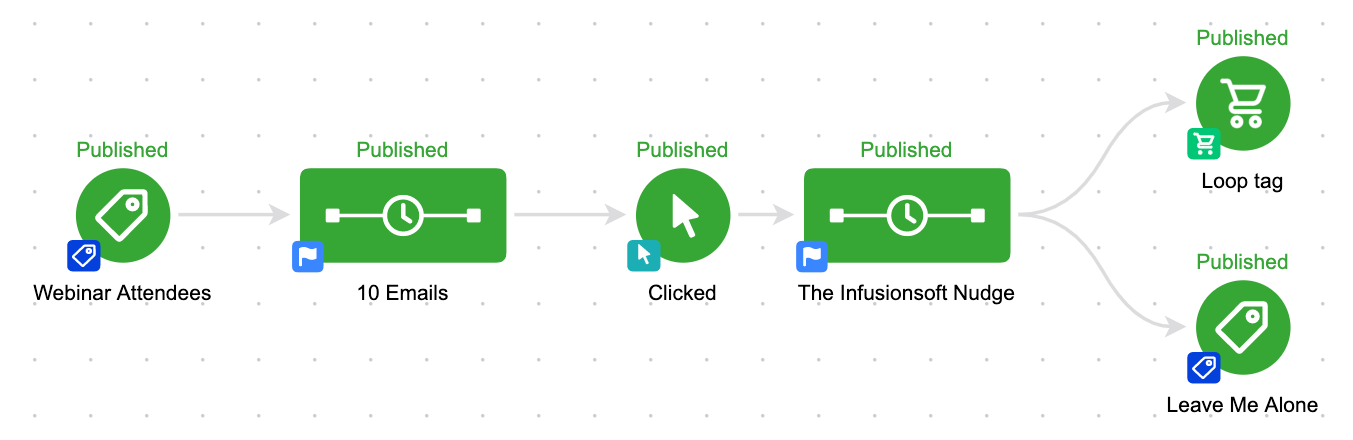
Or maybe you’ve got a much more complex campaign, and multiple paths and entry points.
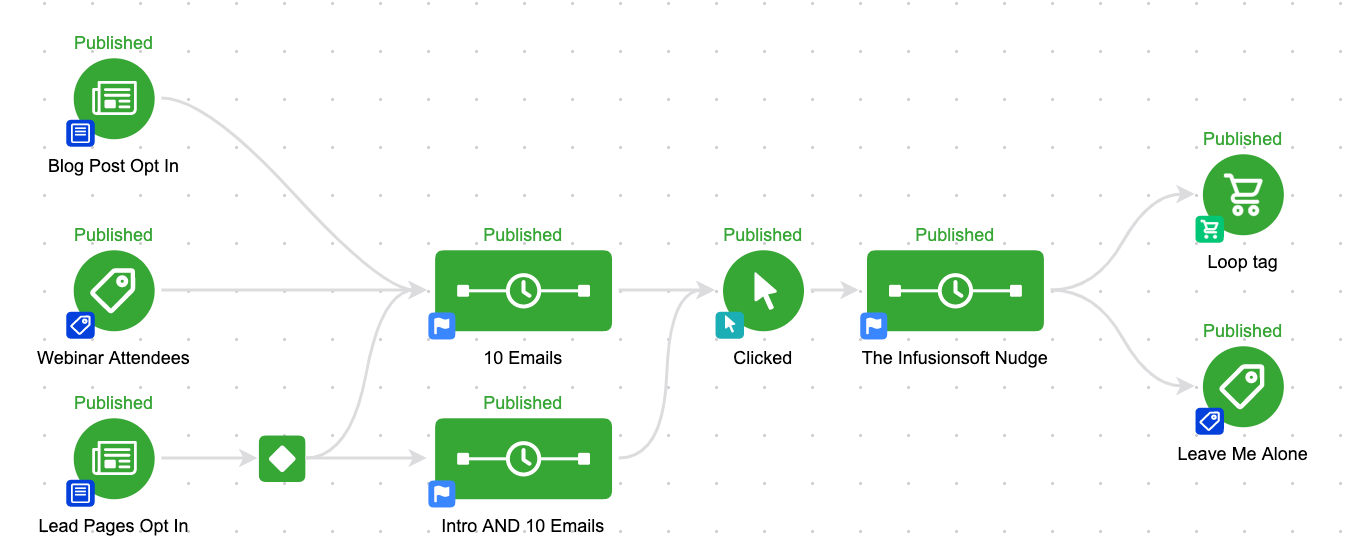
You contacts could be in either of the email sequences, and if they get tagged they’ll jump right to the “Leave Me Alone” goal, and they won’t get another email from this campaign at all.

As you might remember from Campaign Builder Gotcha 1: When a goal is achieved, by default, it will stop anything upstream from it. Even if it’s not directly connected.

The challenge in remembering this is that some goals (task, link click) can only measure or track the sequences to which they’re directly connected.

So, how do you use this? Well, I use this in pretty much all of my nurture campaigns. If you opt-in to learn about one of the courses on using Keap or the OG Membership, I have educational nurture sequences in place – but you’ll also notice that I give you the option to remove yourself from that process if it’s not providing value to you, without removing you from my blog updates list – or whatever else you may be getting from me.

More of a visual learner? Check out this quick video:
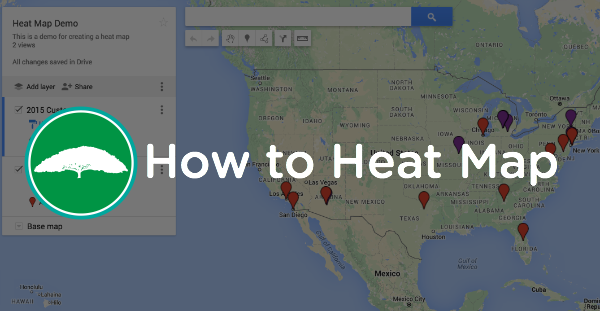
How to Heat Map

How to Heat Map

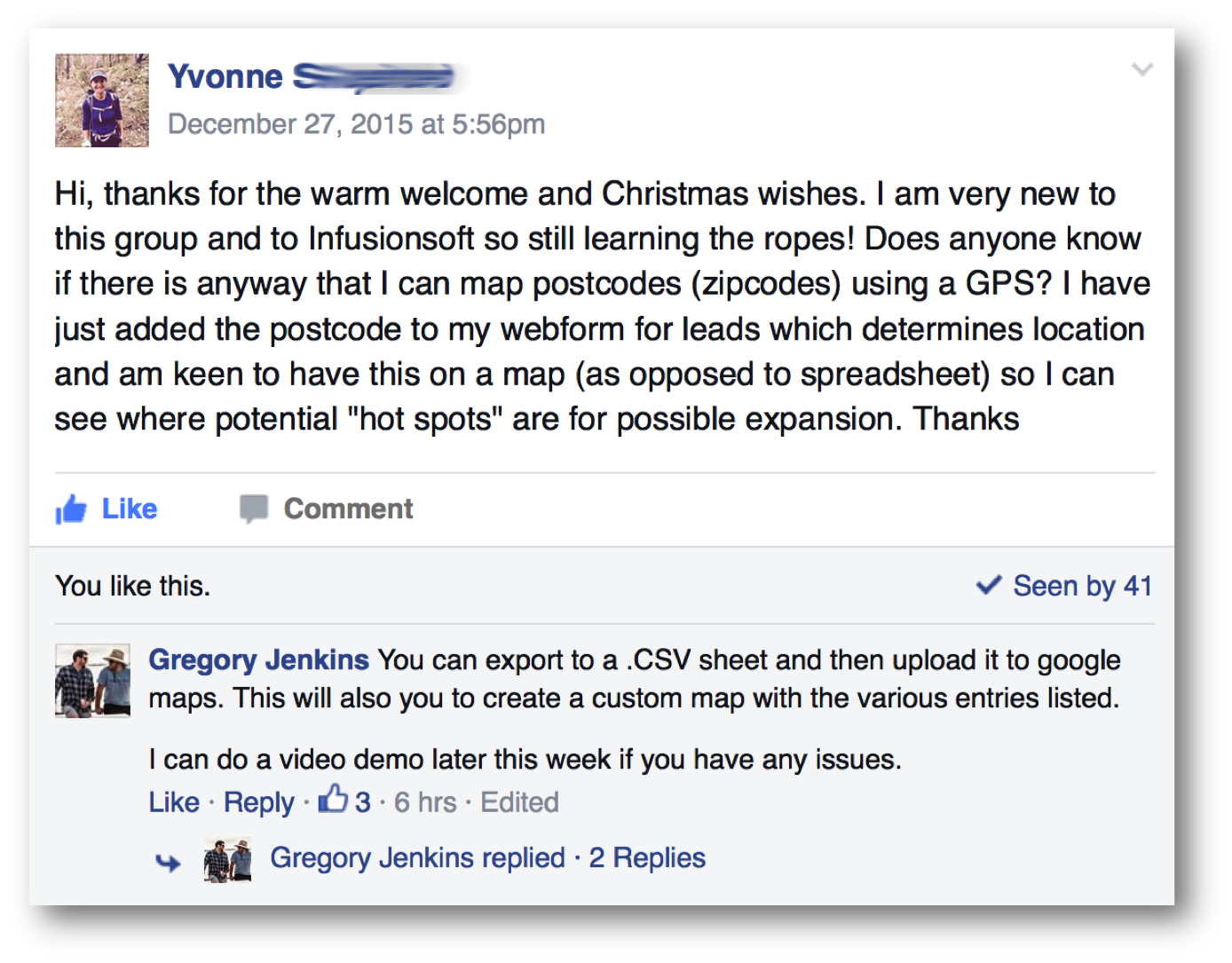
Yvonne_Question_BlogThis is an awesome question about using a Heat Map to see your prospects or customers, and it comes from one of the Monkeypod OG Members, Yvonne. (Curious about membership?)

Anyway, Yvonne has been collecting information about her prospects and she wanted to view all of her prospects, but not in a list, rather she wanted to see them spread out geographically. This is commonly referred to as a Heat Map.

It’s a totally reasonable request, and heat mapping is a pretty common business practice. It’s a great way to identify trends in your business, or new markets that might be able to support an event, or in Yvonne’s case, what areas might be a good fit for a possible expansion.

Just to be clear, there are actually a few different definitions of Heat Mapping. For example, plenty of businesses will use a heat mapping plugin on their web site to give them data about where people are clicking.But in this case, I’m talking about taking a statistical set of data (like customer locations), and mapping it out geographically to see what you can learn.

This isn’t a feature that is built into Keap natively, but it can be done. Lemme show you:

Update: Just got a message from a good friend and award winning marketer, Brett Fairbourn, letting me know that the link to create a heap map has been updated since the original post was published – here’s the new one.

Top 10 Subject Lines of 2015

Top 10 Subject Lines of 2015

Your subject line is really important, we can all agree on that. I mean, it’s the first thing people see – even before they open the email.

Well, with all that emphasis on subject lines, I thought it’d be fun to look back at the last 6 months of Monkeypod emails and see which subject lines of mine performed the best, and then try and figure out why.

The folks over at Digital Marketer have done a list like this every year for the last few years, and they seem to know what they’re doing so I’m not going to reinvent the wheel. I’ll just borrow their structure and use my own findings (Here’s their 2015 list).

Feel free to steal these subject lines for your own business, or use them as inspiration when you’re writing new ones.

Note: I don’t have a massive audience, but I have sent a little over 18,000 emails since June. For the sake of this list, I’m only going to look at emails that were sent to 100+ recipients.
Another note: Open rates and averages can vary dramatically from business to business, and from industry to industry. I’ve worked hard to keep my list really targeted, and to set the appropriate expectations for subscribers. As a result, my audience is pretty engaged. Don’t get discouraged if your open rates aren’t as high as you’d like, it’s an opportunity.

10. Missing Tips Alert [SOS]

  • Open Rate: 57%
  • Click Through: 15%
  • Content: Promotion to buy the Mini Pod Tips Series (get the tips)
  • Analysis: The subject line piques curiosity by indicating that something is missing. I think people inherently have a fear of missing out on things, and the [SOS] added on afterward further indicates that something is wrong, and even that they might be able to fix it.

9. Decision Diamond Hack [BLOG]

  • Open Rate: 57%
  • Click Through: 22%
  • Content: Blog Post (read it)
  • Analysis: Decision diamonds are hard for people. And people like hacks. It’s that simple. By using the word ‘hack’, it implies that this is something secret, or at least not very well known. My audience is primarily Infusionsoft users, and this resonated pretty well.

8. Lesson 3: Simple Works

  • Open Rate: 59%
  • Click Through: N/A
  • Content: Lesson 3 of the 5 Lessons of Automation (grab em)
  • Analysis: I set the expectation that I’d be delivering 5 lessons – so the recipients are expecting the email, which is why this and the number 6 subject line both come from the same series of emails. Also, the simplicity of the subject line “Simple Works” exerts confidence without making it sound intimidating.

7. PartnerCon Recap Part 1

  • Open Rate: 60%
  • Click Through: 29%
  • Content: Blog Post (read it)
  • Analysis: PartnerCon is an important event in the Infusionsoft ecosystem, and as I’ve stated, the majority of my blog readers are Infusionsoft users and partners. This post was published right after PartnerCon, so I think the timing helped it dramatically. Lots of people were wondering what was said, or revealed, and I think even those who attended were curious about a condensed summary. Also, by saying Part 1, I indicated that there’d be more coming, and I think people want to make sure they’re caught up when the next post comes out.

6. Lesson 2: Bring a Personality

  • Open Rate: 60%
  • Click Through: N/A
  • Content: Lesson 2 of the 5 Lessons of Automation
  • Analysis: As with before, the expectation was set that I’d be delivering 5 lessons. So I think recipients were expecting the email, and I also think the word “lesson” indicates that there’s something worth learning in the email.  Finally, saying “Bring a Personality” nearly implies that they haven’t been bringing one, so I think some people may have opened hoping that they were already doing this.

Donatello Clear5. COWABUNGA [BLOG POST]

  • Open Rate: 61%
  • Click Through: 3%
  • Content: Blog Post (read it)
  • Analysis: This was a really effective subject line, but obviously it didn’t generate very many clicks to the content. I can’t be certain, but this post had less technical information, and was a lighter post about what email marketing pet peeves the Teenage Mutant Ninja Turtles might have. I’m guessing the subject line was fun and intriguing, but once they read the email, the copy either didn’t do a good enough job framing up the blog post, or the topic just didn’t resonate.

4. Feeling Tipsy?

  • Open Rate: 62%
  • Click Through: 6%
  • Content: Nurture emails after the Mini Pod Tips Series opt in.
  • Analysis: This email had interesting results. Obviously people opened it. This was a follow-up to the Mini Pod Tips Series, so I was using the word “Tipsy” as a play on words, and at first glance I attributed the success of this email to my own clever subject line. But, back in September I also got a reply to this email from a then prospect who told me he nearly unsubscribed because this email rubbed him the wrong way, because read it and felt it was implying that he was drunk, or would have to be drunk to not take my offer. So, I adapted the email copy to explain the subject line further and make sure that I’m not offending anyone. There’s something to be said for the “shock and awe” approach, but you definitely don’t want to be offending your list on a regular basis.

MiniPodTipsSeries_square3. Pleased to Meet You [New Product]

  • Open Rate: 67%
  • Click Through: 12%
  • Content: Mini Pod Tips Series Announcement
  • Analysis: Man, the mini pod tips series has come up a handful of times in my top 10 subject lines. Which, if you read about my first flop, doesn’t seem to make a whole lot of sense. But I guess it just goes to show that subject lines and open rates don’t necessarily translate to results. This subject line was fairly direct, and I included the *New Product* teaser because I had eluded to an upcoming product a few times before hand. Also, because people like free things, and we like good deals. If you’re receiving emails from me, there’s a good chance that you like the type of thing I have to offer – so I don’t see any reason to disguise an offer or a new product.

2. Just a Quickie

  • Open Rate: 68%
  • Click Through: 31%
  • Content: Survey Request
  • Analysis: This is a subject line that I use in a few different campaigns and it consistently performs. People like it because it’s a little suggestive, just enough to pique the recipients curiosity. And the click through is successful as well because once they open the email, it’s really quick and to the point “Hey, take this one question survey”.

1. Alright. Let’s segment.

  • Open Rate: 88%
  • Click Through: 73%
  • Content: Segmentation Email
  • Analysis: Kind of an anticlimactic conclusion to this list, right? This subject line isn’t all that sexy, but it was sent to a few hundred people and 88% opened it? And 73% took an action? To me, that’s pretty remarkable. So the take-away here isn’t the subject line itself, it’s really the circumstances surrounding this email that made it so successful. When I started Monkeypod I put out a handful of opt-in forms on my various social media channel, and I got several hundred sign-ups from people who wanted to know what I was up to. Then, after I explained a little bit about the vision I had for Monkeypod, and the impetus behind me leaving Infusionsoft; I sent this email and asked people to segment themselves. I gave them a handful of links, and let them click on whichever best described them. In doing so, I was of course applying tags and segmenting people into the various groups so that I could make sure that I only sent them the things which they had told me they wanted to receive. To be honest, this email is probably the reason that my other open rates are as high as they’ve been as well.


Email is still a really effective marketing tool. And I’m not sharing these subject lines with you to brag, although I am pretty proud of the engagement I’ve been able to sustain. I’m sharing these because I hope that you can either use them directly, or as inspiration for your marketing collateral in the upcoming year.

Disclaimer: Yes, I know that a few hundred people isn’t a statistically significant sampling. I’m not a statistician. I just thought this would be a fun way to share some of the subject lines that have been working for me.

Please feel free to share your best performing subject lines below, or by emailing me directly! And if you need help finding them, check out this article from Brett at Blick Digital.

Lifecycle Marketing Perspectives: Part 2

Lifecycle Marketing Perspectives: Part 2

ScottRichinsIn case you missed the first part of this series, I’m a huge advocate for using Lifecycle Marketing in all aspects of your business. You can check out the concepts here of Lifecycle Marketing on the Infusionsoft website, but basically it involves planning an intentional progression for each and every lead as they transition from prospect, to customer, to raving brand advocate.

I’ve been collecting brief perspectives from Lifecycle Marketing experts, and it’s been really insightful to hear how different people approach the concept. The following insights are from Scott Richins. Scott, in addition to being a friend of mine, was formerly the host of the Infusionsoft Mastermind calls and also of Infusionsoft University (he actually trained me).


GJ: Can you briefly explain why lifecycle marketing matters to small businesses?

SR: Lifecycle marketing gives businesses a holistic framework within which they can build their businesses. Many times customers don’t know what they don’t know, so lifecycle marketing gives them a set of benchmarks – a progression to follow – to ensure they aren’t leaving gaps in their customer experience.

GJ: What is the hardest part about lifecycle marketing?

SR: The hardest part is generally anything that isn’t front end of the funnel. Lead generation is what everyone wants to focus on; it helps bring in more money in a short period of time. However, a company’s long term success is often times based on the experience that the company’s customers have after they have made a purchase. (Tweet that)

Focus on your customer experience, after they decide to buy, and maximizing that. Look at it as an investment in your marketing.

GJ: What do most people misunderstand about lifecycle marketing?

SR: Lifecycle marketing is not typically best implemented from beginning to end. If you launch a great attract campaign but you have no way of following up and educating your prospects or of completing a transaction with them, then you may start strong but you’ll sputter shortly after launch.

I recommend you start closest to the cash. You likely already have some leads coming in, so start converting more of those leads into customer first. Get an offer campaign in place. Then turn immediately to the Wow stage to give those customers a memorable experience. Those are the most important two to get into place, because any leads that you bring in after that will receive a strong offer and excellent fulfillment.

After that, you’ll either implement a referral campaign (which is really just another form of lead generation), or shift back upstream to lead capture and education. And when you get version 1 done, go back and level up each area.

LCM PNG_ClearBackground

GJ: Talk about the relationship between Lifecycle Marketing and Infusionsoft (the company or the software):

SR: Lifecycle marketing is the synthesis of the tens of thousands of hours of learnings that have come from Infusionsoft (the company) helping tens of thousands of small businesses grow their businesses. And Infusionsoft (the software) is the best tool to use to implement lifecycle marketing in a business. Lifecycle marketing is all about shifting your messaging based on the behavior of your customers, and the campaign builder is the easiest, most powerful way to build behavior based marketing automation.

GJ: Why are you an expert on Lifecycle Marketing?

SR: I’ve had the opportunity to work with thousands of small businesses to help them implement lifecycle marketing into their businesses. Since 2011, I have either been consulting or training Infusionsoft customers around the world on how to apply lifecycle marketing principles into their business. My expertise in business process mapping lead me to be a part of the team that designed the campaign builder, after which I began to teach lifecycle marketing through various Infusionsoft training programs – Infusionsoft University, Virtual Academy, and Mastermind Webinar series.

If you’d like to get in touch with Scott, or have questions about anything in this post, feel free to comment below or use the details provided:

Name: Scott Richins
Company: Infusionsoft
Website: www.Infusionsoft.com
Twitter Handle: @ScottRichins

[rad_rapidology_inline optin_id=”optin_4″]

Free Lifecycle Marketing Course

If you are interested in learning more about Lifecycle Marketing, and how to use it to create calm, organized, and predictable growth for your business - then spend some time with the free Lifecycle Marketing video series from FUEL.

Lifecycle Marketing Perspectives: Part 1

Lifecycle Marketing Perspectives: Part 1

As you probably have gathered, I’m a huge advocate for using Lifecycle Marketing in all aspects of your business. If you aren’t familiar with Lifecycle Marketing(LCM), you can check out the concepts here in the free course from FUEL.

As an Infusionsoft consultant, and later as a trainer, it was ingrained in me over and over, not just by Infusionsoft touting it, but by witnessing the genuine impact it has and results it consistently creates. (Sidenote, until today I thought it was spelled “engrained”)

In fact, I believe so firmly in the concept of Lifecycle Marketing that the second course I created under the Monkeypod brand was LCM: Real Life, all about helping small businesses take their Lifecycle Marketing strategy and execute it in real life.

Anyway, over the last few months I’ve been collecting perspectives from Lifecycle Marketing experts, and I wanted to share them here. The following insights are from Justin MacDonald, close friend of mine, Adam Lavine doppleganger, current Infusionsoft employee, and fellow entrepreneur.


LCM-Logo

GJ: Can you briefly explain why lifecycle marketing matters to small businesses?

JM: Lifecycle Marketing matters to small business because it provides a clear blueprint of your existing business and where you should invest in your sales, marketing, and fulfillment to improve and grow. It takes the guess work out of what you should be doing.

It matters because too many small businesses know that this stuff is important, but they forget to tie it all together. They end up creating a disjointed customer experience that won’t scale.

GJ: What is the hardest part about LCM?

JM: LCM creates the “why” and then the “what” but doesn’t address the “how”. This is the difficult part — translating “what” you should do next or better in your business into “how” you can best execute it.

GJ: What do most people misunderstand about LCM?

JM: I think the biggest mistake people make regarding Lifecycle Marketing is not actually using it, meaning, not using ALL of it. It is a lifecycle. You have to prioritize what to execute first, of course, but it is an entire system that is effective when leveraged in its entirety. You don’t minor in LCM, you major in it. (Tweet that)

That, and also nurture. Not enough people focus on building a relationship with their potential customers.

GJ: Talk about the relationship between Lifecycle Marketing and Infusionsoft (the company or the software):

JM: LCM is the strategy, Infusionsoft is the tool that best enables the execution of that strategy. The Lifecycle Marketing concepts hold true for every single business, and there are other tools that can help facilitate it, but few that do it as elegantly and comprehensively as Infusionsoft can.

GJ: Why are you an LCM expert?

JM: Well, Greg asked for my perspective, and since he’s and expert on Lifecycle Marketing…

I suppose other reasons might include personally using LCM and Infusionsoft to grow my own business 6x in 3 years; serving hundreds of small businesses through LCM consulting and implementation, designing Infusionsoft services and events that serve thousands of small businesses through LCM consulting and implementation, and then of course, mostly because of Greg’s Beard.


If you’d like to get in touch with Justin, or have questions about anything in this post, feel free to comment below or use the details provided:

Name: Justin “Coach Mac” MacDonald
Company: Authority Football
Website: www.Authorityfootball.com
Twitter Handle: @Jmacfusion

[rad_rapidology_inline optin_id=”optin_4″]

Free Lifecycle Marketing Course

If you are interested in learning more about Lifecycle Marketing, and how to use it to create calm, organized, and predictable growth for your business - then spend some time with the free Lifecycle Marketing video series from FUEL.

Rapidology and Keap

Rapidology and Keap

I was delivering a short presentation for a User Group in the UK today and they asked me if I have any plugins that I like to recommend.

And I realized that I’ve sort of been avoiding plug-ins. Not entirely of course, I’m not crazy. But yeah, a little bit.

You see, when I was working at Keap (back when it was called Infusionsoft), I became an expert in the Keap software. Duh. And as such, I made extra efforts to solve as many problems as possible while using the native functionality of Keap.

It’s not because I don’t like the plugins that are out there, I do. Many of them are absolutely critical.

It’s more because I encountered so many different Keap users who had been sold on the “all-in-one” dream, only to realize that for their particular scenario they also needed these three plugins, and each was an additional $100/month.

So, when I started Monkeypod I sort of subconsciously made the decision not to use a million fancy tools. If I’m going to dedicate myself to explaining things, and breaking down complex subjects, then it stands to reason that I should introduce as few variables into that equation as possible.

For example, a good friend of mine started Go Spiffy, which makes super sexy mobile responsive order forms. And it took me years to start using it because I want people who hit my order forms to know that they can do it too. Maybe I’m naive in thinking this matters to people, that’s possible too.

However, all that being said, I do have some select tools that I use to either extend or improve the power that Keap offers. I’ve actually been compiling a short list of those resources on this page.

Rapidology_Logo_ClearSo, when they asked me if I had any tools that I was currently geeking out on, I realized yes. I do. There’s a free WordPress Plugin called Rapidology. I use it myself, and I recommend it regularly. It allows you to create lead capture forms for your site. They can be embedded in the page, or they can slide over, or pop-up when someone visits your web site. They have 100s of templates and are easy to customize, and easy to integrate with Infusionsoft.

Here’s some truth for ya: The current web form builder works just fine, but it’s just not super clean. You can make it work, and if you know how to code you can really make it sing; but your average business owner or Keap user doesn’t have the time or energy to mess with all of that.

So. I use Rapidology. Yes, you can use JotForm, TypeForm, LeadPages (LeadBoxes), Gravity Forms, Bloom or any number of other options. But Rapidology is the one I’ve used, and if you use WordPress, and are looking for a free tool that might dramatically improve the look and performance of your forms, well, check it out.

Caveat: Rapidology only allows you capture email, and name. It does not have a thank you page feature, instead if just displays a success message. It adds contacts to Infusionsoft through the API, and then can tag them; but that’s basically it.
Would love to hear what go-to tools are in your arsenal. Lemme know in the comments below.

Here’s a 21 minute video covering the entire installation and integration process:

Oh, and if your enjoy plugins and resources like this, then check out my Monkeypod Toolbox ebook for a complete list of tools that have earned my trust: