3 Methods for adding Terms and Conditions to an Infusionsoft Order Form

3 Methods for adding Terms and Conditions to an Infusionsoft Order Form

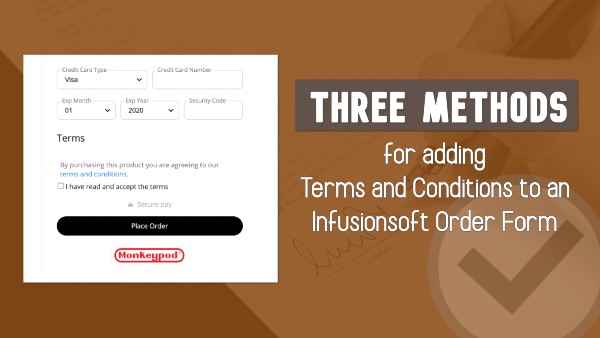
If you need to have your customers check a box agreeing to terms and conditions before they make a purchase, there are a few options for making that happen.

You can use a third-party tool, you can use custom code to modify your existing forms, and finally – there’s now a native option as well.

In this post I’ll show you all three.

Method One:

The first, is to use a tool like Spiffy.

Spiffy is an add-on that lets you level up your Infusionsoft order forms using their drag-and-drop builder. But beyond the improved look and feel, they also have a library of code snippets you can use to do more advanced customization.

This particular request is common enough that they’ve made it a simple toggle inside Spiffy.

Email Trends CTA

Spiffy also offers more advanced options if you want to capture the date and time that they agreed to the terms and store it back to a custom field, or create an on-page scroll box where the purchaser can easily review your terms and conditions.

If you want to see more of what Spiffy offers in general, check out the demo I did in this post.

Method Two:

The second method for adding terms and conditions to your Infusionsoft order forms doesn’t require a third-party tool – but it does require a little familiarity with code.

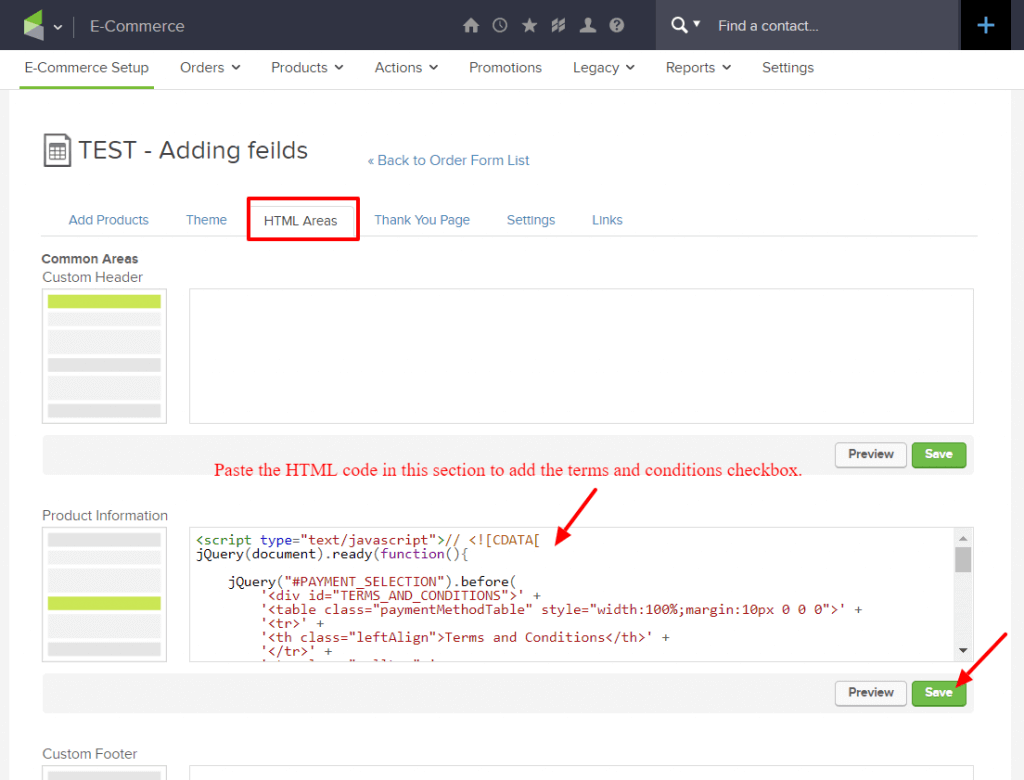
The basic idea is that you’ll be adding code to the form using the HTML areas, and manually adding a “Terms and Conditions” section that your customer can agree to before completing their purchase.
Spy on your competitors traffic

My good friend Brett has done an excellent job documenting this method over on his Blick Digital blog.

If you’re interested in going this route, check out his post where he walks you through the steps, and gives you a download file with the code you’ll need.

Method Three:

And finally, the third option here is a totally native solution.

As you might have heard, Infusionsoft introduced a fully responsive order form theme option in April of 2020.

The new theme option is fairly basic – but modern, clean, and of course it’s fully responsive.

Well, more recently they added the option for easily adding terms and conditions to order forms that are using this new theme.

Here’s a video demonstrating how you can take advantage of this new feature:

Let me be abundantly clear – this is a win.

It’s absolutely an important step in creating more flexible and robust native order forms. So, bravo Infusionsoft product team. Thank you – keep it up.

And also….

There are a few changes and improvements that would make this even more powerful.

  1. I’d love to see the “terms” tab hidden from themes where it’s not available (or, have it work with all themes, rather than just the mobile responsive themes). Right now it’s confusing to have the terms tab show up on order forms where this won’t work as expected.
  2. I think it would be useful to be able to modify the section header, and the actual language on the checkbox itself – this would make the whole area more versatile in general, and accommodate for users who need to adapt this for languages other than English.
  3. It would be valuable to be able to trigger actions when someone checks this box, or to store a timestamp into a custom field on the contact record (or even on the order record).

Okay – lets leave it there for now.

I’m excited about the update – and I love to see this section of the software getting some attention.

In the comments below I’d love to hear if you guys find this valuable, or if you have questions, or have spotted anything I might have missed on this one.

Tap into your Competitor’s Traffic

Tap into your Competitor’s Traffic

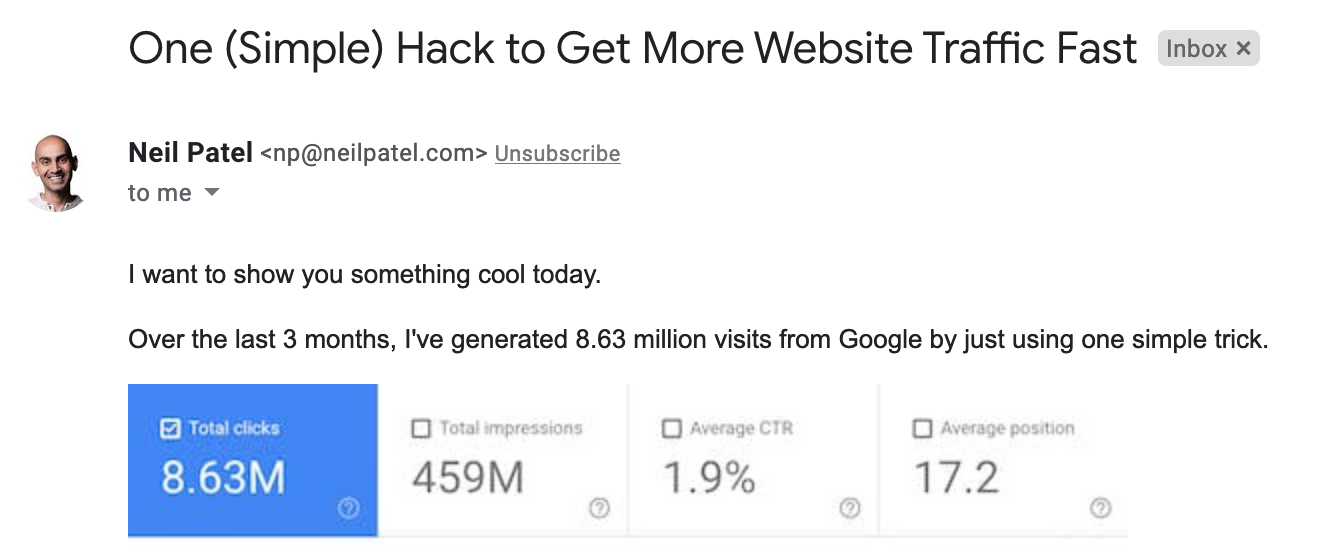
The other day my friend Brett Fairbourn forwarded me an email from Neil Patel, showcasing a simple trick that helps you tap into your competitor’s traffic.

Email Trends

When SuccessCon’s 2019 Ultimate Marketer of the Year says “This is some of the best, most simple and immediately applicable SEO/content marketing advice I’ve ever seen”, I figured I’d better pay attention.

Here’s the deal:

UberSuggest is a tool that Neil Patel offers designed to help you track and measure the performance of key metrics across specific sites. They have a paid version, but for this tactic you can start with the free tier (you can upgrade later if you want).

Once you’ve signed up you can type in the URL of a website you want to analyze.

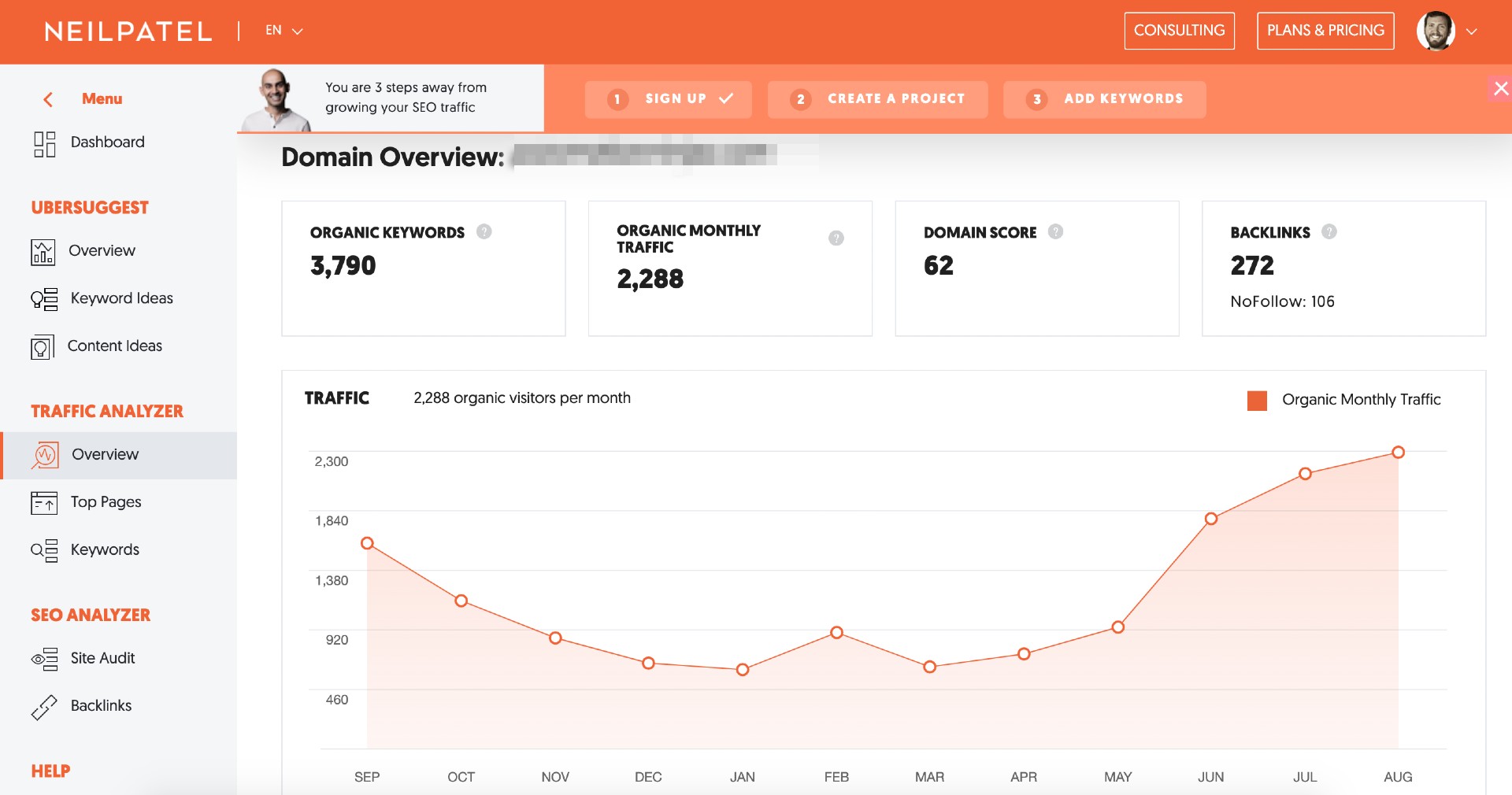
You can check your own first if you’d like, but ultimately the goal here is to spy on your competitors site, and see what keywords are sending people their way.

Spy on your competitors traffic

The goal here is generally to choose a competitor who is getting more traffic than you are – so that you can create content that competes for the keywords that they’re winning.

So, once you’ve analyzed their domain, the next step is to click into their ‘top pages’, which is an option on the left hand side in UberSuggest.

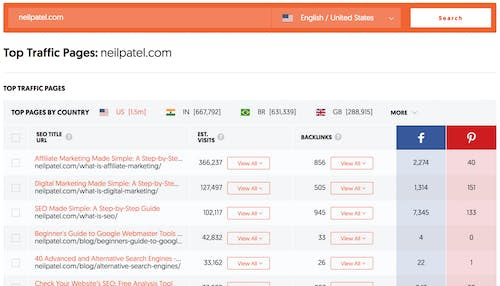
This should take you to a report that looks like this:

Neil Patel Competitors Traffic

From there, you can click into specific pages and see which keywords people searched that led them to that page.

Remember, the goal for this part is not just finding the highest performing pages, but finding ideas for content you can create that would attract people searching those same terms.

Anyway – enough preamble, Brett was kind enough to provide a step-by-step overview of this whole process as he applied it for his company, CrewTracks.

Take a look:

Simple enough, right? (You can tweet a thank you to Brett here.)

K – next steps:

  1. Get started with UberSuggest here.
  2. Spy on a few of your competitors.
  3. Create killer content that capitalizing on keywords you know are already performing.

This might feel obvious, but remember that you really only want to target traffic that you can serve.

And remember – in addition to targeting people who are already a fit, you can also focus on creating your own customers.

So, pick keywords that fit within the products and services you offer, and create content that is genuinely useful for people who might be searching those terms.

Google prioritizes the user experience, so at the end of the day you want to make sure you’re focusing on producing rich and valuable content.

Introducing Task Outcomes

Introducing Task Outcomes

Tasks are automation’s way of telling us that something needs to happen offline – and marking the task as complete is how we report that the deed was done.

But sometimes, that’s not specific enough.

So with this new Infusionsoft feature, Task Outcomes, you can denote not only that the task was completed, but also HOW it was done, and then trigger automation accordingly.

For legacy Infusionsoft users this might feel familiar – it’s a modern version of what used to be called “Task Completion Scenarios”.

So, the first step will be configuring the different outcomes your task might have.

Email Trends

You can set up outcomes on the fly – or repurpose the outcomes you created in the past.

Then, once you’ve done that you’ll use a Task Completed goal like normal, but when you configure the goal you’ll choose which of the task outcomes satisfies that particular goal.

Infusionsoft Task Outcomes Gif2

This dramatically increases the flexibility of tasks, because they’re no longer just complete or incomplete; and the new nuance allows for better segmentation and thus more effective automation.

But, that doesn’t mean that task outcomes will be necessary everywhere – here’s a quick example of use cases where this is and isn’t going to be a fit.

All in all – massive step in the right direction. You can check out their documentation on this feature here.

There are a few small additions that I’d still like to see them add (task outcomes in the mobile app, task outcome reporting, and more accessible interface for managing the existing outcomes we’ve created), but all things considered this is a powerful update that will simplify some of our existing campaigns, and give us more options as we design future automation.

I’d love to hear what questions you have, or how you plan to use it in your own business!

Highlights from Tribe Live 2020

Highlights from Tribe Live 2020

First off, let me say, “HOLY COW!” Or, in Wisconsin, we might say “HOLY HOLSTEIN!”

As a first-timer, brand new, totally fresh newbie, the Tribe Live 2020 experience was incredible, to say the least.  My head is still buzzing with ideas and inspiration, so while it’s fresh I wanted to take a beat to share my favorite takeaways with Greg’s own beloved Tribe– his Monkeypod subscribers. 🙂

Since I want to get right to the meat, I’ll skip the drawn out explanations and let you read more about Stu and what exactly Tribe is by reading Greg’s Monkeypod Success Path Blog Post.  You’re welcome.

(Oh, and I’ll comment on what it was like attending my first large-scale, 3000+ attendee, ALL VIRTUAL event at the end if you’re interested! Spoiler: Twas awesome)

A man looking at computer screens

So, here’s takeaway numero uno:

No one really knows EXACTLY what they’re doing!

Okay, okay, hear me out… Sure there are experts and gurus on every block, but the authentic ones will tell you honestly that they succeeded because they took chances on themselves, and their businesses, even when they weren’t sure.

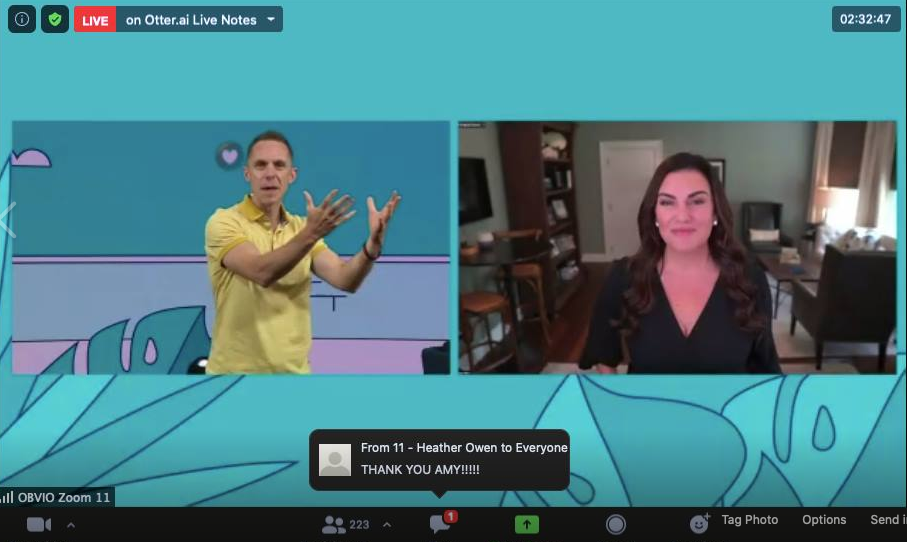
Stu McLaren, his presenters (Amy Porterfield, Ryan Levesque, Pedro Adao, etc), and pretty much every attendee at the virtual conference were hungry and ambitious entrepreneurs, and boy could you FEEL the energy. We’re talking radiant, palpable, entrepreneurial fire.

Stu and Amy video conferencing screenshot

But even entrepreneurs, or perhaps especially entrepreneurs, experience self-doubt and fear.  Not that it’s fun to hear people say that they stumbled, but it certainly was humbling and reassuring to know that successful people have felt doubt too, and likely still do from time to time.  Heck, we’re all just people doing the best that we can.

If you’ve ever heard the saying “we all put our pants on one leg at a time,” so it goes for successful people with fancy pants, too.

Takeaway numero dos:

Niching is KEY.

It’s not difficult to understand that we are drawn to people with whom we identify.  But apply that concept to things that people often get frustrated about – marketing efforts, job hunting, even friendships – and you’ll find that your niche is your Tribe.

In this particular case, entrepreneur attendees across the globe were having “aha!” moments when they realized that, while they couldn’t attract and please everyone, they COULD serve their unique Tribe, and do it well.

My quick homework item for you is to spend some time spelling out exactly who you serve and then to do the exact same thing for who you don’t serve.

This might feel obvious, but taking the time to call out the people we’re not the best fit for will help us proactively avoid projects that zap our energy, or bleed our time.

That’s a great segue into takeaway numero tres:

Tell your story.

I can’t tell you the amount of times I saw Zoom Room comments and Facebook Group posts that said “I’m scared to go live on social media and tell my story..” Every time, the other bajillion people swooped in to say “Hey, you’re doing great! Tell US your story because we care!” Why? Because people who identify with your story will be drawn to it, and also, we were in a safe space of fellow entrepreneurs and learners. A tribe.

The moral of the story is that once you find your niche, you’ll have nothing to fear when it comes to sharing your story.  Tribe proved that time and time again.

Here’s an example of why telling your story is so important, especially as it relates to your niche.  What if you walked up to a stranger on the street and said “I just had a delicious taco for lunch!” They’d probably look at you like you’re insane, right? (Also, who eats just one taco?) Ok, but what if you walked into the Taco Enthusiasts Club and said the same thing? They’d probably jump with joy and ask about every delectable ingredient!

Side note, I love tacos.

But that’s actually the point – your tribe will want your story. It’s like initiating a secret handshake that they didn’t realize they already knew.

Suffice to say it was an exciting and engaging conference, even though it was held entirely online.  Greg and I have talked extensively about how we applaud Stu and his team for providing and maintaining an intimate and personal experience for their members and attendees, despite the size of their organization or the forced-to-be-online conference.

Greg said I could* share this quote of his “Tribe Live 2020 raised the bar for virtual conferences. It changed my opinion about what was possible with an online event.”

*he made me

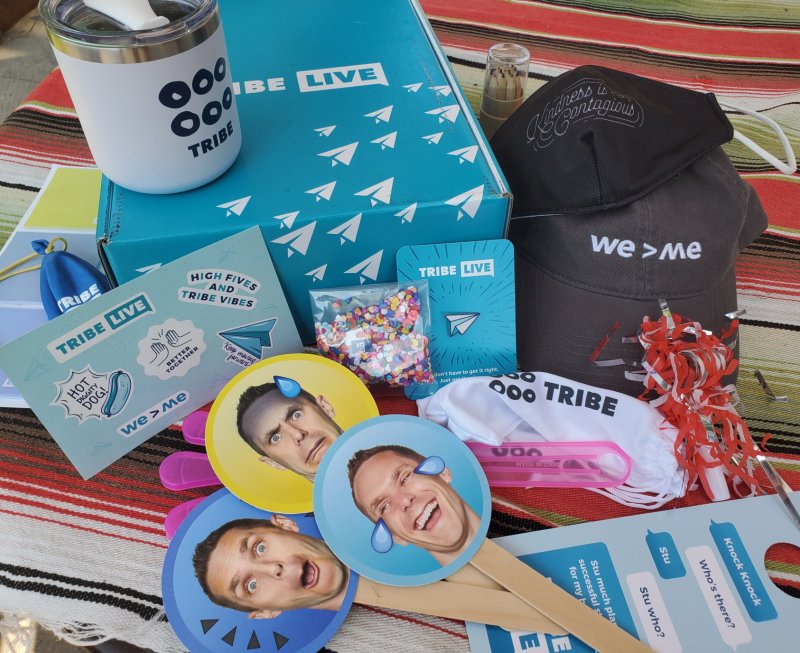
Of course, the content was valuable – but the entire event experience was curated, deliberate, and impressive too. (Did I mention the swag boxes?)

Tribe Live 2020 Swag Box

You might even say that MORE relationships and experiences were cultivated due to the Zoom Chat chatter and the global, yet right at home attendance.  I certainly walked away from Tribe Live 2020 with dozens and dozens of more people in my own Tribe, and a new membership of my own to serve (designed and launched in real time during the conference).

Please feel free to reach out to Greg or myself, or the Grove if you’re a super-duper OG Member, if you’re interested in Stu McLaren’s Tribe Course or even the membership model in general.

We got you.

Introducing Analytics for Infusionsoft

Introducing Analytics for Infusionsoft

We don’t need a whole lot of preamble on this one folk, it’s time to introduce Infusionsoft’s brand new Analytics feature.

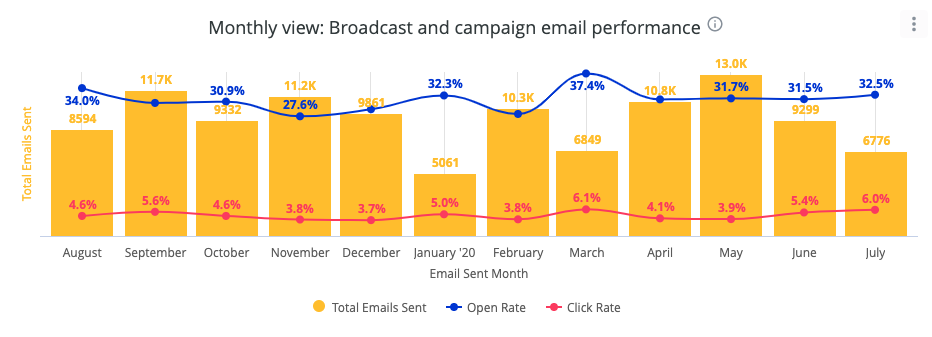
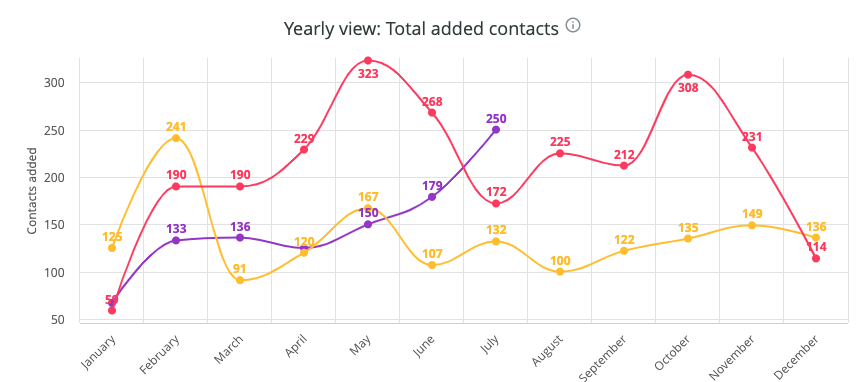
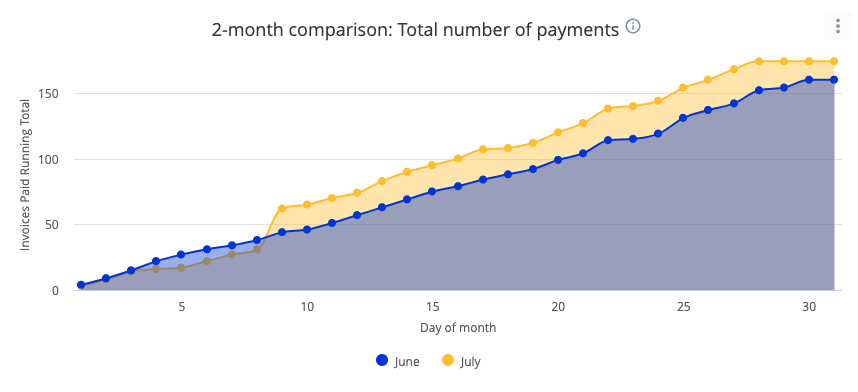
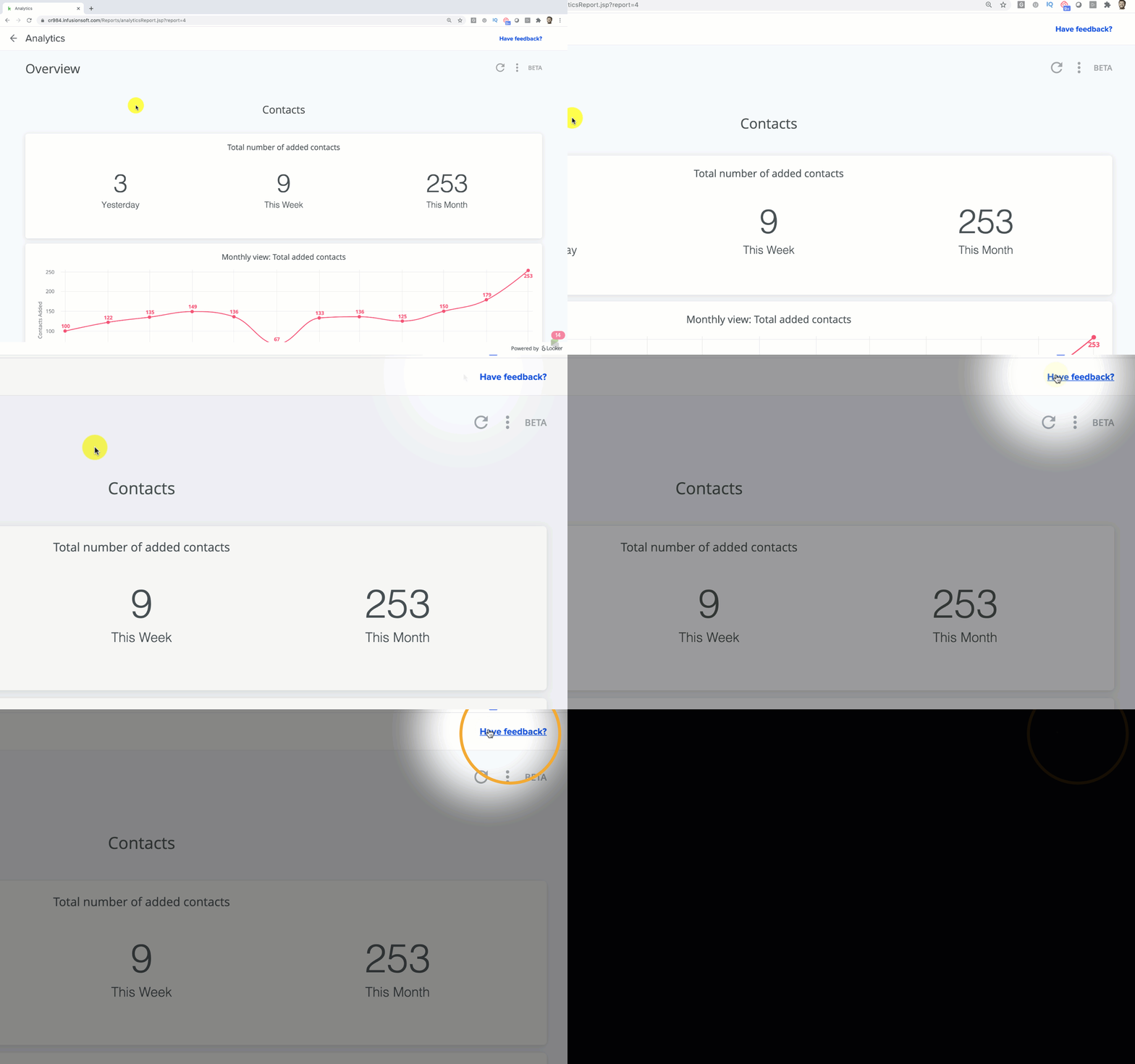
This is not a replacement for your existing dashboard, it’s a new section of the software that offers visual reporting on three key areas of your business.

Email Trends

The new analytics section offers insights and trend analysis for list growth, email engagement, and financial transactions.

Marketing automation 101 CTA
Infusionsoft 101 CTA

This feature has already been released for some users, but they are rolling it out in phases – so if you don’t see it yet be patient. It should be switched on for everyone soon.

Here’s a video walk-through covering what you can expect from the new Infusionsoft analytics section.

Let me be abundantly clear – I’m really excited about this new feature.

I think it’s already incredibly valuable, but more than that – I’m excited about the progress it represents.

For a good portion of 2019, it felt like Infusionsoft was being neglected, so in contrast, it’s nice to see not just feature enhancements but totally new functionality as well.

So, nice work Infusionsoft product org – kudos. Keep it up.

Speaking of keeping it up…

It’s important to call out that this is the first version of the analytics section. So, while I love the progress it represents, I also acknowledge that there will absolutely be limitations we bump into or aspects of it that we as users wish were more flexible.

For example, right now you have a variety of default reports, but we can’t easily adjust the date ranges or filter by contact tags or other criteria.

If there are enhancements you’d like made or reports you’d like added, they’re already collecting feedback and suggestions to help shape improvements they make to this section moving forward.

Analytics Feedback

So, in summary – I’m pumped.

It’s valuable as it is, and we get to play a role in helping make it even more powerful.

I’d love to hear your thoughts as you start checking out this new feature too.

Create Your Customers

Create Your Customers

I take issue with the phrase “lead capture”.

It’s not that it’s wrong, but more that I think it’s incomplete.

Yes, you absolutely can and should find leads who are already a good fit for your products and services; but if that’s all you do then you’re limiting yourself to serving the people who happen to be a good fit.

It struck me recently that we, as businesses, can also actively produce the customers for whom we are the best fit.

You can create your customers.

Let’s say you wanted sunflowers.

Well – you can either go buy yourself some sunflowers.

Or, you can buy sunflower seeds; knowing that when planted they’ll turn into sunflowers.

And if you want butterflies – yes, you can collect butterflies.

Or, you can collect caterpillars and watch them turn into butterflies.

(fun fact – that might be the first time I’ve written “caterpillars” in several decades)

The idea here is that if we want perfect customers – we can find them, and we can also create them.

This isn’t an either or – I believe you should be doing both.

You can find examples of this concept all over the place, from the winery example I gave in the video, to the premier league academy youth programs, or the NBA G-League.

I know those last two aren’t producing ‘customers’, but they’re taking an active role in producing the people that they want.

Take Karate studio for example –  if you run a Karate studio for kids it would make a lot of sense to offer a clinic where their younger siblings could come learn a few things; which would help spark some interest in a group of possible future prospects.

Heck – you might already have a progression in your business – if you offer courses or coaching programs – is there an order in which people consume them?

Does one prepare participants for the next?

All we’re doing here is taking that concept, and extending it across the entire customer journey.

Each stage should prepare customers for the next

So ask yourself – what does my ideal customer know, what do they believe, and what have they already?

Then, use the answers to those to design your content, your education, and your marketing messaging.

The example I used from my own business is the two free mini courses I launched – Marketing Automation 101, and Infusionsoft 101.

Marketing Automation 101

Marketing automation 101 CTA

Infusionsoft 101

Infusionsoft 101 CTA

Do I believe these courses to be independently valuable? You bet.

But do I also believe that they’ll help produce the people who are most prepared to take advantage of my other courses and the OG membership? Absolutely.

Create Your Customers Path

Alright party people – I’d love to hear your thoughts on this one. If you have any questions, or if it sparks an idea for you – please reach out or leave a comment below.

Oh, and if you want to learn more about the Success Path concept, Stu McLaren, or his Tribe course – check out this guide they put together.