Action Planning Framework

Action Planning Framework

This Action Planning Framework is the distillation of lessons learned from a handful of consultants across countless projects, in a variety of industries and business models.

Suffice to say, this works – time and time again.

If you have a strategy you’d like to implement, this framework will help increase the odds (and efficiency) with which it happens.

So, here’s how this works…

It starts by identifying the strategy you are trying to execute.

The strategy is the high level objective – like, book more demos, or drive new consultation appointments, increase membership free trials.

Then, you use the action planning framework to help think through the specifics for what it will take to achieve that objective.

It starts with individual tactics (launching a new ebook, hosting a webinar, deploying a JV partnership promo), and then from there it drills down into the assets required, the content needed to support those assets, the tools required to create the content, and finally the skillset(s) it wiil take to operate those tools.

This is the framework:
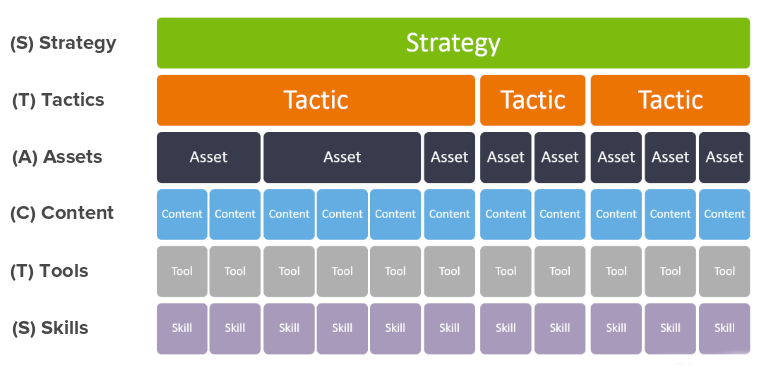
One important thing to note is that a particular strategy may require more than one tactic – and a particular tactic will very likely require multiple assets (a landing page, the thank you page, the follow up campaign, etc), and the same is true for content, the tools, etc.

But this framework illuminates the things that we humans tend to skip over – it forces us to ask add context and detail that could otherwise derail a project.

The Scope Creep Killer?

We’re all familiar with scope creep, right?

Ambiguity breeds scope creep – clarity crushes it.

We’ve all been there – when you think you’re almost done and realize some important element wasn’t connected – or you forgot the video for the thank you page (or the thank you page entirely).

Not anymore.

Action Planning Framework Example

Let’s look at an example: Say you want to drive new leads to your demo

Start by defining the tactic – then the assets required to support that tactic.

But then work down from each asset working through the granular details for what it will take to bring that particular element to life.
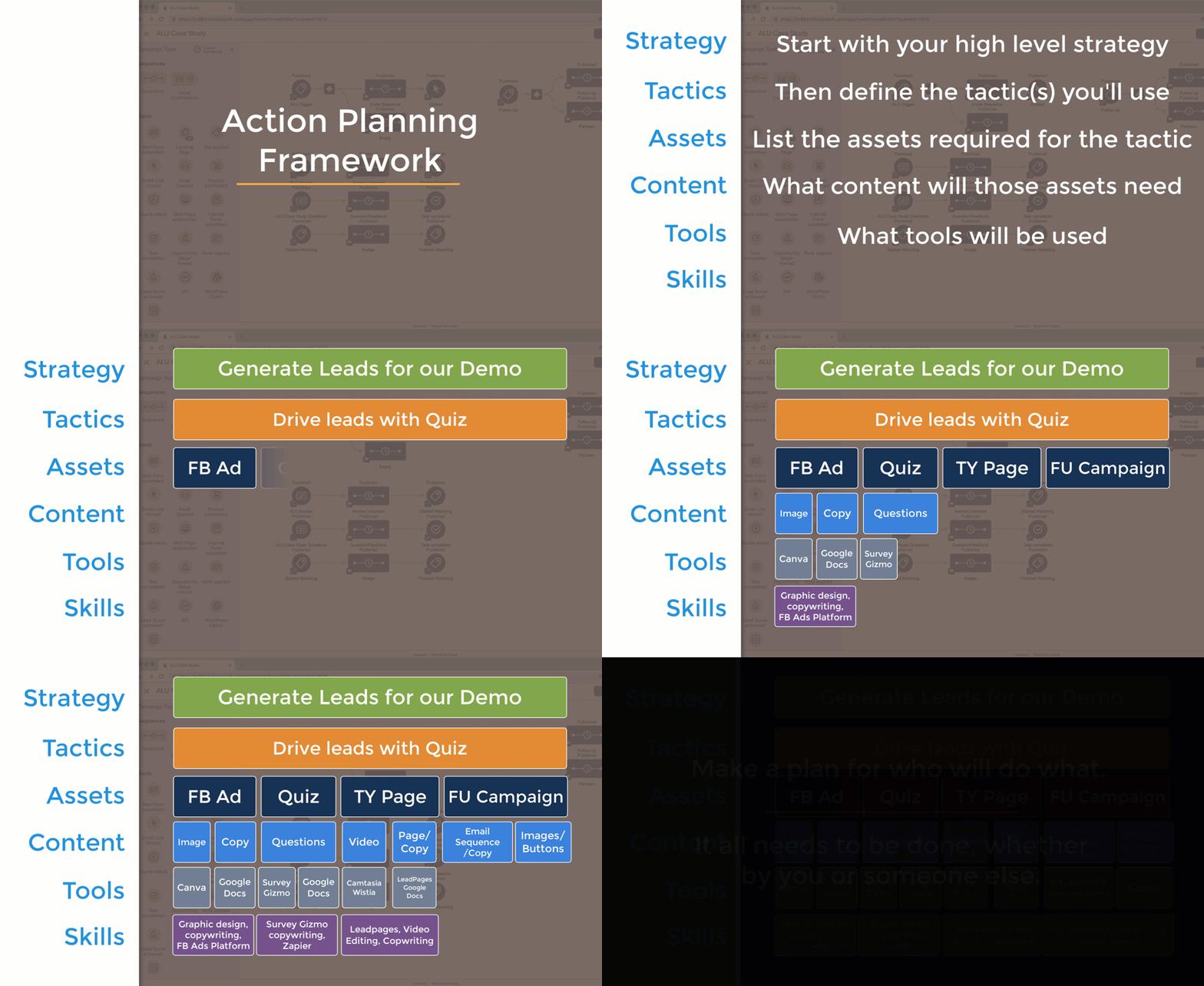
I know, that’s kind of a rushed example – but hopefully you’re seeing how this process works.

By using a systematized framework to flesh out your approach to any strategy, you’ll increase the likelihood that you get it across the finish line.

Launching things feels good, right?

And, by methodically working through the different steps required to launch something you’ll reduce the risk that something you overlooked derails things.

Lemme hand it over to my good friend Justin MacDonald to bring this one home for ya:

Pro Tip: Not everything needs to be done by you – if you’re a one-man-band it might be exhausting to work through this and realize all of the things you need to do to launch something, but the silver lining is that by organizing a project like this it makes it easier to recognize exactly what needs to be done, and the assign out the various responsibilities to the best resource for the job (which might be you, or it might be a team member, or a contractor).

Hope you found this post valuable, if you did then please give a shout out to Justin MacDonald here.

The truth is that I’ve seen far too many good ideas stall out because the details weren’t clear. This framework actively combats that and helps you get more done swiftly and confidently.

Please leave any comments or questions you have below.

Why Queued Contacts Matter

Why Queued Contacts Matter

When it comes to Infusionsoft campaigns your contacts can have one of three statuses, they are either Active, Queued, or Done.

Active and Done are fairly straightforward, but understanding queued contacts isn’t quite as straightforward.

(More on those status types here)

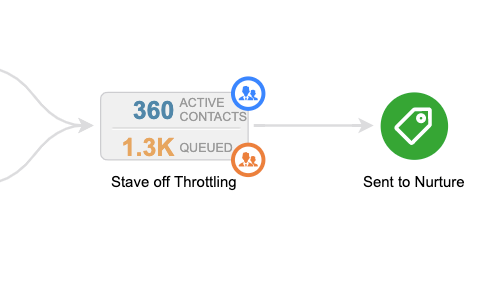
When you’re looking at the reporting tab of the campaign, queued contacts are represented by the orange number you see in each sequence – in the image below there are 1.3.k queued contacts (and 360 active ones).

Okay, Queued Contacts are contacts that are in a sequence, but they haven’t moved on – right?

So they’re just kinda hanging out – which on its surface seems pretty straight forward, but there are two reasons why I think getting super clear on this concept matters.

Why do Queued Contacts matter?

Two main reasons – they represent risk, and also opportunity.

Why are they risky?

If you don’t understand what queued contacts are and how they behave, then you could inadvertently trigger automation to someone for whom it isn’t appropriate, or that they aren’t expecting.

Beyond just being embarrassing, this can also adversely affect your relationship with that contact, and your email reputation in general.

What about that opportunity?

If you understand that goals act as milestones in your campaigns, and they’re designed to help people progress along the journey you’ve built for them, then you can think of queued contacts as the people who for one reason or another stalled out before they hit the next milestone.

There are plenty of reasons why this might happen, but when I see queued contacts in my campaigns I think of it as a place where contacts are getting stuck and treat it as an opportunity to add another touch point.

Pro Tip: Unless they move on or you remove them, contacts can stay queued indefinitely – so, if you’re adding new steps to a sequence which contains queued contacts make sure you’re clear on which contacts could be affected, and whether or not that’s what you would like to have happen.

Here’s an article from the Infusionsoft help center that digs into making changes to sequences with queued contacts.

Hope you found this post valuable – please leave any comments or questions you have below.
If you want a deeper dive on this – or anything to do with the campaign builder, check out the CB Trilogy Course, or grab the free trial below.

Basic Photo Editing

Basic Photo Editing

I’ll be the first to admit that I’m far from a graphic designer.

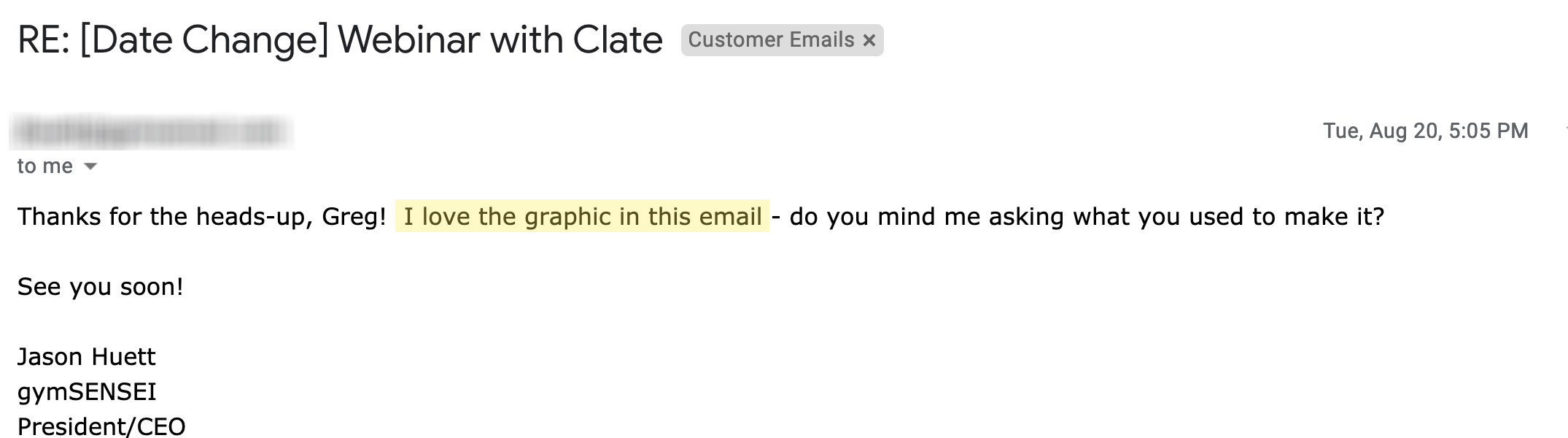
But last month I got a reply from one of my OGs (shout out to Jason) who was impressed by an image I had cobbled together.

And that doesn’t happen very often – in fact, this might be a first.

So I recorded a quick tutorial for Jason showing him my process – then, today I found myself recreating that same image for a second round of the same webinar (more on that below) and I thought “Hey, maybe I should record this in case it helps other people.”

And voila – here we are. Enjoy.

For professional images you’ll probably need something more sophisticated than what I’ve laid out here, but if you’re in a bind and just need something simple, then I hope this helps.

Feel free to share this with someone you think it can help, or take me to school in the comments below with your own graphic design tips and tools.

No Decision Diamond Needed

No Decision Diamond Needed

I’ve said it before and I’ll say it again, the Keap Decision Diamond is my Achilles heel.

(Heck, it’s why I wrote this blog post about simplifying them using cascading logic.)

But this blog post isn’t about decision diamonds, in fact, it’s about scenarios where you should avoid them.

No Decision Diamond Needed

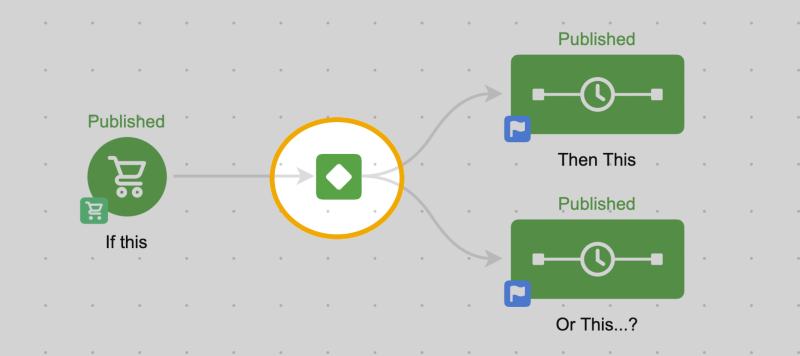
Keap decision diamonds are great when you either want one scenario to happen, or another.

(as a reminder, Keap is the platform formerly known as Infusionsoft)

They’re perfect for segmenting people so you can speak to them differently, based on what you know about them.

Decision Diamond Spotlight

In fact, here’s a robust blog post answering seven of the most important questions about Keap decision diamonds.

But there are scenarios in the campaign builder where I see people try to branch campaigns into different sections based on whether or not someone has taken an action, and that’s where things start to get complicated – because what if they take that action after you’ve already segmented them.

Have a look at this video where we run through a few examples and how to simplify these campaigns:

The key take away here is that because we know that goals advance people in a Keap campaign, we also know that someone who has not advanced must not have achieved that goal – and we can build our automation accordingly.

Let’s take a closer look at a few examples.

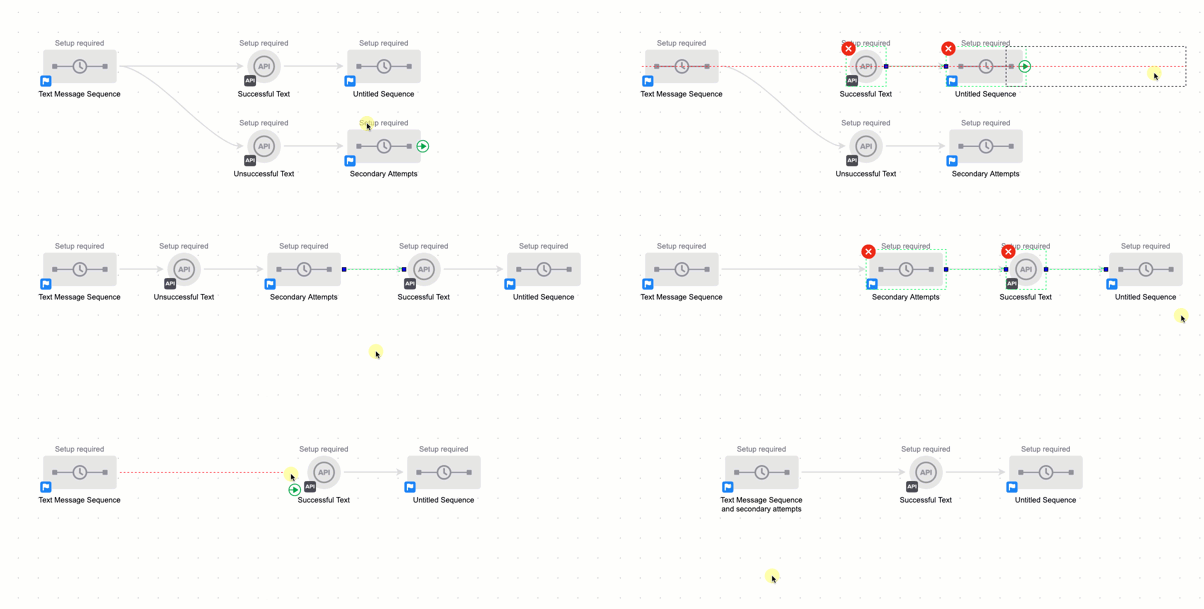
Example 1:

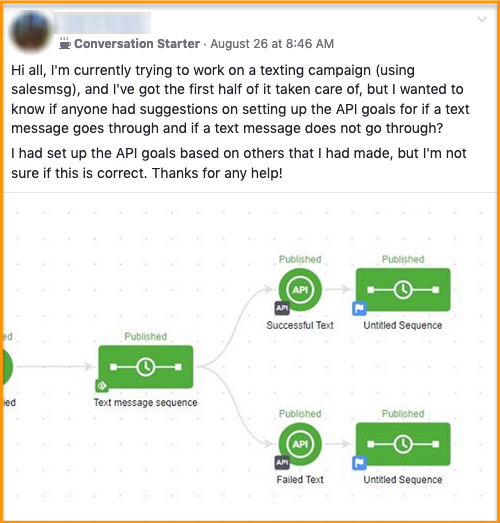
In this scenario we’ve got a campaign designed to trigger an SMS message (through a third party add-on tool), and then we have two possible outcomes.

We want one thing to happen if the message is sent successfully, and something else to happen if it isn’t sent successfully (like, say, attempt to resend it).

Now, if you take out the SMS bit this a bit it’s actually a really common scenario.

But remember, campaign goals not only start the automation that comes after them – but they also stop what comes before them.

So rather than building the second attempt in as it’s own outcome, we can actually bake any second or third attempts right into that original sequence because we know as soon as the SMS message is successfully sent, the contact will jump right to that point in the campaign.

This next example is variation of the first – but instead of working with SMS, we’re now talking about Email.

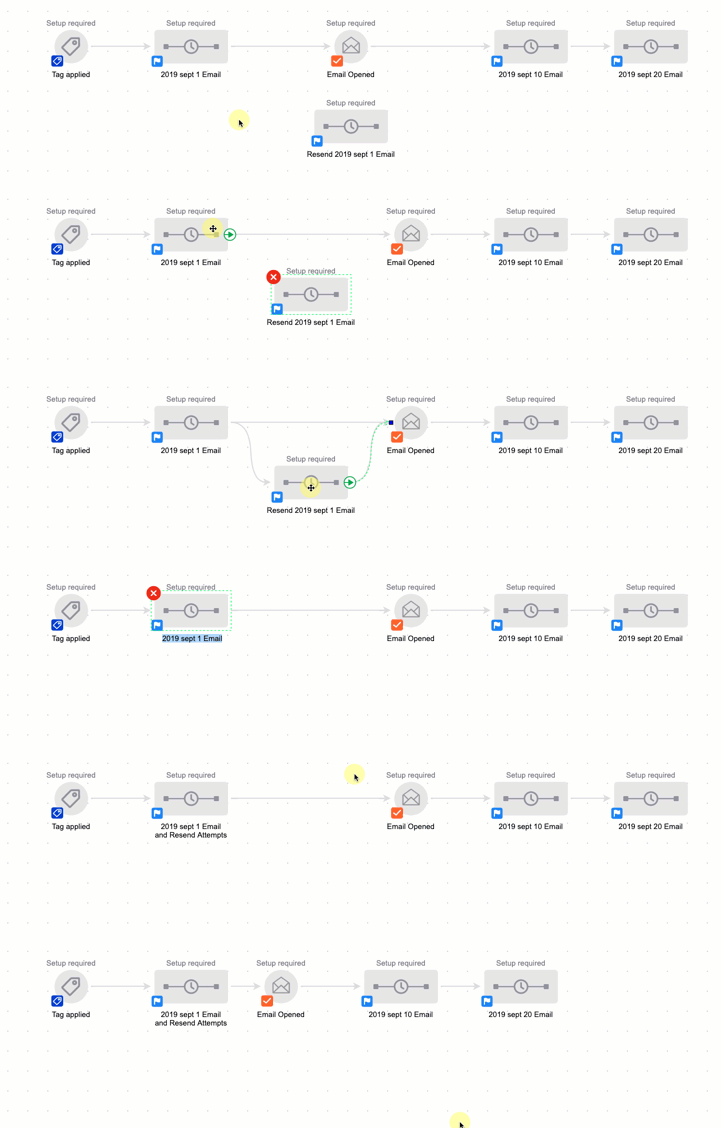
Example 2

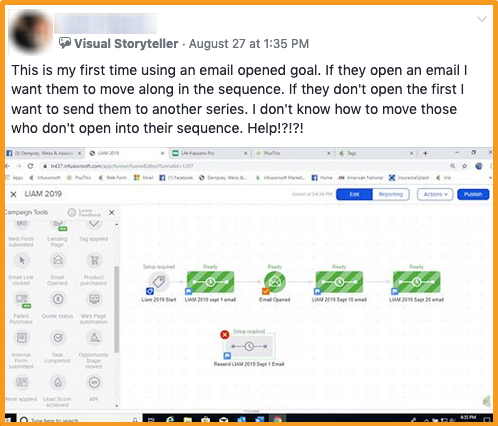
The situation is this – we’ve got an email going out, but it’s an important one, so we want to make sure everyone sees it.

The question becomes how can we automatically resend it to people who haven’t opened the email?

The answer is probably less complicated than people think.

Rather than use an Infusionsoft decision diamond to branch contacts into those who have or haven’t opened the email, you can actually just build your second (and third, fourth, etc) email attempts right into that original sequence – because the minute the contact achieves the goal downstream any automation preceding the goal would stop.

Caveat: I should also point out that you should use this particular tactic (and the Email Open Goal in general) with caution.

Email opens are kinda a sketchy metric, they’re dependent on how the recipient’s email client reports information back to Infusionsoft, so it is possible to report an open when the contact didn’t read the email, and possible for the email to be read without reporting an open.

K decision diamonds are incredibly powerful, and I hope you found this post valuable – please leave any comments or questions you have below.

And if you want to get to know the campaign builder better, check out the Advanced Automations Course in the Keap Academy Platform.

One Day Launch Experiment

One Day Launch Experiment

Context:

K – so this lil experiment came about because I had been intending to record an evergreen webinar, but somehow the project had been on my to do list for over a year.

I had the tools, and the experience – but for one reason or another I just wasn’t prioritizing it (sound familiar?).

So I decided to tackle it – and to prove a point (or punish myself?) I committed to doing it in a single day.

This blog post is a deconstruction of that entire experiment, from the prep, to the execution, to the lessons we learned, and the people who made it happen.

The Launch List:

In preparation for this project I made myself a launch checklist – and then it occured to me that others might want that too – so I published it as it’s own blog post (here’s the checklist).

I timed it so the checklist blog post would go live the day before the experiment was scheduled – that served two purposes, a) it gave people the list so they could follow along, or build their own webinar, and b) it gave me an extra chance to plug the actual launch day experiment and livestream.

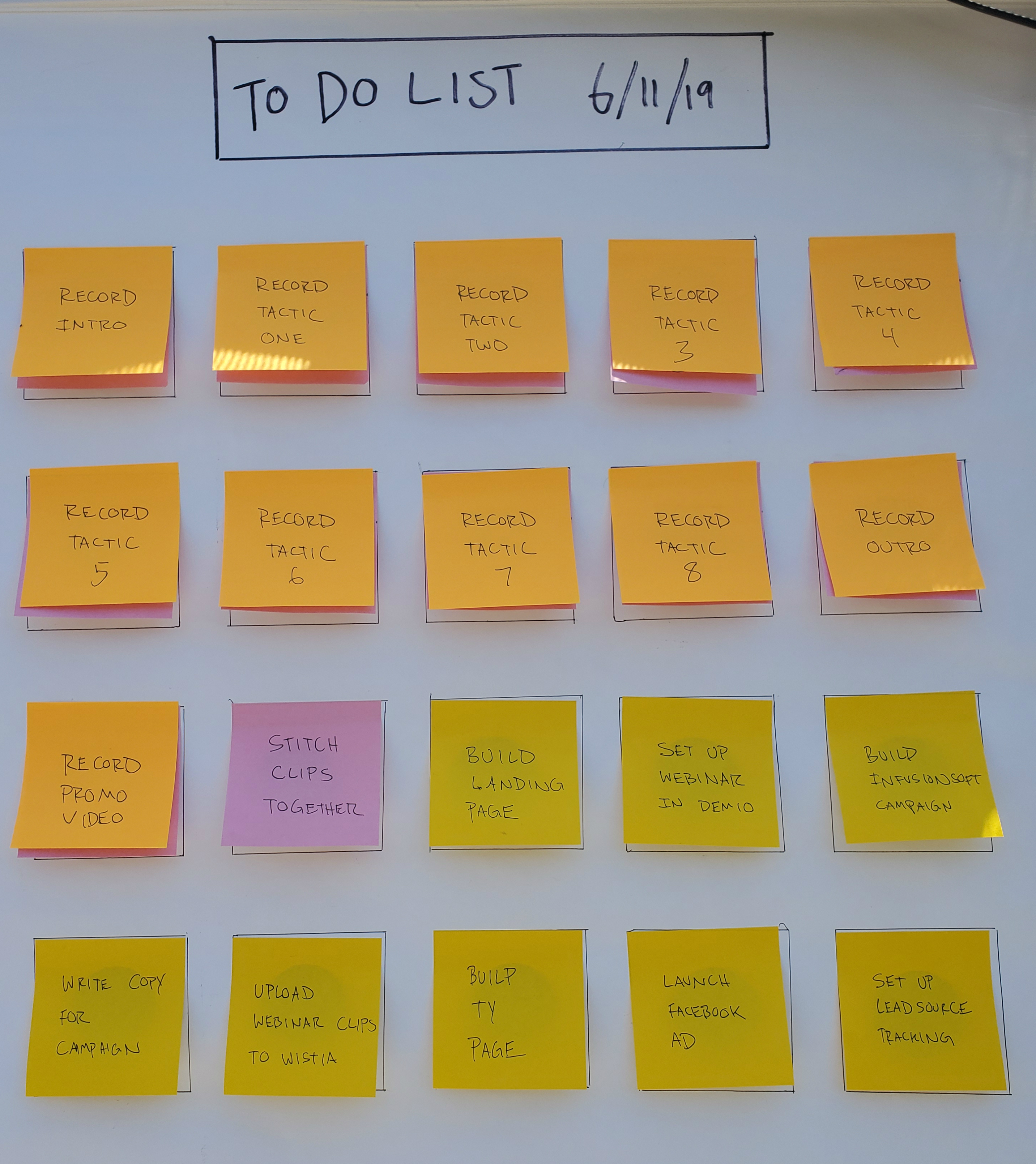
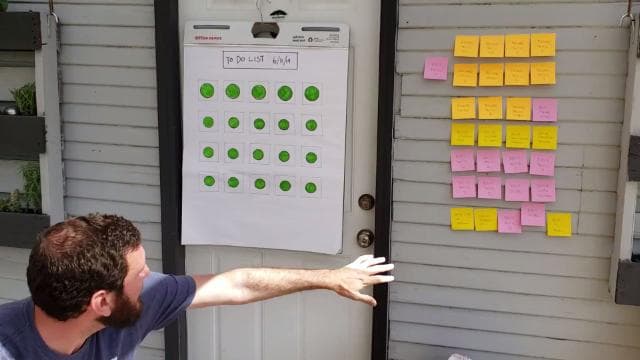
For the live experiment I turned the checklist into this handy-dandy collection of post-it notes:

The only things we prepped ahead of time were the checklist, and the actual presentation material (like, the outline for what we planned to record).

And that part was really only because it was a presentation I had delivered for SuccessCon 2018 (called “Basic to Baller: Tactics for Leveling Up Your Infusionsoft Campaigns”).

The Tools:

There are a bunch of webinar tools out there, I won’t pretend to have used them all, but for the last year or so Demio has been my platform of choice for a number of reasons. And since Demio also offers an evergreen option, that’s what we used for this project.

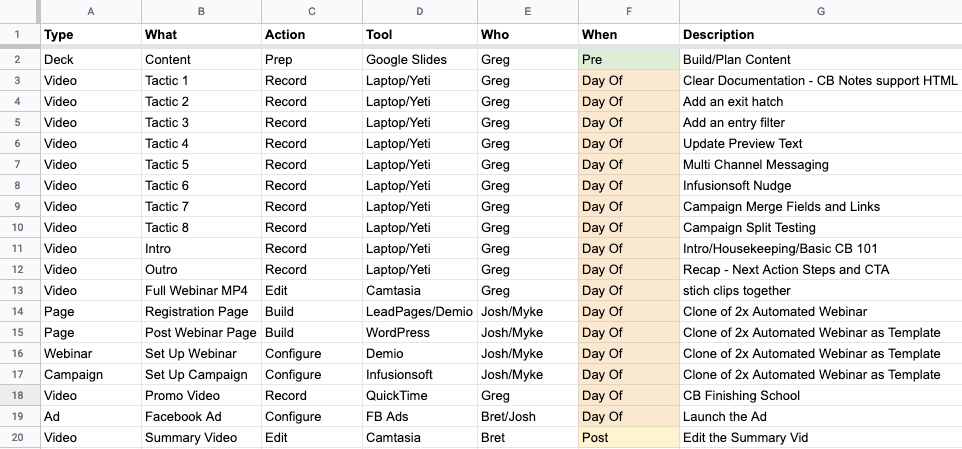
Here are the other tools we used in this project:

[Back to Top]

Content Strategy:

This might be my favorite part of this project.

So, we were setting out to create an evergreen webinar, right? And normally that’d be the end of that, and when you’re done you get to share the webinar you just created.

But a theme of mine lately has been trying to find ways to get additional mileage out of my efforts – so rather than just creating the webinar, we wanted to see how else this project could be valuable. If we’re doing to do the work, then we wanna make sure we’re maximizing the return we get on our efforts.

Here’s what we came up with – in addition to producing the webinar (1), we also write the checklist blog post (2), livestreamed the process from start-to-finish (3), produced a recap video (4), and wrote this blog post breaking down the entire project (5).

That’s five pieces of content from the one project, and I’m not counting the various social posts plugging those different assets. Not bad, right?

I guess my point is that different people might be interested in different parts of this project – and the same thing might be true in your business.

What ways could be getting extra mileage out of your existing efforts?

[Back to Top]

Launch Day:

I knew I’d need a little help with this, so I coordinated with Myke, Josh, and Bret, and the four of us picked a day where we were all available.

Bret was in charge of managing the livestream, and making sure he had the content he needed to produce the summary video.

Here’s the full livestream >>

And here’s the summary video >>

Josh and Myke were there to help with the actual implementation.

The only “work” I did ahead of time was creating an itemized plan of attack – I opened a google sheet and listed out all of the things I thought we’d need to build, including what tools we’d use, and who would be responsible.

Remember that physical “to do list”? As we completed individual tasks throughout the day we moved the ceremoniously peeled the post-it notes off. (surprisingly satisfying, I might add)

The other headstart I have to acknowledge was that we were working with content I had already presented once.

We’d still need to update it, record it, and edit it – but we didn’t need to build that out from scratch and that’s a big deal, because organizing your webinar content can be quite a hurdle.

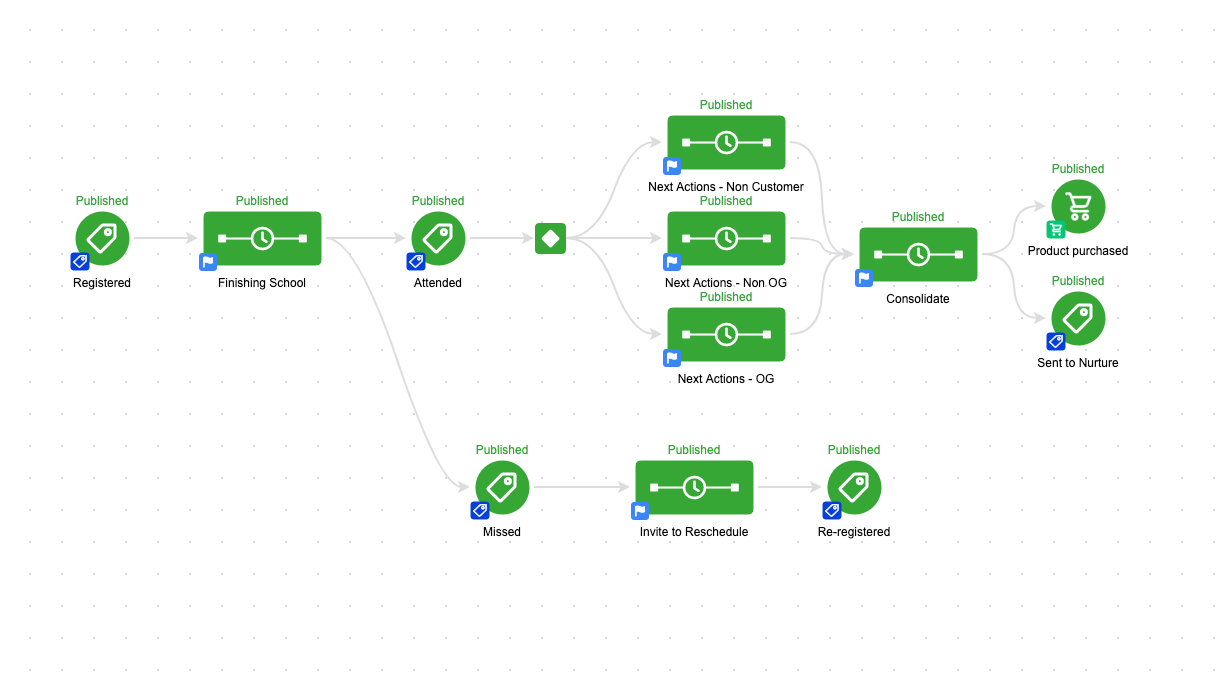
Once the livestream kicked off I dove right into recording and editing the content, and Myke and Josh worked on setting up the webinar in Demio, creating the registration and thank you pages, and building the Keap campaign.

The editing took the bulk of the time, by far.

So Josh and Myke took off once their work was done, and Bret did his best to keep the livestream entertaining.

Then, after a light and breezy 8-hours – all the assets were built and tested and we were ready to launch. The day concluded with Bret pressing publish on this Facebook Ad to start telling people about the webinar.

[Back to Top]

The Final Webinar:

This was the second automated webinar I’ve created and so I made one big change in terms of how I prepared this one – instead of recording the automated webinar first, and then cutting it into individual chunks for the post-webinar page, I decided to record the individual chunks, and then stitch them together for the complete webinar.

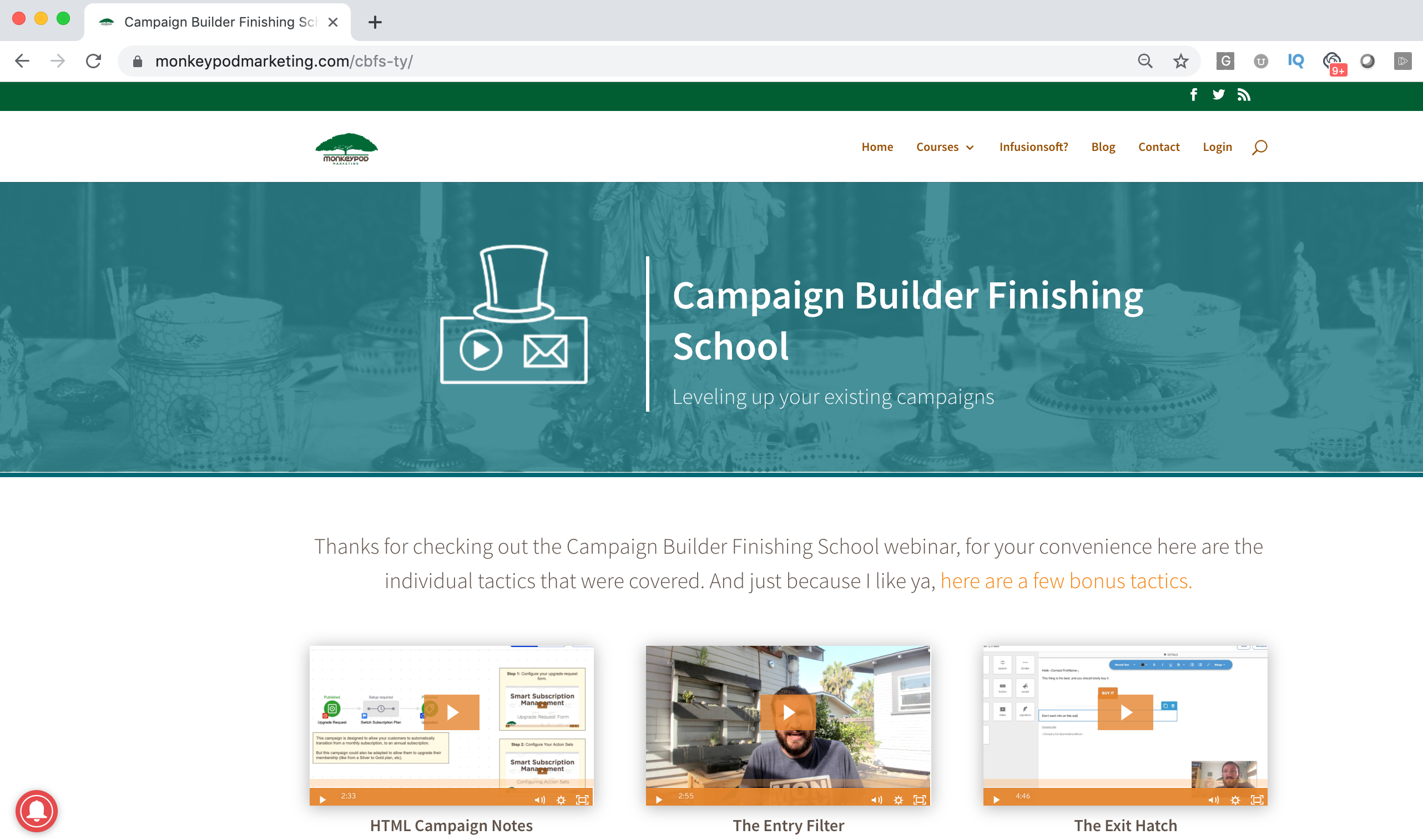
Here’s why this matters – one of the biggest drawbacks of an automated webinar is that your viewers might feel held hostage, so I like to give people the ability to exit the webinar and watch the content at their own pace on the thank you page; so I designed that piece first, and then assembled the individual clips into the large webinar recording.

This made it easy for me to record – because instead trying to find natural points where I could clip out the content, all I had to do was record an intro and outro, and then insert transitions between the individual clips.

The Recap Video:

I’m no fool – I know no one wants to watch an 8-hour livestream, no matter how majestic and inspiring it may have been.

So I hired Bret to distill the recording into something more digestible, and not to diminish his video alchemy – but *poof*, here ya go:

Another important thing to note here is that we went into this knowing we were going to produce a summary video, so that allowed us to capture footage or have conversations that would make future Bret’s life easier once he got into the editing room.

[Back to Top]

Lessons Learned:

This was a fun project, and I’d definitely chalk it up as a success.

We did what we set out to do – but, that doesn’t mean everything went swimmingly. We definitely learned a few things along the way.

1. Look for layers in your content
It would have been easy enough to just record the webinar and put it out there, in fact that’s what I think most people do.

But if we had just done that we’d really only have served people who wanted to polish up their Infusionsoft campaigns (the topic of the webinar). By recording the process and documenting our experience we were able to broaden our audience and provide valuable content for people who are interested in creating an evergreen webinar – or who want a behind the scenes peek at building the campaign to support one.

2. Plan the Livestream
This is definitely something I think we could have done better – we knew we wanted to livestream the whole thing, but we underestimated how long the editing would take, and since a livestream of me editing video might actually be boring enough to kill someone, I wish we’d have coordinated some content to help with engagement.

If I were doing this again (and we might), I’d have come up with different topics, or had some other folks come by for Bret to interview during the livestream (Parks and Rec telethon style).

3. Set Goals
Our goal was really just to see if we could do this, and we did – but I wish I’d have set more specific goals for how long it would take, and then more importantly what type of a business impact this project would have (new leads, new sales, etc).

This one feels obvious in hindsight, but when we started this project I was coming at it from a content creator’s perspective. I wanted to be valuable, which is fine – and I think it was, but I could have also given more thought to exactly how it would serve Monkeypod.

[Back to Top]

Results:

I mentioned that this wasn’t a very “goal oriented” project from the onset, but I thought I should share some numbers for those of you who like numbers (even modest ones).

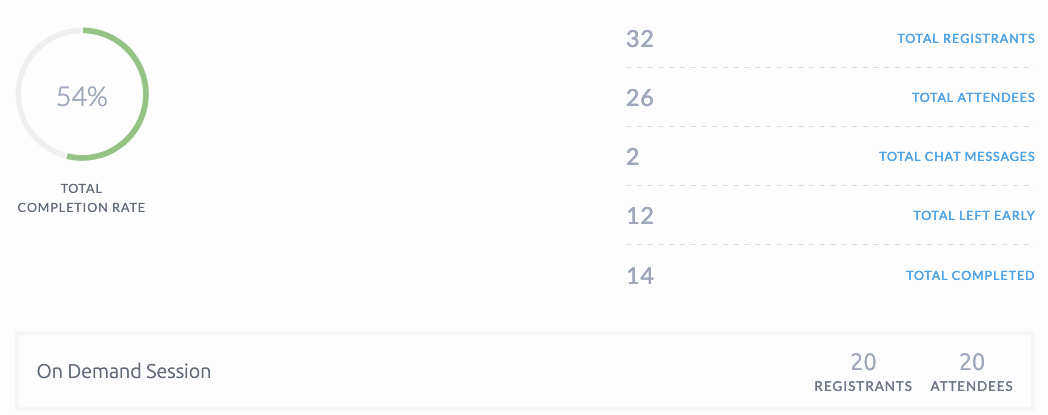
The first thing I’ve noticed, and am encouraged by – is that 80% of registrants are actually showing up for the webinar (compared to normal webinars which are generally less than 50% show rate).

I also noticed here are that 100% of registrants who chose on-demand are showing up, this makes sense since their session can start immediately – but it’s nice to see it validated with 20 out of 20 (admittedly, a small sample).

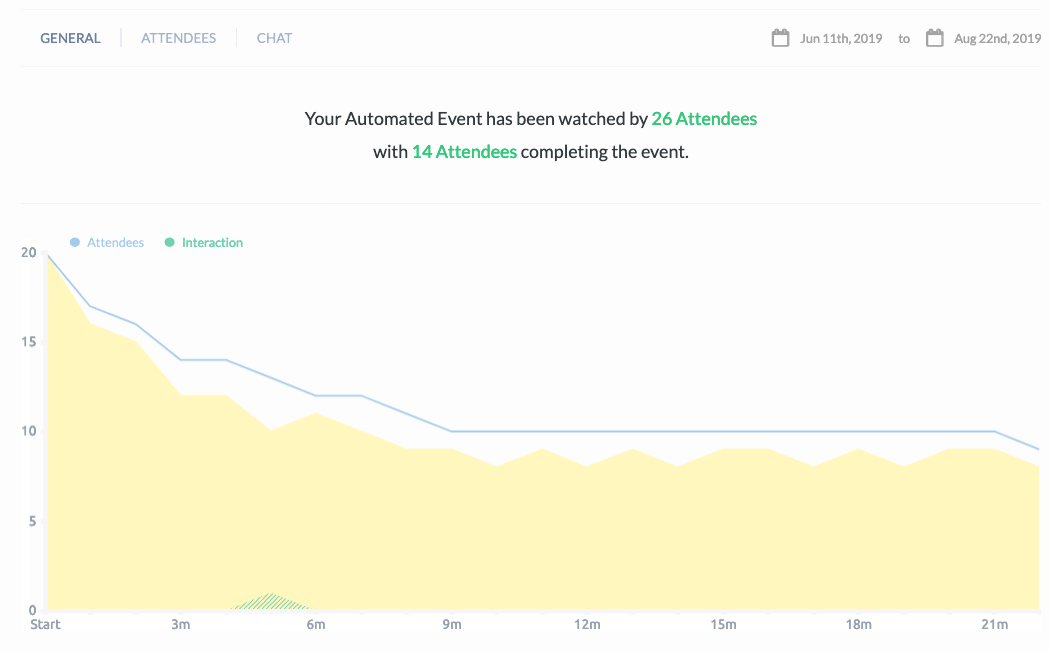
Finally, 54% of those who show up for the webinar are staying through completion – I was surprised by that as well, because I am literally giving people an “escape hatch” to leave the webinar after a few minutes.

Shout Outs:

Gotta give a ton of love to Josh, Mychal for their work on this, and Bret for playing producer, and masterfully editing the recap video..

If you are interested in seeing more of Bret’s video production and editing skills I recommend checking out his YouTube channel. His last couple videos have been on fire.

(Oh, and for the dog people among us, here’s a 4-minute masterpiece he edited together using clips Sara and I shot with our cell phones during our road trip last month.)

I mentioned the tools we used above, but having the right people on your team is a huge factor in the success of any project. Happy to vouch for those three dudes if you find yourself needing any of their respective talents.

Tips for Troubleshooting Infusionsoft

Tips for Troubleshooting Infusionsoft

The more you depend on technology and automation, the more vulnerable you are when things don’t work as planned.

In this post I wanted to cover a few tactics that can help you right the ship when things go sideways.

1. When troubleshooting campaigns…

When you build a campaign you should test it thoroughly, of course.

But even with regular testing from time-to-time you’ll find yourself trying to unravel why things didn’t play out the way your expected, and one of the best pieces of advice I can give for this scenario is to test using clean contact records.

What I mean is that most contacts have a history; a record of the things they’ve done in the past, and what upcoming automations are scheduled for them – but when you’re trying to test a specific part of a specific campaign it can be tricky to pinpoint where things aren’t working if you have other variables in the equation.

So, the advice here is to isolate by create a new contact – one who has never been in your application before, and that way you’ve got a blank slate to work with.

Pro-tip for Gmail Users

Did you know that Gmail allows you to quickly and easily create unlimited test addresses? It does.

If your normal email is hello@monkeypodmarketing.com then all you need to do is add a + after the word hello, and add anything before the @ symbol. (Example: hello+test@monkeypodmarketing.com)

As a pro-pro-tip you could also include the test number, or the actual time that the test contact was created (that can help if you’re testing and there’s a delay of any kind). So, for example a test created at 3:45 pm might be hello+345@monkeypodmarketing.com.

Just remember to periodically clean up dummy contacts you’ve created during testing.

2. When troubleshooting Ecommerce…

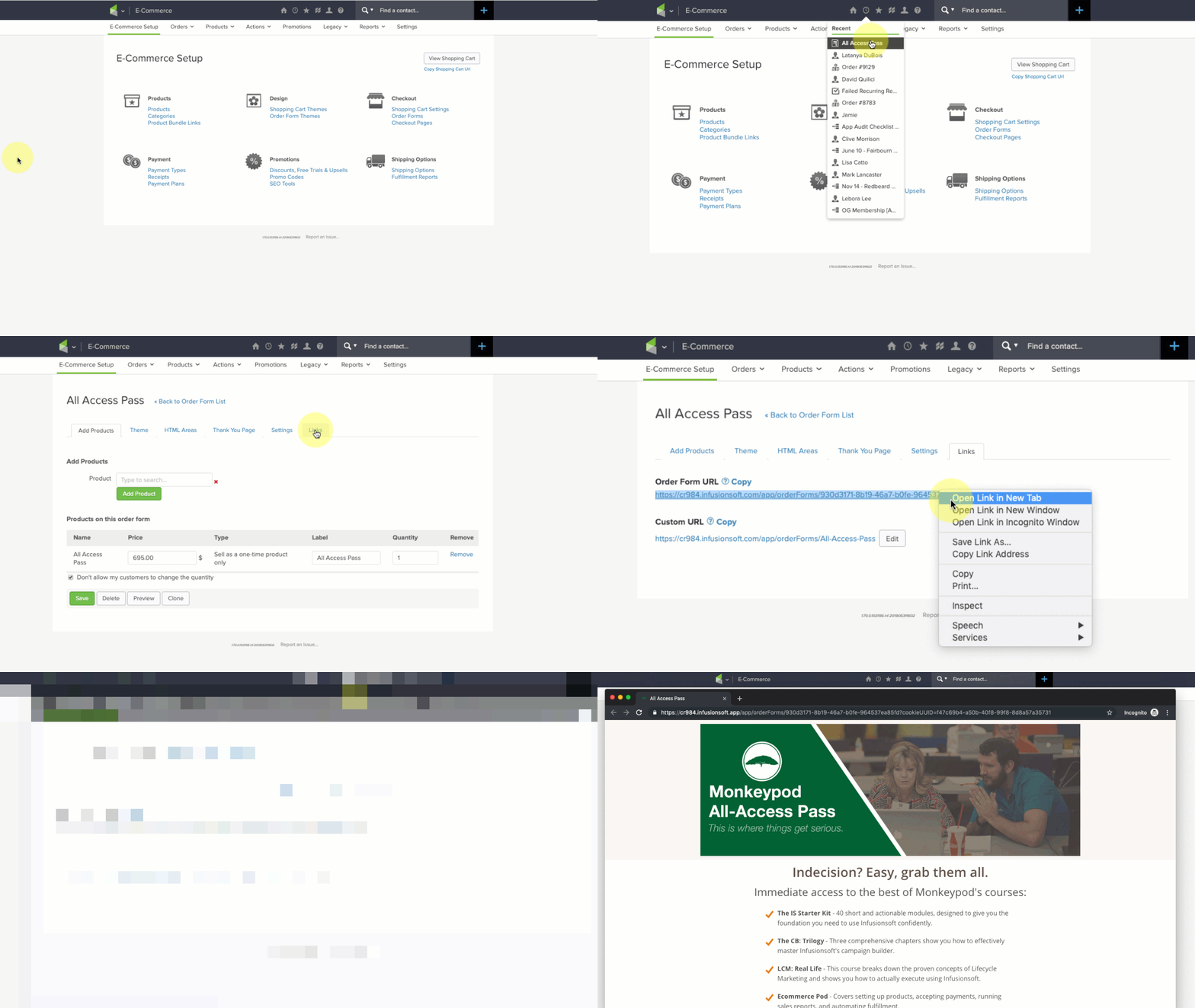
Use an incognito window, or private browsing tab.

This one might sound obvious but I can’t count the number of times I’ve seen this simple trick resolve an otherwise befuddling scenario.

Here’s why: Infusionsoft’s ecommerce components are trying to help simplify things for buyers – it’s trying to make their lives easier by remembering who they are, who their affiliate was, what products they wanted, and what promo codes they’ve used; and most of the time that’s what we want as well.

But, this can create unexpected behavior when we’re testing, updating, adding/removing promotions, and re-testing; so for the sake of your own sanity train yourself and your team to always use private browsing tabs when you’re testing your order forms or shopping cart.

3. When troubleshooting Emails…

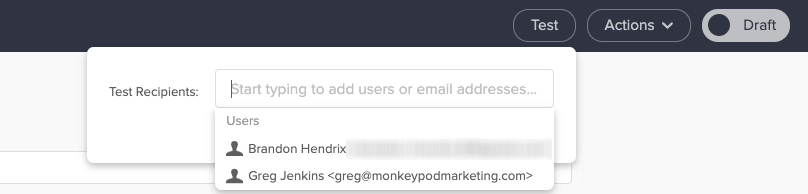
Emails are Infusionsoft’s bread and butter, but one gotcha I regularly see trip people up is that when you use the test function from within the email it sends that test to the user, not to an actual contact.

Did you catch that? The built in test option sends using the details available on the user record, not the details from a contact record.

You might be wondering why that matters – and the answer is this: User Records don’t have custom fields.

So, if your email is using any custom field information in the email body (or merged into links) then testing the email to a user will lead you to think it’s not working.

To replicate the experience an actual contact would have you should test your emails by sending to a contact record (use an email other than the one tied to your user record).

4. Assumptions will ruin us

I know, you’re smart. I get it. Heck, I like to think I’m pretty clever too.

But assumptions will ruin us when it comes to troubleshooting, because if we assume something is working we’ll skip right over it, and that leads us into sketchy territory because now we’re building off of something we think is true, but might not actually be.

The reason I included this tip was because it’s burned me before, in a big way.

To make a long story short: I tested a campaign and it worked the way I wanted it to – then when I added a bunch of contacts to the campaign it didn’t do what we expected.

I assumed that what worked for individual test contacts would also be true when we loaded the campaign up en masse; and it wasn’t.

Want the longer story?

So, this stems back to when I was working with the African Leadership University. (Btw, have you seen that case study?)

The basic idea was that we were sending out the notifications to let prospective students know whether they had been admitted, declined, or waitlisted.

But we had to build a relatively complex campaign because we had to deliver those three messages in either English, French, or Portugese, depending on the language that prospect had denoted during their application.

So, we had a series of decision diamonds – first segmenting by language, and then segmenting by their actual admission decision – and when I tested this campaign I did so by adding individual test records.

The first one was an admitted student with French as their language – it worked.

Then a declined student with English as their language – worked again.

I ran four or five tests and when I was satisfied with the results we decided it was time to add the contacts.

If you haven’t guessed by now, well, it didn’t go very well.

The decision diamonds went haywire and the contacts we added were incorrectly sent all three of the emails (admitted, declined, and waitlisted).

They all got the correct email – but they also got two others, and they had no way of knowing which one was accurate.

For some of these students this email was the single most important piece of news they’d ever received – and we botched it.

I was crushed.

As it turns out the decision diamonds had been corrupted during the process of cloning different campaign structures – and testing it one-by-one had worked just fine, but adding hundreds of contacts at the same time somehow exacerbated the issue.

We did our best to mitigate the impact – we quickly (and carefully) reached out to students to explain what had happened, and to let them know which decision was correct.

The issue was caused by a technical glitch – and my recourse is limited when it comes to fixing bugs in the software; but I still kick myself because I think might have been able to avoid substantial pain if I had thought to test with a batch of contacts, rather than individuals.

Most the of ALU project went much more smoothly than this, if you haven’t seen the whole case study it’s worth a watch.

This was one of the most painful experience of my automation career – but the lesson was this: Assumptions will ruin us.

Just because it looks good on desktop doesn’t mean it’ll look good on mobile.
Just because it works in gmail doesn’t mean it’ll work in outlook.
Just because it worked for an individual doesn’t mean it’ll work for a group.
Just because it created the outcome you expected doesn’t mean did what you expected.

5. Arm yourself with examples

If you’re troubleshooting something and it’s not making sense, at a certain point you’re probably going to end up liaising with Infusionsoft’s support team.

There are plenty of tips for talking to technical support, heck, I’ve even got two blog posts on it (one annnnd two) – but the most important piece of advice I have is to find yourself a screencapture software you like and get in the habit of using it.

I use and recommend Loom, but another popular option is Soapbox (from the fine folks at Wistia).

Infusionsoft’s support team genuinely wants to help you – but if they can’t replicate an issue then it’s infinitely more challenging.

(Sorta like when you take your car to the mechanic and the noise it was making suddenly stops…)

So, if you know you’re gearing up for a convo with support, do yourself a favor by firing up your screencapture software and recording examples of the behavior you’re seeing (or not seeing).

This is helpful for a few reasons, but primarily because it reduces the opportunity for something to get lost in translation – the longer it takes for the support rep to understand the issue, the more frustration you’re likely to experience. And being able to shortcut that process helps get everyone on the same page more rapidly.

The second benefit is that sometimes by recording the test you’re running it forces you to think differently, or helps you notice something you wouldn’t otherwise have seen; personally I’ve stumbled across more than one solution simply by trying to document the issue.

My sincerest hope is that these tips will save you some headache the next time you find yourself troubleshooting some misbehaving automation.

If you’ve got your own tips that have worked for you, or a painful automation story, please feel free to share in the comments below!